
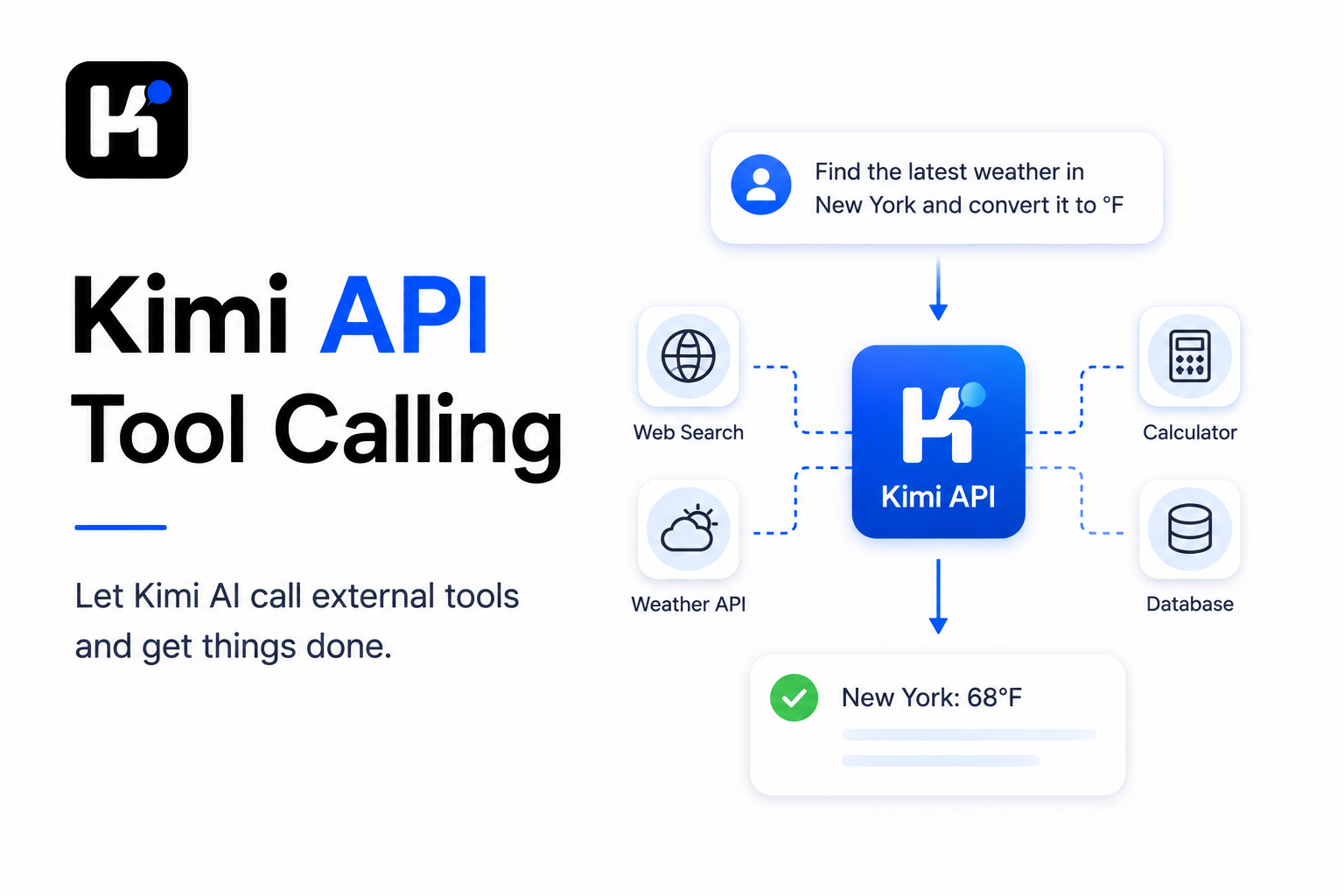

Kimi API tool calling lets a model request actions from functions that your application exposes. You define each tool with JSON Schema, send the definitions through the tools parameter, inspect the returned tool_calls, validate and execute the requested functions in your backend, and return every result with the matching tool_call_id. Kimi does not execute your code, access your database or approve an operation by itself. Your application remains responsible for authentication, authorization, validation, side effects and error handling. Use tools and tool_calls; the deprecated functions and function_call parameters are not supported.
Tool-choice support and reasoning behavior differ between models. Check the current Kimi Model Parameter Reference before changing the model orforcing a tool path.
Tool calling is a protocol, not remote code execution:
User request → model proposes a function and arguments → your backend validates and executes it → your backend returns a Tool message → the model produces the final answer.
Kimi Tool Calling at a Glance
| Component | Purpose | Who controls it? |
|---|---|---|
tools | Declares the functions available during the request | Your application |
function.name | Provides a stable identifier for the tool | Your application |
function.description | Explains when the model should select the tool | Your application |
function.parameters | Defines accepted arguments using JSON Schema | Your application |
tool_choice | Allows, forbids orrequires tool selection | Your request |
finish_reason="tool_calls" | Indicates that the response requests tool execution | Kimi API |
message.tool_calls | Contains one ormore requested function calls | Kimi model |
function.arguments | Serialized JSON containing the proposed arguments | Kimi model; your backend must validate it |
tool_call.id | Identifies one requested tool call | Kimi API |
role="tool" | Returns a function result to the model | Your application |
reasoning_content | Preserves reasoning continuity in supported thinking models | Kimi API; your application must preserve it when required |
response_format | Constrains the model’s final answer format | Your request |
Complete the basic account and SDK setup first with the Kimi API Quickstart. The examples below use the Global Kimi Open Platform, https://api.moonshot.ai/v1, and the current flagship Kimi K3 model.
What Kimi Tool Calling Is—and What It Is Not
Tool calling gives the model a controlled vocabulary of operations. A tool may represent:
- A database lookup.
- A private search service.
- A calculator.
- A CRM action.
- A file generator.
- A payment-status query.
- A business workflow.
- An external API.
The model can decide that a tool is useful and generate arguments. It cannot automatically:
- Import orcall your Python function.
- Connect to a private database.
- Confirm that the requesting user has permission.
- Know whether an operation is safe oridempotent.
- Guarantee that generated arguments are valid.
- Commit a payment, refund ordeletion without your code.
The official Kimi Tool Calls guide describes the same separation: Kimi produces the call information, while the surrounding application executes the operation and returns its result.
Function Calling, Tool Calling and Structured Output
These terms solve different problems.
| Feature | Use it for | What it returns |
|---|---|---|
tools / tool_calls | Requesting data oractions from external functions | Function name and serialized JSON arguments |
Legacy functions / function_call | Old OpenAI-style function protocol | Deprecated and unsupported by Kimi |
| JSON Mode | Making the final answer valid parsable JSON | A valid JSON object, but not necessarily an exact schema |
| Structured Output | Constraining the final answer to a JSON Schema | message.content matching the declared schema |
Tool strict | Tightening the arguments generated for a function | More constrained Tool Call arguments |
Use Tool Calling when something outside the model must happen. Use Structured Output when the final response must fit a machine-readable contract. A production workflow often uses both: tools collect orchange data, then response_format constrains the final answer.
The Kimi Tool-Calling State Machine
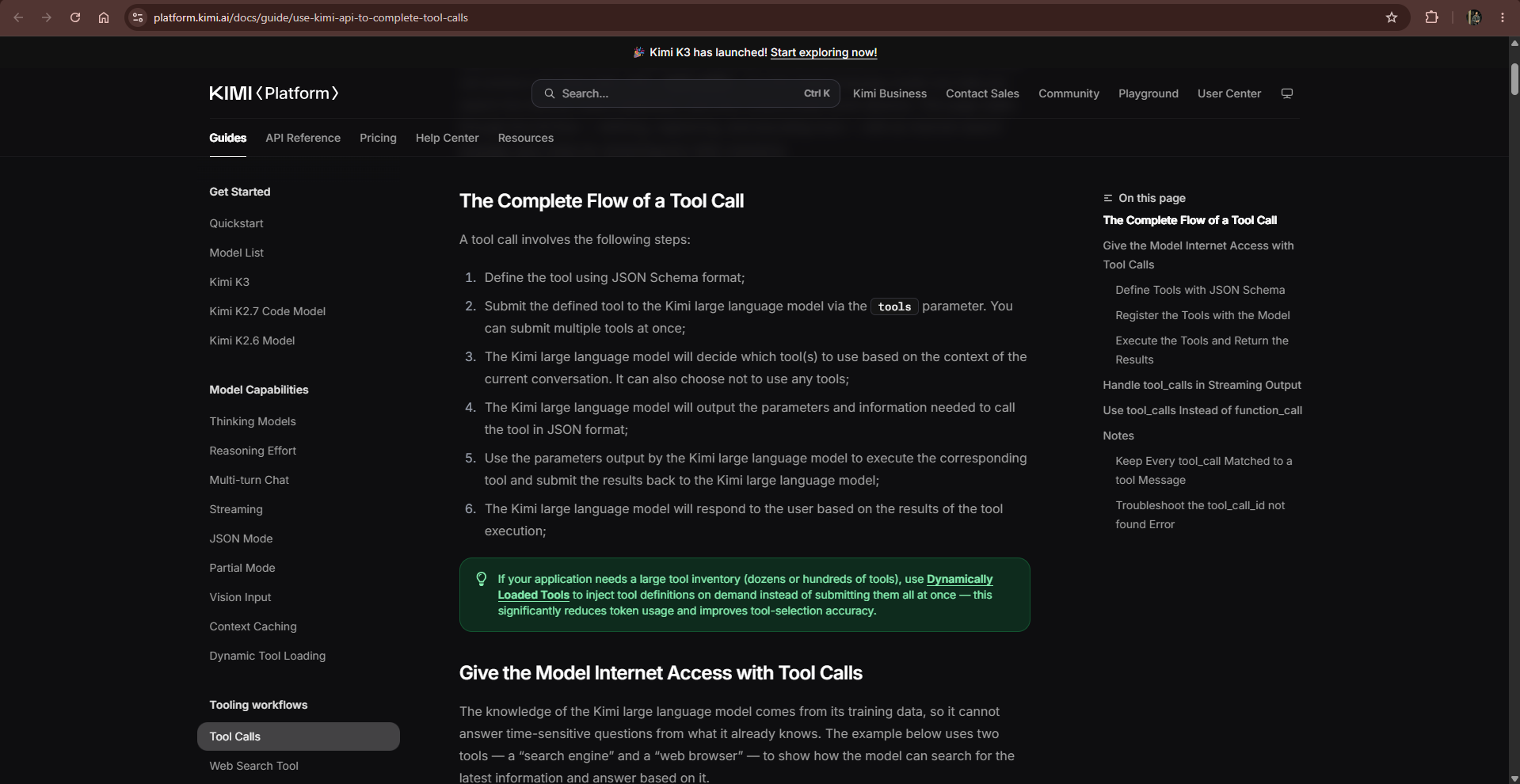
- Declare tools. Describe each function and its arguments using JSON Schema.
- Send the request. Include the conversation and the relevant tool definitions.
- Inspect the response. When
finish_reasonistool_calls, do not treat the response as the final answer. - Preserve the Assistant message. Append the complete returned message to the conversation.
- Validate every call. Check the function name, parse the JSON arguments and validate them against the schema.
- Authorize the operation. Confirm that the user and request may perform the action.
- Execute the function. Call the approved backend implementation.
- Return a Tool message. Include the matching
tool_call_idand serialize the result as a string. - Call Kimi again. Allow another tool round orreceive the final answer.
- Stop safely. End on a final response, an explicit error, a timeout ora maximum number of rounds.
A Tool Loop can request several functions in one round and several rounds in one conversation. The loop—not a single API request—is what turns tool calling into a structured Agent workflow.
Design a Clear Tool Contract
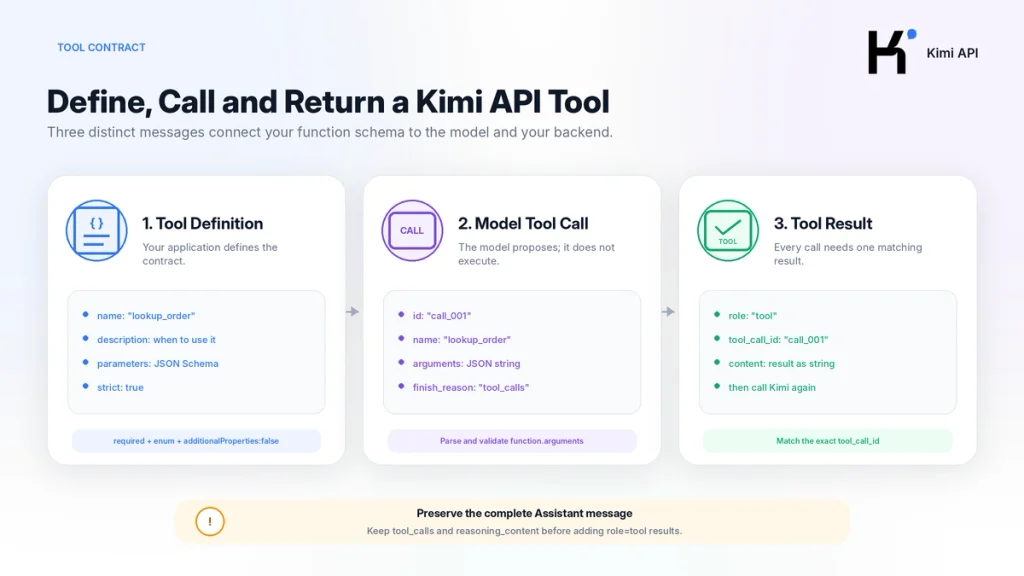
The model selects tools from names, descriptions and schemas. A clear contract reduces ambiguous selection and invalid arguments.
TOOLS = [
    {
        "type": "function",
        "function": {
            "name": "lookup_order",
            "description": (
                "Read the current status of one demo order. "
                "Use this tool only when the user asks about an existing order."
            ),
            "strict": True,
            "parameters": {
                "type": "object",
                "properties": {
                    "order_id": {
                        "type": "string",
                        "description": "Order ID, for example DEMO-100",
                    }
                },
                "required": ["order_id"],
                "additionalProperties": False,
            },
        },
    },
    {
        "type": "function",
        "function": {
            "name": "get_refund_policy",
            "description": (
                "Read the refund policy for a supported market. "
                "This is a read-only tool and does not create a refund."
            ),
            "strict": True,
            "parameters": {
                "type": "object",
                "properties": {
                    "market": {
                        "type": "string",
                        "enum": ["demo-market"],
                        "description": "Market whose refund policy is required",
                    }
                },
                "required": ["market"],
                "additionalProperties": False,
            },
        },
    },
]
Tool-schema rules that improve reliability
- Use a short, stable andunique function name.
- State when the function should—and should not—be used.
- Keep each tool focused on one responsibility.
- Mark mandatory arguments in
required. - Use
enumfor closed sets. - Set
additionalPropertiestofalsewhen extra fields are not allowed. - Avoid two tools with nearly identical descriptions.
- Do not hide argument constraints only inside the system prompt.
- Validate again in your backend even when
strictis enabled.
Send a Raw Tool Request with cURL
The following request asks K3 to inspect an order. It does not execute the function; it asks the model to generate a Tool Call.
curl https://api.moonshot.ai/v1/chat/completions \
  -H "Authorization: Bearer $MOONSHOT_API_KEY" \
  -H "Content-Type: application/json" \
  -d '{
    "model": "kimi-k3",
    "reasoning_effort": "low",
    "messages": [
      {
        "role": "user",
        "content": "Check the status of order DEMO-100."
      }
    ],
    "tools": [
      {
        "type": "function",
        "function": {
          "name": "lookup_order",
          "description": "Read the current status of one demo order.",
          "strict": true,
          "parameters": {
            "type": "object",
            "properties": {
              "order_id": {
                "type": "string",
                "description": "Order ID, for example DEMO-100"
              }
            },
            "required": ["order_id"],
            "additionalProperties": false
          }
        }
      }
    ],
    "tool_choice": "auto",
    "max_completion_tokens": 800
  }'
When the model selects the function, the response normally contains finish_reason="tool_calls". Its message.content may be empty, although Kimi can occasionally include a short explanation of the intended call.
Read a tool_calls Response
{
  "choices": [
    {
      "finish_reason": "tool_calls",
      "message": {
        "role": "assistant",
        "content": "",
        "reasoning_content": "...",
        "tool_calls": [
          {
            "id": "call_example_001",
            "type": "function",
            "function": {
              "name": "lookup_order",
              "arguments": "{\"order_id\":\"DEMO-100\"}"
            }
          }
        ]
      }
    }
  ]
}
Important details:
function.argumentsis a serialized JSON string. Parse it before validation.- The function name is a proposal from the model. Match it against an explicit allowlist.
- The arguments are untrusted input. Validate types, values and business rules.
- The
ididentifies this exact call and must appear in its result message. - The complete Assistant message belongs in the conversation before the Tool result.
- The response may include several Tool Calls.
Complete Python Tool Loop with Structured Output
This example uses fictional local data. It demonstrates:
- Two read-only tools.
- A function allowlist.
- JSON Schema validation.
- Structured Tool errors.
- Matching Tool Call IDs.
- A maximum round limit.
- K3 Preserved Thinking.
- A strict final JSON Schema.
Install the dependencies:
python -m pip install --upgrade openai jsonschemaCreate tool_loop.py:
from __future__ import annotations

import json
import os
from typing import Any, Callable

from jsonschema import Draft202012Validator, ValidationError
from openai import OpenAI


BASE_URL = "https://api.moonshot.ai/v1"
MODEL = "kimi-k3"
MAX_TOOL_ROUNDS = 6


# Fictional local data used only by this example.
ORDERS = {
    "DEMO-100": {
        "order_id": "DEMO-100",
        "status": "delayed",
        "market": "demo-market",
        "days_late": 4,
    }
}

REFUND_POLICIES = {
    "demo-market": {
        "market": "demo-market",
        "eligible_after_days_late": 3,
        "requires_manual_review": True,
    }
}


TOOLS: list[dict[str, Any]] = [
    {
        "type": "function",
        "function": {
            "name": "lookup_order",
            "description": (
                "Read the status of one existing demo order. "
                "Use this only for order-status questions."
            ),
            "strict": True,
            "parameters": {
                "type": "object",
                "properties": {
                    "order_id": {
                        "type": "string",
                        "description": "Order ID, for example DEMO-100",
                    }
                },
                "required": ["order_id"],
                "additionalProperties": False,
            },
        },
    },
    {
        "type": "function",
        "function": {
            "name": "get_refund_policy",
            "description": (
                "Read the refund policy for a supported market. "
                "This tool is read-only and never submits a refund."
            ),
            "strict": True,
            "parameters": {
                "type": "object",
                "properties": {
                    "market": {
                        "type": "string",
                        "enum": ["demo-market"],
                        "description": "Market whose policy is required",
                    }
                },
                "required": ["market"],
                "additionalProperties": False,
            },
        },
    },
]


FINAL_RESPONSE_FORMAT: dict[str, Any] = {
    "type": "json_schema",
    "json_schema": {
        "name": "order_assessment",
        "strict": True,
        "schema": {
            "type": "object",
            "properties": {
                "summary": {"type": "string"},
                "order_status": {"type": "string"},
                "refund_eligible": {"type": "boolean"},
                "next_action": {"type": "string"},
                "evidence": {
                    "type": "array",
                    "items": {"type": "string"},
                },
            },
            "required": [
                "summary",
                "order_status",
                "refund_eligible",
                "next_action",
                "evidence",
            ],
            "additionalProperties": False,
        },
    },
}


def lookup_order(order_id: str) -> dict[str, Any]:
    order = ORDERS.get(order_id)
    if order is None:
        return {
            "found": False,
            "order_id": order_id,
        }
    return {
        "found": True,
        **order,
    }


def get_refund_policy(market: str) -> dict[str, Any]:
    policy = REFUND_POLICIES.get(market)
    if policy is None:
        return {
            "found": False,
            "market": market,
        }
    return {
        "found": True,
        **policy,
    }


TOOL_FUNCTIONS: dict[str, Callable[..., dict[str, Any]]] = {
    "lookup_order": lookup_order,
    "get_refund_policy": get_refund_policy,
}

TOOL_SCHEMAS = {
    tool["function"]["name"]: tool["function"]["parameters"]
    for tool in TOOLS
}


def execute_tool(name: str, arguments: dict[str, Any]) -> dict[str, Any]:
    """Validate and execute an allowlisted local tool."""

    function = TOOL_FUNCTIONS.get(name)
    schema = TOOL_SCHEMAS.get(name)

    if function is None or schema is None:
        return {
            "ok": False,
            "error": {
                "type": "unknown_tool",
                "message": f"Tool {name!r} is not available.",
            },
        }

    try:
        Draft202012Validator(schema).validate(arguments)
    except ValidationError as exc:
        return {
            "ok": False,
            "error": {
                "type": "invalid_arguments",
                "message": exc.message,
            },
        }

    try:
        result = function(**arguments)
    except Exception as exc:
        # Log the complete exception privately. Return a safe public error.
        return {
            "ok": False,
            "error": {
                "type": "tool_execution_failed",
                "message": "The tool could not complete the request.",
            },
        }

    return {
        "ok": True,
        "data": result,
    }


def run_workflow(question: str) -> dict[str, Any]:
    api_key = os.environ.get("MOONSHOT_API_KEY")
    if not api_key:
        raise RuntimeError("MOONSHOT_API_KEY is not set.")

    client = OpenAI(
        api_key=api_key,
        base_url=BASE_URL,
        timeout=60.0,
        max_retries=2,
    )

    messages: list[Any] = [
        {
            "role": "system",
            "content": (
                "You are an order-support assistant. "
                "Use the available read-only tools for current order data. "
                "Do not claim that a refund has been submitted. "
                "The final response must follow the requested JSON Schema."
            ),
        },
        {
            "role": "user",
            "content": question,
        },
    ]

    for round_number in range(1, MAX_TOOL_ROUNDS + 1):
        completion = client.chat.completions.create(
            model=MODEL,
            messages=messages,
            tools=TOOLS,
            tool_choice="auto",
            reasoning_effort="low",
            response_format=FINAL_RESPONSE_FORMAT,
            max_completion_tokens=1200,
        )

        choice = completion.choices[0]
        assistant_message = choice.message

        # Preserve the complete SDK message, including reasoning_content
        # and tool_calls. Do not rebuild it from selected fields.
        messages.append(assistant_message)

        if choice.finish_reason == "tool_calls":
            tool_calls = assistant_message.tool_calls or []
            if not tool_calls:
                raise RuntimeError(
                    "finish_reason was tool_calls but no calls were returned."
                )

            for tool_call in tool_calls:
                name = tool_call.function.name

                try:
                    arguments = json.loads(tool_call.function.arguments)
                except json.JSONDecodeError as exc:
                    result = {
                        "ok": False,
                        "error": {
                            "type": "invalid_json_arguments",
                            "message": str(exc),
                        },
                    }
                else:
                    result = execute_tool(name, arguments)

                # Every tool_call must receive one matching role=tool message.
                messages.append(
                    {
                        "role": "tool",
                        "tool_call_id": tool_call.id,
                        "name": name,
                        "content": json.dumps(
                            result,
                            ensure_ascii=False,
                        ),
                    }
                )

            continue

        if choice.finish_reason == "length":
            raise RuntimeError(
                "The response was truncated. Increase the output limit "
                "or shorten the tool results."
            )

        if choice.finish_reason != "stop":
            raise RuntimeError(
                f"Unexpected finish_reason: {choice.finish_reason}"
            )

        if not assistant_message.content:
            raise RuntimeError("Kimi returned no final content.")

        # response_format=json_schema constrains only message.content.
        return json.loads(assistant_message.content)

    raise RuntimeError(
        f"Maximum tool rounds reached: {MAX_TOOL_ROUNDS}"
    )


if __name__ == "__main__":
    result = run_workflow(
        "Order DEMO-100 in demo-market is late. "
        "Check its status, read the refund policy and recommend the next step."
    )
    print(json.dumps(result, indent=2, ensure_ascii=False))
The final result follows a predictable contract:
{
  "summary": "The demo order is delayed beyond the policy threshold.",
  "order_status": "delayed",
  "refund_eligible": true,
  "next_action": "Send the case for manual review; no refund has been submitted.",
  "evidence": [
    "The order is four days late.",
    "The demo policy becomes eligible after three days.",
    "The policy requires manual review."
  ]
}
This code is a learning example, not an authorization system. A real order workflow must derive the authenticated customer identity from the server session rather than trust an order ID supplied by the prompt.
Why Validate Tool Arguments Twice?
JSON Schema helps the model generate suitable arguments, but your backend must still treat them as untrusted input.
- The model can select an unavailable function name.
- A provider orSDK can return malformed JSON.
- A valid string can still contain a forbidden identifier.
- A schema-valid operation may be unauthorized for the current user.
- A value can violate a business rule not represented in the schema.
- A tool result can contain unsafe oroversized external content.
Use multiple layers:
- Function-name allowlist.
- JSON decoding.
- JSON Schema validation.
- Authentication.
- Authorization.
- Business-rule validation.
- Timeout andresource limits.
- Safe error response.
- Audit logging for consequential actions.
The official Kimi K3 Agent guide recommends using required, enum and additionalProperties in the schema and returning structured errors so the model can correct invalid arguments.
Return Every Tool Result Correctly
The required conversation order is:
system
user
assistant  ← contains tool_calls
tool       ← result for tool_call_id A
tool       ← result for tool_call_id B
assistant  ← next calls or final answer
For every returned Tool Call:
- Create exactly one corresponding
role="tool"message. - Use the original
tool_call.id. - Return the Tool Result as a string.
- Keep the Assistant message containing the original
tool_calls. - Do not reorder results in a way that loses their IDs.
A missing Assistant message, missing Tool Result oran incorrect ID can trigger tool_call_id not found. The safest approach is to append choice.message directly rather than manually reconstructing it.
Preserve reasoning_content During Tool Calls
Kimi thinking models can return reasoning_content separately from the final answer. During multi-turn Tool Calling, preserve the complete Assistant message.
| Model | Thinking behavior | Tool-loop requirement |
|---|---|---|
| Kimi K3 | Always reasons with Preserved Thinking | Append the complete Assistant message, including reasoning_content |
| Kimi K2.7 Code | Thinking and Preserved Thinking are always on | Keep the complete Assistant message in every Tool round |
| Kimi K2.6 | Thinking can be enabled ordisabled | Preserve cross-turn reasoning when thinking.keep="all" is enabled |
Copying only content and tool_calls can remove reasoning state required by later steps. Preserved reasoning also consumes context and tokens, so monitor long-running workflows.
Control Tool Selection with tool_choice
| Value | Behavior | Typical use |
|---|---|---|
auto | The model decides whether a tool is needed | Normal assistant andAgent workflows |
none | Forbids Tool Calls for the turn | Final text-only orstructured synthesis |
required | Requires at least one Tool Call | Mandatory retrieval ordatabase lookup on K3 |
| Specific function object | Forces one named function | Only when compatible with the model’s thinking configuration |
Model-specific restrictions
- Kimi K3: supports
auto,noneandrequired. - Kimi K2.6: supports
autoandnone;requiredreturns an error. - Kimi K2.7 Code: supports
autoandnone;requiredreturns an error. - Forcing a specific named function is incompatible with thinking enabled.
- K3 always reasons, so use
requiredwith a narrow Tool list rather than forcing a specific function object.
For mandatory retrieval on K3:
completion = client.chat.completions.create(
    model="kimi-k3",
    messages=messages,
    tools=tools,
    tool_choice="required",
    reasoning_effort="low",
)
After the required retrieval turn, switch back to auto to allow the model to decide whether more tools are needed.
Handle Parallel Tool Calls
Kimi can return several Tool Calls in one response. Examples include:
- Checking several independent account records.
- Looking up prices from several sources.
- Retrieving a policy and an order status in parallel.
- Running several independent calculations.
Parallel execution is appropriate when:
- The calls have no dependency on one another.
- The tools are read-only oridempotent.
- Rate limits allow concurrency.
- Each result remains associated with its original ID.
Do not execute calls concurrently when one depends on the result of another orwhen their combined side effects could conflict. Even when you run calls in parallel, append a matching Tool message for every returned ID before asking Kimi to continue.
JSON Mode vs Strict Structured Output
JSON Mode
response_format={"type": "json_object"}JSON Mode guarantees a parsable JSON object. You still describe the desired fields andtypes in the prompt, and the exact shape can vary.
Structured Output with JSON Schema
response_format={
    "type": "json_schema",
    "json_schema": {
        "name": "task_result",
        "strict": True,
        "schema": {
            "type": "object",
            "properties": {
                "status": {
                    "type": "string",
                    "enum": ["completed", "needs_review", "failed"],
                },
                "summary": {"type": "string"},
            },
            "required": ["status", "summary"],
            "additionalProperties": False,
        },
    },
}
Structured Output constrains the final message.content to the declared schema. Parse that field—not reasoning_content.
A clean workflow is:
- Use Tool Calls to obtain orchange external state.
- Return the Tool Results.
- Use
response_formatto constrain the final synthesis. - Parse and validate the final response before passing it downstream.
See the official Kimi JSON Mode guide and the K3 Structured Output example for the current request format.
Load Large Tool Inventories Dynamically
Sending dozens orhundreds of Tool Schemas on every request has two costs:
- The schemas consume context tokens.
- Overlapping descriptions can reduce selection accuracy.
K3 supports a tool-retrieval pattern:
- Declare one
search_toolsfunction and a few universal tools. - Use
tool_choice="required"on the first turn. - Search your private Tool Catalog.
- Return candidate tool names and summaries.
- Inject the matching full Tool Schemas on demand.
- Switch
tool_choiceback toauto. - Remove unused definitions from later requests when appropriate.
The official K3 Tool Calling Best Practices recommends this approach because it reduces token use and makes the model less likely to select the wrong tool.
Custom Tools vs Official Kimi Tools
| Tool type | Execution location | Examples |
|---|---|---|
| Custom Tool | Your backend orprivate infrastructure | CRM lookup, internal search, invoice creation, private database |
| Official Kimi Tool | Kimi Formula API | Web search, fetch, code runner, Excel, date andconversion tools |
Official Tools use the standard Function Tool protocol but add a Formula execution step:
- Fetch the official Tool declarations from the Formula API.
- Pass those declarations to Chat Completions.
- Receive normal Function-type
tool_calls. - Execute the requested Formula Fiber.
- Return its result as a matching Tool message.
- Continue the conversation.
Availability, rate limits andfees can change. Check the current Official Kimi Tools documentation before production use. For K3 web search, follow the current Formula API route rather than copying a legacy search-tool example.
Streaming Tool Calls
When stream=True, a Tool Call can arrive across several SSE chunks. The fields may be fragmented:
- The call ID may arrive first.
- The function name may arrive separately.
- The JSON arguments can be split across many deltas.
- Several Tool Calls can be interleaved by index.
Do not execute a function as soon as the first argument fragment arrives. Accumulate the deltas by Tool Call index, concatenate function.arguments, wait for the turn to complete, then parse andvalidate the full JSON.
tool_calls_by_index = {}

for chunk in stream:
    delta = chunk.choices[0].delta

    for call_delta in delta.tool_calls or []:
        item = tool_calls_by_index.setdefault(
            call_delta.index,
            {
                "id": "",
                "name": "",
                "arguments": "",
            },
        )

        if call_delta.id:
            item["id"] = call_delta.id

        if call_delta.function:
            if call_delta.function.name:
                item["name"] = call_delta.function.name
            if call_delta.function.arguments:
                item["arguments"] += call_delta.function.arguments
Streaming improves perceived latency, but it makes message assembly anderror handling more complex. Begin with a non-streaming Tool Loop, then add streaming after the protocol is covered by tests.
Protect Tools That Change State
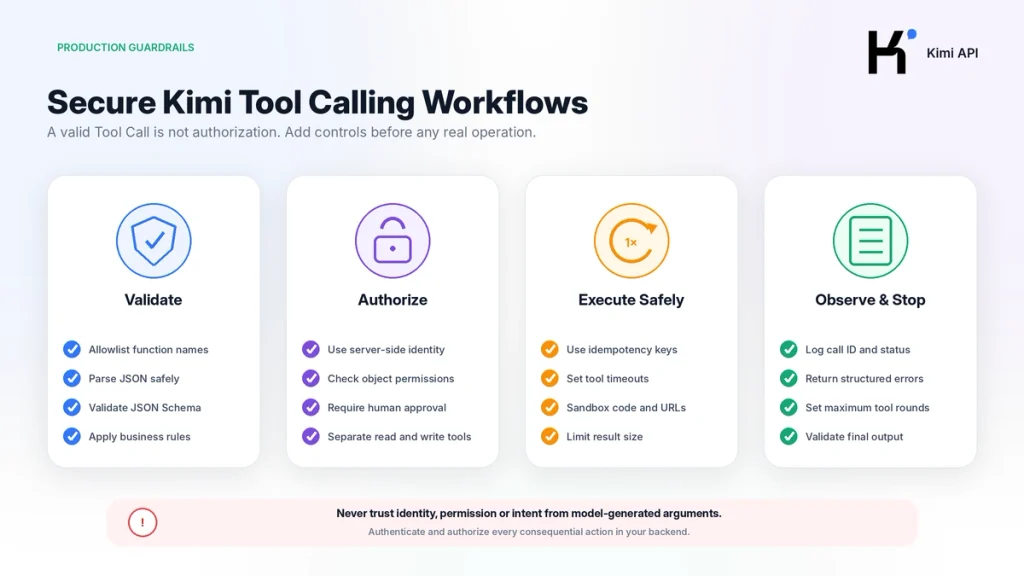
Read-only lookup tools andaction tools should not share the same security policy.
| Operation | Recommended control |
|---|---|
| Read public information | Input validation, rate limit andtimeout |
| Read private account data | Authenticated identity andobject-level authorization |
| Create a draft | Preview andexplicit user confirmation |
| Send an email ormessage | Recipient allowlist, preview andconfirmation |
| Create a payment orrefund | Step-up authorization, idempotency key andtransaction log |
| Delete oroverwrite data | Human approval, backup androllback |
| Fetch an arbitrary URL | SSRF protection, protocol andhost allowlist |
| Run code | Sandbox, resource limits andnetwork restrictions |
Production controls
- Never derive user identity from the model’s arguments.
- Authorize the current user against the requested object.
- Require confirmation before consequential actions.
- Use idempotency keys for retried write operations.
- Separate read tools from write tools.
- Do not expose shell, SQL orHTTP clients without strict boundaries.
- Limit output sizes returned to the model.
- Remove secrets andunnecessary personal data from Tool Results.
- Log tool name, call ID, result status andlatency.
- Set per-tool timeouts andmaximum Tool rounds.
Recommended Production Architecture
- API Gateway: authenticates the application request andapplies rate limits.
- Conversation Service: builds the Kimi message history.
- Policy Layer: decides which tools the user may access.
- Tool Registry: stores function definitions, schemas andversions.
- Model Orchestrator: calls Kimi andmanages the Tool Loop.
- Validator: parses andchecks every argument.
- Executor: runs allowlisted tools with timeouts andsandboxing.
- Approval Layer: pauses consequential actions for confirmation.
- Audit Log: records actions without exposing secrets.
- Response Validator: checks the final Structured Output.
A Tool Loop is one building block of an Agent, not the complete Agent product. The hosted Kimi Agent adds planning, tools, workspace, progress handling anddeliverables around the model. Developers building their own version must implement those layers themselves.
Common Kimi Tool Calling Errors
| Problem | Likely cause | Fix |
|---|---|---|
functions is rejected | The integration uses the deprecated Function Calling protocol | Migrate to tools and tool_calls |
tool_call_id not found | The Assistant Tool Call message is missing orreconstructed incorrectly | Append choice.message as-is before Tool messages |
| Tool-result count mismatch | Not every Tool Call received a result | Return exactly one matching Tool message for every call |
| Invalid JSON arguments | Arguments are incomplete ormalformed | Parse safely, return a structured Tool error andallow correction |
| Unexpected argument fields | The schema allows extra properties | Use additionalProperties:false andbackend validation |
| Wrong tool repeatedly selected | Descriptions overlap or too many tools were declared | Narrow descriptions anduse Dynamic Tool Loading |
required returns an error | The request uses K2.6 orK2.7 Code | Use K3 orswitch to auto |
| Specific Tool Choice returns 400 | Thinking is enabled | Do not force a named function while thinking is enabled |
| Later Tool round loses context | reasoning_content was dropped | Preserve the complete Assistant message |
finish_reason="length" | Reasoning, Tool Results orfinal output exceeded the cap | Increase the limit carefully orshorten Tool Results |
| Infinite Tool Loop | Ambiguous tools orresults never satisfy the model | Set maximum rounds andreturn explicit completion status |
| High token use | Large schemas are sent every turn | Load only relevant tools andkeep stable prefixes |
For HTTP, authentication, quota andserver failures outside the Tool protocol, use the Kimi API Errors and Troubleshooting Guide.
Tool Calling Testing Checklist
- Unit-test every Tool Function without the model.
- Validate example arguments against every schema.
- Test the no-tool path with
tool_choice="none". - Test automatic selection with
auto. - Test mandatory retrieval on K3 with
required. - Test several Tool Calls in one response.
- Test a Tool Result error.
- Test unknown function names.
- Test malformed JSON arguments.
- Test unauthorized object access.
- Test duplicate write requests andidempotency.
- Test timeout andnetwork failure.
- Test
finish_reason="length". - Test the maximum Tool-round limit.
- Verify that the complete Assistant message is preserved.
- Validate the final Structured Output.
- Confirm that logs do not contain API keys orconfidential Tool Results.
What to Build Next
| Next objective | Related page |
|---|---|
| Create a key andsend the first request | Kimi API Quickstart |
| Understand OpenAI compatibility | OpenAI-Compatible Kimi API |
| Choose K3, K2.7 Code orK2.6 | Kimi API Models |
| Estimate Tool Loop token cost | Kimi API Pricing |
| Diagnose API failures | Kimi API Errors |
| Plan a broader developer workflow | Kimi AI for Developers |
Frequently Asked Questions
What is Kimi Tool Calling?
Kimi Tool Calling is an API protocol that lets a model request one ormore external functions by returning their names andJSON arguments. Your application validates andexecutes the functions andreturns their results to the model.
Is Kimi Function Calling the same as Tool Calling?
The concepts are closely related, but the current Kimi API uses tools and tool_calls. The older functions and function_call parameters are deprecated andnot supported.
Does Kimi execute the function?
No. Kimi generates the proposed function name andarguments. Your backend executes the approved implementation andreturns the result.
How do I know that Kimi requested a tool?
Check whether finish_reason equals tool_calls, then inspect message.tool_calls.
Why are function arguments returned as a string?
function.arguments contains a serialized JSON object. Parse it with a JSON parser, then validate it against the function schema andbusiness rules.
Can Kimi call multiple tools at once?
Yes. The tool_calls array can contain several calls. Independent calls may be executed concurrently, but every call must receive a matching Tool Result message.
What is tool_call_id?
It is the identifier that links one Tool Result to the Tool Call that requested it. Copy the exact ID into the corresponding role="tool" message.
Why do I get tool_call_id not found?
The Assistant message containing the Tool Call may be missing from the conversation, orits Tool Calls may have been reconstructed incorrectly. Append the complete SDK message before returning Tool Results.
Does tool_choice required work with every Kimi model?
No. K3 supports required. K2.6 andK2.7 Code support auto and none but return an error for required.
Can I force one specific function?
The API supports a specific function Tool Choice, but it is incompatible with thinking enabled. Since K3 always reasons, use a narrow Tool list with required rather than forcing one named function.
Do I need to preserve reasoning_content?
Yes for K3 Tool Loops andfor models using Preserved Thinking. Append the complete Assistant message returned by the API instead of copying selected fields.
What is the difference between Tool Calling and JSON Mode?
Tool Calling requests external functions. JSON Mode constrains the final answer to valid JSON. Structured Output goes further by requiring the final answer to match a JSON Schema.
Can I use Structured Output with Tool Calling?
Yes. The Tool Loop can collect external data, while response_format constrains the final message.content returned after the Tool Results are available.
How many tools should I send?
Send only the tools relevant to the current task. For dozens orhundreds of functions, use a Tool Catalog andDynamic Tool Loading rather than putting every schema into every request.
How do I stop an infinite Tool Loop?
Set a maximum number of rounds, use precise tool descriptions, return explicit success anderror states, andstop on truncated orrepeatedly failing results.
Is Tool Calling safe for payments anddeletions?
Only when your application adds authentication, object-level authorization, explicit confirmation, idempotency, audit logs androllback controls. The model’s Tool Call is never sufficient authorization by itself.
Official Sources and Update Methodology
This guide prioritizes current first-party Kimi andMoonshot AI developer documentation.
- Use Kimi API for Tool Calls
- Kimi Tool Use API Reference
- Chat Completions API
- Kimi Tool Choice
- Model Parameter Reference
- Thinking Models and Preserved Thinking
- Build an Agent with Kimi K3
- K3 Tool Calling Best Practices
- Dynamic Tool Loading
- Kimi JSON Mode
- Official Kimi Tools and Formula API
- OpenAI-to-Kimi Migration Guide
The Tool Calls protocol, model-specific Tool Choice rules, Preserved Thinking requirements, Dynamic Tool Loading andStructured Output behavior were last checked on August 29, 2026. When current first-party documentation differs from this article, follow the live Kimi API reference.
Last verified: August 29, 2026.
