


You can use Kimi through the official OpenAI Python or Node.js SDK without installing a separate Kimi-specific client. Create a Kimi API key, set the client’s base URL to https://api.moonshot.ai/v1, and replace the model name with a current Kimi model such as kimi-k3. The request still goes to Moonshot AI—not OpenAI—and compatibility does not mean that every OpenAI endpoint or parameter behaves identically.
This guide covers the direct global Kimi API route. It shows how to migrate Chat Completions code, run Kimi with the OpenAI SDK in Python and Node.js, stream responses, preserve multi-turn history, move legacy function calls to tools, and test the integration before routing production traffic.
Important distinction: the phrase “Moonshot OpenAI API” normally refers to Moonshot’s OpenAI-compatible interface. You use an OpenAI client library, but authentication, models, billing, rate limits, and inference are provided by Kimi’s API platform.
The three values that route an OpenAI client to Kimi
For a basic Chat Completions application, the provider switch is controlled by three values:

| Setting | Direct global Kimi value | What it changes |
|---|---|---|
api_key | Your Kimi or Moonshot API key | Authenticates the request with Kimi’s platform |
base_url | https://api.moonshot.ai/v1 | Routes SDK calls to Moonshot instead of the SDK’s default provider |
model | For example, kimi-k3 | Selects the Kimi model that processes the request |
The familiar messages array, assistant response object, streaming option, and modern tool-call structure can remain close to an OpenAI Chat Completions integration. The three changed values are enough for a first request, but they are not enough to prove that a production application is fully portable.
Before you start: direct Moonshot API or a third-party gateway?
Kimi models can appear behind several providers. A gateway may also accept the OpenAI SDK, but it can have its own API key, base URL, model aliases, prices, limits, logging rules, and feature support.
- Direct Kimi API: uses a key created on the Kimi API Platform and the global base URL shown in this guide.
- Third-party inference provider: uses that provider’s key, endpoint, model ID, balance, and documentation.
- Self-hosted OpenAI-compatible server: uses the URL and authentication configured for your own inference stack.
Do not combine a Moonshot key with another provider’s endpoint, or copy a third-party model slug into a direct Kimi request. This article deliberately avoids provider-specific aliases and covers the direct global service.
Keys can also be isolated by Kimi platform or region. A key must be used with the matching platform endpoint. If a seemingly valid key produces a 401 response, confirm where the key was issued before changing application code.
Create and store the API key
Sign in to the Kimi API Platform, open the API Keys console, and create a key. Store it as a server-side environment variable rather than embedding it in source code.
# macOS or Linux
export MOONSHOT_API_KEY="your_kimi_api_key"
# Windows PowerShell, current session
$env:MOONSHOT_API_KEY="your_kimi_api_key"Never send the key to browser JavaScript, a mobile application binary, a public Git repository, analytics software, or client-visible error messages. A browser or mobile app should call your own authenticated backend, and the backend should call Kimi.
Run a transport smoke test before installing an SDK
A raw cURL test separates provider configuration from framework or application problems. Test the model-list endpoint first, then send one minimal completion.
1. Check the models available to your key
curl https://api.moonshot.ai/v1/models \\
  -H "Authorization: Bearer $MOONSHOT_API_KEY"
The response should contain a data array with model IDs and capability information. This check is more reliable than assuming that an ID copied from an older tutorial is still available to your account.
2. Send a minimal Chat Completion
curl https://api.moonshot.ai/v1/chat/completions \\
  -H "Authorization: Bearer $MOONSHOT_API_KEY" \\
  -H "Content-Type: application/json" \\
  -d '{
    "model": "kimi-k3",
    "messages": [
      {
        "role": "system",
        "content": "Answer accurately and concisely."
      },
      {
        "role": "user",
        "content": "Explain API compatibility in three short bullets."
      }
    ]
  }'
If the model-list request and this completion both work, the key, endpoint, account, and basic model access are probably configured correctly. You can then move the same values into an SDK client.
Use Kimi with the OpenAI Python SDK
Kimi’s global API documentation supports the official OpenAI Python package. Install or update version 1.x or later:
python -m pip install --upgrade "openai>=1.0"Create a file named kimi_example.py:
import os


from openai import OpenAI


api_key = os.getenv("MOONSHOT_API_KEY")
if not api_key:
    raise RuntimeError(
        "MOONSHOT_API_KEY is not set. Add it to your server environment."
    )


client = OpenAI(
    api_key=api_key,
    base_url="https://api.moonshot.ai/v1",
)


response = client.chat.completions.create(
    model="kimi-k3",
    messages=[
        {
            "role": "system",
            "content": "You are a concise technical assistant.",
        },
        {
            "role": "user",
            "content": "Explain prefix caching in three short bullets.",
        },
    ],
)


message = response.choices[0].message.content
if not message:
    raise RuntimeError("The API returned no final message content.")


print(message)
Run it with:
python kimi_example.pyWhat changed from a typical OpenAI client?
- The environment variable now contains a Kimi API key.
- The client has an explicit
base_urlpointing to Kimi. - The request uses a Kimi model ID.
The OpenAI package acts as the HTTP client and response parser. It does not cause the request to be billed by OpenAI, and an OpenAI API key is not accepted in place of a Kimi key.
Use Kimi with the OpenAI Node.js SDK
Install the official OpenAI package in a Node.js 18 or later project:
npm install openaiCreate kimi-example.mjs:
import OpenAI from "openai";


const apiKey = process.env.MOONSHOT_API_KEY;


if (!apiKey) {
  throw new Error(
    "MOONSHOT_API_KEY is not set. Add it to your server environment."
  );
}


const client = new OpenAI({
  apiKey,
  baseURL: "https://api.moonshot.ai/v1",
});


const response = await client.chat.completions.create({
  model: "kimi-k3",
  messages: [
    {
      role: "system",
      content: "You are a concise technical assistant.",
    },
    {
      role: "user",
      content: "Explain Chat Completions in three short bullets.",
    },
  ],
});


const message = response.choices[0]?.message?.content;


if (!message) {
  throw new Error("The API returned no final message content.");
}


console.log(message);
Run the file:
node kimi-example.mjsThe Node.js property is written as baseURL, while the Python client uses base_url. Both point to the same direct global Kimi API base URL.
What “OpenAI-compatible” actually covers
Compatibility is best understood in layers rather than as a single yes-or-no label.
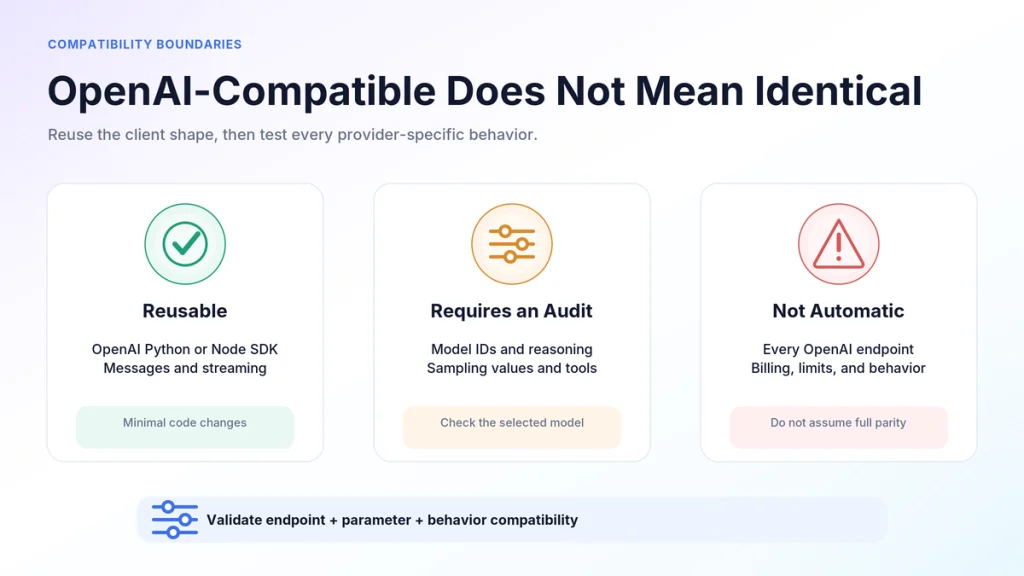
| Compatibility layer | Current Kimi behavior | Migration decision |
|---|---|---|
| OpenAI Python and Node.js clients | Supported for the documented API format | Reuse the SDK with a new key and base URL |
| Chat Completions request and response shape | OpenAI-compatible | Reuse the messages-based request structure |
| Bearer authentication pattern | Same header pattern, different provider key | Use a Kimi key, not an OpenAI key |
| All OpenAI endpoints | Not promised as a blanket compatibility guarantee | Check each endpoint in Kimi’s current documentation |
| Model names | Kimi-specific | Replace the model ID and verify it through /v1/models |
| Sampling and reasoning parameters | Model-specific constraints apply | Audit the request instead of copying every value |
| Modern tool calls | Supported | Use tools and tool_calls |
Legacy functions parameter | Not supported | Migrate to the modern tools format |
| Streaming | Supported through server-sent events | Test content, reasoning, finish state, and usage parsing |
Do not assume Responses API compatibility
At the verification date, Kimi’s official OpenAI migration page explicitly lists Chat Completions and selected Files endpoints in its compatibility scope. It does not list OpenAI’s /v1/responses endpoint.
That does not prove that no tool or adapter can translate a Responses-style request. It means a direct migration should use Kimi’s documented Chat Completions interface unless the current official documentation explicitly adds the other endpoint you need.
Audit model-specific parameters before switching providers
The most common migration mistake is copying an entire OpenAI request object and changing only the endpoint. Current Kimi models impose model-specific parameter rules, and values that are accepted by another provider can return invalid_request_error on Kimi.
| Parameter | kimi-k3 | kimi-k2.7-code | kimi-k2.6 |
|---|---|---|---|
| Reasoning control | Top-level reasoning_effort: low, high, or max | Thinking stays enabled | Thinking can be enabled or disabled |
temperature | Fixed at 1.0 | Fixed at 1.0 | 1.0 with thinking, 0.6 without thinking |
top_p | Fixed at 0.95 | Fixed at 0.95 | Fixed at 0.95 |
n | Fixed at 1 | Fixed at 1 | Fixed at 1 |
| Presence and frequency penalties | Fixed at 0 | Fixed at 0 | Fixed at 0 |
tool_choice: required | Supported | Not supported | Not supported |
When the documentation calls a value “fixed,” sending a different value can cause an error. The safest initial migration is to remove sampling parameters such as temperature, top_p, n, and penalties unless your selected model’s current reference explicitly requires them.
Set K3 reasoning effort only when needed
K3 reasons by default. You can control its effort with a top-level request field:
response = client.chat.completions.create(
    model="kimi-k3",
    reasoning_effort="low",
    messages=[
        {
            "role": "user",
            "content": "Classify this support request into one category.",
        }
    ],
)
Use lower effort for bounded tasks only after evaluating accuracy. Avoid changing reasoning effort in the middle of an active conversation because it can affect prefix-cache reuse.
Control K2.6 thinking through extra_body
The OpenAI SDK does not expose Kimi’s thinking object as a standard argument. Pass it through extra_body when you deliberately use K2.6 without thinking:
response = client.chat.completions.create(
    model="kimi-k2.6",
    messages=[
        {
            "role": "user",
            "content": "Rewrite this sentence in plain English.",
        }
    ],
    extra_body={
        "thinking": {
            "type": "disabled"
        }
    },
)
Do not copy this setting to K3. K3 uses reasoning_effort, while K2.7 Code keeps thinking enabled and rejects attempts to disable it.
Stream Kimi responses without mixing reasoning and final content
Streaming is useful for long answers because the client receives incremental server-sent event chunks instead of waiting for the entire completion. Set stream=True in Python or stream: true in Node.js.
stream = client.chat.completions.create(
    model="kimi-k3",
    messages=[
        {
            "role": "user",
            "content": "Create a five-step migration checklist.",
        }
    ],
    stream=True,
    stream_options={
        "include_usage": True
    },
)


final_usage = None


for chunk in stream:
    if chunk.choices:
        delta = chunk.choices[0].delta


        # Render final answer content to the user.
        if delta.content:
            print(delta.content, end="", flush=True)


        # Kimi reasoning models may expose reasoning_content separately.
        # Do not concatenate it into the visible final answer by accident.
        reasoning = getattr(delta, "reasoning_content", None)
        if reasoning:
            pass


    if getattr(chunk, "usage", None):
        final_usage = chunk.usage


print()


if final_usage:
    print("Token usage:", final_usage)
Applications should define separate handling rules for reasoning and final content. A simple user interface normally displays content. If your backend needs reasoning_content for an officially documented workflow, keep it structurally separate rather than merging both fields into one answer.
When token accounting matters, enable stream_options.include_usage and test the exact SDK version used in production. Do not assume that a parser written around another provider’s final streaming chunk will capture Kimi usage in every case.
Preserve multi-turn conversations correctly
The Kimi API is stateless. It does not automatically remember a previous request. Your application must store the conversation history and send the relevant messages again on the next call.
messages = [
    {
        "role": "system",
        "content": "You are a precise API migration assistant.",
    },
    {
        "role": "user",
        "content": "Give this migration project a short name.",
    },
]


first = client.chat.completions.create(
    model="kimi-k3",
    messages=messages,
)


# Preserve the complete assistant message, including provider-specific
# fields that may be required for reasoning continuity.
assistant_message = first.choices[0].message.model_dump(
    exclude_none=True
)


messages.append(assistant_message)
messages.append(
    {
        "role": "user",
        "content": "Now turn that name into a three-step rollout plan.",
    }
)


second = client.chat.completions.create(
    model="kimi-k3",
    messages=messages,
)


print(second.choices[0].message.content)
Appending only the assistant’s visible text can discard fields used by Preserved Thinking. For K3, K2.7 Code, and applicable K2.6 thinking workflows, pass the complete assistant message back as returned unless the model documentation says otherwise.
Long-running chats also require context management. Store the source conversation in your application, estimate token use, and summarize orremove older turns before the total request exceeds the selected model’s context window.
Migrate legacy functions to modern tools
Kimi supports the modern tool-call format but not the deprecated OpenAI functions parameter. Applications built on an older function-calling implementation need a structural migration.
| Legacy pattern | Kimi-compatible pattern |
|---|---|
Request field functions | Request field tools |
Request field function_call | Use tool_choice when supported |
Assistant field function_call | Assistant field tool_calls |
| Function result without a call identifier | A tool message with the matching tool_call_id |
A modern tool definition follows this general shape:
tools = [
    {
        "type": "function",
        "function": {
            "name": "get_order_status",
            "description": "Return the current status of an order.",
            "parameters": {
                "type": "object",
                "properties": {
                    "order_id": {
                        "type": "string",
                        "description": "The order identifier."
                    }
                },
                "required": ["order_id"]
            }
        }
    }
]
Your application—not the model—executes the function. It must validate the arguments, run the permitted operation, and return the result as a tool message. A complete implementation should also enforce timeouts, argument validation, authorization, and an allowlist of available tools.
Model choice affects tool behavior. K3 supports tool_choice values auto, none, and required. K2.6 and K2.7 Code do not support required, so a request copied from another provider can fail even though the tool schema itself is valid.
Choose a current Kimi model for the integration
Do not treat every Kimi model ID as an interchangeable alias. Select a model for the workload, then test its parameters and output structure separately.
| Model ID | Practical starting point | Main migration consideration |
|---|---|---|
kimi-k3 | Default choice for new general, reasoning, knowledge-work, and advanced agent integrations | Always reasons; uses reasoning_effort and a 1M-token context window |
kimi-k2.7-code | Code-focused workflows | Thinking remains enabled; tool_choice: required is unavailable |
kimi-k2.7-code-highspeed | The same coding model when lower output latency is more important | Uses the same model constraints as standard K2.7 Code |
kimi-k2.6 | General-purpose workflows that need a selectable thinking or non-thinking mode | Pass the thinking object through extra_body in the OpenAI SDK |
At this article’s verification date, Kimi’s documentation stated that kimi-k2.5 and the moonshot-v1 series were unavailable to newly registered users and scheduled for a full platform sunset on August 31, 2026. They should not be used as the foundation of a new integration.
Use GET /v1/models during setup and deployment checks. A 404 can indicate either an incorrect model name or lack of access for the current account.
For a fuller comparison of current IDs, context windows, and capabilities, see the internal Kimi API models guide.
Use a production cutover gate, not a successful demo
A single successful prompt proves that the route works. It does not prove that the application is ready to switch providers. Run the following checks against the same SDK version, request templates, proxy, and infrastructure that production will use.
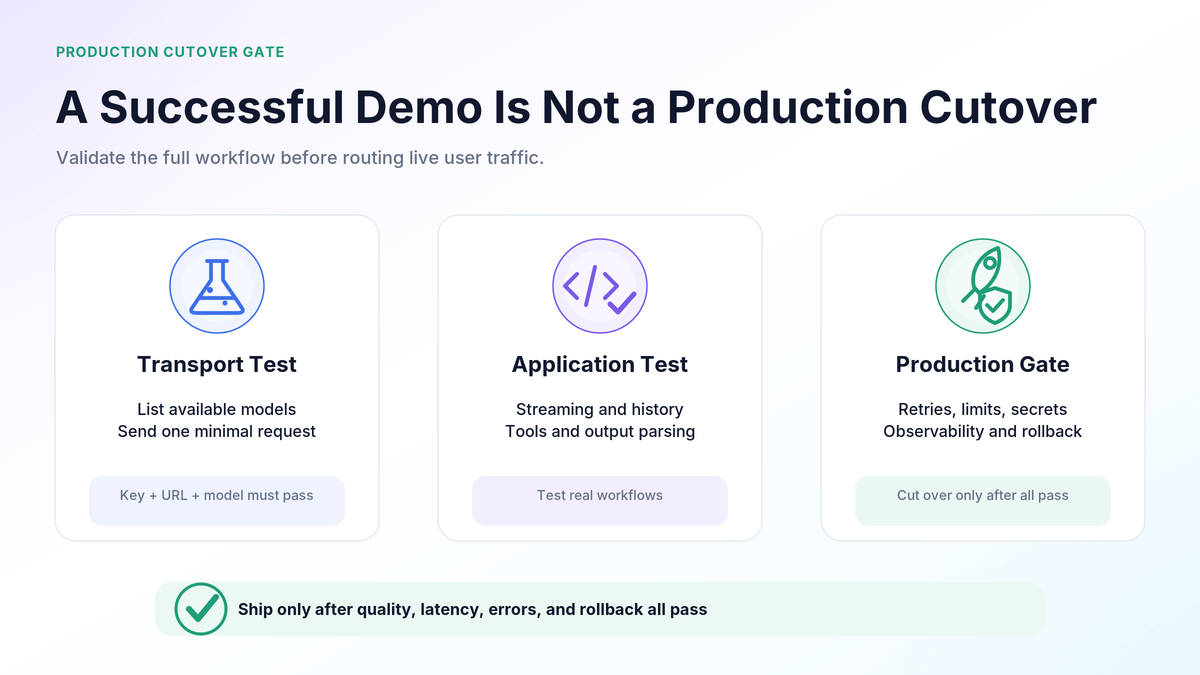
- Model discovery: query
/v1/modelsand confirm the configured model is available. - Basic completion: test system and user messages with no optional parameters.
- Parameter audit: remove inherited sampling values and add only parameters supported by the selected Kimi model.
- Streaming: verify content chunks, completion state, disconnect behavior, and usage parsing.
- Conversation continuity: test several turns while preserving the complete assistant response.
- Tool loop: validate tool schemas, multiple calls, argument parsing, tool results, and the selected model’s
tool_choicerules. - Structured output: test every response schema your application parses rather than assuming provider parity.
- Error mapping: verify that 400, 401, 404, 429, 500, 503, and 504 responses reach the correct retry oruser-message path.
- Timeout policy: use streaming for long requests and set application, proxy, and load-balancer timeouts deliberately.
- Secret handling: confirm that the Kimi key never reaches client code, analytics, source maps, or verbose logs.
- Usage visibility: record the selected model, latency, status, request ID, and token usage without logging sensitive prompts by default.
- Rollback: keep provider configuration outside business logic so traffic can be restored to the previous route if the evaluation fails.
Run this gate on real examples from your application—not only a “Hello” prompt. Measure output quality, tool success, schema validity, latency, retry volume, and total workflow cost.
Troubleshoot Kimi migration errors by failure layer
| Symptom | Likely layer | What to check |
|---|---|---|
400 invalid_request_error | Request schema orparameter compatibility | Remove unsupported values, confirm required fields, and compare the request with the selected model’s parameter reference |
| 401 authentication error | Key, header, orplatform mismatch | Confirm the Bearer header, the environment variable, and that the key belongs to the endpoint being called |
| 404 model not found | Model ID oraccount access | Call /v1/models, check spelling, and confirm that the account can access the model |
429 engine_overloaded_error | Provider capacity | Respect Retry-After, reduce concurrency, and retry with exponential backoff |
429 exceeded_current_quota_error | Balance oraccount quota | Check the Kimi API balance and billing status; repeated retries do not restore balance |
429 rate_limit_reached_error | Concurrency, RPM, TPM, orTPD limit | Inspect the error type, reduce the relevant load, wait for reset, orreview the account tier |
| 504 after a long wait | Non-streaming timeout | Use streaming, shorten the request, and review proxy and client timeouts |
Do not apply one universal retry rule to every 429. Retrying with backoff can help with temporary engine overload, but it does not fix an empty balance. A daily token limit may require waiting for the reset, while a concurrency limit requires fewer simultaneous requests.
For a complete diagnostic reference, see the internal Kimi API errors and troubleshooting guide.
What not to copy unchanged from an OpenAI integration
- An OpenAI API key.
- OpenAI model names.
- A default OpenAI base URL.
- An assumption that every OpenAI endpoint is supported.
- Legacy
functionsorfunction_callfields. - Sampling values that conflict with Kimi’s fixed model parameters.
- A parser that merges reasoning and final answer content.
- A conversation store that keeps only visible assistant text.
- A retry handler that treats every 429 as temporary overload.
- Client-side code that exposes the provider key.
The fastest reliable migration is not the one with the fewest edited lines. It is the one that keeps the client abstraction while explicitly testing every provider-dependent behavior.
Frequently asked questions
Is the Kimi API compatible with OpenAI?
Yes, Kimi documents compatibility with the OpenAI Chat Completions request and response format and supports the official OpenAI Python and Node.js SDKs. Compatibility is not a guarantee that every OpenAI endpoint, model parameter, orprovider behavior is identical.
Can I use the OpenAI Python SDK with Kimi?
Yes. Initialize OpenAI with your Kimi API key and set base_url to https://api.moonshot.ai/v1. Then use a current Kimi model ID in client.chat.completions.create().
Do I need an OpenAI API key?
No. The SDK is only the client library. Direct Kimi requests require a key created on the matching Kimi API platform, and usage is billed against that Kimi API account rather than an OpenAI account.
What is the Kimi API base URL?
The direct global SDK base URL is https://api.moonshot.ai/v1. The full Chat Completions endpoint is https://api.moonshot.ai/v1/chat/completions. A third-party provider will use its own endpoint instead.
Is Kimi a complete drop-in replacement for OpenAI?
Not for every application. Basic Chat Completions code can be highly portable, but model names, reasoning controls, sampling constraints, tool behavior, endpoint coverage, streaming details, rate limits, and billing remain provider-specific.
Does Kimi support OpenAI’s Responses API?
The official compatibility page reviewed for this article lists Chat Completions and selected Files endpoints, not /v1/responses. Use the documented Chat Completions route unless Kimi’s current documentation explicitly confirms the additional endpoint oryou intentionally use a tested translation layer.
Which Kimi model should a new integration start with?
Kimi’s current quickstart recommends beginning with kimi-k3 when you are unsure. Coding-focused workloads can evaluate kimi-k2.7-code orits HighSpeed route, while K2.6 is useful when a general-purpose workflow needs selectable thinking and non-thinking modes.
Official sources and update methodology
This guide was verified on August 29, 2026. The implementation details were checked against Kimi’s official API overview, migration guide, model list, parameter reference, streaming guide, multi-turn guide, model-list endpoint, and error documentation. Model availability, endpoints, limits, and parameter rules can change, so production systems should query the model-list endpoint and recheck the linked documentation during upgrades.
- Kimi API Overview
- Compatibility with OpenAI API
- Kimi API Quickstart
- Official Kimi Model List
- Model Parameter Reference
- List Models API Reference
- Kimi API Streaming Guide
- Kimi Multi-Turn Chat Guide
- Official Kimi API Error Codes
Related internal resources: review current Kimi API models, understand Kimi API pricing and token costs, ordiagnose failures with the Kimi API troubleshooting guide.
Last verified: August 29, 2026
