


Last verified: September 13, 2026.
The Kimi context window depends on both the model and the product. In Kimi Code, K2.8 Preview runs through kimi-for-coding with up to 1,048,576 tokens. Through the direct Kimi API, Kimi K3 supports 1,048,576 tokens, while Kimi K2.7 Code, K2.7 Code HighSpeed, and Kimi K2.6 support 262,144 tokens. Kimi Chat and Deep Research have their own product-level limits.
The published context number is not an input-only allowance. System instructions, conversation history, files, supported media, tool definitions, tool results, preserved reasoning, and the next generated response can all use the available working space.
Context planning rule: identify the model, product surface, plan entitlement, client configuration, and required output reserve before deciding how much content fits.
Kimi context window limits at a glance
The official Kimi API model list and individual model guides publish the following limits for direct Open Platform API models. This table is separate from Kimi Code:

| Direct API Model ID | Context Window | Primary Role |
|---|---|---|
kimi-k3 | 1M / 1,048,576 tokens | Flagship model for long-horizon coding, knowledge work, reasoning, and multimodal tasks |
kimi-k2.7-code | 256K / 262,144 tokens | Coding-specialized model with thinking enabled |
kimi-k2.7-code-highspeed | 256K / 262,144 tokens | Faster serving route for the same K2.7 Code model |
kimi-k2.6 | 256K / 262,144 tokens | General-purpose multimodal model with optional thinking |
These are model-level direct API limits. They should not be copied automatically into Kimi Chat, Kimi Code, a third-party inference provider, or a specialized Kimi feature. In particular, upgrading kimi-for-coding to K2.8 Preview does not change kimi-k2.7-code into a 1M API model. For a broader comparison, use the Kimi API models guide.
Identify the Kimi product before applying a token limit
The same Kimi brand appears across several products. Each product can expose a model through a different endpoint, plan, Model ID, context policy, or history-management system.
| Surface | What controls the effective limit? | Common mistake |
|---|---|---|
| Direct Kimi API | API Model ID, request size, and completion reserve | Applying a consumer Chat limit to an API request |
| Kimi Chat | Selected model, conversation state, and membership entitlement | Assuming every K3 chat receives the complete 1M window |
| Kimi Code | Kimi Code Model ID, membership tier, and coding-client configuration | Using a direct API ID or retaining an outdated client-side context limit |
| Deep Research | The feature-specific Kimi-Researcher workflow | Assuming it automatically inherits K3’s 1M context |
| Third-party provider | The provider’s deployed checkpoint, endpoint, and service limits | Treating the provider’s limit as Moonshot’s direct product limit |
| Self-hosted model | Checkpoint, inference engine, configuration, and available hardware | Assuming the model card’s maximum is enabled by default |
Start every context calculation by recording the exact endpoint and model ID. K3 has both 1M-capable and 256K Kimi Code routes, while the unchanged kimi-for-coding ID now identifies K2.8 Preview. A familiar display name or a saved configuration is not enough to identify the effective limit.
Direct Kimi API context windows by model
Kimi K3: 1,048,576 tokens
Kimi K3 has the largest context window in the current direct API catalog. The official K3 documentation specifies a 1M-token window for long-horizon coding, knowledge work, reasoning, and native multimodal input.
A one-million-token context does not mean the application can send 1,048,576 input tokens and still request a long answer. Input and output must fit within the same model ceiling.
K3 also keeps thinking enabled. Its reasoning effort can be set to low, high, or max. A context budget should therefore leave room for reasoning, tool calls, and final-answer tokens rather than allocating nearly the entire window to source material.
Kimi K2.7 Code: 262,144 tokens
Through the direct API, Kimi K2.7 Code supports a 256K context window. The official K2.7 Code guide describes its coding, tool-use, and multimodal capabilities. Its API ID is kimi-k2.7-code, not the Kimi Code alias kimi-for-coding.
K2.7 Code HighSpeed has the same 256K context because it is a faster serving route for the same underlying model. It changes output speed, not the amount of context available.
K2.7 Code keeps thinking enabled. When an application preserves full assistant messages, reasoning content, tool calls, and tool results across turns, that history can occupy a significant portion of the next request.
Kimi K2.6: 262,144 tokens through the API
Kimi K2.6 supports 256K through the Direct API. According to the official K2.6 guide, the model accepts text, images, and video and can run with thinking enabled or disabled.
The 256K figure applies to the API model. The consumer Kimi Chat product publishes a smaller approximate limit for a K2.6 conversation, which is why different official Kimi pages can show different numbers without necessarily contradicting each other.
Kimi Chat context limits
Consumer Kimi Chat applies product and membership rules in addition to the technical capabilities of the underlying model.
| Chat Configuration | Published Capacity | Important Qualification |
|---|---|---|
| K2.6 single conversation | Approximately 128K tokens | Consumer Chat limit, not the K2.6 Direct API ceiling |
| K3 Extra-Long Chat | Up to 1M tokens | Currently listed for Allegro and Vivace members |
| K3 without Extra-Long Chat entitlement | Do not assume the complete 1M window | The model may be available while the largest Chat capacity remains plan-dependent |
The Kimi Chat troubleshooting page describes K2.6’s single-conversation context as approximately 128K tokens. Once that conversation fills, Kimi may no longer accept additional usable content.
Kimi recommends summarizing the conclusions, creating a handoff document, and starting a new conversation. Deleting earlier messages inside the same conversation does not release the accumulated context according to the current Help Center guidance.
For K3, the official membership comparison lists Extra-Long Chat capacity of up to 1M tokens for Allegro and Vivace. See the internal Kimi AI pricing guide for the broader distinction between consumer membership, credits, and API billing.
Kimi Code context windows and plan access
Kimi Code has its own endpoint, Model IDs, membership rules, and context-management behavior. Its Model IDs should not be confused with Direct Open Platform IDs such as kimi-k3.
The September 11, 2026 release notice confirms that kimi-for-coding was upgraded in place to K2.8 Preview. The ID stayed the same; the underlying model changed, and its context increased from 256K to up to 1M.
| Kimi Code model ID | Underlying model | Context window | Access rule |
|---|---|---|---|
k3 | Kimi K3 | Up to 1,048,576 tokens | Moderato: up to 262,144; Allegretto and higher: up to 1,048,576 |
k3-256k | Kimi K3 | Fixed 262,144 tokens | Moderato and higher |
kimi-for-coding | Kimi K2.8 Preview | Up to 1,048,576 tokens | All Kimi Code members |
kimi-for-coding-highspeed | Kimi K2.7 Code HighSpeed | 262,144 tokens | Allegretto and higher |
The Kimi Code model configuration reference lists these limits and notes that the 1M K3 route consumes approximately twice the quota of k3-256k. That comparison concerns the two K3 routes; it is not a universal cost ratio for K2.8 Preview.
K2.8 Preview’s 1M access is not subject to K3’s higher-tier rule. The release notice makes it available across Kimi Code membership tiers. Membership access still has usage limits; it does not mean unlimited free API calls or identical capacity in consumer Chat.
A third-party coding client may expose less than 1M
A coding client can impose a smaller context limit than the selected model supports. This matters for both k3 and kimi-for-coding: a saved 262,144-token setting should not be treated as proof that K2.8 Preview is still a 256K model.
Check the client’s configured context length and displayed capacity. For a supported 1M route, the model ceiling is 1048576; the field name and configuration steps depend on the client. Kimi’s Hermes integration guide, for example, uses context_length. Do not add that field blindly to a different client’s configuration.
A model ID does not override a client-side cap or grant additional plan access. Keep k3-256k and kimi-for-coding-highspeed at their 262,144-token limits, and do not assume a Moderato account unlocks K3 at 1M. For K2.8 Preview, check the selected ID and client configuration rather than applying K3’s plan restriction.
Switching from 1M to 256K can trigger compaction
When a Kimi Code session already exceeds 256K and the user switches from k3 to k3-256k, supported tools may compact the history. Kimi recommends running a manual compact first so the summary can prioritize the requirements, decisions, and unfinished work that matter most.
The official Kimi Code session documentation explains automatic history compression near the limit and manual compression with /compact. You can add a hint about what the summary should preserve.
Apply the same planning precaution before moving a long K2.8 Preview session to a 256K-only route: preserve the objective, constraints, verified findings, and unfinished work before switching. Do not assume every third-party client handles an oversized history automatically.
Thinking effort and cache after the upgrade
K2.8 Preview supports low, high, and max thinking effort, with max as its default. These settings do not create additional context beyond the model’s ceiling.
Kimi’s model reference warns that changing models or thinking effort can invalidate cached context and require it to be processed again. Keep effort consistent within a session; when moving to the upgraded model, Kimi recommends starting a new session. Cache reuse affects processing and usage, not the published context limit.
Special workflows and historical Kimi context lengths
Search results can include older models or special products whose context windows should not be applied to the current Direct API catalog.
| Model or Workflow | Context | How to Interpret It |
|---|---|---|
| Kimi Deep Research | 128K | Feature-specific Kimi-Researcher workflow |
| Original Kimi K2 Base and Instruct | 128K | Historical open-weight checkpoints |
| Kimi K2 Instruct 0905 | 256K | Later historical Instruct checkpoint |
| Kimi K2 Thinking | 256K | Historical reasoning model |
| Moonshot V1 family | 8K, 32K, or 128K | Historical limits; the direct API series was retired on August 31, 2026 |
The official Deep Research FAQ currently specifies 128K for a research task. A user selecting Deep Research should therefore plan around its feature-specific capacity rather than assuming the task receives K3’s 1M window.
For the difference between original K2 checkpoints and retired K2 API routes, see the internal Kimi K2 historical model guide.
The API catalog’s retirement notice confirms that the direct moonshot-v1 series is no longer available. Historical model context specifications should not be read as a list of callable API endpoints.
What counts toward the Kimi context window?
The active context is the complete package sent to or retained for the current generation. The latest visible prompt may be only a small part of it.
- System instructions: roles, policies, output constraints, and application rules.
- Conversation history: earlier user, assistant, and tool messages sent again with the request.
- Current user input: the latest question, instructions, and pasted text.
- Documents: text extracted from PDF, Word, spreadsheet, Markdown, or plain-text files.
- Images and video: visual content converted into model-consumable tokens.
- Tool definitions: names, descriptions, and JSON schemas available to the model.
- Tool results: search output, terminal logs, database results, code execution, and other returned content.
- Preserved reasoning: reasoning fields resent in supported multi-turn thinking workflows.
- The next completion: reasoning and final-answer tokens generated for the current response.
A short visible question can therefore create a large request when it sits behind a long system prompt, hundreds of prior messages, several tool schemas, and multiple attached documents.
Context window and Kimi token limit are not the same as every other limit
| Limit | What It Controls | What It Does Not Do |
|---|---|---|
| Context window | Total input and output available to the model | Does not guarantee equal attention to every detail |
| Completion limit | Maximum tokens allowed for the current generated response | Does not increase the total model context |
| Rate limit | Concurrency, requests, or tokens allowed over a period | Does not describe the maximum size of one request |
| File upload limit | Accepted file size, count, format, or request-body size | Does not guarantee all extracted content fits in context |
| Membership credits | Amount of paid product usage available | Does not represent a context-window size |
| Context caching | Cost and processing benefits when a prefix is reused | Does not expand the published context ceiling |
| Memory or Projects | Stores or reintroduces useful information between workflows | Does not create unlimited active model context |
For example, a 429 token-rate error can occur even when an individual request fits inside the model window. Conversely, a single oversized request can fail with a context-related 400 error even when the account is below its rate limits.
Kimi output token limits
The Kimi Chat Completions reference defines max_completion_tokens as the maximum number of tokens the current response may generate. The following table concerns direct API models, not Kimi Code’s kimi-for-coding alias.
| Model | Total Context | Documented Default Completion Setting | Planning Meaning |
|---|---|---|---|
kimi-k3 | 1,048,576 | 131,072 | Input plus requested completion must remain within 1,048,576 |
kimi-k2.7-code | 262,144 | 32,768 | Leave room for thinking, tools, and the final response |
kimi-k2.7-code-highspeed | 262,144 | 32,768 | Same context behavior as standard K2.7 Code |
kimi-k2.6 | 262,144 | 32,768 | Thinking mode can use more of the shared context budget |
K3 allows max_completion_tokens to be configured as high as 1,048,576, but this is not an additional million tokens on top of the prompt. If the input plus requested completion exceeds the context window, the API returns invalid_request_error.
If generation reaches the configured completion ceiling, the response normally returns finish_reason="length". Increasing the value helps only when unused model context remains.
The general Chat Completions reference marks max_tokens as deprecated in favor of max_completion_tokens. The individual K2.6 and K2.7 Code guides still describe their 32,768-token defaults under max_tokens. Check the selected model’s parameter guide rather than assuming every example uses the same field.
A 1M context window is not a documented 1M output allowance for K2.8 Preview. Do not copy K3’s direct API completion settings into a Kimi Code configuration solely because both routes can have a 1M context.
Token budget lab: calculate a safer working limit
A practical request should reserve space before filling the model with source material.
estimated input tokens
+ reserved completion tokens
+ operational safety margin
≤ model context window
The safety margin is a planning recommendation, not an additional official Kimi restriction. It protects against message wrappers, tool definitions, media-token estimates, reasoning history, and changes introduced by a framework.
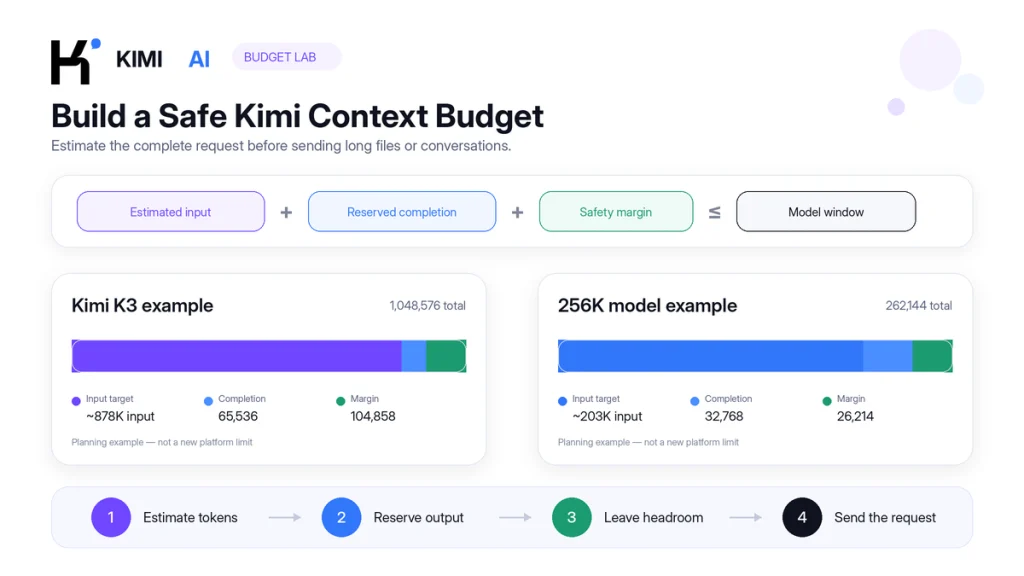
| Planning Example | Model Ceiling | Completion Reserve | 10% Safety Margin | Approximate Input Target |
|---|---|---|---|---|
| Large K3 knowledge project | 1,048,576 | 65,536 | 104,858 | About 878,000 tokens |
| K2.6 or K2.7 Code direct API workflow | 262,144 | 32,768 | 26,214 | About 203,000 tokens |
| K2.6 Chat planning example | Approximately 131,072 | 16,384 | 13,107 | About 101,000 tokens |
These are conservative examples, not new platform limits. The Chat example is a planning illustration, not a user-configurable output setting. A short classification task may need a smaller response reserve, while a reasoning-heavy report or tool loop may need more headroom.
The same budgeting principle applies to a K2.8 Preview session at its 1M ceiling. Choose a task-appropriate reserve rather than treating the K3 example as a published K2.8 output specification.
Estimate Kimi tokens before sending the request
Kimi provides an official Estimate Tokens endpoint. Its input structure is close to a Chat Completions request, making it more reliable than estimating from pages or words.
curl --request POST \
  --url https://api.moonshot.ai/v1/tokenizers/estimate-token-count \
  --header "Authorization: Bearer $MOONSHOT_API_KEY" \
  --header "Content-Type: application/json" \
  --data '{
    "model": "kimi-k3",
    "messages": [
      {
        "role": "system",
        "content": "Analyze the supplied material and cite the relevant sections."
      },
      {
        "role": "user",
        "content": "Insert the long source material or request here."
      }
    ]
  }'
A successful response includes data.total_tokens. The following count is illustrative; it is not a measured result from running the sample request:
{
  "data": {
    "total_tokens": 80421
  }
}
Use that value in the budget formula:
- Confirm the exact model and its context window.
- Estimate the complete request, including history and tools.
- Subtract the estimated input from the model ceiling.
- Subtract an operational safety margin.
- Set a completion budget that fits inside the remaining capacity.
- Reduce or split the input when the remaining response space is too small.
This token-estimation example uses the direct Open Platform API. Do not replace kimi-k3 with kimi-for-coding or assume it measures a Kimi Code client’s complete internal session. For direct API setup, see how to use the OpenAI-compatible Kimi API.
Why file size does not reveal how much Kimi context it uses
Upload systems measure bytes and file counts. Models process a tokenized representation of the extracted content. A file that uploads successfully can still create too much context for a useful request.
- PDFs: OCR layers, repeated headers, footers, tables, and scanned pages can expand the processed representation.
- Spreadsheets: formulas, hidden sheets, repetitive cells, and large ranges can consume substantial context.
- Code repositories: generated files, dependencies, minified assets, lockfiles, logs, and build output may add tokens without helping the task.
- Images: token use depends partly on resolution and visual processing.
- Videos: keyframes, duration, and frame resolution affect token consumption.
- Multiple files: each file may satisfy the upload rule while their combined extracted content exceeds the model window.
The official K2.6 and K2.7 documentation recommends using the Token Estimation API for multimodal requests because image and video token consumption is calculated dynamically.
What happens when the Kimi context window fills?
| Symptom | Likely Cause | Recommended Action |
|---|---|---|
invalid_request_error on a large request | Input plus requested completion exceeds model context | Estimate tokens, lower the completion reserve, or reduce the input |
finish_reason="length" | The current completion reached its generation ceiling | Increase it only when unused context remains, or continue in a controlled follow-up |
| Kimi Chat will not accept more useful content | The conversation has accumulated approximately its available context | Create a handoff and start a new conversation |
| Earlier instructions appear missing | History was compressed, omitted, or diluted by unrelated content | Restate critical constraints and use a structured summary |
| Kimi Code compacts after a model switch | The current session exceeds the destination model’s 256K limit | Run a manual compact before switching |
| 401 when requesting K3 1M in Kimi Code | The account lacks the required plan entitlement | Use 256K or verify the current membership requirement |
| 429 token-related error | TPM, TPD, concurrency, or quota rather than context size | Inspect the error type before reducing the prompt |
| K2.8 Preview appears limited to 256K in a coding client | A stale model label or a smaller client-side context setting | Confirm kimi-for-coding, update the client, and inspect its configured context limit |
For complete error-code handling, use the internal Kimi API errors and troubleshooting guide.
A practical Kimi context-management workflow
- Name the surface. Write down whether the task runs in Chat, Code, Deep Research, the Direct API, or another provider.
- Verify the Model ID. Do not rely only on the display name shown by an interface.
- Confirm the plan or account entitlement. A model may support 1M technically while the current product plan exposes only 256K.
- Reserve the response first. Decide whether the workflow needs a brief answer, a detailed report, thinking, or several tool calls.
- Estimate the complete request. Include system instructions, history, schemas, files, and tool results.
- Remove irrelevant content. Exclude duplicate documents, generated code, old logs, and unrelated conversation turns.
- Use stable document boundaries. Label each source and preserve headings so Kimi can locate relevant evidence.
- Keep a safety margin. Do not intentionally plan to exactly 100% of the published ceiling.
- Compact before a forced switch. Create a deliberate summary before moving from a 1M route to a 256K route.
- Start a new session when the task changes. Unrelated topics consume context and can interfere with active instructions.
- Keep tool results concise. Return the useful result rather than thousands of raw log lines.
- Monitor usage and finish state. Record prompt tokens, completion tokens, model ID, actual model version, client version, test date, and
finish_reasonwhere available. An unchanged alias does not guarantee an unchanged underlying model.
Which Kimi model or product should you choose?
| Workload | Suggested Starting Point | Context Reason |
|---|---|---|
| Large API knowledge base or repository | Kimi K3 | Current Direct API option with a 1M ceiling |
| Direct API coding task within 256K | Kimi K2.7 Code | Coding-specialized context without using the full K3 window |
| General multimodal API task within 256K | Kimi K2.6 | Text, image, and video support with optional thinking |
| Routine Kimi Code edits | k3-256k | Fixed 256K; lower documented quota use than the 1M K3 route |
| Repository-scale Kimi Code session | kimi-for-coding (K2.8 Preview) or k3 with eligible 1M access | Up to 1M for K2.8 Preview; K3 remains plan-dependent |
| Very long consumer conversation | K3 Extra-Long Chat on an eligible plan | Consumer Chat capacity of up to 1M |
| Focused sourced research task | Kimi Deep Research | Separate 128K research workflow |
| Historical K2 reproduction | Matching open-weight checkpoint | Use that checkpoint’s documented 128K or 256K limit |
The largest available context is not automatically the best option. A focused request can be easier to validate and require less processing than an unstructured one-million-token prompt. Use the additional capacity in K3 or K2.8 Preview when the source material genuinely requires it, not simply because it is available.
Frequently asked questions
What is the Kimi context window?
The Kimi context window is the maximum combined token capacity available to a model for the current request or conversation state. It includes supplied input and generated output. The number depends on the model and product surface.
How many tokens can Kimi K3 process?
Kimi K3 supports a maximum context of 1,048,576 tokens through the Direct API. Full 1M access in Kimi Chat or Kimi Code can depend on the product and membership plan.
What is the Kimi K2.8 Preview context window?
K2.8 Preview supports up to 1,048,576 tokens through Kimi Code’s kimi-for-coding ID. The Kimi Code overview lists this route as available to all Kimi Code members. A coding client’s own configuration can still impose a smaller usable limit.
Did the kimi-for-coding model ID change?
No. Kimi upgraded the existing ID in place to K2.8 Preview. Older guides that label it K2.7 Code with 256K describe its previous configuration. The direct API model kimi-k2.7-code is separate.
What is the Kimi K2.7 Code context window?
Through the direct API, kimi-k2.7-code and kimi-k2.7-code-highspeed both support 262,144 tokens. Kimi Code’s kimi-for-coding-highspeed also remains K2.7 Code HighSpeed at 256K. The standard Code ID kimi-for-coding instead runs K2.8 Preview at up to 1M.
Why is Kimi K2.6 listed as both 128K and 256K?
The Direct K2.6 API model supports 256K. The consumer Kimi Chat Help Center currently describes a K2.6 single-conversation context of approximately 128K. The numbers refer to different product surfaces.
Does Kimi support a 2M-token context window?
The official direct API catalog reviewed for this guide lists K3 at 1M and K2.7 Code and K2.6 at 256K. Kimi Code lists K2.8 Preview at up to 1M. Neither catalog establishes a 2M-token limit for these routes. Check the unit, model, product, and date behind any “2 million” claim.
Does output count toward the Kimi token limit?
Yes. Input and generated output share the model context. If the supplied input plus requested max_completion_tokens exceeds the model window, the Direct API returns an invalid-request error.
Can Kimi K3 produce a one-million-token answer?
The API permits a high completion ceiling, but the response must share the 1,048,576-token context with the input. A large prompt leaves less room for output, and the model may finish naturally before reaching the configured maximum.
Does context caching increase the context window?
No. Caching can reduce the cost and repeated processing associated with an unchanged prefix, but the cached content still occupies space inside the model’s published context window.
Why does my coding tool show only 256K for K3 or K2.8?
For K3, check whether the selected ID is k3-256k, the plan limits k3 to 256K, or the client has a smaller configured window. For K2.8 Preview, confirm kimi-for-coding and check for an outdated 256K client setting. The K3-specific plan restriction should not be applied to K2.8.
What should I do when a Kimi conversation becomes too long?
Create a structured handoff containing the objective, decisions, constraints, important evidence, unresolved questions, and next actions. Start a new conversation with the handoff and only the files needed for the next stage.
Official sources and update methodology
This guide’s documentation review was updated on September 13, 2026. Direct API limits were checked against the model catalog, model guides, and API reference. Kimi Code changes were checked separately against its model configuration, release notice, and session documentation. Consumer Chat and Deep Research limits were checked against their Help Center pages.
The token-budget calculations and sample token count are illustrative, not measured maximum-capacity tests. The retained API screenshot keeps its original September 8, 2026 capture date.
- Kimi API Model List
- Kimi K3 Official Guide
- Kimi K2.7 Code Official Guide
- Kimi K2.6 Official Guide
- Kimi Chat Completions API Reference
- Kimi Estimate Tokens API
- Kimi Chat Context and Conversation Issues
- Kimi Membership Pricing and Feature Comparison
- Kimi Code Model Configuration
- Kimi Code Sessions and Context
- Kimi Deep Research FAQ
- Kimi Code Overview
- Kimi Code K2.8 Preview Release Notice
- Kimi Code Configuration in Hermes Agent
- Kimi K2 Original Model Repository
- Kimi K2 Instruct 0905 Model Card
- Kimi K2 Thinking Model Card
Context windows, plan entitlements, Model IDs, and product behavior can change. Recheck the official model and product documentation before configuring a production workflow.
Related resources: compare the direct Kimi API models, review Kimi membership plans, configure the OpenAI-compatible Kimi API, or troubleshoot failures with the Kimi API errors guide.
