
Kimi Agent is Moonshot AI’s autonomous task-execution mode for work that requires more than one answer. Instead of responding once and stopping, it interprets a goal, breaks it into subtasks, chooses from more than 20 built-in tools, executes the steps, observes the results, changes its plan when something fails, and returns a finished deliverable such as a Word document, spreadsheet, presentation, research report, code project, or deployed website. Kimi Agent is not a standalone model: the current consumer interface uses Kimi K3 for general Agent work and K3 Swarm for large tasks that benefit from parallel sub-agents.
Agent tools, model routing, plan eligibility, credit rules, context limits, and product entry points can change. Use the current signed-in Kimi interface and official Help Center as the final reference.
The simplest distinction:
Chat follows the pattern question → answer.
Kimi Agent follows the pattern goal → plan → tools → actions → observations → revised plan → deliverable.
Kimi Agent at a Glance
| Developer | Moonshot AI |
|---|---|
| Product type | Autonomous, multi-step AI task agent |
| Current general-agent model path | Kimi K3 in the current consumer interface |
| Parallel option | K3 Swarm / Agent Swarm |
| Built-in tools | More than 20 tool categories and capabilities under the current documentation |
| General Agent context | 128K tokens, including instructions, tool history, tool results, and output |
| Typical task time | Approximately 5–20 minutes for a General Agent task; Swarm can take longer |
| Execution style | Asynchronous background execution |
| Typical General Agent file output | Usually one primary file per task |
| Multiple-file route | Agent Swarm or separate staged tasks |
| Billing | Shared membership credits based on actual token consumption |
| Primary uses | Research, websites, documents, spreadsheets, presentations, coding, and data analysis |
| Web entry point | https://www.kimi.com/agent |
| Mobile entry point | Select K3 or K3 Swarm above the input box in the official Kimi app |
Kimi Agent Is a System, Not a Standalone Model
Three different layers work together:
| Layer | Role | Current Kimi example |
|---|---|---|
| Model | Understands instructions, reasons, generates content, and selects actions | Kimi K3 |
| Agent loop | Plans, invokes tools, observes results, retries, and decides when the goal is complete | Kimi Agent |
| Tools and workspace | Provide browsing, files, code execution, data processing, design, and deployment capabilities | Browser, terminal, Docs, Sheets, PPT, website tools, and other approved services |
K3 can answer an ordinary chat question without executing a multi-step Agent task. Kimi Agent can use K3 inside a longer execution loop with tools and progress tracking.
This also explains why calling kimi-k3 through the API does not automatically reproduce the complete hosted Kimi Agent product. A developer using the API must build or connect the orchestration loop, tools, permissions, state, retry logic, and user interface.
Mission Trace: What Happens After You Press Send?
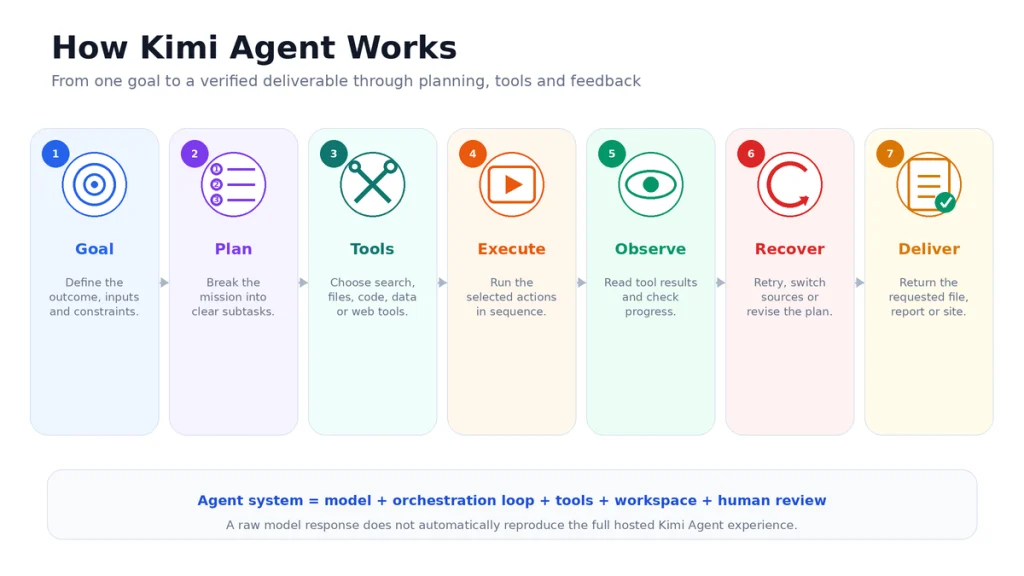
Consider this request:
“Analyze 20 competitors in the project-management software market. Build a source-linked report, a feature-and-pricing spreadsheet, three charts, and a five-slide executive summary.”
A normal chatbot may return a narrative answer. Kimi Agent treats the request as an execution mission.
Step 1: Understand the goal
The Agent identifies:
- The market and number of companies.
- The required data fields.
- The source-quality requirements.
- The deliverable formats.
- The intended audience.
- Any missing information that requires clarification.
If the request is ambiguous, a reliable Agent should ask about geography, date range, company type, currency, or the criteria that define a competitor.
Step 2: Build an execution plan
The Agent can divide the job into stages such as:
- Define the competitor list.
- Collect official product and pricing pages.
- Extract structured data.
- Normalize currencies and feature categories.
- Identify gaps and conflicting information.
- Create the comparison spreadsheet.
- Generate charts.
- Write the report.
- Build the presentation.
- Check that every requested deliverable exists.
The plan is dynamic. It can change after new evidence, a blocked page, a failed command, or an unavailable data field.
Step 3: Select tools
Kimi Agent chooses the tools required by the current step rather than using every available tool. The competitive-analysis task might use:
- Web browsing and search.
- File creation and storage.
- Python or spreadsheet processing.
- Chart generation.
- Document formatting.
- Presentation-generation tools.
A website task may additionally require code generation, terminal commands, preview environments, a database, and deployment tools.
Step 4: Execute and observe
The Agent takes an action, receives the result, and decides what it means. It may:
- Open an official pricing page.
- Extract a plan table.
- Notice that one price excludes tax.
- Store the normalized value in a spreadsheet.
- Check whether a second source confirms the information.
- Move to the next company.
The Kimi interface can show the task plan, tools called, websites visited, and intermediate actions. Treat this as an execution trace, not as proof that every decision or conclusion is correct.
Step 5: Recover from errors
If a page fails to load, code raises an error, or a source contradicts another source, the Agent can:
- Retry the operation.
- Use another source.
- Change the extraction method.
- Revise the plan.
- Mark the value as unverified.
- Ask the user for permission or clarification.
Automatic recovery is useful, but it can also create repeated actions, additional credit usage, or a workaround that changes the intended scope. Review important deviations.
Step 6: Deliver and check the result
At the end, Kimi Agent can return a professional deliverable such as:
- An editable Word or PDF report.
- An Excel or CSV spreadsheet.
- A PowerPoint presentation.
- Charts and visualizations.
- A code project or ZIP archive.
- A previewable or published website.
- A folder containing generated files.
The user should verify that every required file exists, opens correctly, contains the expected information, and matches the acceptance criteria.
What Tools Can Kimi Agent Use?
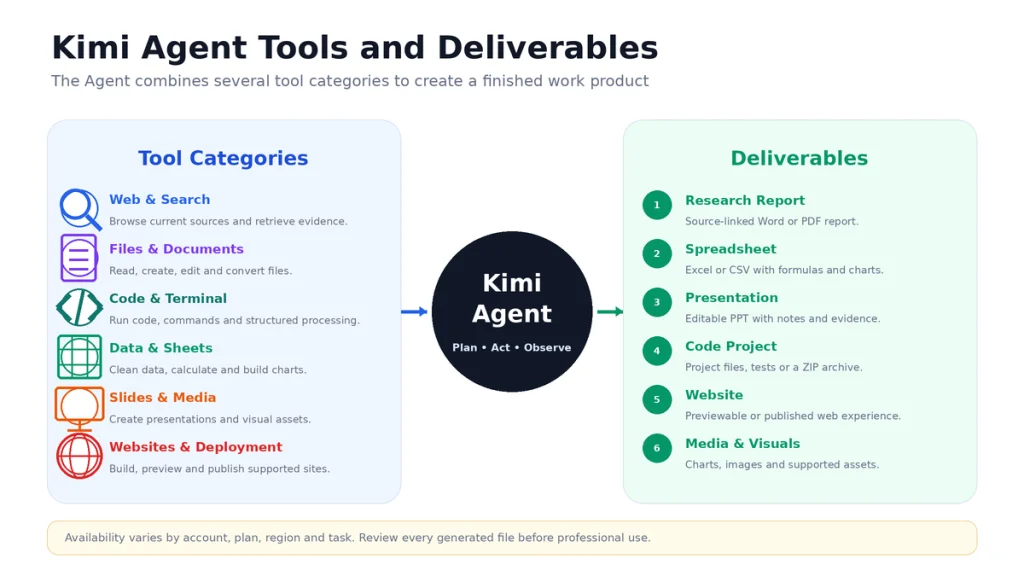
Kimi’s official documentation describes more than 20 built-in tools or capabilities. The exact available set can vary by product, plan, region, and task.
| Tool category | What it enables | Example |
|---|---|---|
| Web browsing and search | Open pages, retrieve current information, and trace sources | Research a market or verify product pricing |
| File and document tools | Read, create, edit, convert, and format files | Review a contract or create a Word report |
| Terminal and code execution | Write code, run commands, process data, and test outputs | Build a website or clean a dataset |
| Spreadsheet tools | Build formulas, pivots, models, tables, and charts | Create a financial model or competitor matrix |
| Presentation tools | Generate slide structure, content, visuals, and layouts | Create an executive briefing deck |
| Image and media tools | Interpret or generate visual and audio material where supported | Create illustrations for a story or analyze a screenshot |
| Professional data sources | Retrieve specialized financial, economic, or academic data where available | Analyze a public company or industry |
| Website tools | Create front-end and back-end logic, preview, version, and deploy sites | Build a voting app or business website |
| Skills and plugins | Apply reusable procedures, standards, and specialist integrations | Use a fixed SEO audit or document-review workflow |
Tool availability does not grant unlimited permission. A connected account, local folder, external database, or deployment operation can still require authentication, approval, or a supported plan.
What Can Kimi Agent Create?
Websites and applications
Kimi Agent can turn natural-language requirements, screenshots, or screen recordings into web interfaces. Current website tools support front-end and back-end previews, persistent storage, version rollback, authentication in supported scenarios, one-click publication, and project-code export.
Documents
It can create or edit reports, proposals, contracts, summaries, translations, and formatted documents in formats such as Word, PDF, Markdown, and TXT.
Spreadsheets and analysis
It can consolidate data, clean tables, generate formulas, build pivot-style summaries, perform analysis, and return Excel or CSV files and visual charts.
Presentations
It can create presentation structures, write slide content, apply visual templates, and generate editable decks. A source paper or report can be converted into a presentation with a defined audience and length.
Research deliverables
It can search, organize evidence, calculate metrics, create charts, and combine the findings into a long-form source-linked report.
Code projects
It can generate HTML, CSS, JavaScript, and other code, package project files, and create previewable applications. Production use still requires testing, security review, and deployment control.
Kimi Agent, Chat, Swarm, Work, Code, and Claw Compared
| Product or mode | Best for | What makes it different |
|---|---|---|
| K2.6 Chat | Fast questions, explanations, and simple content | Responds quickly without a long Agent execution |
| Kimi Agent | One complex goal requiring planning, tools, and a finished deliverable | General autonomous execution in the hosted Kimi workspace |
| Deep Research | Complex source-heavy research | Specialized research Agent from planning to source-linked report |
| Agent Swarm / K3 Swarm | Large parallelizable tasks | Coordinates many Sub-agents and can produce multiple files |
| Kimi Work | Deep desktop workflows and local files | Local-folder access, WebBridge, Python, dashboards, and scheduled tasks |
| Kimi Code | Repository and terminal development | Dedicated coding Agent for CLI, VS Code, and supported tools |
| Kimi Claw | Persistent, always-online automation | Long-term memory, scheduled work, chat channels, workspace, and Skills |
Can General Agent run continuously?
A General Agent task can continue asynchronously after you leave the page, but it is still a bounded task. For a persistent assistant that remains online, remembers long-term context, and runs scheduled automation, Kimi Claw is the more relevant product.
Can General Agent access my local computer?
The web Agent primarily uses its hosted workspace and tools. Kimi Work is the product designed for authorized local-folder handling and browser automation, while Kimi Code handles repository and terminal workflows.
How to Access Kimi Agent
On the web
- Open the official Kimi Agent page at kimi.com/agent.
- Sign in to the intended Kimi account.
- Enter a clear task with the required output and constraints.
- Review the plan and execution progress.
- Leave the page if needed; the task can continue in the background.
- Return when the completion notification appears.
- Preview, download, and verify the deliverable.
On mobile or tablet
- Open the latest official Kimi app.
- Use the model selector above the input box.
- Select K3 for general Agent tasks.
- Select K3 Swarm when the task is large and can be divided into parallel subtasks.
- Submit the task and monitor progress.
Availability can differ by account, region, membership, and product rollout. A missing option does not necessarily mean that the feature has been removed globally.
How to Write an Agent-Ready Prompt
A useful Agent prompt resembles a project brief more than a chat question.
| Prompt component | What to include |
|---|---|
| Outcome | The finished result you want |
| Background | Audience, project, use case, and why the task matters |
| Inputs | Files, URLs, data, screenshots, or approved sources |
| Scope | Time period, geography, number of items, and exclusions |
| Constraints | Format, length, language, style, budget, and technical limits |
| Permissions | What the Agent may browse, run, create, or publish |
| Acceptance criteria | Conditions proving the task is complete |
| Verification | Tests, source rules, calculations, and quality checks |
| Deliverables | Exact file types and names |
| Stop conditions | When the Agent must ask before continuing |
Reusable Agent prompt template
Goal:
[Describe the finished outcome.]

Background:
[Explain the project, audience, and intended use.]

Inputs:
[List the files, links, data, and approved sources.]

Scope:
- Time range:
- Geography:
- Number of items:
- Exclusions:

Requirements:
1.
2.
3.

Permissions:
- You may browse:
- You may run code:
- You may create files:
- Do not publish or send anything without confirmation.

Acceptance criteria:
- Every major claim has a source.
- All requested files are present.
- Calculations are reproducible.
- The final output follows the required format.
- Missing information is marked, not invented.

Deliverables:
1. [file name and format]
2. [file name and format]

Stop and ask me before:
- Using a paid service.
- Publishing a website.
- Contacting an external party.
- Deleting or overwriting data.
- Changing the agreed scope.
Practical Kimi Agent Prompt Examples
Market-research task
Analyze the US project-management software market.

Compare 15 products using:
- Target customer.
- Current public pricing.
- Core features.
- AI features.
- Integrations.
- Security certifications.
- Main limitation.

Use official first-party sources wherever possible.
Add a link and verification date for every price.

Deliver:
1. A source-linked Word report.
2. An Excel comparison matrix.
3. Three charts.
4. A list of unverified claims.

Do not estimate missing prices.
Do not use affiliate comparison pages as the only source.
Website task
Create a responsive website prototype for a local accounting firm.

Required pages:
- Home.
- Services.
- About.
- Contact.

Technical requirements:
- Mobile-first responsive design.
- Accessible semantic HTML.
- Contact-form validation.
- No third-party tracking.
- No database or public deployment yet.

First show:
1. Information architecture.
2. Visual direction.
3. Data-flow plan.
4. Security risks.

Wait for approval before writing or publishing the full project.
Spreadsheet-analysis task
Analyze the uploaded sales files.

Steps:
1. Identify inconsistent columns and data types.
2. Preserve the original files.
3. Create a cleaned dataset.
4. Reconcile totals with the originals.
5. Calculate monthly growth and customer concentration.
6. Create three management charts.
7. Flag any assumption.

Deliver one Excel workbook containing:
- Raw-data copies.
- Clean data.
- Calculations.
- Dashboard.
- Methodology and limitations.

Do not replace missing values without documenting the rule.
Presentation task
Create a 12-slide executive presentation from the verified report.

Audience:
Company leadership.

Structure:
1. Decision required.
2. Current situation.
3–5. Evidence.
6–8. Options.
9. Risk comparison.
10. Recommendation.
11. Implementation plan.
12. Sources.

Use one message per slide.
Add speaker notes.
Do not invent charts or metrics.
Cite the source on every evidence-based slide.
Kimi Agent vs Regular Chat
| Task | Recommended mode | Reason |
|---|---|---|
| Define a term | Regular Chat | No tool-based execution is needed |
| Rewrite one paragraph | Regular Chat | Faster and uses fewer credits |
| Compare three short options | Regular Chat | A direct response is sufficient |
| Research 20 companies and create a report | Kimi Agent | Requires repeated search, extraction, organization, and file creation |
| Clean data and build a spreadsheet | Kimi Agent | Requires tools, calculations, and an editable deliverable |
| Create and deploy a website | Kimi Agent | Requires planning, code, preview, and deployment tools |
| Process hundreds of independent sources | Agent Swarm | The independent work can be parallelized |
Do not use Agent simply because it sounds more powerful. For simple questions, Kimi’s own documentation recommends regular Chat because it is faster and more economical.
General Agent vs Agent Swarm
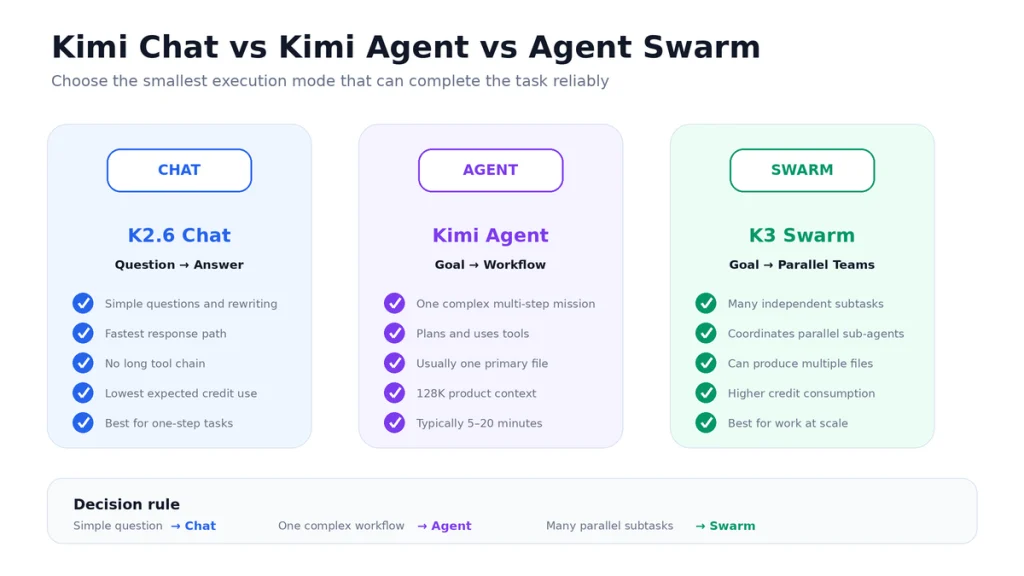
| Area | General Agent | Agent Swarm |
|---|---|---|
| Execution pattern | One main Agent manages a multi-step task | A commander coordinates many specialist Sub-agents |
| Best task | One complex but coherent workflow | Many independent or parallelizable subtasks |
| Current model path | K3 | K3 Swarm |
| Maximum publicized scale | Not defined as hundreds of separate Agents | Up to 300 Sub-agents and more than 4,000 tool calls |
| Typical outputs | Usually one primary file | Can produce several files and folders |
| Execution time | Usually 5–20 minutes | Can take longer, despite parallel work |
| Credit use | Based on actual tokens | Usually several times higher than a General Agent task |
| Availability | Depends on account access | Requires an eligible plan and rollout |
The “up to 300” figure is a maximum capability, not the number used for every request. K3 Swarm decides how much parallelism the task needs.
Agent Swarm is valuable when subtasks can run independently. It is less useful when every step depends on the result of the previous step.
Kimi Agent Context and File Limits
128K Agent context
The current General Agent product documents a 128K-token context window. That budget includes:
- Your instructions.
- Conversation history.
- Uploaded or extracted material.
- Tool-call records.
- Tool results.
- Intermediate task information.
- The Agent’s final output.
Web scraping, verbose tool output, multiple files, and long execution traces can consume the context quickly.
K3’s 1M model context does not mean Kimi Agent currently exposes 1M. The model specification and the product-level Agent limit are separate.
One primary file in General Agent
In a normal Agent scenario, Kimi currently recommends expecting one main output file, such as a document or spreadsheet. When you need Word, Excel, PPT, source folders, and code in the same run, use Agent Swarm or divide the project into staged tasks.
Multi-turn forgetting
During several rounds of revisions, the Agent can lose emphasis on early requirements. Keep a short master brief containing:
- The goal.
- Non-negotiable constraints.
- Approved sources.
- Acceptance criteria.
- Outstanding issues.
Restate this brief before a major revision rather than relying on a very long conversation history.
Kimi Agent Credits and Billing
Kimi Agent does not use a guaranteed fixed number of tasks. It draws from the shared Kimi membership credit pool according to actual token consumption.
- Agent, Deep Research, Docs, Sheets, PPT, Kimi Work, Kimi Code, and Kimi Claw can share one membership credit pool.
- Simple tasks consume less than complex, long-running tasks.
- Complimentary or campaign credits are used before plan credits.
- Credits normally refresh according to the monthly subscription cycle.
- A successfully completed task is charged according to actual usage.
- The official current rule says a failed task is not charged.
- If credits run out during a task, the task already in progress can finish.
- New Agent tasks show an Insufficient Balance message until credits refresh or the plan is changed.
How to check Agent credit usage
- Web: Me → Settings → Subscription.
- App: Me → Membership Plan → Subscription.
The account can show the current percentage balance, next refresh time, and recent feature-usage records. Exact plan availability and allowances can differ by market and account.
For a broader comparison, read Kimi AI Free vs Paid and Kimi Usage Limit Reached.
Use Skills to Standardize Agent Work
A Skill is a reusable set of instructions, standards, or procedures. In Agent mode, a Skill can be invoked through:
- A slash command in the input box.
- The plus menu.
- Automatic selection when Kimi recognizes the task.
Useful Agent Skills include:
- A fixed investment-research method.
- A document-formatting standard.
- A company Style Guide.
- An SEO-audit checklist.
- A meeting-minutes template.
- A recurring spreadsheet-analysis workflow.
- A source-verification policy.
Skills improve consistency, but they can also repeat an outdated rule. Review and update them when your process, source requirements, or product interface changes.
Safety and Human Review
More autonomy creates more actions to review. Use these controls:
- Ask for the plan first. Approve the scope before the Agent performs expensive or consequential work.
- Protect secrets. Do not upload passwords, API keys, identity documents, confidential customer records, or unnecessary private data.
- Limit permissions. Give access only to the files, accounts, and services required for the task.
- Confirm external actions. Require approval before publishing, sending, buying, deleting, or overwriting.
- Verify sources. Open important links and locate the supporting passage.
- Test code. Use a controlled environment, review the diff, run tests, and scan dependencies.
- Check spreadsheets. Recalculate totals and inspect formulas, data types, units, and missing values.
- Review generated files. A polished PDF or presentation can still contain factual errors.
- Keep backups. Preserve original documents and source data.
Do not interpret automatic exception handling as a guarantee that the workaround is safe or aligned with your original intent.
Kimi Agent Troubleshooting
| Problem | Likely cause | Recommended action |
|---|---|---|
| The page looks frozen | The Agent is still running asynchronously | Leave the page or refresh later; do not press Stop immediately |
| The task takes a long time | Large search, code, files, or tool chain | General tasks usually take 5–20 minutes; Swarm can take longer |
| The Agent forgot an early requirement | Long multi-turn history or context pressure | Restate a compact master brief and acceptance criteria |
| The output is incomplete | Context, output, or task-scope limit | Divide the project into two or three stages |
| Only one file was produced | General Agent usually returns one primary file | Use separate tasks or Agent Swarm for multiple outputs |
| Research went in the wrong direction | Broad prompt or weak clarification | Specify geography, dates, source types, exclusions, and required claims |
| A created website does not work | Backend, database, login, sandbox, or deployment requirements were unclear | Specify front end, back end, storage, authentication, preview, and publishing separately |
| Insufficient Balance appears | The shared credit pool is exhausted | Check Subscription, wait for refresh, or review the available membership options |
| The Agent retried the same action | Tool failure or inadequate result | Inspect the execution trace and set a retry or escalation limit in the prompt |
| The file looks polished but contains errors | Generation was not independently verified | Review sources, calculations, formulas, links, and acceptance criteria |
When Kimi Agent Is the Wrong Tool
- A simple definition or short rewrite that regular Chat can complete faster.
- A deterministic process that should use fixed automation rules instead of open-ended reasoning.
- A production deployment with no human review.
- A financial, legal, medical, or safety decision requiring a qualified professional.
- A task requiring confidential data that you are not authorized to process externally.
- An action that could send money, delete data, publish content, or contact people without confirmation.
- A project whose success criteria cannot be defined.
- A task that requires guaranteed completion time or perfect reproducibility.
Traditional automation is often better when every input has a known path. Agent workflows are most useful when the next step depends on interpretation, evidence, or tool results.
How to Evaluate Kimi Agent on Your Work
- Select three representative, non-sensitive tasks.
- Write measurable acceptance criteria before running them.
- Save the original files and expected result.
- Run the task once with General Agent.
- Use Agent Swarm only when the task is genuinely parallel.
- Record the execution time and credit consumption.
- Verify every source, calculation, file, and code change.
- Measure the human time needed to repair the output.
- Repeat the task to test consistency.
| Metric | Question |
|---|---|
| Task completion | Were all requested deliverables produced? |
| Accuracy | Do sources and calculations support the result? |
| Scope control | Did the Agent avoid unrelated work? |
| File usability | Do the generated files open and function correctly? |
| Recovery quality | Did error handling solve the issue without changing the goal? |
| Human correction | How much time was required to make the result usable? |
| Credit efficiency | Was the saved time worth the consumed credits? |
| Repeatability | Does the workflow produce reliable results across several runs? |
Frequently Asked Questions
What is Kimi Agent?
Kimi Agent is Moonshot AI’s autonomous task mode. It plans a multi-step job, selects tools, executes actions, reacts to results, and produces a finished deliverable rather than only returning a chat response.
Is Kimi Agent a model?
No. Kimi Agent is the execution and orchestration system around a model, tools, workspace, state, and retry loop. The current consumer interface uses K3 for general Agent work and K3 Swarm for parallel work.
What is the difference between Kimi Chat and Kimi Agent?
Chat is designed for direct answers and simple content. Agent is intended for goals that require planning, repeated tool calls, file creation, calculations, coding, or deployment.
How does Kimi Agent work?
It interprets the goal, breaks it into subtasks, selects tools, executes each step, observes the result, changes the plan when necessary, and checks whether the requested deliverable is complete.
Which model powers Kimi Agent?
Kimi’s current consumer guide positions K3 as its strongest model for chat and Agent tasks. K3 Swarm powers the current parallel Agent Swarm path.
How many tools does Kimi Agent have?
Kimi’s current official documentation describes more than 20 built-in tools or capabilities covering areas such as browsing, files, code, terminal operations, media, professional data, and website deployment.
Can Kimi Agent create Word, Excel, and PowerPoint files?
Yes. It can generate editable documents, spreadsheets, charts, presentations, PDFs, and other supported deliverables. Review the files before professional use.
Can Kimi Agent build a website?
Yes. Current website tools support conversational generation, visual references, front-end and back-end previews, persistent storage, version rollback, code export, and manual publication in supported scenarios.
Can Kimi Agent browse the web?
Yes. It can browse and retrieve information as part of an Agent task. Important claims should be checked against the original sources.
Can Kimi Agent run code?
It can use coding and terminal tools in supported environments. Code should be tested and reviewed before it is deployed or merged.
What is Kimi Agent’s context window?
The current General Agent documentation lists a 128K-token context window, including instructions, tool history, tool results, and output.
Why does Agent have 128K if K3 supports 1M?
The model’s technical limit and the context exposed by a product are separate. Kimi currently documents 128K for General Agent even though K3 can support 1M in other eligible routes.
How long does a Kimi Agent task take?
Kimi states that a General Agent task usually takes approximately 5–20 minutes. Agent Swarm and unusually complex work can take longer.
Can I close the page while Kimi Agent is working?
Yes. Agent tasks run asynchronously in the background. You can leave the page and return later. Do not click Stop merely because the page appears inactive.
Can Kimi Agent create multiple files?
General Agent usually produces one main file per task. Use separate staged tasks or Agent Swarm when you need multiple files and folders in one workflow.
What is the difference between Kimi Agent and Agent Swarm?
General Agent manages one multi-step workflow. Agent Swarm can coordinate many specialist Sub-agents in parallel for large search, batch processing, long-form writing, and other parallelizable work.
Does every Agent Swarm task use 300 agents?
No. Three hundred is a published maximum. The system decides how many Sub-agents and tool calls the task requires.
Is Kimi Agent free?
Agent features use account allowances or shared membership credits. Ordinary K2.6 Chat is currently the free chat path and does not consume membership credits. Exact Agent access depends on the account and region.
How are Kimi Agent credits calculated?
Credits are deducted according to actual token consumption. Longer, more complex, and tool-heavy tasks generally use more credits than simple tasks.
Are credits deducted if an Agent task fails?
The current official rule states that credits are not deducted when a task fails. Successfully completed tasks are charged according to actual consumption.
Can Kimi Agent run 24 hours a day?
General Agent tasks can continue in the background, but they are bounded tasks. Kimi Claw is the product intended for an always-online Agent with long-term memory and scheduled automation.
Can developers access Kimi Agent through the API?
The Kimi API provides model and tool-calling capabilities, but the hosted consumer Agent is a separate product. Developers must build or connect their own orchestration, tools, permissions, and state management when using the raw API.
Official Sources and Update Methodology
This article prioritizes current first-party Kimi and Moonshot AI documentation. The principal sources reviewed were:
- Kimi Agent Overview
- Kimi Agent Features and Usage Limits
- Kimi Agent Credits and Billing
- Kimi Agent Swarm
- Kimi New User Guide
- Kimi Membership Features and Limits
- Kimi Agentic Search
- Kimi Deep Research
- Kimi Docs and Sheets
- Kimi Skills
- Using Skills in Kimi Agent
- Kimi Work FAQ
- Kimi Code CLI
- Kimi Claw Overview
Agent workflow, tools, limits, billing rules, and product routing were last checked on August 24, 2026. When the live Kimi interface or signed-in subscription page differs from this article, follow the current first-party information.
Last verified: August 24, 2026.