
Kimi AI can help writers research a topic, organize source material, build an outline, draft sections, review Word documents and prepare publication-ready files. Its strongest workflow is not “write everything for me.” Create a Project for the book, article or client; store the brief, source pack and style guide; use Search or Deep Research to collect evidence; draft one section at a time; then use Kimi Docs for comments, revisions and formatting. The writer should retain ownership of the argument, voice, facts and final editorial decisions.
Kimi features, file limits, model access, free allowances and membership-credit rules can change. Check the current official Help Center and signed-in interface before relying on a specific feature or limit.
Quick verdict: Kimi works best as a room of specialized assistants—a researcher, outlining partner, critical editor and document formatter—not as an invisible ghostwriter. Use it to create options, expose weaknesses and reduce repetitive work, then make the final writing sound unmistakably yours.
Kimi AI for Writers at a Glance
| Writing stage | Best Kimi surface | Useful output | Main risk |
|---|---|---|---|
| Idea development | Kimi Chat or a writing Skill | Angles, questions, scene alternatives and audience options | Generic ideas when the brief is vague |
| Research | Search, Deep Research or uploaded sources | Source brief, evidence table and research gaps | Wrong, incomplete or misapplied sources |
| Project organization | Projects | Persistent files, instructions and separate chats for related outputs | Old instructions or files continuing to influence new work |
| Outlining | Chat or Agent | Argument map, chapter structure, scene sequence and counterarguments | Accepting the first plausible structure |
| Drafting | Chat, Agent or Kimi Docs | Section drafts, transitions, examples and alternative openings | Voice drift, repetition and unsupported detail |
| Developmental editing | Chat or Kimi Docs | Structural notes, missing evidence, pacing and argument feedback | Rewriting before diagnosing the real problem |
| Line and copy editing | Kimi Docs | Comments, suggested edits, consistency and formatting | Flattening the writer’s distinctive voice |
| Fact checking | Search plus the original sources | Claim ledger, source links and uncertainty labels | Treating source links as proof without reading them |
| Delivery | Kimi Docs, Slides or translation tools | Word, PDF, presentations and bilingual versions | Polished formatting hiding factual errors |
Kimi currently accepts common formats including PDF, Word, Excel, PowerPoint, images, TXT and video. Its official user guide lists a maximum of 100MB for each file and up to 50 files in one upload workflow.
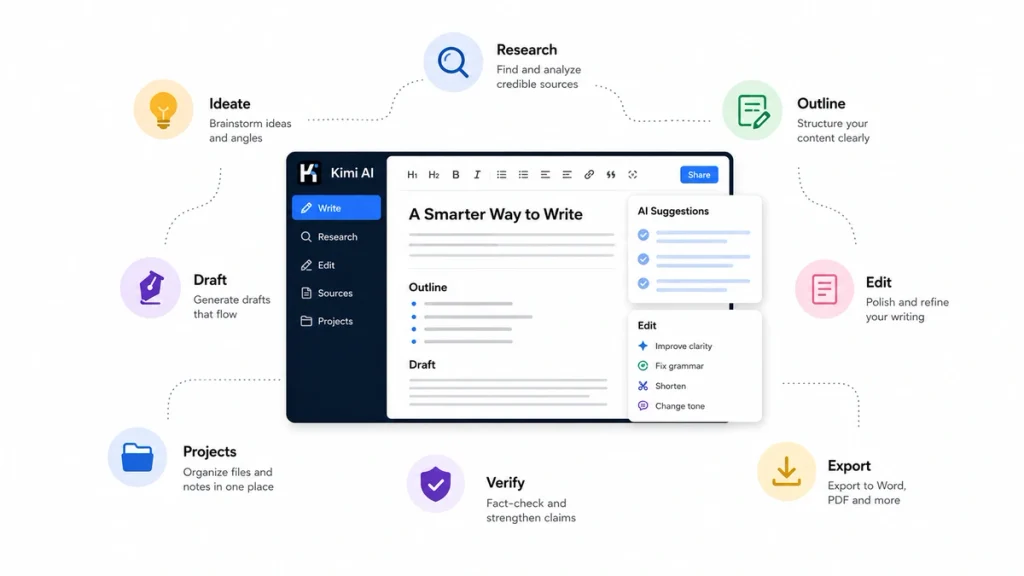
Treat Kimi as a Writer’s Room, Not a Ghostwriter
A professional writing project contains several different jobs:
- The researcher collects and verifies information.
- The architect decides the argument, sequence or plot.
- The drafter turns the plan into readable prose.
- The editor diagnoses structural and sentence-level weaknesses.
- The fact checker verifies claims, names, numbers and quotations.
- The production editor prepares the final document and format.
Kimi can assist with every role, but it should not perform all of them in one prompt. When the same conversation researches, outlines, drafts and approves its own work, early errors can survive every later stage.
The human writer remains the editor-in-chief. You decide:
- What the work is trying to say.
- Which sources deserve trust.
- Which details are relevant.
- What emotional or intellectual effect the reader should experience.
- Which sentences sound like you.
- When the work is ready to publish.
Build a Kimi Project for Each Major Writing Job
Use a separate Kimi Project for a book, newsletter, report series, publication or long-running client. Projects keep reference files, project instructions and related chats together.
Add only the materials that help the project:
- The approved brief.
- Audience profile.
- Style guide.
- Brand or publication guidelines.
- Glossary and preferred terminology.
- Source documents.
- Interview transcripts.
- Approved facts and data.
- Previous writing samples.
- Outline or story bible.
- Editorial checklist.
Do not create one enormous conversation for the entire project. Start a separate chat for each output:
- Research brief.
- Outline.
- Chapter or article section.
- Developmental review.
- Line edit.
- Fact check.
- Repurposed version.
The Project retains the common files and instructions while each chat stays focused on one editorial task.
Suggested project instructions
You are part of my editorial team for this project.

Your role is to help me research, test structure, identify weaknesses,
create draft options and review revisions.

Project rules:
1. Do not invent facts, quotations, interviews or sources.
2. Separate verified information from inference and creative suggestion.
3. Follow the uploaded style guide and glossary.
4. Preserve my voice instead of replacing it with generic AI prose.
5. Mark any sentence that requires fact checking.
6. Cite the file, page, section or URL supporting a factual claim.
7. Give editorial comments before rewriting.
8. Do not treat a polished draft as publication-ready.
9. Ask a clarifying question when the audience, purpose or evidence is unclear.
10. Keep a record of unresolved questions.
Use a Three-Document System to Keep Kimi Honest
Maintain three separate artifacts throughout the writing process.
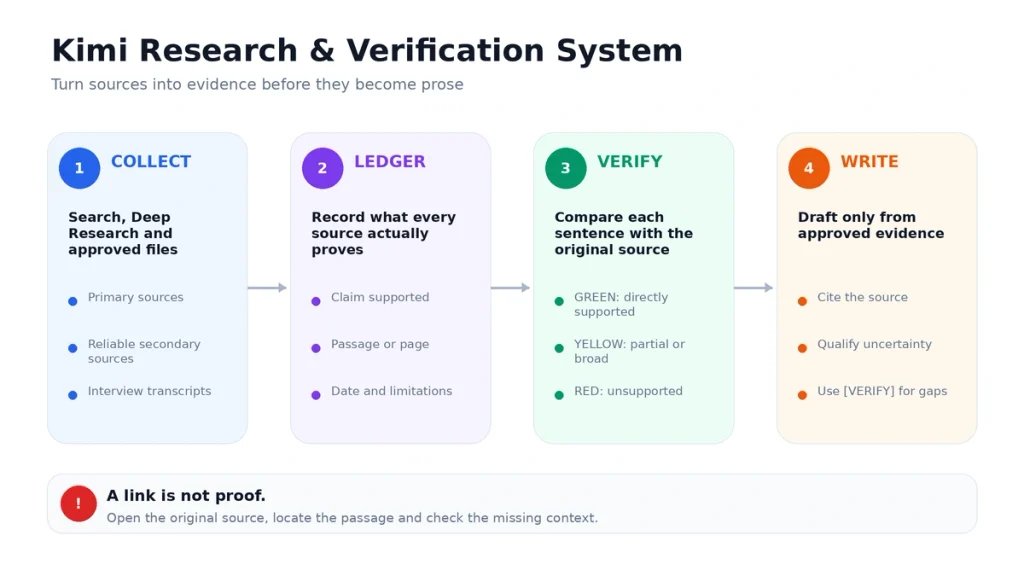
1. The source ledger
The source ledger connects each factual claim to its evidence.
| Field | Purpose |
|---|---|
| Source ID | A short identifier used in the draft |
| Title and author | Basic source identification |
| URL, DOI or file | Original location |
| Publication date | Helps evaluate freshness |
| Claim supported | The exact point the source supports |
| Passage or page | Where the evidence appears |
| Limitations | What the source does not establish |
| Verification status | Verified, partially verified or unverified |
2. The working draft
The working draft contains the prose. It can reference source IDs, but it should not become the only place where evidence is stored.
3. The revision log
The revision log records:
- What changed.
- Why it changed.
- Which editor or prompt suggested it.
- Whether the change was accepted.
- Which facts need rechecking.
- Which voice or structural concerns remain.
This separation prevents a sentence from appearing “verified” merely because Kimi repeated it several times.
The Research Desk: Use Search, Deep Research and Source Files Differently
| Research need | Best route |
|---|---|
| Explain or summarize one supplied source | Upload the file or paste the URL in Chat |
| Check a current fact, quote, policy or statistic | Web-connected Search |
| Build a multi-source brief on a complex subject | Deep Research |
| Compare several interviews or reports | Project files plus a focused analysis chat |
| Find themes across a large source collection | Deep Research or Agent workflow |
| Research many independent subtopics in parallel | Agent Swarm where available |
Use Agent Swarm primarily for collecting and organizing research, not for producing the final voice. Multiple agents can explore different sources efficiently, but combining their prose can create inconsistent tone and duplicated points.
Prompt for a source-grounded research brief
Research this writing brief:

Topic:
[topic]

Audience:
[audience]

Purpose:
[inform / persuade / investigate / explain / entertain]

Questions the final piece must answer:
[list]

Create a research brief containing:
1. The central question.
2. Verified background facts.
3. Competing interpretations.
4. Important data and dates.
5. Primary sources.
6. High-quality secondary sources.
7. Quotable passages with exact source locations.
8. Gaps or disputed claims.
9. Legal, ethical or factual risks.
10. Suggested interviews or additional reporting.

Rules:
- Do not invent a source.
- Include a working URL for every web source.
- Distinguish primary reporting from commentary.
- Mark claims that rely on only one source.
- State what the available evidence cannot prove.
Open every important source. Confirm that the source exists, that the relevant passage says what Kimi claims and that the publication date fits your purpose.
The Structure Board: Ask for Competing Outlines
Do not ask Kimi to produce “the outline.” Ask it to propose several structures that solve different editorial problems.
Using the approved brief and verified source ledger, propose four outlines:

1. A question-led structure.
2. A narrative structure.
3. A problem–solution structure.
4. A contrarian or myth-correction structure.

For each outline:
- State the reader promise.
- Give the purpose of every section.
- Identify the evidence required.
- Show where the strongest counterargument appears.
- Explain the likely pacing problem.
- Identify what should be removed if the piece must be 25% shorter.

Do not draft prose yet.
Choose the structure based on the reader’s journey, not on which outline looks most detailed.
Stress-test the selected outline
Act as a skeptical editor.

Review this outline for:
- A weak or unclear thesis.
- Sections that repeat the same function.
- Evidence appearing too late.
- Unsupported claims.
- Missing counterarguments.
- An introduction that promises something the body does not deliver.
- A conclusion that only summarizes.
- Sections that serve the writer but not the reader.

Do not rewrite the outline.
Return a prioritized revision memo.
The Drafting Desk: Write in Controlled Sections
Kimi Docs currently advertises the ability to generate long Word or PDF documents of up to 10,000 words. A high word limit does not mean that a writer should generate a complete book, report or article in one step.
Draft one section at a time using two boundaries:
- The fact envelope: facts and sources that may be used.
- The voice envelope: tone, rhythm, vocabulary and stylistic constraints.
Draft only Section 3 of the approved outline.

Purpose of this section:
[purpose]

Reader should understand or feel:
[result]

Verified facts available:
[list with source IDs]

Voice constraints:
- Clear and direct.
- Vary sentence length.
- Use concrete nouns and active verbs.
- Avoid hype, filler and generic motivational language.
- Do not use the banned phrases in the style guide.
- Do not imitate a named author.
- Preserve uncertainty where the evidence is limited.

Length:
[range]

Use [VERIFY] instead of inventing a missing fact.
End with a transition that creates a real reason to read the next section.
After each section, compare it with the source ledger and outline before moving to the next one.
For fiction writers
Store a story bible in the Project files containing:
- Character profiles and current emotional states.
- Timeline.
- Locations and world rules.
- Point-of-view rules.
- Established facts.
- Open plot threads.
- Promises made to the reader.
- Voice and dialogue notes.
Help me plan this scene without writing the final prose.

Scene objective:
[objective]

Point of view:
[character]

Starting emotional state:
[state]

Ending emotional state:
[state]

Conflict:
[conflict]

Information that must be revealed:
[list]

Information that must remain hidden:
[list]

Return:
1. Five possible scene turns.
2. The strongest option and why.
3. A beat sheet.
4. Continuity risks against the story bible.
5. Three choices that would make the scene predictable.
6. Questions I should answer before drafting it myself.
Use Kimi to create alternatives, diagnose continuity and test consequences. The final scene should still reflect the writer’s taste and intention.
For nonfiction writers
Require every section to contain a clear relationship between claim, evidence and implication.
| Element | Question |
|---|---|
| Claim | What exactly is the paragraph asserting? |
| Evidence | What source or observation supports it? |
| Scope | How broadly can the claim be applied? |
| Qualification | What exception or limitation matters? |
| Meaning | Why should the reader care? |
The Editing Desk: Use Five Separate Passes
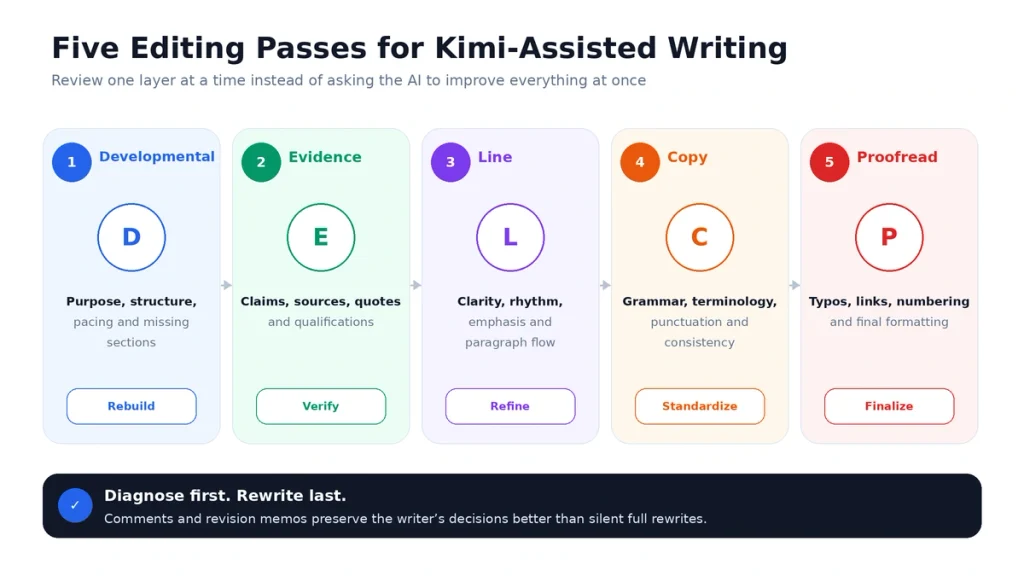
A prompt such as “Improve this article” combines too many editorial decisions. Use separate passes.
| Editing pass | What Kimi should inspect |
|---|---|
| Developmental edit | Purpose, structure, argument, plot, pacing and missing sections |
| Evidence edit | Claims, sources, quotations, examples and unsupported certainty |
| Line edit | Clarity, rhythm, emphasis, paragraph flow and repetition |
| Copy edit | Grammar, consistency, terminology, punctuation and style-guide compliance |
| Proofread | Typos, formatting, numbering, links, headings and final mechanical errors |
Developmental editing prompt
Act as a developmental editor.

Do not rewrite the manuscript.

Evaluate:
1. The central promise or dramatic question.
2. Structure and sequence.
3. Missing logic or missing story beats.
4. Pacing.
5. Repetition.
6. Sections that do not earn their place.
7. Weak transitions.
8. Missing evidence or unresolved setup.
9. The strongest section and why it works.
10. The three revisions with the highest impact.

Return:
- Editorial diagnosis.
- Prioritized revision plan.
- Questions for the writer.
- No replacement prose.
Line editing prompt
Line-edit this section while preserving my voice.

Do not make every sentence shorter.
Do not replace concrete language with abstract language.
Do not remove intentional fragments or repetition automatically.

For each suggested change:
- Show the original.
- Show the suggestion.
- Explain the reason.
- Label it as clarity, rhythm, precision, emphasis or consistency.
- Mark optional stylistic choices as optional.

Do not change facts, quotations or citations.
Edit Word Files Directly with Kimi Docs
Kimi Docs can create Word and PDF documents, add comments and suggested edits to existing Word files, preserve document formatting and compare different versions.
For a controlled edit:
- Keep an untouched copy of the original.
- Upload a duplicate of the working file.
- State the editorial pass being performed.
- Ask for comments before automatic rewrites.
- Restrict the edit to selected sections where possible.
- Download and compare the output with the original.
- Accept or reject each important change manually.
Review this Word document as a line editor.

Insert comments in the document rather than silently rewriting it.

Focus on:
- Unclear claims.
- Repetition.
- Weak paragraph openings.
- Abrupt transitions.
- Unnecessary jargon.
- Inconsistent terminology.
- Sentences that do not sound like the surrounding voice.

Do not change quotations, citations, numbers or legal wording.
Preserve the existing heading hierarchy and formatting.
Provide a short editorial summary at the beginning.
Preserve Your Writing Voice
A writer’s voice is more than tone. It includes selection, rhythm, point of view, attitude, detail and the kinds of conclusions the writer refuses to make.
Create a Style Sheet containing:
- Audience and relationship to the reader.
- Desired level of formality.
- Typical sentence rhythm.
- Preferred vocabulary.
- Paragraph-length range.
- Point-of-view rules.
- Use of humor, analogy and examples.
- Terms that must remain consistent.
- Claims or tones the writer avoids.
- Several approved writing samples.
Create an Anti-Style List
Tell Kimi not only what to do, but what to avoid:
Apply this anti-style list:

- No generic inspirational opening.
- No “in today’s fast-paced world.”
- No automatic rule of three.
- No unnecessary rhetorical questions.
- No claims that a tool is revolutionary or game-changing.
- No fake quotations.
- No conclusion beginning with “In conclusion.”
- No repeated summary at the end of every section.
- No unexplained jargon.
- No uniform sentence length.
- No imitation of a named living author.

Flag any sentence in the draft that violates these rules.
Describe desired characteristics instead of asking Kimi to reproduce a living writer’s distinctive style. For example, request restrained narration, short concrete sentences and dry humor rather than “write exactly like” a particular author.
The Fact-Checking Desk
Do not ask the same draft-generation chat to approve its own facts without returning to the sources.
Fact-check this draft against the source ledger.

Create a claim table with:
- Claim ID.
- Exact sentence.
- Claim type: fact, interpretation, opinion or prediction.
- Source ID.
- Supporting passage and location.
- Verification status.
- Missing qualification.
- Recommended action.

Use these labels:
GREEN — directly supported.
YELLOW — partially supported, uncertain or too broad.
RED — unsupported, contradicted or source missing.

Do not rewrite the draft until the claim table is complete.
Manually verify:
- Names and titles.
- Dates.
- Numbers and percentages.
- Quotations.
- Study findings.
- Legal or policy claims.
- Product features and prices.
- Links.
- Citations and DOIs.
Kimi Search includes clickable sources, but a link is only the beginning of verification. Open the original page, find the supporting passage and check whether important context was omitted.
Manage Long-Form Writing without Losing Coherence
Long context reduces some continuity problems, but it does not eliminate them. A model can access a detail without assigning it the correct importance.
- Keep a current one-page project brief.
- Maintain an approved outline.
- Store the source ledger separately.
- Create a chapter or section summary after each draft.
- Record character, argument or terminology changes.
- Start a separate chat for each major output.
- Archive outdated instructions and sources.
- Run a continuity review before the final line edit.
Use Memory Space for lightweight preferences, not as the only story bible or editorial database. Kimi’s current Memory Space is limited to a finite number of short entries. Store full style guides, manuscript facts and source files inside a Project or custom Skill instead.
Create Reusable Writing Skills and Quick Prompts
If you repeat the same editorial workflow, create a custom Skill from your Style Guide, templates or approved examples.
Useful writing Skills include:
- Editorial brief builder.
- Source-led research memo.
- Brand-voice reviewer.
- Developmental editing checklist.
- Newsletter structure.
- Case-study interview processor.
- Story continuity checker.
- Technical documentation template.
- Fact-checking workflow.
- Content repurposing workflow.
Create a different Skill for each writing job rather than one Skill called “write better.” Specialized instructions are easier to evaluate and update.
Use Quick Prompts for short instructions that do not require files, scripts or a multi-step workflow, such as:
- “Return comments, not a rewrite.”
- “Build a claim ledger.”
- “Test this outline as a skeptical editor.”
- “Mark unsupported details with [VERIFY].”
- “Preserve my sentence rhythm.”
A 60-Minute Writing Sprint with Kimi
| Time | Writer action | Kimi’s role |
|---|---|---|
| 0–10 minutes | Define audience, promise and boundary | Challenge the brief and expose ambiguity |
| 10–20 minutes | Review or collect sources | Create the source ledger and identify gaps |
| 20–30 minutes | Select a structure | Propose and stress-test competing outlines |
| 30–45 minutes | Write the core section | Offer examples, alternatives and targeted feedback |
| 45–53 minutes | Revise structure and clarity | Provide a focused editorial memo |
| 53–60 minutes | Verify claims and save next steps | Generate a claim table and unresolved-question list |
The writer should spend more of the sprint making decisions than reading generated prose.
Ready-to-Copy Kimi Prompts for Writers
Find a stronger angle
Do not draft the article.

Generate ten possible angles on [topic] for [audience].

For each angle, state:
- The reader problem.
- The surprising or useful promise.
- Evidence required.
- Why the angle may be weak or overused.
- A question that would make it more original.

Reject angles that depend on unsupported controversy or empty hype.
Interview transcript analysis
Analyze this interview transcript.

Return:
1. The interviewee’s main claims.
2. Strong quotations with exact transcript locations.
3. Contradictions or changes in position.
4. Specific examples and anecdotes.
5. Claims requiring external verification.
6. Themes that appeared repeatedly.
7. Important questions I failed to ask.
8. Possible article structures.

Do not invent or clean up a quotation.
Keep quotation wording exactly as spoken.
Improve an opening without writing it for you
Diagnose this opening without rewriting it.

Evaluate:
- Does it create a clear reason to continue?
- Is the subject visible quickly enough?
- Is the promise specific?
- Is there unnecessary setup?
- Does the tone match the rest of the piece?
- Which sentence is doing the least work?
- What information should be delayed?

Give me three revision strategies, not three replacement openings.
Check a fiction scene
Review this scene against the story bible.

Check:
- Character objective.
- Conflict.
- Emotional movement.
- Point-of-view consistency.
- Continuity.
- Pacing.
- Dialogue subtext.
- Information revealed too early.
- Repetition of earlier scenes.

Do not rewrite the scene.
Give a prioritized revision memo and five questions for the author.
Cut a draft by 25%
Help me reduce this draft by 25% without removing essential evidence or voice.

First identify:
- Repeated ideas.
- Background that arrives too early.
- Examples serving the same function.
- Sentences that explain what the previous sentence already showed.
- Paragraphs that do not advance the reader.

Return a cut plan before editing.
Show the estimated word reduction for each proposed cut.
Best Kimi Workflows by Writer Type
| Writer type | Strong Kimi use | Keep human-controlled |
|---|---|---|
| Novelist | Story bible, scene alternatives, continuity checks and revision memos | Voice, meaning, emotional choices and final prose |
| Blogger | Research brief, outline testing, examples and repurposing | Original experience, opinion and fact approval |
| Newsletter writer | Source monitoring, issue structure and summary tables | Editorial selection, personality and reader relationship |
| Journalist | Transcript organization, background research and claim tracking | Reporting, source confirmation, quotations and publication decisions |
| Technical writer | Source-file analysis, structure, terminology checks and document formatting | Technical accuracy, tested procedures and version compatibility |
| Copywriter | Message variations, objections, audience angles and brief analysis | Brand promise, legal claims and conversion judgment |
| Editor | Developmental memos, comments, consistency and version comparison | Editorial taste, prioritization and author relationship |
| Research writer | Deep Research, source matrix and evidence organization | Source evaluation, synthesis and citation approval |
Privacy, Copyright and Unpublished Manuscripts
Do not upload a manuscript or client document merely because Kimi supports the file format.
- Check publishing, employment and client agreements.
- Do not upload confidential interviews without consent.
- Remove personal and identifying information that the task does not need.
- Do not upload copyrighted books or paywalled material without the required rights.
- Keep an offline backup of every manuscript.
- Review Project files and Memory entries after the work ends.
- Delete obsolete files and instructions.
- Do not use public sharing links for confidential drafts.
- Read Kimi’s current Privacy Policy before processing sensitive work.
Deleting a Project permanently removes its chats, files and instructions and cannot be undone. Confirm that the required materials are backed up before deletion.
Is Kimi AI Free for Writers?
Simple brainstorming, outlining and short drafting can begin in ordinary Kimi Chat. Under Kimi’s current membership documentation, K2.6 at the normal Chat entry point does not consume membership credits.
Advanced workflows such as Deep Research, document processing, Kimi Work, Agent tasks and Agent Swarm can use a free allowance or shared membership credits, depending on the account and current product rules.
A writer does not need to pay merely to test whether Kimi fits the workflow. Consider a subscription when:
- You regularly process long source packs.
- Deep Research repeatedly saves reporting time.
- You generate or edit professional documents frequently.
- You need more Projects or storage.
- Agent or Swarm tasks are part of your regular production process.
- Free limits interrupt paid writing work.
See our Kimi AI free vs paid guide for the current plan comparison.
Kimi AI Limitations for Writers
- Voice drift: a paragraph may sound strong while the full document develops an inconsistent personality.
- Generic fluency: readable prose can still lack observation, risk ororiginal insight.
- Source errors: links, citations or claims can be wrong or misapplied.
- Long-form repetition: the same idea can return in different wording across sections.
- False continuity: Kimi may confidently connect two facts that do not belong together.
- Overediting: aggressive cleanup can remove rhythm, ambiguity and intentional roughness.
- Flattened dialogue: fictional characters can begin speaking with the same sentence patterns.
- Outdated instructions: old Project files or Memory entries can influence new drafts.
- Formatting confidence: a polished Word or PDF file may still contain factual or editorial errors.
- Rights and confidentiality: an accepted upload format does not establish permission to process the content.
- Creative dependency: requesting generated prose before making your own choices can weaken the writer’s control over the work.
Kimi is not a literary agent, publisher, lawyer, fact checker or substitute for a human editor with knowledge of the work and audience.
Test Kimi on Your Own Writing before Adopting It
Create a small evaluation using completed or non-confidential work.
- Select one research article, one voice-heavy piece and one long draft.
- Save the original versions.
- Give Kimi the same brief and source pack used in the real project.
- Test research, outlining, drafting and editing separately.
- Do not tell the reviewer which passages came from Kimi.
- Measure the time required to correct the output.
- Record source mistakes, voice changes, repetition and useful suggestions.
- Decide which stages Kimi improved and which it made slower.
| Criterion | Question |
|---|---|
| Research accuracy | Did every important claim link to supporting evidence? |
| Structural value | Did Kimi reveal a better organization or only make the outline longer? |
| Voice | Could a regular reader identify which sections were AI-assisted? |
| Revision quality | Did the comments lead to better writer decisions? |
| Editing effort | How much time was needed to make the output publishable? |
| Originality | Did the work contain a real insight or merely competent wording? |
| Reliability | Did the same workflow perform consistently across several tasks? |
Frequently Asked Questions
Is Kimi AI good for writers?
Kimi is useful for research, outlining, source organization, drafting alternatives, document review and formatting. It works best when a human writer controls the argument, voice, facts and final revision.
Can Kimi write a complete book?
Kimi can help plan chapters, track a story bible, draft sections and review continuity. Generating an entire book in one prompt is likely to produce voice drift, repetition and weak editorial control. Use separate Project chats and review chapter by chapter.
Can Kimi edit Microsoft Word documents?
Yes. Kimi Docs can create and edit Word documents, insert comments and suggested revisions, preserve formatting and compare document versions. Review every material change before accepting it.
Can Kimi preserve my writing voice?
It can follow a Style Sheet, approved writing samples and an Anti-Style List, but consistency is not guaranteed. Ask for comments and alternatives before permitting a full rewrite.
Can Kimi help with creative writing?
Yes. Kimi can brainstorm plots, test scene alternatives, check continuity, develop characters and review pacing or dialogue. The author should retain control of the creative choices and final prose.
Can Kimi help with nonfiction research?
Yes. Search is useful for focused, current questions, while Deep Research is designed for complex multi-source investigations. Every source and claim should still be verified in the original material.
Does Kimi provide citations?
Search and Deep Research can provide traceable source links, and Kimi Docs can format citations. Writers should verify the source metadata, supporting passage and context before publication.
Can Kimi proofread an article?
Yes. It can check grammar, punctuation, consistency, terminology and formatting. Perform fact checking and structural editing before the final proofread.
Can Kimi write blog posts?
It can research, outline and draft blog sections. The writer should add original experience, first-hand evidence, editorial judgment and a distinctive point of view rather than publishing the generated first draft.
Can Kimi analyze interview transcripts?
Yes. It can organize themes, identify quotations and flag claims requiring verification. Compare every quotation with the original transcript before using it.
What is the best way to organize a manuscript in Kimi?
Create a Project containing the brief, source files, style guide, outline and story bible. Use a separate chat for each chapter, research task and editing pass.
Can I create a custom writing style in Kimi?
You can create a custom Skill from a Style Guide, templates and writing samples. Test the Skill on several passages and update it when the output becomes repetitive or overly generic.
Should I ask Kimi to write like a famous author?
It is better to describe the desired traits—such as restrained narration, clipped dialogue or detailed sensory observation—rather than asking for an exact imitation of a living writer’s distinctive style.
Is Kimi free for writing?
Ordinary Chat can handle basic brainstorming, outlining and drafting. Advanced features such as Deep Research, document processing and Agent workflows may use free allowances or membership credits under the current product rules.
Is it safe to upload an unpublished manuscript?
Review the manuscript’s confidentiality, publishing, employment and client restrictions before uploading it. Remove unnecessary personal data, maintain an offline backup and read Kimi’s current Privacy Policy.
Can Kimi replace a human editor?
No. Kimi can surface issues and suggest revisions, but a human editor contributes taste, context, accountability and a relationship with the writer that automated feedback does not replace.
Official Sources and Update Methodology
This guide prioritizes current first-party Kimi and Moonshot AI documentation for product capabilities and limits. The main sources reviewed were:
- Kimi Docs and Sheets Overview
- Kimi Docs Use Cases and Prompt Library
- Kimi AI Document Agent
- Kimi Projects
- Kimi Memory Space
- Kimi Agentic Search
- Kimi Deep Research Overview
- Deep Research Use Cases
- Kimi Creative Writing Skills
- What Are Kimi Skills?
- Using Skills in Kimi Agent
- Kimi New User Guide
- Kimi Membership Benefits and Credits
- Kimi Privacy Policy
Writing workflows and editorial recommendations in this article were designed to separate research, drafting and verification so that one generated output does not become its own evidence.
Features, file limits and product entry points were last checked on August 23, 2026. When the signed-in Kimi interface or current official Help Center differs from this article, follow the current first-party information.
Last verified: August 23, 2026.