
Kimi AI can help students understand lessons, study long PDFs, organize lecture notes, research topics, create practice questions and improve their own writing. The best approach is to use Kimi as a tutor and research assistant—not as a machine that completes assignments for you. Ask it to explain, question, compare, challenge and review your work. Keep the original course materials and sources open, verify every citation and calculation, and follow your school or instructor’s AI policy. Kimi Chat is suitable for quick study questions, while Search, Deep Research, Docs, Slides and Sheets support larger academic workflows.
Kimi features, file limits, model access, free allowances and membership-credit rules can change. Check the current signed-in interface and official Help Center before relying on a particular feature or limit.
Quick verdict: Kimi is most useful when it makes you think more actively—by asking questions, explaining mistakes, testing recall and organizing evidence. It is least useful when you copy its first answer without checking the source or understanding the reasoning.
Kimi AI for Students at a Glance
| Kimi feature | Useful student tasks | Main boundary |
|---|---|---|
| Kimi Chat | Concept explanations, examples, translation, brainstorming and quick questions | Answers can be inaccurate or oversimplified |
| Photo-based problem solving | Read a photographed problem, diagram, equation or worksheet | Image recognition and mathematical reasoning both require verification |
| File processing | Analyze PDF, Word, Excel, PPT, images, TXT and video materials | Upload limits and context do not guarantee complete recall |
| Agentic Search | Find current information and source links | Search results are starting points, not automatically valid academic evidence |
| Deep Research | Literature discovery, multi-source reports and research planning | Every source and claim still needs independent checking |
| Kimi Docs | Create study guides, restructure notes, review drafts and export Word or PDF files | Generated prose should not be submitted unchanged as your own work |
| Kimi Slides | Create editable seminar, class-project and research presentations | Visual polish does not prove factual accuracy |
| Kimi Sheets | Literature tables, survey analysis, formulas and charts | Check formulas, data types and statistical interpretation |
| Projects and Memory | Keep course files, preferences and recurring instructions organized | Do not allow old or incorrect assumptions to persist unnoticed |
| Quick Prompts and Skills | Reuse a tutoring method, note format or research checklist | A repeatable workflow can repeat the same mistake unless reviewed |
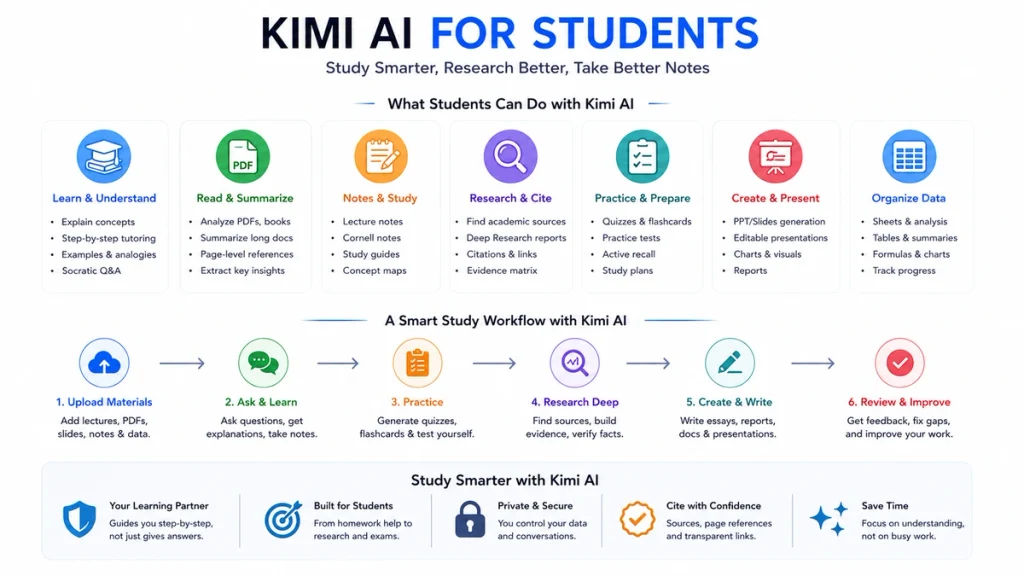
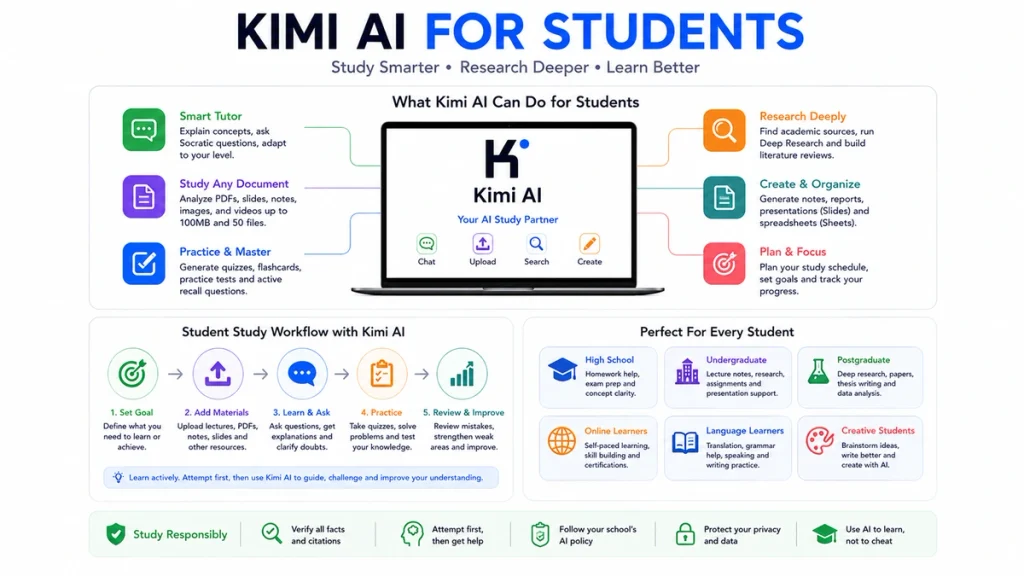
Kimi currently supports common study files including PDF, Word, Excel, PowerPoint, images, TXT and video. Its new-user documentation lists a maximum of 100MB per file and up to 50 files in one upload workflow. A product limit is not a promise that every page, table or image will be interpreted correctly.
Is Kimi AI Good for Students?
Kimi is a strong student tool when the task involves a large amount of material, source organization or repeated interaction. It can explain a difficult concept at several levels, compare readings, turn lectures into structured notes, generate questions and help build a study plan.
Its most useful strengths for students are:
- Processing several course files in one workflow.
- Explaining the same topic using definitions, examples, analogies and counterexamples.
- Creating source-linked research reports.
- Turning documents into editable notes, reports and slides.
- Generating targeted quizzes from the student’s materials.
- Working in multiple languages.
- Supporting text, images, charts, equations and video.
Kimi is not a replacement for lectures, textbooks, instructors, academic databases or your own reasoning. Its answers can contain false facts, incomplete document coverage, invented citations, calculation errors and confident interpretations that the source does not support.
Set Up Kimi for One Course
A separate course workspace reduces context mixing and makes the study assistant more consistent.
- Create a separate Project or session for the course. Do not mix biology, economics and programming in one long conversation.
- Upload only authorized materials. Add the syllabus, learning outcomes, lecture notes, permitted readings and your own notes.
- Define the tutoring rules. Tell Kimi when to ask questions, when to give hints and when it may show a worked answer.
- Define the source rule. Require page, section or URL references and ask it to mark anything it cannot verify.
- State your level. Include the course level, topics already covered and the methods your instructor expects.
- Save useful instructions. Use Quick Prompts, a Project instruction or a custom Skill for repeated study workflows.
- Review Memory. Remove outdated or overly broad memories that could affect unrelated courses.
A useful initial instruction is:
You are my learning partner for this course.

Course:
[course name and level]

My current knowledge:
[what I already understand]

Rules:
1. Help me learn instead of completing assessed work for me.
2. Ask what I have tried before giving a solution.
3. Use only the uploaded materials unless I explicitly enable web search.
4. Cite the file name and page or section for claims from course materials.
5. Clearly label any inference or uncertainty.
6. Quiz me after each explanation.
7. When I make a mistake, diagnose the misconception rather than only correcting the answer.
8. Follow the terminology and methods used in this course.
Use Kimi as a Tutor, Not an Answer Machine
The fastest answer is not always the best learning experience. Ask Kimi to delay the final answer and guide you through the problem.
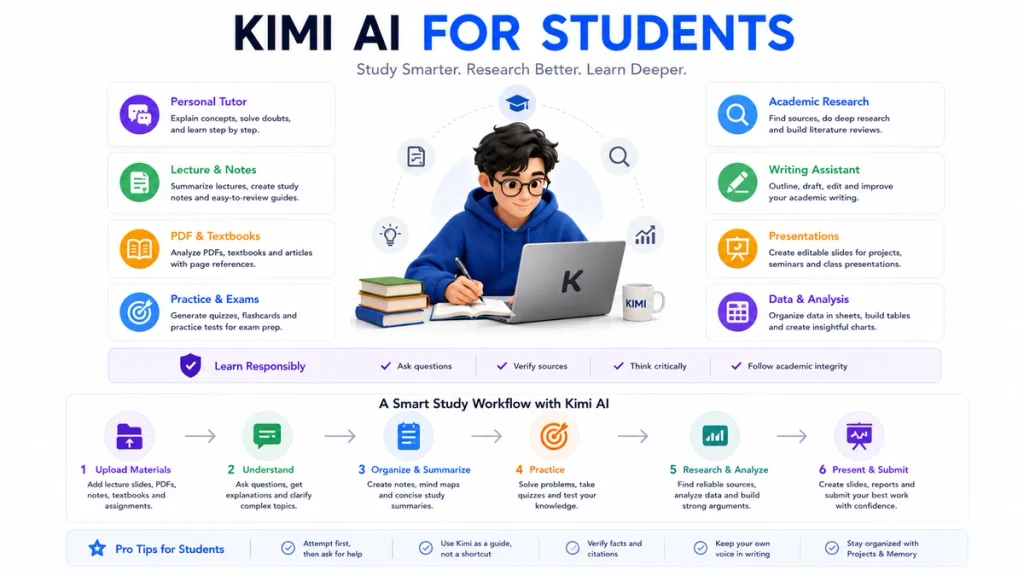
Teach me [topic] using the Socratic method.

Start by asking what I already know.
Ask one question at a time.
Do not give the complete answer immediately.
If my reasoning is wrong, ask a question that exposes the mistake.
Use an example only after I attempt the question.
At the end, ask me to explain the concept in my own words and give me two transfer questions.
For a difficult concept, request several representations:
- A one-sentence definition.
- A detailed explanation.
- A simple analogy.
- A worked example.
- A counterexample.
- A connection to an earlier topic.
- A question that tests application rather than memorization.
After reading the explanation, close it and reconstruct the idea from memory. Then ask Kimi to compare your explanation with the course material.
Use Kimi for Homework Responsibly
Kimi can support homework without completing it on your behalf. A responsible workflow keeps the student’s attempt at the center.
- Read the assignment and course AI policy.
- Explain what you think the task is asking.
- Make an initial attempt or outline.
- Ask Kimi for a hint, critique or diagnostic question.
- Revise the work yourself.
- Use Kimi to check the revision against the rubric.
- Disclose AI assistance when the course requires it.
I am working on this assignment:

[paste the assignment instructions]

Do not write the submission for me.

First:
1. Restate the task in plain language.
2. Identify the knowledge and skills being assessed.
3. Ask me what approach I plan to take.
4. Review my approach for misunderstandings.
5. Give one hint at a time.
6. After I submit my attempt, provide feedback using the rubric.
7. Do not invent sources, results or evidence.| Use | Example | Risk level |
|---|---|---|
| Understanding instructions | Explain the assignment and rubric | Low |
| Receiving hints | Ask one guiding question at a time | Low |
| Feedback on your attempt | Identify gaps without rewriting everything | Low |
| Creating practice problems | Generate similar but different questions | Low |
| Rewriting a complete assessed answer | Turn a rough idea into a submission-ready essay | Depends on course policy; often risky |
| Generating sources you did not read | Add citations to make the paper look researched | High |
| Completing a take-home exam | Provide answers during an assessment | Usually prohibited unless explicitly allowed |
| Submitting AI output as your own work | Copy the generated answer without disclosure | High |
Turn Lectures and Slides into Study Notes
Kimi can organize lecture slides, transcripts and rough notes into a consistent revision format. The goal should be to preserve the instructor’s content while exposing gaps—not to replace the original material.
- Upload the lecture slides and your notes.
- Ask Kimi to identify topics mentioned in one source but missing from the other.
- Generate structured notes with page or slide references.
- Separate definitions, processes, examples and formulas.
- Add a section called “Questions I still need to answer.”
- Convert the notes into a short study guide.
- Create recall questions without displaying the answers first.
Turn these lecture slides and my notes into a study guide.

Use this structure:
1. Learning objectives.
2. Key concepts and definitions.
3. Processes or mechanisms.
4. Formulas and what each variable means.
5. Examples used by the lecturer.
6. Common confusions.
7. Connections to earlier lectures.
8. Ten active-recall questions.
9. Five application questions.
10. Missing or unclear information.

For every factual point, cite the slide number, page or note section.
Do not add outside information unless you label it clearly.
You can also ask Kimi Docs to turn PowerPoint materials into a Word-style lesson or note document. Check every heading, formula and citation against the original slides before relying on the export.
Study PDFs, Textbooks and Research Papers
Kimi can process long files, but uploading a document does not prove that every passage was retrieved correctly. Use a two-pass workflow.
Pass 1: map the document
Map this document before summarizing it.

Return:
- Title and document type.
- Author and date if stated.
- Table of contents or section structure.
- Main question or objective.
- Key concepts by section.
- Methods, evidence and conclusions.
- Tables, figures or formulas that need separate inspection.
- Sections that are unclear, scanned poorly or may not have been extracted correctly.

Cite page or section numbers.
Do not infer missing text.
Pass 2: interrogate the evidence
Now analyze the document's argument.

For each major claim:
1. State the claim.
2. Quote or closely paraphrase the supporting passage.
3. Give the page or section.
4. Identify the evidence type.
5. Note limitations or assumptions.
6. Identify contradictory or qualifying passages elsewhere in the document.
7. Mark any claim you could not verify directly.
Keep the PDF open beside Kimi. Verify page references, formulas, tables, footnotes and quoted wording. Scanned pages, complex layouts, multi-column text and mathematical notation are especially likely to need manual inspection.
Use Kimi for Academic Research
Kimi offers several research levels:
| Research need | Recommended Kimi route |
|---|---|
| Explain one paper or URL | Chat with the file or link |
| Find current sources for a focused question | Web-connected Search |
| Find academic papers or structured professional data | Search with an available academic or professional database |
| Investigate a complex question across many sources | Deep Research |
| Organize many papers into a table | Deep Research plus Kimi Sheets |
| Produce a seminar or conference deck | Deep Research plus Kimi Slides |
Kimi Deep Research performs multiple rounds of search and analysis and generates a source-linked report. Kimi’s current Search documentation also describes access to academic data such as journal articles, papers, preprints, dissertations and patents where supported.
These capabilities do not remove the need to verify that a paper exists, that its metadata is correct and that it supports the claim assigned to it.
Build a literature matrix
Research the following question:

[research question]

Build a literature matrix with:
- Full title.
- Authors.
- Year.
- Journal, conference or repository.
- DOI or stable URL.
- Research question.
- Method.
- Sample or dataset.
- Main finding.
- Limitation.
- How it relates to my question.
- Evidence supporting and challenging my current hypothesis.

Rules:
1. Prefer primary research and systematic reviews.
2. Separate peer-reviewed papers from preprints.
3. Do not invent a citation.
4. If metadata cannot be verified, mark it as unverified.
5. Include the source link for every row.
6. End with research gaps, disagreements and suggested search terms.
Open every source that you may cite. Check the abstract, methods, results and limitations rather than relying only on Kimi’s summary. For important claims, read the relevant section in the full paper.
Deep Research is better suited to complex questions. For a simple definition or one paper, ordinary Chat or Search is faster and usually consumes fewer credits.
Write Essays Without Losing Your Voice
The student should own the thesis, reasoning and final wording. Use Kimi as a critic, editor and questioner.
- Interpret the assignment.
- Write your provisional answer or thesis.
- Research and read the evidence.
- Build your own outline.
- Draft the section in your own words.
- Ask Kimi for targeted feedback.
- Revise manually.
- Check every citation and quotation.
Review this paragraph without rewriting it for me.

Evaluate:
1. Is the main claim clear?
2. Does each sentence support that claim?
3. Is the evidence relevant and sufficient?
4. Are there logical jumps?
5. Does the paragraph acknowledge an important limitation or counterargument?
6. Which sentence is weakest, and why?
7. What question should I answer in my revision?

Preserve my voice.
Do not add facts or citations.
Do not produce a replacement paragraph unless I explicitly ask after revising it myself.
For citations, ask Kimi to format metadata you have already verified. Do not ask it to create references from memory and insert them without opening the original sources.
Prepare for Exams with Active Recall
Use Kimi to test what you can retrieve without looking at the notes. Ask it to hide answers until you commit to a response.
Generate a practice test
Create a practice exam using only the uploaded course materials.

Match this format:
[describe the professor's exam format]

Requirements:
- Mix basic recall, application, analysis and synthesis.
- Cover every learning objective proportionally.
- Do not show answers yet.
- Ask one question at a time.
- Record my answer before giving feedback.
- For an incorrect answer, identify the misconception and ask a follow-up question.
- At the end, create a weak-topic report and a revision plan.
- Cite the course page or slide supporting every answer.
Use a blank-page test
Give me a blank-page test on [topic].

Ask me to explain the topic completely from memory.
Do not provide hints during my first attempt.

Then assess:
- Accuracy.
- Completeness.
- Depth.
- Examples.
- Connections to other topics.
- Misconceptions.
- Important material I omitted.

Use only the uploaded course materials for the assessment.
Create an error log
After a quiz, ask Kimi to classify each mistake:
- Knowledge gap.
- Misunderstood concept.
- Calculation error.
- Misread question.
- Weak evidence.
- Incomplete explanation.
- Time-management problem.
Use the error categories to choose the next study task instead of generating another random quiz.
Use Kimi for Math, Physics and Science
Kimi’s photo-based problem solving and multimodal input can read a photographed question, equation, chart or diagram. Use it as a guided problem coach.
Coach me through this problem without giving the final answer first.

1. Ask me to identify the problem type.
2. Ask what is known and unknown.
3. Ask which principle or formula may apply.
4. Check the units.
5. Let me perform each algebraic step.
6. Point out the first incorrect step without completing the rest.
7. After I finish, verify the calculation independently.
8. Give me a similar practice problem with different numbers.
Check the image transcription before solving. A single misread exponent, sign, axis label or unit can invalidate every later step.
For scientific questions, ask Kimi to distinguish:
- Definition.
- Observed result.
- Mechanism.
- Assumption.
- Model prediction.
- Correlation.
- Causal claim.
Create Academic Presentations with Kimi Slides
Kimi Slides can generate editable presentations from a topic, text, document, image or PowerPoint template. The current product includes an academic-research scenario and can incorporate formulas, charts and research content.
- Complete the research and source verification first.
- Write a slide-level argument or outline.
- Upload the verified source materials.
- Specify the audience, time limit and course level.
- Ask for a first draft.
- Review every claim, chart, image and citation.
- Reduce text and add your own speaker notes.
- Export the editable file and test it in presentation software.
Create a 10-slide academic presentation from these verified materials.

Audience:
[course and level]

Purpose:
[seminar / project defense / class presentation]

Structure:
1. Research question.
2. Background.
3. Key concepts.
4. Method or evidence.
5–7. Main findings.
8. Counterarguments or limitations.
9. Conclusion.
10. References.

Requirements:
- One main message per slide.
- Use concise text.
- Add speaker notes.
- Cite the verified source on every slide containing evidence.
- Do not invent data, charts or references.
- Mark any statement that needs manual verification.
Organize Research Data with Kimi Sheets
Kimi Sheets can help organize papers, build formulas, create pivot-style summaries and generate charts. Student uses include:
- A literature-review matrix.
- A reading tracker.
- A survey-response summary.
- A laboratory results table.
- A study-hours dashboard.
- An error log for exam preparation.
- A source and citation tracker.
Create a literature-review spreadsheet from these verified papers.

Columns:
- Paper ID.
- Full citation.
- Year.
- Research question.
- Method.
- Sample.
- Main finding.
- Limitation.
- Theme.
- Supports or challenges my thesis.
- DOI or stable URL.
- Verification status.
- My notes.

Do not fill a field unless the source supports it.
Mark missing information as "Not reported."
Create a summary sheet showing themes, methods and research gaps.
Open the resulting spreadsheet and inspect formulas, merged cells, sorting, dates, missing values and chart ranges. AI-generated spreadsheet logic can be syntactically valid and still answer the wrong question.
Use Kimi for Language Study and Translation
Kimi can explain grammar, translate course material, generate dialogues and provide writing feedback. Use it to compare meanings rather than accepting one translation as definitive.
Help me study [language] using this text.

1. Keep the original sentence.
2. Provide a natural translation.
3. Explain important vocabulary.
4. Explain the grammar pattern.
5. Give two alternative translations and how their tone differs.
6. Ask me to translate a similar sentence.
7. Correct my attempt while preserving what I expressed correctly.
8. Create five review questions from the weak points.
For assessed translation, follow the assignment rules. Translation tools can remove the practice that the task is designed to assess.
A 45-Minute Study Session with Kimi
| Time | Student action | Kimi’s role |
|---|---|---|
| 0–5 minutes | Write what you remember without notes | Wait; do not reveal the answer |
| 5–15 minutes | Compare your explanation with the material | Diagnose gaps and misconceptions |
| 15–25 minutes | Work through two application problems | Give hints and ask questions |
| 25–35 minutes | Complete a short closed-note quiz | Score answers and classify errors |
| 35–40 minutes | Re-teach the weakest concept in your own words | Challenge unclear reasoning |
| 40–45 minutes | Choose the next review task | Create a short action plan based on errors |
This structure keeps the student producing answers rather than spending the entire session reading generated explanations.
Ready-to-Copy Kimi Prompts for Students
Explain a difficult concept
Explain [concept] at three levels:
1. A one-sentence explanation.
2. An explanation for a student taking [course].
3. A technical explanation using the course terminology.

Then give:
- One example.
- One counterexample.
- One common misconception.
- Three questions that test whether I understand it.
Turn notes into recall questions
Use only these notes to create 20 active-recall questions.

Mix:
- Definitions.
- Comparisons.
- Causes and effects.
- Applications.
- "Why" questions.
- Questions that connect two topics.

Do not show the answers until I submit mine.
Cite the note section supporting each answer.
Check understanding after reading
I have read [chapter or paper].

Interview me to test whether I understood it.
Start with the thesis, then methods, evidence, limitations and implications.
Ask follow-up questions when my answer is vague.
Do not teach the material until you have diagnosed what I do and do not understand.
Create a realistic study plan
Create a study plan using the information below.

Courses:
[list]

Exam and assignment dates:
[list]

Available study time:
[list]

Current confidence by topic:
[list]

Rules:
- Prioritize by deadline, difficulty and importance.
- Include retrieval practice and problem solving.
- Add buffer time.
- Do not schedule more time than I actually have.
- Include one weekly review and one catch-up block.
- Explain what I should postpone if I fall behind.
How to Verify Kimi’s Answers
Use a five-part verification protocol for any answer that may enter an assignment, exam preparation or research project.
- Source check: does the cited paper, page or URL exist?
- Claim check: does the source actually support the sentence?
- Context check: did Kimi omit a limitation, exception or contradictory passage?
- Calculation check: can you reproduce the arithmetic, units, formula and code independently?
- Policy check: is this form of AI assistance allowed and disclosed where required?
For academic sources, verify:
- Authors.
- Title.
- Year.
- Journal or repository.
- DOI or stable URL.
- Publication type.
- Peer-review status.
- The exact passage supporting the claim.
Use phrases such as:
Separate your answer into:
- Verified directly from the uploaded source.
- Inference from the source.
- Outside background knowledge.
- Information that could not be verified.

For every verified claim, provide the page, section or URL.
Do not create a citation when you are uncertain.
Academic Integrity: Allowed, Risky and Prohibited Uses
AI rules differ by institution, course and assignment. The instructor’s current instructions take priority over a general guide.
| Usually appropriate when permitted | Requires caution or disclosure | Usually inappropriate without explicit permission |
|---|---|---|
| Explaining a concept | Editing assessed writing | Completing a live or take-home exam |
| Creating extra practice questions | Building an assignment outline | Generating a complete submission |
| Giving feedback on your attempt | Translating assessed work | Inventing laboratory results or interviews |
| Organizing your own notes | Creating code for an assessed project | Fabricating references or quotations |
| Brainstorming search terms | Paraphrasing source material | Impersonating the student’s authorship |
| Checking grammar after drafting | Summarizing a restricted course file | Uploading exam materials that must remain confidential |
Keep a simple AI-use record when the assignment permits assistance:
- Date.
- Tool and feature used.
- Prompt or task.
- Material provided.
- How the output influenced your work.
- What you verified or changed.
Privacy, Copyright and Course Materials
Do not upload a file merely because Kimi technically accepts its format.
- Do not upload unpublished research without permission.
- Do not upload identifiable participant data.
- Do not upload medical, financial or counseling records.
- Do not upload exam banks or confidential assessments.
- Do not upload classmates’ work without their consent.
- Do not upload copyrighted textbooks when your license or institution prohibits external processing.
- Remove names, student IDs and unnecessary personal information.
- Use publicly accessible or institution-approved sources where possible.
Kimi’s current usage guidance says session history is retained. After a sensitive task, save what you are permitted to keep and delete the complete session when appropriate. Kimi also provides controls for deleting conversations, managing Memory Space and deleting an account.
For a deeper review, see our planned Kimi AI safety and privacy guide.
Is Kimi AI Free for Students?
Kimi does not currently publish a separate student-only plan in its international membership documentation.
Under the current rules:
- Ordinary K2.6 Chat is available without consuming membership credits.
- Some advanced features provide a limited free allowance or trial access.
- Deep Research, PPT, Kimi Work, Docs, websites and other membership features can consume the shared credit pool.
- Usage depends on the number of tokens processed, not a guaranteed fixed number of assignments or papers.
- Availability and limits shown in the signed-in account take priority.
Start with ordinary Chat for explanations and short study sessions. Use Deep Research or document-generation features when the task genuinely requires them rather than spending credits on every question.
See our Kimi AI free vs paid comparison for plan details.
Kimi AI Limitations for Students
- False confidence: an incorrect answer can be presented in polished language.
- Fabricated references: a plausible citation may not exist or may not support the claim.
- Incomplete document retrieval: a large context window does not prove that every passage was used.
- OCR errors: scans, formulas, tables and multi-column PDFs can be misread.
- Calculation errors: arithmetic, units and statistical interpretation require independent checking.
- Oversimplification: a student-friendly explanation may remove an important condition.
- Search gaps: subscription databases, paywalled papers or inaccessible pages may be missing.
- Outdated information: ordinary model knowledge may not reflect a recent event unless Search is used.
- Writing homogenization: repeated AI editing can erase the student’s own voice.
- Dependency: asking for answers before attempting problems weakens the evidence of what you can do independently.
- Credit consumption: long files, Deep Research and agent workflows can use advanced-feature credits quickly.
- Policy risk: technically possible use may still violate the course rules.
Who Should Use Kimi AI for Studying?
| Student situation | Fit |
|---|---|
| Needs alternative explanations and examples | Strong fit |
| Studies from many PDFs and lecture files | Strong fit with verification |
| Needs practice questions and feedback | Strong fit |
| Conducts a literature review | Useful alongside academic databases and manual reading |
| Needs editable presentation drafts | Strong fit after source verification |
| Wants the AI to complete assessed homework | Poor and risky use |
| Works with confidential research or student data | Use only through an approved institutional workflow |
| Will not verify citations, calculations or files | Poor fit |
Kimi is most valuable for a student who is willing to attempt, question, verify and revise. It is not a shortcut around learning; it is a tool for creating more structured opportunities to learn.
Frequently Asked Questions
Is Kimi AI good for students?
Yes. Kimi can explain concepts, analyze course files, create notes, generate practice questions, support research and build presentations. Students still need to verify answers and follow their institution’s AI rules.
Can Kimi help with homework?
Kimi can explain instructions, give hints, identify misconceptions and review your attempt. It should not complete prohibited assessed work or generate a submission that you present as entirely your own.
Can Kimi solve math problems from a photo?
Kimi includes photo-based problem solving and multimodal image input. Verify that it transcribed the numbers, symbols, exponents, graph labels and units correctly before trusting the solution.
Can Kimi summarize a textbook or PDF?
Yes, but context and upload capacity are not page-count guarantees. Ask for a document map, page references and evidence, then check important passages in the original PDF.
What files can students upload to Kimi?
Kimi currently supports PDF, Word, Excel, PowerPoint, images, TXT and video. Its new-user guide lists up to 100MB per file and up to 50 files in one workflow.
Can Kimi create study notes?
Yes. It can turn lecture slides, rough notes and readings into outlines, Cornell-style notes, study guides and recall questions. Check that it has not added unsupported material.
Can Kimi create flashcards and quizzes?
Yes. Ask it to hide the answer until you respond, mix difficulty levels and create an error report for topics you miss.
Can Kimi help with academic research?
Yes. Kimi Search and Deep Research can discover and organize sources, while Sheets can create a literature matrix. Open and verify every paper before citing it.
Does Kimi Deep Research provide citations?
Kimi’s current Help Center says Deep Research produces reports with embedded, traceable source links. A linked source still needs to be checked for accuracy, context and relevance.
Can Kimi write an essay for me?
It can generate text, but submitting AI-written work may violate the assignment policy and prevent you from demonstrating your own learning. Use it to question, outline and critique your own draft.
Can Kimi create a PowerPoint presentation?
Yes. Kimi Slides can create editable presentations from text, documents, images or templates and includes academic-research scenarios. Verify every claim, chart and reference.
Can Kimi help with Excel and research data?
Yes. Kimi Sheets can organize literature, build formulas, summarize datasets and create charts. Review the formulas, ranges, missing values and statistical conclusions.
Is Kimi free for students?
Kimi does not currently list a separate international student plan. Ordinary K2.6 Chat does not consume membership credits under the current rules, while advanced agent, research and document features use free allowances or membership credits.
Are Kimi citations always accurate?
No. Verify that each source exists, that its metadata is correct and that the cited passage supports the claim. Do not cite a source you have not opened.
Should I upload all my course materials to Kimi?
Only upload materials you are authorized to process. Avoid confidential exams, unpublished research, participant data, classmates’ work and copyrighted material that your license or institution prohibits you from sharing.
Does Kimi remember my courses?
Kimi provides Memory Space and Projects for persistent context. Review saved memories, keep different courses separated and delete information that is outdated or sensitive.
How should I disclose Kimi use in an assignment?
Follow the exact disclosure format required by the instructor or institution. A useful record includes the tool, date, task, prompts, materials supplied and how you verified or changed the output.
Official Sources and Update Methodology
This guide prioritizes current first-party Kimi and Moonshot AI documentation for product capabilities and limits. The main sources reviewed were:
- Kimi New User Guide
- What Kimi Can Do
- Kimi Agentic Search
- Kimi Deep Research Overview
- Deep Research Use Cases
- Kimi Docs and Sheets Overview
- Kimi Sheets Use Cases
- Kimi Slides Overview
- Kimi Slides Creation Modes
- Kimi Memory Space
- Kimi Chat Context, Memory and Projects Guidance
- Kimi Membership and Credit Rules
- Kimi Chat Best Practices
- Kimi Account and Data Deletion
- Kimi Privacy Policy
The learning workflows were also informed by current student-focused guidance emphasizing guided tutoring, retrieval practice, independent attempts, source verification and preserving student authorship.
Features, file limits, credits and product entry points were last checked on August 23, 2026. When the signed-in Kimi interface or current first-party Help Center differs from this article, follow the current official information.
Last verified: August 23, 2026.