
Kimi AI can help freelancers research prospects, turn scattered notes into proposals, analyze client files, and produce editable documents, spreadsheets, slides, or website drafts. It is most useful as a supervised workbench, not as an autonomous replacement for professional judgment. Use K2.6 for quick drafting, K3 for complex deliverables, Deep Research for source-heavy investigation, and Kimi Work or Kimi Code when a project depends on local files or software. Keep pricing, scope, legal commitments, confidential-data decisions, and final approval under human control.
Kimi’s available models, feature names, membership credits, and access conditions can change by account or region. This is a documentation-based workflow guide, not a controlled performance benchmark.
The most reliable way to use Kimi for client work: let it organize, research, draft, transform, and review—while you remain responsible for facts, promises, pricing, permissions, and the final deliverable.
Is Kimi AI Useful for Freelancers?
Yes, especially when a freelance project includes research, long briefs, proposals, reports, spreadsheets, presentations, website drafts, or repeated revisions. Kimi combines chat, web-connected research, file analysis, document generation, and agent-style task execution across several products.
The value is not simply “writing faster.” A better use is reducing the friction between stages of a project. The notes from a discovery call can become a structured brief. That brief can guide client research. Verified research can support a proposal. The approved proposal can become a project plan, and the same acceptance criteria can later be used to review the final work.
Kimi is less useful when it is asked to make decisions it cannot responsibly own. It does not know the real value of your time, what you verbally promised a client, whether you are legally allowed to process a file, or whether an attractive claim is accurate enough to publish. Those decisions remain yours.
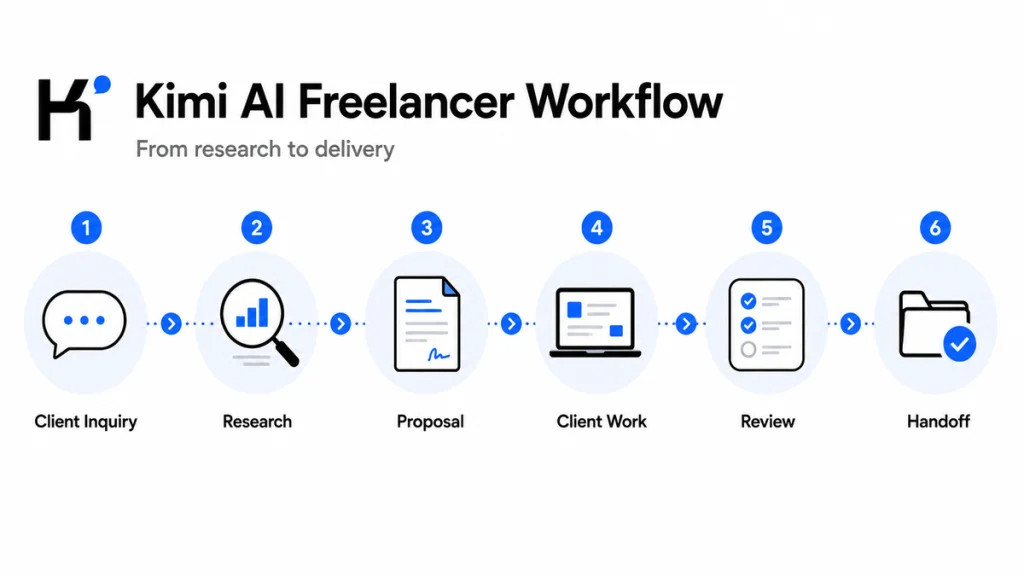
The Freelance Client Lifecycle Kimi Can Support
| Freelance stage | How Kimi can assist | Human approval gate |
|---|---|---|
| Lead qualification | Extract goals, requirements, deadlines, missing details, and possible risks from an inquiry. | Decide whether the lead fits your services, capacity, and minimum budget. |
| Client research | Research the company, industry, audience, competitors, and relevant trends. | Open and verify the sources supporting any important claim. |
| Proposal | Organize the problem, solution, scope, deliverables, timeline, assumptions, and exclusions. | Set the price, commercial terms, availability, and promises. |
| Project planning | Convert the accepted scope into milestones, tasks, dependencies, and acceptance criteria. | Confirm that the plan matches the signed agreement. |
| Client delivery | Analyze material, draft content, create reports, build spreadsheets, prepare slides, or assist with code. | Review the work using your professional expertise. |
| Revisions | Classify feedback, identify conflicting requests, and compare changes with the approved scope. | Approve in-scope revisions and price out-of-scope work. |
| Handoff | Prepare a delivery summary, file index, instructions, changelog, and next-step email. | Inspect every file and send the package yourself. |
You do not need every Kimi product for every project. A short copywriting job may only need K2.6 and a document editor. A consulting engagement may benefit from Deep Research, Kimi Docs, Kimi Sheets, and Kimi Slides. A developer may spend most of the project in Kimi Code.
Which Kimi Freelance Tools Should You Use?
Kimi is now a group of connected products and features rather than one chat box. Choosing the smallest tool that fits the task helps reduce unnecessary complexity and credit consumption.

| Kimi tool | Best freelance use | Important limitation |
|---|---|---|
| K2.6 Chat | Quick questions, outlines, email drafts, brief cleanup, brainstorming, and small text tasks. | It is designed more for fast text responses than complex editable deliverables. |
| K3 | Complex reasoning, multimodal files, detailed reports, editable documents, presentations, spreadsheets, and multi-step tasks. | Its use can consume membership credits and access may depend on the current plan. |
| K3 Cluster | Large-scale research, batch comparison, and tasks that benefit from parallel processing. | It is unnecessary for a small proposal or a simple client email. |
| Deep Research | Market research, competitor analysis, due diligence, trend research, and evidence-supported client reports. | A generated research report still requires source-level verification. |
| Kimi Docs | Proposals, statements of work, reports, document revisions, summaries, and formatted Word or PDF deliverables. | Generated pricing, legal language, case studies, and factual claims must be checked. |
| Kimi Sheets | Project trackers, estimates, content calendars, data cleanup, formulas, charts, and client reporting. | Formulas and totals must be tested before delivery. |
| Kimi Slides | Pitch decks, client presentations, research summaries, strategy decks, and training material. | Visual consistency, licensing, speaker notes, and data claims need manual review. |
| Kimi Work | Working with local files, organizing folders, moving information between files, browser-supported tasks, and desktop workflows. | File permissions do not replace client consent, an NDA review, or a privacy assessment. |
| Kimi Code | Understanding codebases, implementing features, fixing errors, running commands, writing tests, and preparing technical documentation. | Review diffs, tests, dependencies, security implications, and deployment changes. |
| Kimi Websites | Portfolio drafts, landing-page prototypes, client concept pages, and early website iterations. | Do not publish without checking content, forms, links, accessibility, security, and mobile behavior. |
The official Kimi product guide currently recommends Kimi web or mobile for everyday writing, search, presentations, documents, spreadsheets, and Deep Research; Kimi Work for local desktop workflows; and Kimi Code for software development. That distinction is more useful than treating every task as a normal chat.
Step 1: Turn a Vague Inquiry Into a Client Brief
Many freelance projects begin with a message such as, “I need help with my website,” “Can you write content for our launch?” or “We need competitor research by next week.” Writing a proposal immediately is risky because the request does not yet define the real problem.
Start by giving Kimi a sanitized version of the inquiry. Ask it to separate what the client explicitly stated from what remains unknown. A useful client brief should identify:
- The client’s desired business outcome.
- The target audience or end user.
- The requested deliverables.
- The deadline and important milestones.
- Provided source material and missing inputs.
- Required platforms, formats, languages, or technical constraints.
- Approval owners and decision-makers.
- Acceptance criteria.
- Possible risks, dependencies, and scope ambiguities.
- Questions that must be answered before pricing.
You are helping me qualify a potential freelance client.

Use only the sanitized inquiry below. Do not assume facts that are not stated.

Return:
1. The client's stated goal
2. Requested deliverables
3. Known audience
4. Deadline and timing constraints
5. Files, access, or decisions the client must provide
6. Missing information
7. Scope risks or ambiguous phrases
8. Ten prioritized discovery questions
9. A short reply I can edit and send

Label every inferred point as "Needs confirmation."

Client inquiry:
[PASTE A REDACTED VERSION HERE]
Do not let the reply promise availability, turnaround time, price, or a specific result unless you have supplied and approved those details. The goal of this stage is qualification, not closing the deal at any cost.
Step 2: Research the Client, Market, and Problem
Once the opportunity appears relevant, research should make the proposal more specific. A generic proposal repeats the client’s request. A stronger proposal shows that you understand the company’s context, audience, constraints, and likely alternatives.
Use ordinary Kimi search for quick questions. Use Deep Research when the answer requires multiple sources, comparisons, dated evidence, or a structured report. Suitable freelance research tasks include:
- Mapping a client’s products, positioning, and target segments.
- Comparing direct and indirect competitors.
- Identifying current market language and customer objections.
- Reviewing public product documentation, pricing pages, reports, or regulations.
- Finding evidence that supports a strategy recommendation.
- Preparing for a discovery or stakeholder meeting.
Research quality depends heavily on the question. “Research this company” is too broad. Define the decision the research must support, the relevant market, the date range, the required source types, and the final format.
Research [CLIENT OR MARKET] to support a freelance proposal for [SERVICE].

Decision this research must support:
[DESCRIBE THE DECISION]

Cover:
- Company positioning and current offer
- Target audience and likely customer needs
- Five relevant competitors
- Observable strengths, weaknesses, and market gaps
- Recent developments that may affect the project
- Risks or assumptions I should clarify with the client

Evidence rules:
- Prefer official company pages, primary documents, and dated sources
- Include a source link and publication or update date for every material claim
- Separate confirmed facts from interpretation
- Flag contradictions, missing evidence, and outdated pages
- Do not invent traffic, revenue, customer counts, budgets, or business results

Finish with:
1. Proposal insights
2. Discovery questions
3. Claims that require manual verification
Do not paste every research finding into the proposal. Select only the evidence that helps explain the client’s problem, your proposed approach, or a material project risk. Open the strongest sources yourself before relying on them.
For a very large assignment—such as comparing dozens of competitors, vendors, locations, or content examples—K3 Cluster or Agent Swarm may help divide the research into parallel subtasks. Use that level of processing only when the workload genuinely requires it; more agents do not automatically produce better evidence.
Step 3: Create a Proposal Without Inventing Details
Kimi Docs can help turn discovery notes, research, service information, pricing inputs, and previous approved material into a structured proposal. The official documentation specifically includes professional documents and proposals among its supported use cases.
A practical freelance proposal normally needs:
- A short summary of the client’s situation.
- The desired outcome.
- Your recommended approach.
- Included deliverables.
- Excluded work.
- Milestones and estimated timing.
- Client responsibilities and dependencies.
- Revision policy.
- Investment and payment terms.
- Change-request process.
- Assumptions and validity period.
- A clear next step.
Kimi should not decide your rate. It also should not invent testimonials, credentials, case-study results, certifications, availability, turnaround guarantees, or legal clauses. Supply approved facts and instruct the model to leave a placeholder whenever information is missing.
Create a client-specific freelance proposal using only the approved facts below.

Do not invent:
- Credentials
- Case studies
- Results
- Prices
- Timelines
- Team members
- Legal terms
- Client facts

Use this structure:
1. Client context
2. Desired outcome
3. Recommended approach
4. Deliverables
5. Milestones
6. Client responsibilities
7. Assumptions
8. Exclusions
9. Revision policy
10. Investment
11. Change-request process
12. Next step

Writing requirements:
- Lead with the client's outcome, not my biography
- Use clear and specific language
- Avoid exaggerated claims
- Make deliverables measurable
- Mark missing information as [CONFIRM]
- Mark commercial decisions as [FREELANCER TO APPROVE]

Approved client brief:
[PASTE]

Verified research:
[PASTE]

My approved service information:
[PASTE]

My approved price and terms:
[PASTE]
After the client accepts the commercial proposal, create a separate statement of work or contract-ready scope if your process requires one. A persuasive proposal and a precise scope document serve different purposes. Any legal document or legal clause should be reviewed by a qualified professional in the relevant jurisdiction.
Step 4: Convert the Approved Proposal Into a Project Plan
The approved proposal should become the project’s source of truth. Ask Kimi to translate it into an operational plan without silently changing the scope.
The plan can include:
- Milestones and target dates.
- Tasks and dependencies.
- Inputs required from the client.
- Approval checkpoints.
- Acceptance criteria for each deliverable.
- Risks and contingency actions.
- A file and naming structure.
- A communication schedule.
- A decision log.
Kimi Sheets can be useful when the plan needs a timeline, content calendar, workload estimate, budget breakdown, issue tracker, or reporting dashboard. Before sharing a spreadsheet, inspect formulas, ranges, totals, filters, dates, currency settings, and charts.
This stage also creates a defense against scope creep. When a client requests a change, compare the new request with the approved deliverables, exclusions, assumptions, and revision policy. Kimi can organize that comparison, but you decide whether the request is included, exchanged for another task, or quoted separately.
Useful scope-change prompt: “Compare this request with the approved scope. Quote the relevant scope language, classify each item as included, unclear, or additional, and draft a neutral response. Do not approve the change or mention a price.”
Step 5: Use Kimi During Client Delivery
The best workflow depends on what the client is paying you to produce. Kimi can support several freelance disciplines, but the freelancer’s expertise should remain visible in the final work.
Writers and Editors
Use Kimi to organize source material, compare briefs, create outlines, find unsupported claims, produce alternative structures, summarize interviews, and review consistency. Avoid publishing an unedited first draft or allowing the model to invent quotations and citations.
Marketing Freelancers
Use it for audience research, competitor messaging analysis, campaign briefs, content calendars, variation generation, and performance-report narratives. Feed it approved brand guidelines and real campaign data rather than asking it to guess a brand voice or performance outcome.
Consultants and Researchers
Deep Research can support market maps, vendor comparisons, policy reviews, due diligence, or evidence collection. Kimi Docs can turn verified findings into a report, while Kimi Slides can prepare an executive presentation. Your methodology, interpretation, and recommendation remain professional responsibilities.
Designers and Web Freelancers
Use Kimi to clarify requirements, organize page content, analyze screenshots, draft information architecture, produce prototype copy, or create an early website concept. Check licensing, accessibility, responsive behavior, component consistency, performance, forms, and production code before delivery or publication.
Developers
Kimi Code can inspect a codebase, propose a plan, edit files, run commands, write tests, and help diagnose failures. Review the diff before accepting it, run the relevant test suite, inspect new dependencies, and verify security-sensitive changes. See our dedicated Kimi AI for Developers guide for a deeper workflow.
Virtual Assistants and Operations Freelancers
Kimi Work can help organize files, extract information, prepare recurring reports, move information between documents, and assist with browser-based workflows. Use “Request permission” where appropriate, supervise destructive actions, and never provide passwords or secret keys in a prompt.
Step 6: Create Client-Ready Deliverables
Kimi’s document tools can produce or transform editable office files, but an editable file is not automatically a finished deliverable. Treat generation as a production stage followed by professional QA.
| Deliverable | Useful Kimi workflow | Check before sending |
|---|---|---|
| Proposal or report | Research → Kimi Docs → local editing | Facts, citations, headings, pagination, terminology, pricing, and confidentiality. |
| Spreadsheet | Raw data → Kimi Sheets → formulas and charts | Source rows, formulas, totals, units, dates, filters, and edge cases. |
| Client presentation | Verified report → Kimi Slides → manual refinement | Slide logic, chart accuracy, image rights, branding, readability, and speaker notes. |
| Website draft | Brief → structure → generated prototype → testing | Links, forms, mobile layout, accessibility, claims, analytics, privacy, and security. |
| Code change | Issue → repository analysis → implementation → tests | Diff, tests, dependencies, permissions, secrets, performance, and rollback plan. |
Keep a clear version history outside the conversation. Use names such as client-project-proposal-v2-approved.docx rather than repeatedly overwriting “final.docx.” Store the original client inputs, your verified evidence, the approved scope, and the final deliverable separately.
Step 7: Review the Work Before the Client Sees It
Do not ask Kimi to create and approve the same deliverable in one uninterrupted instruction. A separate review pass—with the original brief and acceptance criteria visible—usually produces a more useful critique.
Act as a strict quality reviewer.

Compare the draft deliverable with:
1. The approved client brief
2. The signed scope
3. The acceptance criteria
4. The verified source list
5. The client's style requirements

Do not rewrite the document yet.

Return a review table with:
- Location
- Requirement
- What the draft currently says or does
- Problem or risk
- Severity: Critical / Major / Minor
- Evidence needed
- Recommended correction

Check specifically for:
- Missing deliverables
- Unsupported facts
- Fabricated citations or quotations
- Incorrect numbers or dates
- Scope expansion
- Internal contradictions
- Broken links
- Confidential information
- Unapproved promises
- Inconsistent terminology
- Formatting or accessibility problems

Finish with a clear pass / conditional pass / fail recommendation.
After reviewing the report, correct the material yourself or ask Kimi to apply only the changes you approve. Then perform a final human pass on the exported file—not only the text shown in the chat.
Step 8: Manage Revisions, Handoff, and Follow-Up
Client feedback often arrives as emails, comments, call notes, and chat messages. Kimi can consolidate that material into a revision matrix with the request, source, owner, priority, affected deliverable, scope classification, and current status.
Before making changes, identify contradictions. One stakeholder may request a shorter page while another asks for more detail. A client may call a new deliverable a “small revision.” Kimi can expose the conflict, but it should not decide whose instruction overrides the others.
A professional handoff package can include:
- A delivery summary.
- An index of the supplied files.
- A list of completed deliverables.
- Usage or editing instructions.
- A changelog for the final revision.
- Known limitations or open items.
- Required client actions.
- Maintenance or support boundaries.
- The next milestone, where applicable.
Kimi can draft the handoff email and documentation, but inspect the attachments, permissions, names, links, and recipient list before sending anything.
Example: From a Vague SaaS Inquiry to a Client-Ready Package
Imagine a freelance marketing consultant receives this inquiry: “We are launching a SaaS product and need competitor research, positioning, and a presentation for our founders.”
- Qualification: K2.6 extracts the requested outputs and identifies missing details such as market, launch date, target users, competitor definition, and presentation audience.
- Research: Deep Research investigates the approved market, prioritizing official product pages, pricing information, documentation, and dated primary sources.
- Proposal: Kimi Docs organizes the verified context into a proposal containing research scope, positioning workshop, final report, slide deck, schedule, exclusions, and client inputs.
- Planning: Kimi Sheets creates a milestone tracker covering research, interviews, draft findings, client review, positioning, and final presentation.
- Delivery: The consultant reviews the evidence, makes the strategic decisions, and uses Kimi Docs and Slides to produce the report and founder deck.
- QA: A separate Kimi review compares every major claim and deliverable with the approved scope and source list.
- Handoff: Kimi drafts the file index, change summary, open questions, and follow-up email; the consultant verifies and sends the package.
The consultant remains responsible for defining the market, interpreting the evidence, choosing the positioning, setting the fee, managing stakeholders, and presenting the recommendation. Kimi reduces production friction; it does not become the consultant.
Client Data, Confidentiality, and Privacy
The fact that a client sent you a document does not automatically mean you may upload it to an AI service. Before using Kimi for client work, check the contract, NDA, data-processing requirements, client policies, and applicable regulations.
Use the following minimum safeguards:
- Obtain authorization where the agreement or project requires it.
- Remove personal data, credentials, API keys, financial records, health information, and unrelated confidential material.
- Replace real names and identifiers with neutral placeholders when possible.
- Share only the minimum content required for the task.
- Use synthetic or public sample data when testing a workflow.
- Review the current data-use, retention, storage-location, and subprocessor terms for the exact Kimi product being used.
- Check third-party plugin permissions separately.
- Do not assume that deleting a visible conversation immediately satisfies every contractual retention requirement.
- Keep an approved source copy outside Kimi.
Kimi Work provides controls that can require your permission before it modifies, overwrites, or runs code in local files. That protects against unauthorized local actions within the workflow, but it does not establish that the client approved the processing or that the project meets a particular compliance standard.
Product terms also differ. Kimi’s official API security page states that API inputs and outputs are not used to train or improve its models, while Kimi Business provides a separate statement for enterprise data. Do not transfer those statements automatically to consumer chat, a plugin, or another product surface. Review the current documentation and any applicable agreement before processing sensitive work.
For regulated, highly confidential, or contractually restricted projects, obtain appropriate legal, security, or privacy guidance instead of relying on a general-purpose article or an AI-generated interpretation.
Is Free Kimi Enough for Freelance Work?
It can be enough for occasional brainstorming, brief cleanup, email drafting, outlining, and other short text tasks. As of the verification date, K2.6 chat is available without consuming membership credits.
Complex K3 tasks and membership features such as Deep Research, advanced document generation, presentations, Kimi Work, and other agent workflows can consume a shared credit pool. The practical question is therefore not simply “Is Kimi free?” but “Which parts of my workflow need the advanced tools, and how often?”
Start with the free chat workflow if your work is light and text-based. A paid membership becomes easier to justify when you repeatedly produce research reports, editable office files, client decks, websites, or long multi-step deliverables. Check the live subscription screen because plan names, regional prices, included access, and credit rules can change. See our Kimi AI free vs paid comparison for the current plan-level breakdown.
If you encounter a usage message during active work, do not promise a delivery based on assumed availability. Review the error and your current balance using our Kimi usage limit guide.
Where Kimi Helps—and Where It Does Not Replace Specialist Tools
| Strong fit | Use another specialist tool or human process |
|---|---|
| Research planning and evidence collection | Final expert, legal, medical, financial, or compliance judgment |
| Briefs, proposals, reports, and documentation | Binding contract approval and legal drafting without review |
| Spreadsheet assistance and data summaries | Accounting records, tax filing, or financial controls |
| Presentations and website prototypes | Final brand, accessibility, security, or production approval |
| Code assistance and technical documentation | Unsupervised production deployment |
| Feedback organization and QA support | Client negotiation and relationship management |
| Drafting status updates and handoff notes | CRM records, e-signatures, invoices, and payment collection |
Kimi can sit inside a freelance tool stack, but it is not automatically your marketplace, CRM, contract-signing platform, time tracker, accounting system, or payment processor. Keep authoritative commercial records in the systems designed for them.
Frequently Asked Questions
Can freelancers use Kimi AI for client work?
Yes. Kimi can assist with prospect research, client briefs, proposals, project planning, file analysis, reports, spreadsheets, presentations, websites, code, revisions, and handoff documentation. The freelancer should retain control over permissions, facts, strategy, pricing, commitments, and final approval.
Can Kimi AI write a freelance proposal?
Yes. Kimi Docs can organize client information, research, pricing inputs, case studies, and service details into a structured proposal. Supply only approved information and instruct Kimi not to invent credentials, results, rates, timelines, or legal terms.
Which Kimi model is best for freelancers?
Use K2.6 for quick conversations, outlines, and small drafting tasks. Use K3 for complex reasoning, multimodal inputs, and editable documents, spreadsheets, or presentations. Use K3 Cluster for genuinely large research or batch-processing tasks. Access and credit requirements can vary.
Is Kimi AI free for freelancers?
K2.6 chat currently does not consume membership credits. K3 and advanced tools can use membership credits. Whether the free experience is sufficient depends on how often you need research agents, editable deliverables, presentations, spreadsheets, websites, coding tools, or desktop workflows.
Is Kimi safe for confidential client files?
There is no universal yes-or-no answer. Safety depends on the Kimi product, current terms, project agreement, type of data, client authorization, retention requirements, plugins, and applicable law. Redact unnecessary information and do not upload restricted material without permission.
Can Kimi replace a freelance project-management or invoicing tool?
It can draft project plans, trackers, status updates, and invoice-related text, but it should not be treated as the authoritative system for contracts, time records, invoices, tax records, signatures, payment collection, or client-account history unless a specifically configured and verified workflow provides those controls.
Should I tell clients that I use Kimi AI?
Follow the contract, platform rules, professional standards, and client disclosure requirements that apply to your work. Even where disclosure is not explicitly required, never misrepresent AI-assisted work, fabricate a manual process, or claim expertise and research you did not personally verify.
Official Sources and Update Methodology
This guide was reviewed against official Kimi and Moonshot AI documentation on August 23, 2026. Official documentation was used for product capabilities, model roles, file workflows, membership behavior, and published data-security statements. Third-party freelancer articles were reviewed only to understand search intent and content gaps; their performance and time-saving claims were not adopted as verified facts.
- Kimi Deep Research Overview
- Kimi Deep Research Use Cases
- Kimi Docs and Sheets Overview
- Kimi Model and Chat Guide
- Kimi Product Comparison
- Kimi Work Overview
- Kimi Work Permissions and FAQ
- Kimi Membership Benefits
- Kimi API Data Security
- Kimi Business Overview
Product interfaces, access, credit consumption, plan names, regional pricing, and usage limits can change. Check the current official product page and your signed-in subscription screen before making a purchase or promising that a feature will be available for a client deadline.
Last verified: August 23, 2026.