
Kimi AI can support developers across repository analysis, feature implementation, debugging, testing, code review and documentation. The main developer product is Kimi Code, available as a terminal CLI and a Visual Studio Code extension. It can read project files, propose plans, edit code, run shell commands and tests, and show the resulting changes for review. Developers building their own applications can instead use the OpenAI-compatible Kimi API with K3, K2.7 Code or K2.6. Kimi is most effective when you provide clear acceptance criteria, review every diff, run independent tests and treat generated code as a draft rather than automatically merging it.
Kimi Code models, versions, quota rules, integrations and experimental features can change. Use the current official Kimi Code documentation, model configuration page and release notes as the final reference.
Quick verdict: use Kimi Code CLI for terminal-first repository work, Kimi Code for VS Code when visual diffs and rollback matter, and the Kimi API when you are building your own coding assistant, developer platform or automation. Start complex work in Plan Mode, define verifiable completion criteria, keep edits scoped and run your own tests before accepting the result.
Kimi AI for Developers at a Glance
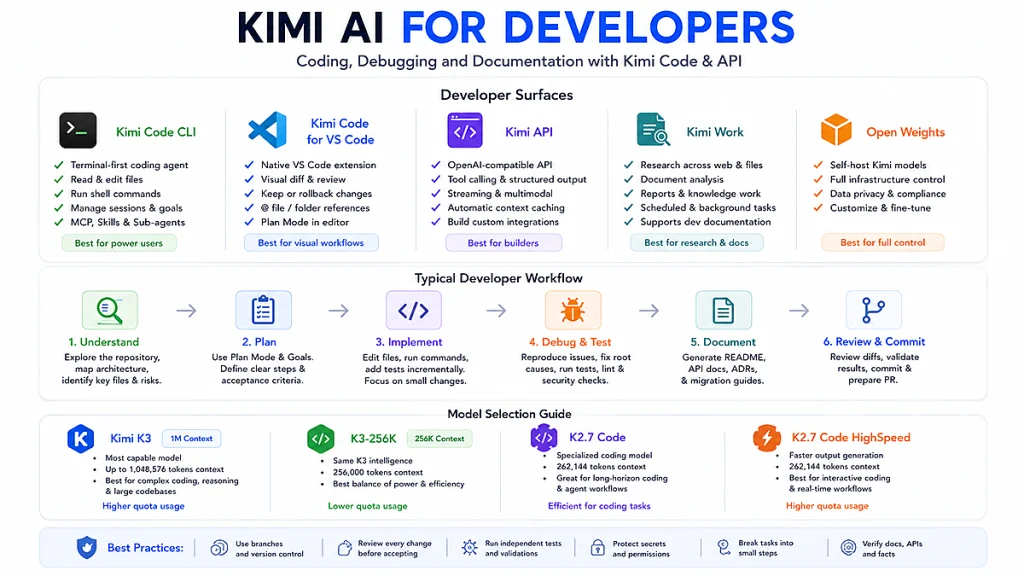
| Developer surface | Best suited to | Main capabilities |
|---|---|---|
| Kimi Code CLI | Terminal-first development and autonomous repository tasks | Read and edit files, search code, run shell commands, execute tests, manage sessions, use Goals, background tasks, MCP, Skills and sub-agents |
| Kimi Code for VS Code | Developers who want visual review inside the editor | Reference files with @, inspect diffs, keep or roll back changes, use Plan Mode, manage context and connect MCP servers |
| Kimi Code in third-party tools | Teams already using Claude Code, OpenCode, Codex or Hermes Agent | Use Kimi Code model benefits through supported integration routes and product-specific configuration |
| Kimi API | Building custom coding assistants, agents, SaaS features and internal tools | OpenAI-compatible Chat Completions, tool calling, structured output, multimodal input, streaming and automatic context caching |
| Kimi Work | Technical research, local documents and mixed office-development workflows | Research across local files and the web, document analysis, reports, scheduled tasks and broader knowledge work |
| Open model weights | Organizations with substantial inference infrastructure | Self-host selected Kimi models with greater control over deployment and data flow |
Kimi Chat can still help with isolated code explanations and small snippets, but Kimi Code is the more appropriate surface when the task requires repository access, file changes, commands, tests or a multi-step agent loop.
Kimi AI, Kimi Code and the Kimi API Are Different
These terms describe different layers:
- Kimi models provide the underlying intelligence. Current relevant families include Kimi K3, Kimi K2.7 Code and Kimi K2.6.
- Kimi Code is the first-party coding-agent product. It supplies repository access, file tools, command execution, approvals, session management and an agent loop around the models.
- Kimi API provides programmatic model access. Your application must implement its own tools, permissions, storage, validation and user interface.
A raw model response does not edit a repository or run a test by itself. Kimi Code provides those actions through its built-in tools. With the API, the model can request a tool call, but your application must validate and execute the corresponding function before returning the result to the model.
Current Kimi Code documentation lists Kimi K3 and Kimi K2.7 Code across four model IDs. K2.6 remains available through the general Kimi API and other Kimi products, but it is not currently presented as a direct Kimi Code model-selection option.
Choose the Right Kimi Developer Surface
| Your objective | Recommended starting surface |
|---|---|
| Understand or modify an existing repository from the terminal | Kimi Code CLI |
| Review proposed edits visually before accepting them | Kimi Code for VS Code |
| Build an AI feature into your own product | Kimi API |
| Use Kimi models inside an existing coding-agent interface | An officially documented third-party integration |
| Analyze technical documents and local files without primarily editing code | Kimi Work |
| Ask a short code question without repository access | Kimi Chat |
| Control the complete inference infrastructure | Open weights and self-hosting |
Do not select a surface only because it has more features. Use the smallest tool that safely completes the task. A short code explanation does not need an autonomous shell agent, while a repository-wide migration is difficult to complete reliably in a simple chat window.
How to Set Up Kimi Code CLI
Kimi Code CLI is a terminal-based coding agent. It can read and modify code, run commands, search files, fetch web pages and adapt its plan according to tool results.
Install it using the official script.
macOS and Linux
curl -fsSL https://code.kimi.com/kimi-code/install.sh | bashWindows PowerShell
irm https://code.kimi.com/kimi-code/install.ps1 | iexWindows users currently need Git for Windows because Kimi Code CLI uses the included Git Bash shell environment. The official installer manages the required runtime, so a separate Node.js installation is not required when using the recommended install script.
Open a terminal in the repository root and run:
cd /path/to/project
kimi
By default, read-only operations such as searching and reading files can run automatically. Kimi asks for approval before modifying files or running shell commands unless you have configured a broader permission rule.
Useful first commands
| Command | Purpose |
|---|---|
/help | Open the command and keyboard-shortcut reference |
/new | Start a fresh session |
/sessions | Browse and resume earlier sessions |
/model | Switch the active Kimi Code model |
/compact | Compress a long conversation to free context capacity |
/fork | Create an independent copy of the current session |
/init | Scan the project and create initial project documentation |
/goal | Start or manage work with a clear, verifiable finish line |
For unfamiliar or high-impact projects, start with kimi --plan or enter Plan Mode before authorizing any edits.
How to Set Up Kimi Code for VS Code
Kimi Code for VS Code adds a native chat and agent panel to the editor. It supports Kimi account authentication and API Key mode.
- Install the official extension from the Visual Studio Code Marketplace.
- Restart VS Code or run Developer: Reload Window if the panel does not appear.
- Sign in with a Kimi account or use the supported API Key mode.
- Open the repository workspace.
- Use
@to reference a file or folder. - Enable Plan Mode for changes that affect several files.
The VS Code extension is particularly useful when reviewability matters:
- Every modified file appears in a File Changes panel.
- You can open the native VS Code diff.
- You can keep or roll back individual files.
- You can keep or undo all tracked changes in bulk.
- The context indicator shows usage and token information.
/compactcan compress an overly long session./initcan scan the project and generate documentation.
The extension stores session history locally and allows older sessions to be searched and resumed. Local history should not be treated as a substitute for Git commits or an external backup.
Which Kimi Coding Model Should a Developer Choose?
| Kimi Code model ID | Model | Best suited to |
|---|---|---|
k3 | Kimi K3 with up to 1M context for eligible access | Very large repositories, long sessions, visual coding and difficult multi-step engineering |
k3-256k | Kimi K3 limited to 256K context | Routine development, code completion, small or medium feature work and better quota efficiency |
kimi-for-coding | Kimi K2.7 Code | Dedicated coding work, debugging, refactoring and programming agents |
kimi-for-coding-highspeed | Kimi K2.7 Code HighSpeed | Interactive development where faster model output is worth higher quota consumption |
Kimi’s current documentation says the 1M K3 option consumes roughly twice as much Kimi Code quota as k3-256k. The 256K K3 option provides the same model behavior inside its shorter context and is the more economical choice for everyday development. It currently does not support video input.
Through the general Kimi API, developers can also use:
kimi-k3for the strongest current capability and 1M context.kimi-k2.7-codefor dedicated coding workloads.kimi-k2.7-code-highspeedfor faster hosted coding output.kimi-k2.6for general-purpose work and requests where thinking should be disabled.
Review our Kimi API models comparison for model IDs, context limits and reasoning behavior.
A Reliable Kimi Development Workflow
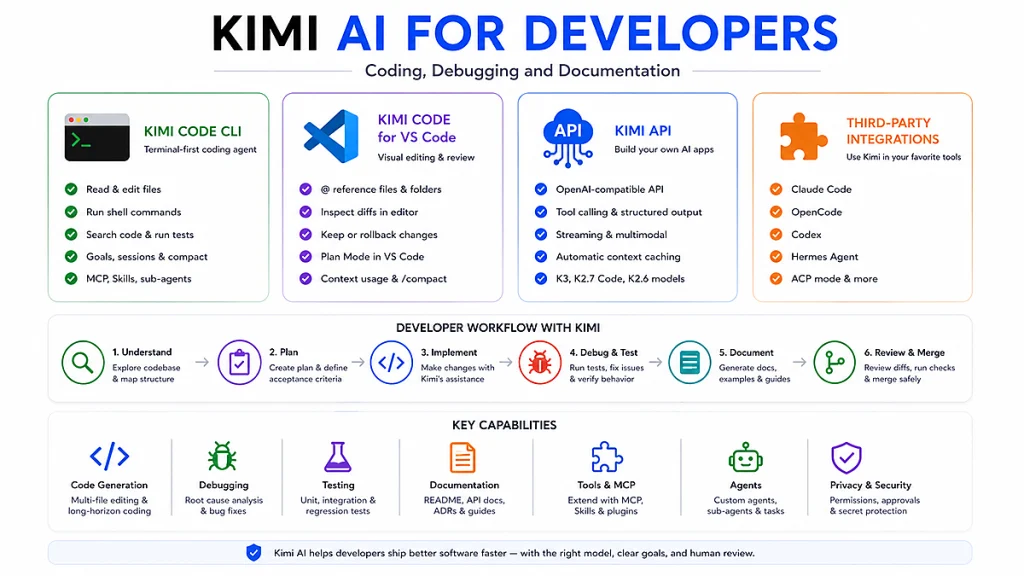
- Create a safe working state. Start a Git branch or isolated worktree and run the relevant baseline tests.
- Ask Kimi to inspect before editing. Use Plan Mode and request a repository map, affected files and risks.
- Define acceptance criteria. State the behavior, interfaces, compatibility requirements and tests that must pass.
- Approve a scoped plan. Reject plans that rewrite unrelated areas or introduce unnecessary dependencies.
- Apply small changes. Prefer reviewable increments instead of one enormous patch.
- Run independent checks. Tests, type checking, linting, builds, migrations and security checks should verify the change.
- Review the diff. Inspect every file and compare the implementation with the original requirements.
- Update documentation. Keep README, API docs, examples and migration instructions aligned with the code.
- Commit a checkpoint. Preserve a known-good state before beginning the next task.
Generation is not verification. A coding agent can produce a plausible implementation and run commands, but the developer remains responsible for correctness, security, compatibility and release approval.
Use Kimi to Understand an Existing Codebase
Start with read-only exploration. Do not ask for an immediate rewrite before Kimi understands the architecture, tests, conventions and deployment process.
Do not edit any files yet.

Map this repository and explain:

1. The application entry points.
2. The startup and request flow.
3. The main modules and their dependencies.
4. Where configuration and secrets are loaded.
5. The test structure and commands.
6. The build and deployment path.
7. The five files I should read first.

Cite file paths and relevant symbols for every major claim.
Mark anything you could not verify from the repository.
For a large repository, ask Kimi to delegate independent exploration tasks to sub-agents, then consolidate only their verified conclusions. This keeps the main context smaller, but each sub-agent independently consumes model capacity.
Build Features with Kimi AI
A good implementation request contains behavior, boundaries and evidence of completion.
Work in Plan Mode first.

Add a retry utility under src/utils with these requirements:

- Generic async function.
- Configurable maximum attempts.
- Exponential backoff with optional jitter.
- Preserve and throw the final error.
- No new production dependency.
- Unit tests for first-attempt success, recovery after failure,
  exhaustion, invalid options and cancellation.
- Update the relevant developer documentation.

Before editing:
1. Identify existing retry or timing utilities.
2. List affected files.
3. Explain compatibility risks.
4. Propose the smallest implementation.

After editing:
- Run the targeted tests.
- Run type checking and linting.
- Summarize changed files and remaining assumptions.
The acceptance criteria prevent the agent from declaring success after only creating a function. The task is complete when the implementation, tests, documentation and required checks agree.
Refactor Code with Kimi
Refactoring prompts should distinguish behavior-preserving work from feature changes.
Review @src/payments/ before making changes.

Refactor the payment-provider selection logic to remove duplication.

Constraints:
- Preserve the public API.
- Preserve current error codes and logging fields.
- Do not change database schemas.
- Do not add dependencies.
- Keep provider-specific behavior isolated.
- Add regression tests before changing implementation.

First return:
1. Current behavior and duplication points.
2. Proposed module boundaries.
3. A risk and rollback plan.

Wait for approval before editing files.
After the change, inspect the diff for accidental formatting churn, renamed public symbols, error-message changes and deleted edge-case handling.
Debug Code with Kimi AI
A weak debugging request says, “This does not work.” A strong request supplies a reproducible failure and asks Kimi to distinguish evidence from hypotheses.
Information to provide
- The observed symptom.
- Exact reproduction steps.
- Expected behavior.
- Actual behavior.
- Complete stack trace or failing-test output.
- Relevant files and recent changes.
- Operating system, runtime and dependency versions.
- Whether the problem is deterministic or intermittent.
- What you already tested.
Investigate this bug before editing files.

Symptom:
npm test intermittently fails with:
TypeError: Cannot read properties of undefined (reading 'id')
at SessionStore.update (src/session/store.ts:142:18)

Reproduction:
1. Run npm test -- session-store --repeat=50
2. Failure occurs approximately once every 15–25 runs.

Expected:
Every update uses an existing session record.

Actual:
The session sometimes disappears before update completes.

Recent change:
Commit abc123 introduced asynchronous cleanup.

Please:
1. Reproduce the failure.
2. List competing root-cause hypotheses.
3. Identify evidence for and against each hypothesis.
4. Find the smallest root-cause fix.
5. Add a regression test that fails before the fix.
6. Run the targeted suite repeatedly after the fix.
7. Do not suppress the error or add an arbitrary delay.
For multi-turn debugging with a clear finish line, use a Goal:
/goal Find why the release build fails, fix the root cause,
run the production build successfully, and summarize the evidence.
A Goal should specify what proves completion. Avoid broad instructions such as “find all bugs,” which provide no boundary or stopping condition.
Generate Tests with Kimi
Kimi can generate tests, but the request should require meaningful behavioral coverage rather than maximizing test count.
- Ask it to identify existing testing conventions first.
- Require a failing regression test for each confirmed bug.
- Cover success, failure, boundaries and concurrency where relevant.
- Avoid tests that only repeat the implementation.
- Require the actual test command to run.
- Check that tests can fail when the behavior is broken.
- Review mocks that bypass the code path being tested.
Review the current tests for @src/auth/token.ts.

Create a coverage plan before editing.

Add tests for:
- Valid access token.
- Expired token.
- Incorrect signature.
- Missing required claim.
- Clock-skew boundary.
- Key-rotation race.
- Malformed input.

Use the repository's existing test style.
Do not mock the function under test.
Run the targeted suite and report the exact command and result.
Create and Maintain Documentation with Kimi
Kimi Code supports project scanning and documentation generation through /init. Developers can also create targeted documentation grounded in repository files.
| Documentation type | What Kimi should verify |
|---|---|
| README | Installation, environment, commands, examples and tested prerequisites |
| Architecture overview | Entrypoints, modules, dependencies, data flow and deployment boundaries |
| API documentation | Actual routes, methods, schemas, status codes and authentication behavior |
| ADR | Context, decision, alternatives, consequences and date |
| Migration guide | Prerequisites, ordered steps, compatibility, rollback and validation |
| Runbook | Symptoms, metrics, diagnostics, safe actions, escalation and rollback |
| Docstrings | Real behavior, parameters, return values, exceptions and side effects |
| Changelog | Verified changes from commits or release metadata, not invented summaries |
Generate an architecture guide for this repository.

Requirements:
- Derive every statement from the current code or checked-in config.
- Cite file paths and important symbols.
- Include startup flow, request flow, data storage, background jobs,
  external dependencies and deployment boundaries.
- Add a Mermaid module diagram.
- Separate verified behavior from assumptions.
- Do not invent APIs, environment variables or commands.
- Test every command included in the documentation where safe.
- Save the result under docs/architecture.md.
Documentation generated by an AI can be polished and still be wrong. Review route names, commands, configuration keys, examples, version requirements and operational procedures against the source of truth.
Use Kimi for Code Review and Pull Requests
Ask Kimi to review before modifying. A code-review task should distinguish confirmed defects from optional improvements.
Review the current Git diff. Do not edit files.

Evaluate:
1. Correctness and edge cases.
2. Security and authorization.
3. Concurrency and failure handling.
4. Backward compatibility.
5. Database and migration safety.
6. Performance regressions.
7. Logging and observability.
8. Test coverage.
9. Documentation impact.

For every finding:
- Give severity.
- Cite file and line range.
- Explain the failure scenario.
- Suggest the smallest fix.
- Mark uncertain findings as hypotheses.

Do not include style-only comments unless they affect maintainability.
For a large review, a dedicated review sub-agent can inspect an independent area while the main agent handles context and consolidation. Sub-agent results still require human review and consume additional model capacity.
Use Goals and Background Tasks for Longer Work
Kimi Code Goals are designed for tasks that may require several turns but have a clear, verifiable finish line.
/goal Update the feature implementation, add documentation,
run the relevant tests, and summarize every changed file.
The CLI can inspect results, modify files, rerun checks and decide whether the stated evidence has been produced. Goals can be paused, resumed, replaced or cancelled.
Background tasks allow suitable shell commands and delegated work to continue while the agent performs another step. Current Kimi Code includes a WaitFor tool that lets the agent wait for a background task inside the same turn.
- Use background tasks for independent builds, test suites or exploration.
- Do not run destructive database or deployment actions unattended.
- Set timeouts and inspect saved output.
- Cancel tasks that no longer contribute to the goal.
- Do not assume that background completion means the result is correct.
Extend Kimi Code with MCP, Skills and Plugins
Model Context Protocol
Kimi Code CLI can act as an MCP client. MCP servers can expose tools for systems such as GitHub, issue trackers, databases, internal documentation and approved local services.
Use least-privilege credentials and prefer read-only access until a write action is genuinely required. A model should not receive unrestricted production-database or cloud-admin access simply because the MCP server supports it.
Agent Skills
A Kimi Code Skill is a Markdown file with YAML frontmatter that describes specialized knowledge or a workflow. Useful project Skills include:
- Code-style and architecture conventions.
- Pull-request review checklists.
- Commit-message standards.
- Release and migration procedures.
- Security-review requirements.
- Documentation templates.
- Framework-specific development workflows.
Project-level Skills can be stored under directories such as .kimi-code/skills/ or .agents/skills/, allowing the workflow to travel with the repository.
Plugins
Plugins can package Skills, custom agents, startup instructions and MCP server definitions into reusable units. They are useful for distributing a team workflow or connecting an approved service without manually configuring each developer environment.
Review plugin source, permissions, network destinations and credential requirements before installation.
Use Agents and Sub-agents Carefully
Kimi Code can delegate independent work to built-in or custom sub-agents. Examples include:
- An exploration agent mapping relevant files.
- A coding agent implementing one isolated component.
- A planning agent comparing approaches.
- A review agent examining security or tests.
Each sub-agent receives an isolated context and returns its final result to the main agent. This keeps exploratory logs out of the main conversation and allows independent work to run in parallel.
Isolation also creates limitations:
- The sub-agent does not automatically know the main conversation history.
- The task description must contain the necessary constraints.
- Each sub-agent consumes separate model tokens or quota.
- Parallel results can conflict.
- Permission rules can propagate from the main agent.
Use sub-agents only when the work is genuinely independent or context-heavy. A simple one-file change is normally cheaper and easier to verify with the main agent alone.
Use Kimi in Third-Party Developer Tools
Kimi publishes integration guidance for tools including Claude Code, OpenCode, Codex and Hermes Agent. Kimi Code CLI can also run in ACP mode so compatible IDEs can drive its sessions and tool calls.
Do not assume that every tool uses the same protocol:
- Some integrations use the Kimi Code endpoint and Kimi Code model IDs.
- The general Kimi API uses Moonshot Open Platform model IDs.
- Codex uses the OpenAI Responses API, while Kimi For Coding exposes Chat Completions; the current official setup therefore uses a local routing layer.
- A client can inject parameters, alter message history or apply its own retries and timeouts.
When an integration fails, test the Kimi endpoint directly before concluding that the model or account is broken.
Build Your Own Developer Tool with the Kimi API
The international Kimi API is compatible with the OpenAI Chat Completions format. Set the base URL to https://api.moonshot.ai/v1.
import os

from openai import OpenAI

api_key = os.environ.get("MOONSHOT_API_KEY")
if not api_key:
    raise RuntimeError("Set MOONSHOT_API_KEY before running this script.")

client = OpenAI(
    api_key=api_key,
    base_url="https://api.moonshot.ai/v1",
)

response = client.chat.completions.create(
    model="kimi-k2.7-code",
    messages=[
        {
            "role": "system",
            "content": (
                "You are a careful software reviewer. "
                "Do not invent files, APIs or test results."
            ),
        },
        {
            "role": "user",
            "content": (
                "Review the following patch for correctness, security, "
                "backward compatibility and missing tests.\n\n"
                "[INSERT A SANITIZED DIFF HERE]"
            ),
        },
    ],
    max_completion_tokens=4096,
)

print(response.choices[0].message.content or "")
For production use:
- Keep the API key on the server.
- Set explicit output limits.
- Validate structured output.
- Implement bounded retries.
- Log request IDs without logging secrets.
- Use a tool allowlist.
- Require confirmation for consequential writes.
- Preserve complete assistant and tool-call messages during multi-turn loops.
Use our Kimi API model guide to select a model, the pricing guide to estimate cost and the troubleshooting guide to design error handling.
Manage Context in Large Codebases
A large context window does not make it efficient to send an entire repository into every request.
- Let Kimi search for relevant files before reading everything.
- Reference only the required folders or files.
- Keep generated build artifacts and dependencies out of context.
- Summarize completed investigation stages.
- Use
/compactbefore the session becomes full. - Start a new session when the objective changes substantially.
- Use
/forkto test an alternative approach without corrupting the original context. - Use sub-agents for independent exploration that would flood the main session.
- Store stable architectural knowledge in project documentation or Skills.
K3 can provide up to a 1M-token context in supported routes, while K3-256K and K2.7 Code use 256K. More context can increase quota consumption, latency and review complexity. Use it when the task genuinely needs the additional information.
Security and Permission Controls
- Use a branch or worktree. Never let an initial AI run modify the only copy of important work.
- Keep confirmation enabled. Review file modifications and shell commands before execution.
- Avoid unrestricted autonomous modes in production repositories, infrastructure accounts and sensitive environments.
- Do not place secrets in prompts. Use environment variables and secret managers.
- Give MCP tools least privilege. Prefer read-only scopes and test accounts.
- Block destructive commands. Database deletion, cloud-resource removal and production deployment should require explicit approval.
- Review dependency changes. Verify package names, versions, licenses and maintenance status.
- Run security checks. Static analysis, secret scanning and dependency auditing remain necessary.
- Inspect generated commands. A command can be syntactically valid and still be unsafe for the current environment.
- Redact private data before using external APIs or public support channels.
AI-generated code should pass the same controls as code written by a human contributor. Autonomy increases the amount of output that can be produced before review; it does not reduce the need for review.
Kimi AI Developer Limitations
- Invented APIs: Kimi can propose functions, flags or package versions that do not exist.
- Plausible but incomplete fixes: a patch can address the visible symptom while leaving the root cause.
- Large unreviewable diffs: broad prompts can produce excessive unrelated changes.
- Security regressions: generated authentication, parsing and shell code require specialist review.
- Tool side effects: commands and external services can change real data.
- Context drift: long sessions can retain outdated assumptions after the code changes.
- Documentation drift: generated docs may describe intended behavior rather than actual behavior.
- Quota and cost: long contexts, sub-agents, retries and HighSpeed models can increase usage.
- Integration mismatch: third-party clients may transform requests or drop reasoning and tool state.
- Model changes: Kimi Code receives ongoing model and product updates, so behavior can change over time.
Kimi is not a substitute for code ownership, architecture judgment, security review, domain knowledge or release accountability.
A Practical Evaluation Before Team Adoption
- Select one non-critical repository with a reliable test suite.
- Create 10–20 representative tasks: explanation, bug fix, feature, refactor, tests and documentation.
- Record the starting commit and baseline test results.
- Use the same acceptance criteria for every model or tool being compared.
- Measure whether the task was completed correctly—not whether the answer sounded confident.
- Record changed files, human-review time, tests, retries, quota and cost.
- Track invented APIs, excessive edits, security findings and documentation errors.
- Compare CLI, VS Code and direct API workflows where relevant.
- Decide which tasks can be delegated, which require approval and which remain prohibited.
| Metric | What to record |
|---|---|
| Task completion | Whether all acceptance criteria were satisfied |
| Correctness | Test results and human review findings |
| Scope control | Unnecessary files or behavior changes |
| Security | Introduced vulnerabilities, secret exposure or unsafe commands |
| Review effort | Time required to understand and correct the result |
| Latency | Time to first useful plan and final verified result |
| Usage | Quota, tokens, retries and sub-agent consumption |
| Documentation quality | Verified facts, working commands and missing assumptions |
Who Should Use Kimi AI for Development?
| Scenario | Fit |
|---|---|
| Developer exploring an unfamiliar repository | Strong fit when used read-only first |
| Feature work with clear acceptance criteria and tests | Strong fit |
| Debugging reproducible failures | Strong fit |
| Generating or updating project documentation | Useful with source verification |
| Large repository or long engineering session | Strong K3 use case |
| Routine coding with lower quota consumption | K3-256K or K2.7 Code |
| Building a custom AI developer product | Use the Kimi API |
| Automatic production deployment without review | Poor and unsafe fit |
| Security-critical code without specialist review | Poor fit |
| Repository with no tests, no version control and unclear requirements | Prepare the engineering workflow first |
Frequently Asked Questions
Is Kimi AI good for developers?
Kimi is useful for repository analysis, coding, debugging, testing, code review and documentation. Its value depends on task clarity, tool permissions, test coverage and human review rather than model output alone.
What is the Kimi coding assistant called?
The primary first-party coding product is Kimi Code. It is available as a terminal CLI and a Visual Studio Code extension.
Can Kimi read an entire codebase?
Kimi Code can search and read repository files and K3 can support very large contexts. For efficiency, let the agent identify relevant files instead of placing the complete repository into every request.
Can Kimi edit files and run commands?
Yes. Kimi Code can edit files and run shell commands. Read-only operations run automatically by default, while modifications and shell commands normally require confirmation.
Can Kimi debug code?
Yes. Provide the symptom, reproduction steps, expected behavior, actual behavior, stack trace, environment and relevant files. Require a failing regression test and evidence that the fix resolves the root cause.
Can Kimi generate unit tests?
Yes. It can create and run unit, integration and regression tests. Developers should verify that the tests exercise the real behavior and can fail when the implementation is broken.
Can Kimi generate code documentation?
Yes. Kimi Code supports project scanning and documentation generation through /init. It can also create README files, architecture guides, API docs, ADRs, runbooks, migration guides and docstrings when grounded in the repository.
What is the difference between Kimi Code CLI and Kimi Code for VS Code?
The CLI is optimized for terminal-first workflows and automation. The VS Code extension provides a visual editor workflow with file references, native diffs, rollback and an integrated chat panel.
Which Kimi model is best for developers?
Use K3 for the largest and most difficult tasks, K3-256K for routine work with lower quota usage, K2.7 Code for dedicated programming tasks and K2.6 through the API when you need a general-purpose model or non-thinking mode.
What is Kimi Code HighSpeed?
It is a faster hosted version of K2.7 Code with the same coding behavior. It is useful when model output latency matters, but it consumes more quota or costs more through the direct API.
Does Kimi Code support MCP?
Yes. Kimi Code CLI can act as an MCP client and expose approved external tools to the agent alongside built-in file, search and shell tools.
What are Kimi Agent Skills?
Skills are Markdown-based reusable instructions for specialized knowledge or workflows, such as code style, pull-request review, commit messages or release procedures.
Does Kimi Code support sub-agents?
Yes. The main agent can delegate independent tasks to sub-agents with isolated contexts. Sub-agents can improve parallel exploration, but each consumes additional model resources and requires a complete task description.
Can I use Kimi with Claude Code or OpenCode?
Kimi publishes integration documentation for Claude Code, OpenCode, Codex and Hermes Agent. Use the exact endpoint, key type and model IDs documented for that integration rather than copying settings from the general API.
Can I build my own coding assistant with Kimi?
Yes. The Kimi API provides OpenAI-compatible model access, tool calling, structured output, multimodal input and streaming. Your application must implement repository access, authorization, tool execution, validation and user controls.
Is Kimi safe for production code?
Kimi can assist with production development, but its output should not be merged automatically. Use branches, permission controls, diff review, tests, security scans and human approval.
Can Kimi replace a software developer?
No. It can accelerate analysis and implementation, but developers remain responsible for requirements, architecture, security, correctness, operations and release decisions.
Official Sources and Update Methodology
This guide prioritizes current Kimi and Moonshot AI documentation. The main sources reviewed were:
- Kimi Code Overview
- Kimi Code CLI Getting Started
- Kimi Code Common Use Cases
- Kimi Code Goals
- Kimi Code for VS Code Quick Start
- Kimi Code for VS Code Core Operations
- Kimi Code Model Configuration
- Kimi Code MCP
- Kimi Code Agent Skills
- Kimi Code Plugins
- Kimi Code Agents and Sub-agents
- Kimi Code What’s New
- Kimi API Quickstart
- Kimi API Tool Calling
- Kimi K3 API Guide
- Kimi K2.6 API Guide
Developer surfaces, commands, model IDs and product capabilities were last checked on August 23, 2026. When the current Kimi Code documentation or model selector differs from this article, follow the current first-party documentation.
Last verified: August 23, 2026.