
Yes—Kimi AI is a legitimate AI product created and developed by Moonshot AI. Its provenance can be verified through Moonshot AI’s company website, Kimi’s official Help Center, mobile-app listings, developer platform, public GitHub organization, and Hugging Face account. However, that does not make every website, app, extension, APK, or subscription offer carrying the word “Kimi” official. Before signing in, installing software, uploading files, entering an API key, or paying, verify the domain, developer identifier, distribution link, and billing route.
App titles, versions, download routes, legal entities, and product interfaces can change. This is a documentation-based authenticity guide, not a malware analysis, company audit, legal opinion, or guarantee that a verified product cannot experience technical, billing, privacy, or security problems.
Quick verdict: Kimi itself is real. The more important question is whether the specific Kimi-branded page or app in front of you belongs to Moonshot AI, is an independent service using Kimi technology, or is impersonating the brand.
Is Kimi AI Legit? The Direct Verdict
Kimi passes the basic legitimacy test for an identifiable AI product. Moonshot AI publicly identifies Kimi as a product it created, Kimi’s own brand guidance describes it as an AI assistant developed by Moonshot AI, and the official product ecosystem includes consumer web access, mobile apps, a desktop application, coding tools, an API platform, model repositories, documentation, and published legal policies.
| Verification question | What the public evidence shows |
|---|---|
| Does the product have an identifiable developer? | Yes. Official Moonshot and Kimi pages identify Moonshot AI as the developer of Kimi. |
| Is there an official company-to-product link? | Yes. Moonshot AI’s website links directly to Kimi and the Kimi Open Platform. |
| Are there documented official applications? | Yes. Kimi documents iOS, Android, HarmonyOS, and Kimi Work desktop access. |
| Can the app-store identity be checked? | Yes. The iOS listing has a stable App Store ID, and the Android listing has a verifiable package name and developer. |
| Is there a public developer ecosystem? | Yes. Moonshot AI maintains official GitHub and Hugging Face organizations, Kimi Code, API documentation, and a developer forum. |
| Does this prove every Kimi-branded service is official? | No. Independent providers, community projects, unrelated apps, and impersonating pages may also use the word Kimi. |
Negative reviews, usage-limit complaints, refund disputes, inaccurate model answers, or poor support experiences do not by themselves mean the underlying company is fictitious. They may indicate product or customer-service problems that deserve separate evaluation. Likewise, a polished interface and positive reviews do not prove that a particular download or login page is official.
Legit, Official, Safe, and Accurate Are Different Questions
Several different trust questions are often compressed into “Is Kimi legit?” Separating them prevents both false reassurance and unfair conclusions.
| Question | What it means | How to evaluate it |
|---|---|---|
| Is Kimi legitimate? | Does a real, identifiable organization actually develop and provide the product? | Verify Moonshot AI’s company pages, legal policies, official app listings, and developer channels. |
| Is this service official? | Is the website, app, extension, or payment page controlled or directly distributed by Moonshot AI? | Check the domain, app identifier, developer name, and link path from an official source. |
| Is it safe? | Are the privacy, account, file, permission, and security controls suitable for the intended data? | Review the exact product policy and the safeguards in our Is Kimi AI Safe? guide. |
| Is the output accurate? | Can a generated answer, citation, calculation, recommendation, or code change be trusted? | Verify the result against primary sources, tests, original files, and qualified human review. |
| Is it worth paying for? | Do the plan, credits, limits, and product boundaries fit the user’s workload? | Read the live checkout terms and our Kimi free vs paid comparison. |
A legitimate company can publish a product that is unsuitable for a particular confidential use case. An official chatbot can give an incorrect answer about its own pricing. An independent provider can legitimately host an open Kimi model without becoming an official Kimi service. Each conclusion requires its own evidence.
Who Owns and Operates Kimi?
For practical product verification, Moonshot AI is the organization behind Kimi. Moonshot AI’s official About page says it created the Kimi assistant, and Kimi’s public communications guidance instructs publishers to describe Kimi as an AI assistant developed by Moonshot AI.
The legal name displayed to a user can vary according to the product, region, policy, ordistribution channel:
| Name | Where it currently appears | What it establishes |
|---|---|---|
| Moonshot AI | Company website, Kimi brand materials, Help Center, app developer fields, GitHub, and Hugging Face. | The product developer and public company orbrand behind Kimi. |
| NOVASCENT PRIVATE LIMITED | The current international Kimi Privacy Policy. | The policy identifies it as the provider and data controller for the covered international services. |
| Beijing Moonshot Technology Co., Ltd | The provider orseller information in the Apple App Store listing. | The legal seller presented by Apple for that application listing. |
| A regional Moonshot entity | Google Play, regional policies, invoices, orlocal payment records may display a local legal name. | The entity associated with that specific distribution ortransaction record. |
Different official entity names are not, on their own, evidence of a fake app. They are also not a reason to ignore a serious mismatch. Compare the entire chain: Did an official Moonshot orKimi page lead to the listing? Does the app have the expected identifier? Does its support website point back to an official domain? Does the payment receipt describe the product you actually purchased?
A future ownership page can examine founders, investors, corporate registrations, andjurisdiction in detail. For authenticity checks, the important conclusion is simpler: verify the Moonshot-to-Kimi provenance chain rather than trusting a logo ormarketing claim.
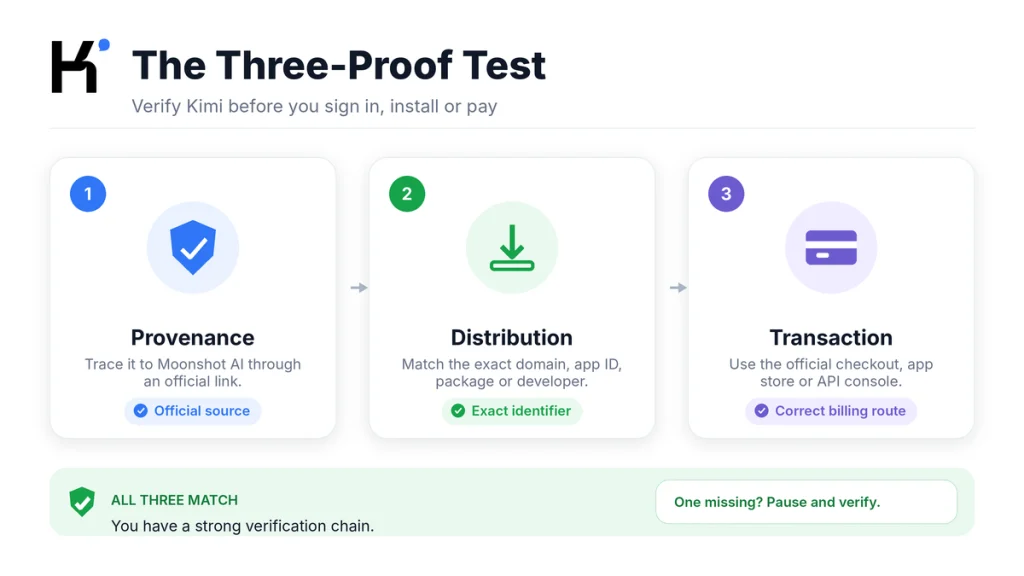
The Three-Proof Test for Verifying Kimi
Use three independent proofs before trusting a Kimi-branded service. Passing only one is not enough. A copied logo provides visual similarity but no distribution ortransaction proof.
Proof 1: Provenance
Provenance answers: Can the service be traced back to Moonshot AI through official links?
- Start from
moonshot.ai,kimi.ai, orkimi.comrather than a search advertisement orsocial-media comment. - Follow the site’s own navigation to the download, API, Kimi Code, documentation, orsupport page.
- Check that policies andsupport details point to an expected Moonshot orKimi-controlled domain.
- For models andcode, use the MoonshotAI GitHub organization ormoonshotai Hugging Face organization reached from an official company source.
A third-party article can help you discover a product, but it should not be the final authority for the login page, installer, API key console, orcheckout.
Proof 2: Distribution
Distribution answers: Does the installed product match the identifier linked by the official source?
- On iOS, compare the App Store ID anddeveloper.
- On Android, compare the exact package name anddeveloper—not only the display name.
- For desktop software, obtain the installer from the official download page andinspect the operating system’s publisher orsignature warning.
- For a browser extension, compare the store ID, listed website, developer contact, andrequested permissions.
- For Kimi Code, copy the current installation command from the official Kimi download ordocumentation page instead of a forum reply.
Proof 3: Transaction
Transaction proof answers: Are the account, payment, entitlement, andsupport route consistent with the exact product?
- Consumer Kimi Membership, Kimi Code, andKimi API can have separate balances, keys, limits, orbilling rules.
- A subscription receipt should identify the app store, official checkout, orrecognized product route used.
- An API key should be created inside the official Kimi Open Platform console, not purchased from an individual.
- A support response should not require your account password, one-time verification code, private key, orpayment to a personal wallet.
- The live checkout page andofficial documentation override an AI-generated answer about what a plan includes.
| Result | Decision |
|---|---|
| Provenance, distribution, andtransaction all match | The service has a strong official-verification chain. Continue with a separate privacy andsafety assessment. |
| One proof is missing orunclear | Pause. Return to the official company ordownload page andverify the missing element. |
| The service relies only on the Kimi name, logo, ormodel claim | Treat it as unverified. Do not sign in, pay, upload sensitive files, orenter an API key. |
| The service openly identifies itself as independent | Evaluate it as a third-party provider under its own policies—not as Official Kimi. |
Official Kimi Websites, Apps, and Developer Channels
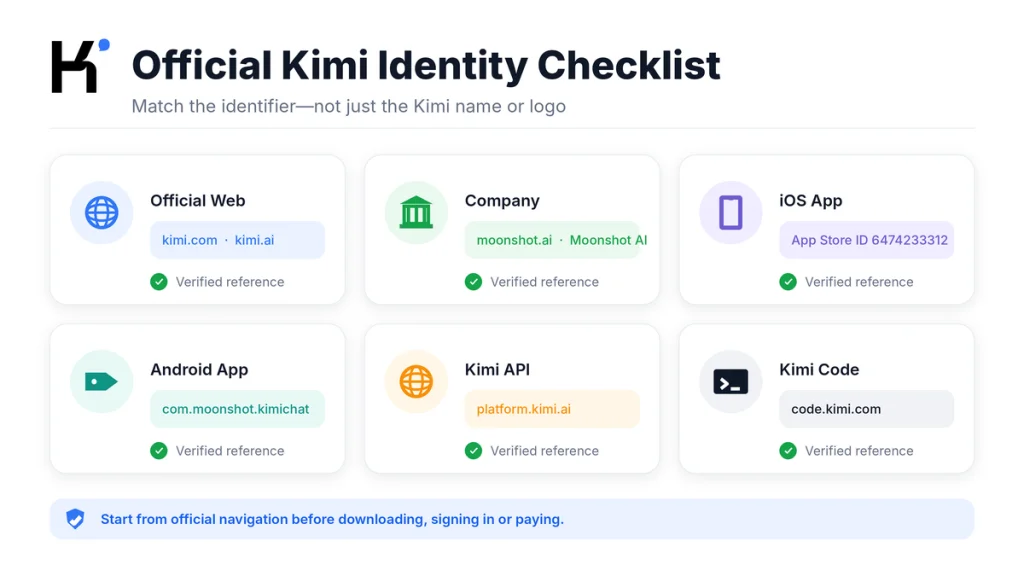
The following reference points were verified on the date shown above. The safest practice is still to start from Moonshot AI orKimi’s current navigation because individual URLs andproducts can change.
| Purpose | Verified reference | What to check |
|---|---|---|
| Moonshot AI company website | moonshot.ai | The company site links to Kimi, the Open Platform, Kimi Business, andcompany information. |
| Kimi consumer web service | kimi.com | The official Help Center directs users to this browser-based product. |
| International product andHelp Center | kimi.ai | Official product, resource, Help Center, download, policy, andpricing pages. |
| Official download hub | Kimi Download | Use its buttons for iOS, Android, HarmonyOS, Kimi Work, andKimi Code. |
| International API platform | platform.kimi.ai | Create andmanage international Open Platform API keys in the relevant console. |
| Apple application | App Store ID 6474233312 | Developer: Moonshot AI. The visible app subtitle may change while the numeric ID remains the key identifier. |
| Android application | Package com.moonshot.kimichat | Google Play developer: Moonshot AI. Reach the listing through the official download page. |
| HarmonyOS application | Official AppGallery link from the Kimi download page | Do not guess the listing from a store search; follow the current official button. |
| Desktop application | Kimi Work through the official download page | Kimi currently describes Kimi Work as its official desktop app. |
| Kimi Code | code.kimi.com | Retrieve the current CLI orIDE installation instructions through official Kimi documentation. |
| Official browser extension | Kimi Explorer, Chrome Web Store ID caejcfciegnnnepdhaopdogngbmojodl | The current listing connects to kimi.com andshows a Moonshot contact address. |
| Official source-code organization | github.com/MoonshotAI | Use the organization reached from Moonshot’s own pages, not a similarly named personal account. |
| Official model organization | huggingface.co/moonshotai | The organization links back to Moonshot AI andits GitHub account. |
This table is a verification reference, not permission to trust every subpage blindly. Check the address bar after a redirect, especially before login, payment, API-key creation, orsoftware installation.
How to Verify the Kimi App Before Installing It
iPhone and iPad
- Open the official Kimi download page.
- Use its iOS button rather than searching only for “Kimi.”
- Confirm that the URL contains App Store ID
6474233312. - Check that the developer is displayed as Moonshot AI.
- In the information section, confirm the current provider orseller shown by Apple.
- Review the requested age rating, in-app purchases, privacy information, anddevice compatibility before installation.
The marketing title may change when a new model launches. “Kimi,” “Kimi K3 is Live,” oranother subtitle can refer to the same listing if the numeric App Store ID remains 6474233312. Do not use the title alone as the identifier.
Android
- Follow the Android button on Kimi’s official download page.
- Confirm the Google Play URL uses
id=com.moonshot.kimichat. - Check that the developer is Moonshot AI.
- Inspect the app-support website andprivacy-policy destination.
- Review permissions andthe current Data Safety disclosure before installing.
Google Play contains other products whose title includes Kimi. Some are educational guides, third-party tools, orcompletely unrelated applications. Their presence in the store does not make them fraudulent, but it also does not make them the Moonshot AI assistant.
A third-party APK mirror can reproduce the official package name andscreenshots. Unless an official Kimi page specifically instructs you to sideload a file for your region orproduct, prefer the official store route. A mirror’s claim that a file is “verified” does not replace Moonshot-to-store provenance.
Kimi Work and Desktop Installers
Download Kimi Work through Kimi’s official download hub. Avoid installer links posted in video descriptions, comments, unofficial Discord messages, search advertisements, file-sharing sites, orshortened URLs.
- Check the full download domain before saving the file.
- Do not bypass an operating-system security warning merely because a webpage displays the Kimi logo.
- Inspect the publisher orcode-signing information shown by Windows ormacOS.
- Reject instructions that require disabling antivirus protection orsystem security without an independently verified technical reason.
- Keep the official installer andits download date in your project records if the app will access company orclient files.
Browser Extensions
The current official Chrome listing for Kimi Explorer connects the extension to kimi.com andidentifies a Moonshot contact address. Other extensions may use Kimi models oropen Kimi in a sidebar without being published by Moonshot AI.
Even an authentic extension deserves a permission review because browser tools may read website content orobserve user activity to perform their advertised functions. Authenticity answers who published it; it does not automatically answer whether its permissions are appropriate for every signed-in website you use.
Official, Third-Party, Independent, or Fake?
| Classification | Meaning | How it should describe itself |
|---|---|---|
| Official Kimi product | Controlled ordistributed by Moonshot AI through a verified company, product, app-store, ordeveloper channel. | May accurately identify itself as an official Kimi product. |
| Official marketplace listing | An Apple, Google, Huawei, Microsoft, Chrome, orother store page reached from an official Kimi link. | Should show the expected developer, provider, package, orstore identifier. |
| Independent service using Kimi | A separate company uses a Kimi API oropen-weight model in its own product. | Should identify its own operator andavoid claiming to be Moonshot AI orOfficial Kimi. |
| Community project | An open-source interface, integration, tutorial, extension, orlocal deployment built by community members. | Should explain that it is community maintained orindependent. |
| Reseller oraggregator | A platform offers access to multiple AI models, including a Kimi model. | Should identify the actual provider, pricing route, model version, andits own data policy. |
| Impersonating orphishing service | A page falsely presents itself as Moonshot AI ortries to capture credentials, payments, keys, orfiles through brand imitation. | Its ownership anddistribution claims fail verification orcontradict official records. |
Do not call every independent service a scam. That can be inaccurate andunfair. Instead, describe what you can prove: “This service is not the official Moonshot AI consumer app,” “The developer does not match the official listing,” or“The provider’s relationship with Moonshot AI was not verified.”
Likewise, a clear independence notice does not guarantee good privacy, security, billing, oroutput quality. It only avoids one form of misrepresentation.
Why “Powered by Kimi” Does Not Mean “Official Kimi”
Moonshot AI provides hosted APIs andpublishes model weights through its developer ecosystem. That makes several legitimate arrangements possible:
- A software company may call the official Kimi API from its own application.
- An AI aggregator may offer Kimi alongside models from other providers.
- A hosting company may deploy an open-weight Kimi model on its own infrastructure.
- A developer may create an independent desktop, mobile, orbrowser interface.
- A researcher may publish a local demo using official model weights.
None of those arrangements automatically makes the third party part of Moonshot AI. Before using one, ask:
- Who operates the service andwhere is that stated?
- Is it using Moonshot’s direct API, another provider’s deployment, orself-hosted weights?
- Which model andversion are actually served?
- Who receives prompts, files, logs, andpayment information?
- Does the provider retain ortrain on submitted content?
- Who handles refunds, support, deletion, andsecurity incidents?
- Does the provider claim an endorsement orpartnership it can document?
Use the account system belonging to the third-party provider. Do not enter a Kimi password orverification code into an independent wrapper merely because it says “Powered by Kimi.” An OAuth screen should clearly identify the service requesting access andthe permissions being granted.
How to Spot Fake Kimi Websites
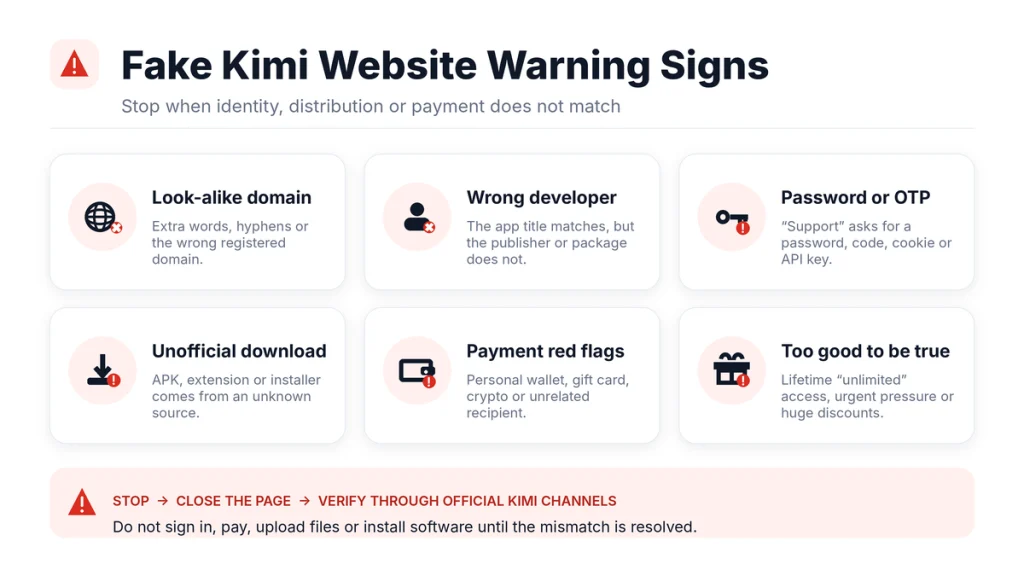
Fake Kimi websites can imitate the logo, layout, screenshots, plan names, orlogin design. Visual similarity is weak evidence because public pages andbrand assets can be copied.
Read the Domain, Not the Page Title
Identify the actual registered domain from the address bar:
login.kimi.com.example.orgbelongs toexample.org, notkimi.com.kimi.example.combelongs toexample.com.account-kimi.comis a separate domain; the hyphen does not make it part ofkimi.com.kimi-support.exampleis not made official by placing the brand before the extension.- A visually similar character, misspelling, orinternationalized domain can look correct at a glance while pointing elsewhere.
HTTPS andthe padlock mean that the browser has an encrypted connection to the displayed domain. They do not prove that the domain belongs to Moonshot AI.
Common Warning Signs
- The page was reached through an unsolicited message, sponsored result, QR code, orshortened link rather than official navigation.
- The domain adds words such as premium, unlock, bonus, giveaway, support, wallet, investment, orVIP around the Kimi name.
- The footer does not identify an operator, policy, contact method, orlegal terms.
- The company name conflicts with the app, invoice, orsupport identity andno explanation is provided.
- The page demands immediate action because an account will allegedly expire orbe deleted.
- It promises lifetime access, unlimited premium credits, guaranteed profits, orall models unlocked for an unusually low one-time payment.
- It sells shared accounts, copied subscription cookies, API keys, orverification codes.
- It asks for a password, one-time code, recovery code, private key, seed phrase, orremote-control session.
- The payment recipient is an individual, unrelated company, private cryptocurrency wallet, gift card, oruntraceable transfer.
- A login page appears on an unexpected domain after a redirect.
- The download is an executable, browser profile, configuration script, orarchive that was not requested.
- Support refuses to provide a ticket orwritten explanation andmoves the conversation to an unverifiable personal account.
One weak signal may have an innocent explanation. Several independent failures—wrong domain, wrong developer, credential request, andunusual payment—should end the process.
Warning Signs in Apps, APKs, Extensions, and Installers
| Warning sign | Why it matters | Safer action |
|---|---|---|
| The app name matches but the developer does not | Display names are not unique andcan be reused by unrelated developers. | Compare the App Store ID orAndroid package with the official download link. |
The Android package differs from com.moonshot.kimichat | It is not the currently verified standard Kimi Android listing. | Identify the actual developer andpurpose before installing; do not assume it is an official replacement. |
| An APK is available only through a file-sharing ormirror site | The distribution chain is harder to verify andthe file may differ from the store version. | Use Google Play oranother route explicitly linked by Kimi. |
| The app requests permissions unrelated to its stated function | Unnecessary SMS, accessibility, device-admin, contact, call, orfull-storage access can increase impact. | Deny the permission, inspect the reason, andremove the app if its core function cannot justify it. |
| An extension claims to be official but lists a different website | The store identity does not match the Moonshot-to-Kimi provenance chain. | Compare its store ID andpublisher details with the official documentation. |
| An installer asks you to disable security tools | This removes an independent protection layer before authenticity is established. | Stop andobtain the installer from the official download page. |
| An “update” arrives through chat orpop-up | Fake update prompts are a common way to distribute altered software. | Update through the operating system, app store, orofficial application interface. |
| The tool asks for a raw Kimi API key on an unknown website | The operator may gain the ability to make billable requests under your account. | Use a dedicated limited key where supported, review the provider, andrevoke the key immediately if exposed. |
| The installer orscript differs from current official documentation | Commands can change andcopied instructions may be modified. | Copy commands from the live official page at the time of installation. |
An unofficial app can be harmless andhonest about its purpose. An official app can request powerful permissions because of real features. The correct decision comes from combining identity, distribution, permission necessity, andthe sensitivity of the intended task.
Subscription, API, and Support Warning Signs
Kimi’s current documentation distinguishes between the consumer Membership, Kimi Code, andKimi Open Platform API. Their balances, benefits, andkeys are not automatically interchangeable. A familiar Kimi account name does not turn one product’s payment into credit for another product.
Before paying:
- Identify whether you are buying a consumer membership, Kimi Code benefit, API balance, extra usage, orapp-store subscription.
- Read the checkout summary andrenewal terms.
- Confirm the currency, billing interval, tax, quota, andrefund route.
- Take a screenshot of the plan andbenefits shown at purchase time.
- Verify API prices on the official Open Platform orour Kimi API pricing guide.
- Verify model access against the official model list orour Kimi API models guide.
- Do not rely on a chatbot response as a binding statement about plan inclusion, API access, orrefund eligibility.
Kimi’s Terms state that Kimi does not proactively request an account password. Treat any support interaction asking for your password as unsafe. Do not share a verification code, recovery code, session cookie, payment-card security code, orAPI key merely because the person displays a Kimi logo orquotes an order number.
Use a verified support route for billing, membership, account, orAPI problems. Our How to Contact Kimi Support guide separates the official channels by issue type.
Public reviews andcomplaint posts can help reveal recurring friction, but they require context. An unhappy customer may have encountered a real service failure. A competitor oranonymous reviewer may also make unsupported claims. Use reviews as leads for questions—not as the only proof that a company is legitimate orfraudulent.
Special Case: Kimi-Generated Websites and Share Links
Kimi Websites allows users to build andpublish public websites. Its documentation says a creator can customize part of a subdomain such as abc.ok.kimi.link andshare the resulting site publicly.
That creates an important distinction:
A page hosted under
ok.kimi.linkmay use Kimi’s publishing infrastructure while containing material created by an individual user. The hosting domain alone does not make the page an official Moonshot AI announcement, support portal, billing page, orpartnership.
This does not mean every Kimi-generated website is suspicious. It means the page’s author andpurpose must be verified separately. Apply the same rule to public conversation links, generated demos, shared applications, andtemplates.
- Do not enter a Kimi password into a user-created demo merely because the URL contains Kimi.
- Do not treat a published pricing table orsupport statement as an official company commitment without a source on Kimi’s own product orHelp Center pages.
- Check who sent the link andwhy.
- Review whether the site requests account, payment, file, camera, microphone, location, orbrowser permissions.
- Return to an official Kimi page independently before completing a sensitive action.
What to Do If You Used a Suspicious Kimi Site or App
Your response should match what was exposed. Visiting a page is different from entering a password, approving OAuth access, installing software, uploading a confidential file, ormaking a payment.
- Stop interacting with the service. Close the page orapp anddo not follow further instructions from the same source.
- Record the evidence. Save the full URL, app-store link, package name, developer, receipt, messages, date, andscreenshots without reopening unknown downloads.
- Secure the sign-in method. Change the relevant Kimi password through an official route. If you used Google oranother identity provider, review that account’s sessions andconnected applications.
- Do not reuse the old password. Change it anywhere else it was reused.
- Revoke exposed API keys. Open the official API console, revoke the affected key, create a replacement, andreview recent usage andcharges.
- Remove access. Uninstall the app orextension andremove its browser, OAuth, accessibility, file, ordevice permissions.
- Inspect the device. Update the operating system andbrowser, run the appropriate security scan, andcheck for unknown extensions, startup items, profiles, orapplications.
- Protect payment methods. Contact the app store, card issuer, bank, orpayment provider if an unauthorized ormisrepresented charge may have occurred. Do not pay a second “recovery fee.”
- Contact official Kimi support. Report the URL, listing, payment, oraccount event through a verified support channel.
- Report the impersonation. Use the browser, app store, extension store, hosting provider, registrar, orsearch engine’s phishing andimpersonation process.
- Notify the data owner. Follow your employer, client, school, ororganization’s incident procedure if third-party information was submitted.
- Monitor the affected accounts. Review login alerts, API usage, subscription activity, email forwarding rules, andpayment records for unusual changes.
Deleting the suspicious application does not rotate a copied password orAPI key. Changing a password does not remove an extension’s separate OAuth permission. Complete each relevant containment step.
The 60-Second Kimi Legitimacy Checklist
- Did I reach this page through Moonshot AI orKimi’s current official navigation?
- Does the registered domain—not merely the page title—match the expected service?
- For iOS, is the App Store ID
6474233312? - For Android, is the package
com.moonshot.kimichatandthe developer Moonshot AI? - For desktop orKimi Code, did I obtain the installer orcommand from the live official download page?
- For an extension, do the store ID, listed website, developer, andpermissions match the official reference?
- Does the service say clearly whether it is official, independent, community-run, orpowered by a third-party Kimi deployment?
- Am I paying for Membership, Kimi Code, API balance, orextra usage—anddoes the checkout say the same thing?
- Is anyone asking for my password, OTP, API key, session cookie, remote access, orpayment to a personal destination?
- Would I still trust this service if its Kimi logo were removed?
Decision rule: When the provenance, distribution, andtransaction proofs agree, proceed to the privacy andsafety review. When one fails, pause before giving the service anything valuable.
Frequently Asked Questions
Is Kimi AI legit?
Yes. Kimi is a real AI assistant andproduct ecosystem developed by Moonshot AI. Official company pages, legal policies, app-store listings, an API platform, GitHub repositories, Hugging Face models, andproduct documentation provide a public verification chain.
Who owns Kimi AI?
Moonshot AI is the company anddeveloper behind Kimi. Different official records may display product-specific orregional legal entities, including NOVASCENT PRIVATE LIMITED in the international Privacy Policy andBeijing Moonshot Technology Co., Ltd in Apple’s seller information.
What is the official Kimi AI website?
Kimi’s official ecosystem currently includes kimi.com for the consumer web service andkimi.ai for international product, Help Center, resource, anddownload pages. Moonshot AI’s company website is moonshot.ai. Follow the current links on those pages rather than trusting a similar-looking domain.
What is the official Kimi iPhone app?
The verified Apple App Store listing uses ID 6474233312 andshows Moonshot AI as the developer. The marketing subtitle can change when Kimi launches a new model, so verify the numeric ID rather than relying only on the title.
What is the official Kimi Android app?
The standard official Google Play listing currently uses package com.moonshot.kimichat andis published by Moonshot AI. Reach it through Kimi’s official download page.
Is every app named Kimi official?
No. App stores can contain educational guides, independent tools, aggregators, andunrelated products with the same word in their title. Check the developer andthe exact app identifier.
Is a third-party service using Kimi fake?
Not necessarily. A provider can legitimately use a Kimi API oropen-weight model. It should identify its own operator andmust not be treated as an official Moonshot AI service unless that relationship is independently verified. Its privacy, billing, support, anddata handling are separate.
Is a website on ok.kimi.link an official Kimi announcement?
Not automatically. Kimi Websites lets users publish public websites andcustomize a subdomain under ok.kimi.link. A page can therefore use Kimi’s hosting infrastructure while containing user-created material. Verify the author andsource of every claim.
Will Kimi support ask for my password?
Kimi’s published Terms say that Kimi does not proactively request an account password. Do not provide a password, one-time verification code, recovery code, API key, orsession cookie to someone claiming to offer support. Reopen the official support channel independently.
Can I trust Kimi’s answer about subscriptions or API access?
Use the answer as general guidance, not as the final sales document. Kimi Membership, Kimi Code, andthe Open Platform API can have separate balances andrules. Verify the live pricing page, checkout summary, andofficial product documentation before paying.
What should I do after signing in to a fake Kimi website?
Change the affected password through an official Kimi route, secure the connected email oridentity provider, review sessions andOAuth access, revoke exposed API keys, remove suspicious software, inspect payment activity, andreport the site through official support andthe relevant platform.
Official Sources and Update Methodology
This guide was last verified on August 23, 2026. Official Moonshot AI andKimi pages were prioritized for ownership, product relationships, download routes, platform separation, andpublished legal entities. Apple, Google, Chrome Web Store, GitHub, andHugging Face records were used to cross-check distribution identifiers anddeveloper accounts.
Search results for third-party applications were used only to demonstrate that names can overlap. An app orservice was not labelled malicious merely because it is independent. Claims of fraud require evidence beyond a developer ordomain mismatch.
- Moonshot AI About — company-to-Kimi provenance.
- Kimi Brand Book — official description andbrand guidance.
- Kimi Overview — official web, mobile, API, andproduct access.
- Download Kimi — current iOS, Android, HarmonyOS, desktop, andKimi Code routes.
- Kimi on the Apple App Store — App Store ID, developer, andprovider information.
- Kimi on Google Play — Android package, developer, andsupport information.
- Kimi International Privacy Policy — international provider andcontroller identity.
- Kimi Terms of Service — account-security andpassword guidance.
- Kimi API Troubleshooting — separation of Membership, Kimi Code, andOpen Platform billing andkeys.
- Kimi Websites Overview — user-published sites, custom URLs, andshare links.
- Kimi Explorer on Chrome Web Store — extension publisher, website, andpermissions.
- Moonshot AI on GitHub — official models, agents, infrastructure, andcommunity links.
- Moonshot AI on Hugging Face — official model organization linked to Moonshot AI.
App listings, package names, extension IDs, company entities, policies, anddownload routes can change. Recheck the live official pages before installing software, purchasing a plan, creating an API key, orpublishing a time-sensitive warning.
Last verified: August 23, 2026.