
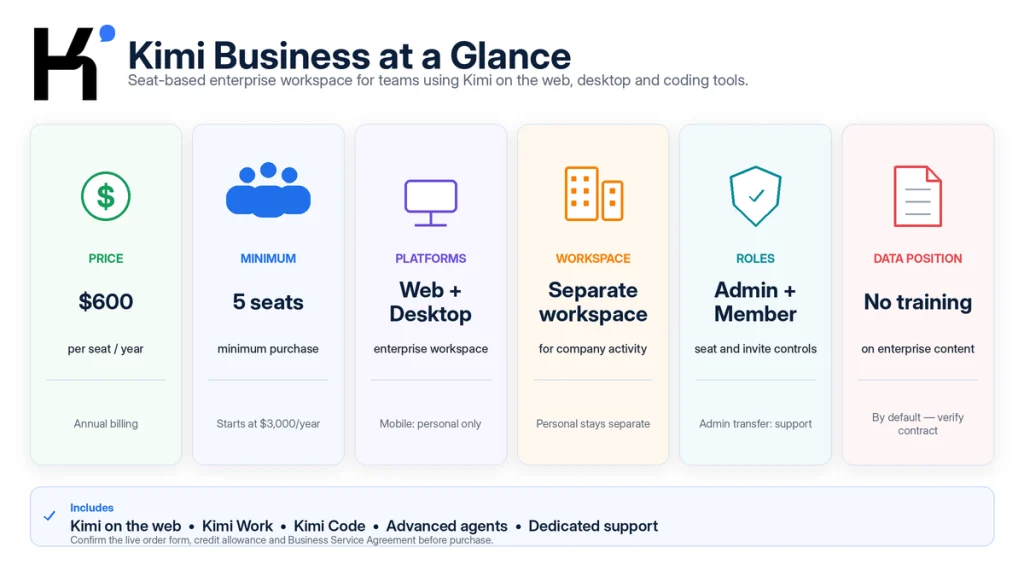
Kimi Business is Moonshot AI’s annual, seat-based Kimi plan for organizations. It provides a separate enterprise workspace, basic administrator and member management, Kimi on the web, Kimi Work, Kimi Code, advanced Agent features, and Kimi’s published no-training-by-default protection for enterprise content. The current public price is $600 per seat per year, with a five-seat minimum and a $3,000 starting annual purchase. It is designed mainly for small and medium-sized teams—not as a replacement for Kimi API billing, a private deployment, or a complete identity-governance platform.
Prices, seat rules, included credits, product access, security commitments, and enterprise terms can change. This article is based on public documentation; it is not a signed-in checkout test, contract review, security assessment, compliance certification, or legal opinion.
Practical verdict: Kimi Business is most useful when a team needs company-managed seats, a clear boundary between personal and work activity, advanced Kimi tools, and a business-specific data position. It is less compelling when the team only needs a few inexpensive personal accounts or when procurement requires enterprise controls that have not been verified in the public product documentation.
What Is Kimi Business?
Kimi Business is the organization-focused version of Kimi’s hosted workspace. It gives employees access to Kimi through an enterprise workspace while giving an administrator basic control over seats, invitations, members, and orders.
The plan brings together three major ways of working:
- Kimi on the web: Chat, Agent, Deep Research, Docs, Sheets, Slides, Websites, search, files, and other hosted features.
- Kimi Work: Desktop workflows involving authorized local folders, browser actions, scheduled tasks, Goal Mode, and professional deliverables.
- Kimi Code: Coding workflows in a terminal, IDE, or supported third-party development tool.
Kimi Business is not simply a personal plan paid with a company card. It creates a separate enterprise workspace and a distinct organization membership. A user can retain a personal Kimi membership while also belonging to one or more Kimi Business organizations.
The public product name is Kimi Business. “Kimi Enterprise” is also used in some purchase paths and search queries, but the order, workspace, and governing agreement should identify the exact service the organization is buying.
Kimi Business at a Glance
| Attribute | Current public position |
|---|---|
| Product type | Annual, seat-based AI workspace for organizations |
| Public price | $600 per seat per year |
| Effective seat-month | Approximately $50 per seat per month, billed annually |
| Minimum purchase | 5 seats |
| Published starting cost | $3,000 per year before applicable taxes or extras |
| Public plan count | One documented Business plan rather than multiple Business tiers |
| Billing term | Annual |
| Additional seats | Can be added during the term and are prorated to the existing expiry date |
| Roles | Administrator and Member |
| Workspaces | Personal Workspace and Enterprise Workspace |
| Platforms | Web and desktop; enterprise features are not currently available in the mobile app |
| Published context benefit | Up to 1 million tokens for long conversations |
| Included product surfaces | Kimi web, Kimi Work, and Kimi Code |
| Published data position | Enterprise content is not used for model training by default |
| Support | Dedicated technical support and priority enterprise channels |
The table describes public product documentation, not every contractual entitlement. The accepted order, checkout page, Business Service Agreement, and any separately signed enterprise contract control the actual purchase.
Kimi Business Plans and Pricing
Despite the frequent search for “Kimi Business plans,” Kimi currently publishes one standard self-service Business plan rather than a Moderato-to-Vivace Business lineup.
| Pricing item | Documented value |
|---|---|
| Price per seat | $600 per year |
| Minimum number of seats | 5 |
| Minimum initial annual total | $3,000 |
| Monthly billing | No standard monthly Business billing is documented; the public plan is annual |
| Adding seats | Allowed during the subscription period |
| Added-seat price | Prorated for the remaining days in the current term |
| Added-seat expiry | The same expiry date as the organization’s original subscription |
| Corporate transfer | Supported through the documented enterprise payment process |
| Custom contract | Available through Sales for eligible enterprise requirements |
How Does the Cost Compare With Personal Memberships?
The following table compares published annual list prices for five users. It is a cost illustration—not an entitlement comparison. Personal plans and Kimi Business do not provide identical credits, controls, data terms, or support.
| Route for five users | Annual list cost | Centralized seats and enterprise workspace |
|---|---|---|
| Five Moderato annual memberships | $900 | No |
| Five Allegretto annual memberships | $1,860 | No |
| Five Kimi Business seats | $3,000 | Yes |
| Five Allegro annual memberships | $4,740 | No |
| Five Vivace annual memberships | $9,540 | No |
Kimi Business is therefore not automatically the cheapest route for a five-person team. It becomes easier to justify when the organization values workspace separation, seat administration, business-specific data terms, dedicated support, advanced feature access, and a company-owned purchasing relationship.
The current public English Business pages say members receive the full credit allowance for the current period and that enterprise benefits refresh monthly. They do not publish a stable numeric per-seat credit allowance in the Help pages reviewed for this article. Confirm that number in the live checkout, order, or written offer before budgeting a fixed workload.
What Does Each Kimi Business Seat Include?
Kimi’s public Business materials describe the following benefits.
| Benefit | What it provides | What it does not automatically prove |
|---|---|---|
| Enterprise Workspace | A separate place for organization benefits, conversations, and enterprise-related data | A customer-selected physical server, region, or private deployment |
| Up to 1M context | Access to extra-long conversations for supported workflows | Perfect retrieval from every million-token prompt or file set |
| Kimi Agent | Multi-step task planning, tool use, and deliverable creation | Unsupervised approval for high-impact actions |
| Agent Swarm | Parallel processing for tasks that can be divided into independent branches | Unlimited sub-agents or guaranteed higher quality |
| Kimi Work | Desktop access to authorized local files, browser workflows, tasks, and deliverables | Fully offline model inference or unrestricted device access |
| Kimi Code | AI-assisted software-development workflows in supported terminals and IDEs | Kimi Open Platform API balance or unlimited coding use |
| Dashboard and Plugins | Interactive team workflows and connections to supported applications or data sources | That every plugin is available in every region or approved by the organization |
| Docs, Sheets, Slides, and Websites | Creation of reports, spreadsheets, presentations, PDFs, websites, and other outputs | That the generated deliverable is accurate, compliant, or publication-ready |
| Dedicated support | Business-specific technical support channels | A particular response time, uptime commitment, or remedy unless stated in the contract |
The phrase “all advanced features” should not be read as a permanent promise that every experimental capability, regional plugin, or future feature is included without a limit. Record the feature list and allowances shown in the accepted order.
Kimi Business vs Personal Membership vs Kimi API
These are separate products with different buyers, controls, and billing systems.
| Product | Designed for | Billing | Main control | Important boundary |
|---|---|---|---|---|
| Personal Kimi Membership | One individual using Kimi’s hosted features | Monthly or annual subscription | The individual manages the account and plan | No organization seat management or Enterprise Workspace |
| Kimi Business | Teams that need managed seats and an enterprise workspace | $600 per seat per year; five-seat minimum | Administrator invites and removes members and views orders | Does not automatically provide Kimi Open Platform balance |
| Kimi API Open Platform | Developers building applications, internal tools, or automated systems | Pay as you go by model and token usage | API keys, projects, budgets, rate limits, and organization verification | Does not create Kimi Business seats or enterprise workspace access |
| Enterprise API contract | High-volume or contract-governed API deployments | Negotiated usage and contract terms | Higher quotas, custom SLA, support, and possible volume discounts | Still a programmatic API product rather than a human-seat workspace |
Do not buy Kimi Business because an internal application needs API calls. Use the Kimi API pricing guide and Kimi API models guide for programmatic workloads.
Likewise, do not place a shared Open Platform API key inside an employee conversation or assume that a Business administrator can manage API projects through the Business seat console.
Enterprise Workspaces and Team Administration
Kimi Business separates each user’s personal activity from organization activity through two selectable workspaces.
| Workspace | Contains | Recommended rule |
|---|---|---|
| Personal Workspace | Personal membership benefits, personal chat history, and individual settings | Use for private, non-company work that complies with the personal account terms. |
| Enterprise Workspace | Organization benefits and enterprise-related conversations and data | Use for approved company work under the organization’s AI policy. |
Switching workspaces refreshes the product to load the relevant benefits and data. Train every employee to confirm the active workspace before entering company information. A separate workspace is valuable only when users consistently select the correct one.
Administrator and Member Roles
| Role | Publicly documented actions | Governance implication |
|---|---|---|
| Administrator | Purchase seats, create invitation links, manage members, and view orders | Use a company-controlled account and document recovery ownership. |
| Member | Use enterprise benefits inside the organization | Members still need an approved-use policy and human review rules. |
The first account that purchases the subscription becomes Administrator. Kimi does not currently document self-service administrator transfer. Avoid using a temporary contractor, personal mailbox, or employee likely to leave as the only administrator.
Invitations and Seat Allocation
- An Administrator generates an invitation link.
- The link can expire after two or seven days.
- An unallocated seat must exist before a new member can join.
- Benefits activate immediately after the invitation is accepted.
- A member joining on an unallocated or newly added seat receives the full current-period credits.
- One user can join up to ten Kimi Business organizations and occupies one seat in each.
Send invitation links through a verified company channel. Do not post reusable links in public rooms, open documentation, or messages that cannot be recalled.
Removing Members and Pending Release
Removing an employee immediately ends their Enterprise Workspace access and Business benefits. However, the occupied seat enters Pending Release status and cannot be assigned to a different person until the next billing cycle.
This creates an offboarding cost that should be planned before buying exactly the minimum number of seats. A company with frequent contractors, temporary projects, or staff turnover may need additional unallocated seats or a written clarification from Sales.
Kimi’s public role table does not establish that an Administrator can read every employee conversation, export all organization activity, apply a legal hold, or recover deleted content. Confirm content visibility and administrative access before telling employees what the company can monitor.
Web, Desktop, and Mobile Support
- Web: Supports the Enterprise Workspace.
- Desktop: Supports Kimi Business after the user switches to the Enterprise Workspace in Chat mode.
- Mobile: Currently supports personal membership only, not Kimi Business enterprise features.
A mobile-first sales or field team should treat the absence of Enterprise Workspace support in the mobile app as a material product limitation, not a minor setup issue.
How Teams Can Use Kimi Business
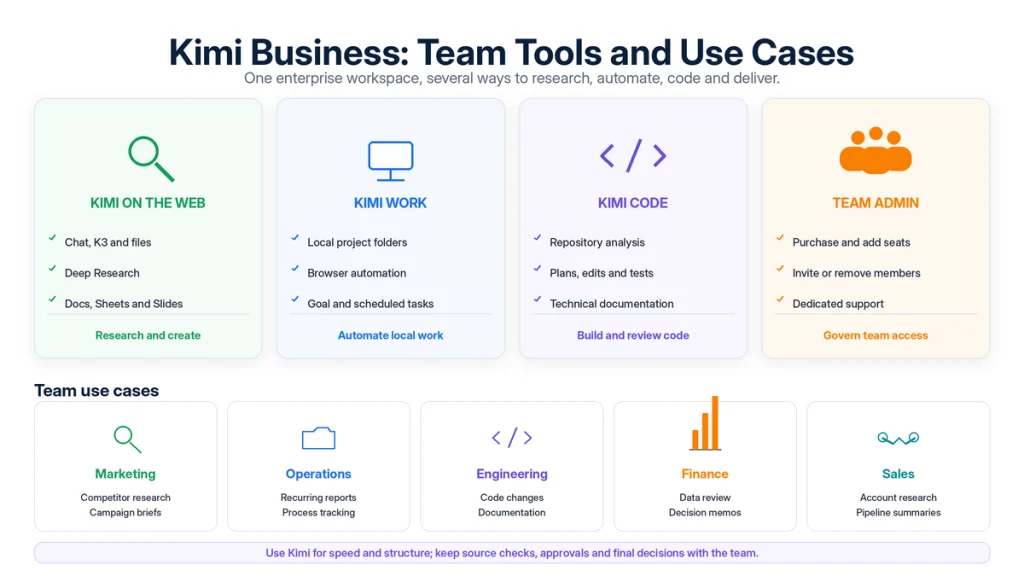
The best team use cases have repeatable inputs, reviewable outputs, and a named human owner. Kimi should accelerate the workflow rather than become the final decision-maker.
| Team | Example workflow | Useful Kimi capabilities | Human approval gate |
|---|---|---|---|
| Marketing | Research competitors and audiences, create a campaign brief, build a content plan, and summarize performance feedback | Deep Research, Docs, Sheets, Slides, web search, and Plugins | Brand claims, source quality, customer data, and publishing approval |
| Operations | Convert proposals into implementation plans, monitor risks, produce status reports, and turn completed projects into SOPs | Agent, Kimi Work, scheduled tasks, Docs, Sheets, and Dashboard | Owners, deadlines, source-of-truth systems, and process changes |
| Engineering | Translate requirements into plans, inspect codebases, investigate issues, generate changes, and prepare review notes | Kimi Code, K3, Kimi Work, web search, and project files | Diff review, tests, dependencies, security, and deployment |
| Finance and data | Combine reports, compare actuals with plan, detect material changes, and prepare decision summaries | Sheets, Kimi Work, professional databases, Docs, and Slides | Source data, formulas, currencies, audit status, and financial judgment |
| Sales | Research accounts, summarize meeting notes, analyze pipeline data, and create regional or channel dashboards | Search, Docs, Sheets, Dashboard, Plugins, and scheduled tasks | CRM accuracy, customer confidentiality, pricing, and outbound communication |
| Leadership | Synthesize reports, compare strategic options, and convert reviewed evidence into an executive briefing | Deep Research, long context, Docs, Slides, and Agent | Strategy, risk tolerance, legal implications, and final decision |
For a detailed explanation of the research product, read Kimi Deep Research: Features, Sources and Limitations. Development teams can use the workflow in Kimi AI for Developers.
Kimi on the Web, Kimi Work, and Kimi Code
Kimi Business is one commercial plan, but team members can work through several product surfaces.
| Surface | Use it for | Primary risk to control |
|---|---|---|
| Kimi on the web | Chat, search, files, Deep Research, documents, sheets, slides, and websites | Using the wrong workspace or uploading unapproved data |
| Kimi Work | Desktop access to authorized folders, browser workflows, scheduled tasks, and local deliverables | Over-broad file or browser permissions and unattended actions |
| Kimi Code | Repository analysis, implementation, debugging, tests, and technical documentation | Secrets, unsafe commands, unreviewed diffs, and production deployment |
Do not assume that a control configured in one surface automatically applies to another. Test web, desktop, Kimi Work, Kimi Code, Plugins, and browser access separately during the pilot.
Data Privacy, Training, and Enterprise Security
Kimi’s current Business documentation makes two important public statements:
- Enterprise data is separated from personal account data through an Enterprise Workspace.
- Enterprise content is not used for model training by default.
These statements are relevant, but they should not be expanded into claims that Kimi does not make publicly.
| Published statement | What it supports | What it does not establish by itself |
|---|---|---|
| No model training on enterprise content by default | A Business-specific restriction on using customer content for model training | Zero processing, zero logging, zero retention, or no legally required storage |
| Isolated Enterprise Workspace | Product-level separation between personal and business activity | A dedicated physical server, tenant-selected region, or customer-managed encryption key |
| Dedicated technical support | A Business-specific support path | A specific response time, uptime SLA, escalation schedule, or service credit |
| Plugins and connected tools | Access to supported external services | That the third party follows Kimi’s data terms or the company’s security policy |
Kimi’s Business FAQ directs organizations to the official Business Service Agreement and to Sales for enterprise contracts, authorization documents, compliance information, and security materials. The accepted agreement—not a marketing page—should define the binding training restriction, confidentiality duties, retention, liability, and remedies.
Public Kimi Business pages reviewed for this article did not verify every control that a larger enterprise may expect, including SAML or OIDC SSO, SCIM provisioning, custom administrator roles, department groups, audit-log export, eDiscovery, legal holds, customer-selected data residency, customer-managed encryption keys, or a self-service retention console. This does not prove that none is available under a contract; it means the buyer should obtain written confirmation.
Kimi Business is also not documented as an on-premises deployment. Kimi’s current API Help Center says the hosted API is cloud-only and directs customers with private-deployment requirements to Sales.
Read Is Kimi AI Safe? for the broader distinction between consumer chat, Business, API, accounts, files, Plugins, and local permissions.
Questions the Buying Committee Should Ask
Before purchasing, assign questions to the people responsible for cost, security, identity, legal terms, and business outcomes.
| Reviewer | Questions to confirm in writing |
|---|---|
| Business sponsor | Which workflows will Kimi replace or accelerate? Who owns each output? What result would justify renewal? |
| Procurement and finance | What is the final seat price, tax, currency, renewal rule, credit allowance, additional-seat process, refund policy, and invoicing route? |
| IT and identity | Are SSO, SCIM, domain verification, session controls, device controls, role granularity, and emergency administrator transfer supported? |
| Security | Where is data processed and stored? What is retained? Which subprocessors are used? Which certifications or reports are available? What is the incident-notification process? |
| Privacy and legal | Which DPA applies? What transfer mechanism applies? What are the deletion, confidentiality, IP, indemnity, liability, and law-enforcement terms? |
| Records and compliance | Can the organization export logs or conversations, apply retention rules, support legal holds, or respond to data-subject requests? |
| Department lead | Which files, websites, Plugins, and actions are approved? What requires human review? What is prohibited? |
| Engineering | Does the team need Business seats, API access, Kimi Code, or all three? How are keys, repositories, tests, and deployment permissions controlled? |
Do not infer a “yes” because a feature is common in other enterprise AI products. Record unsupported requirements as open procurement items.
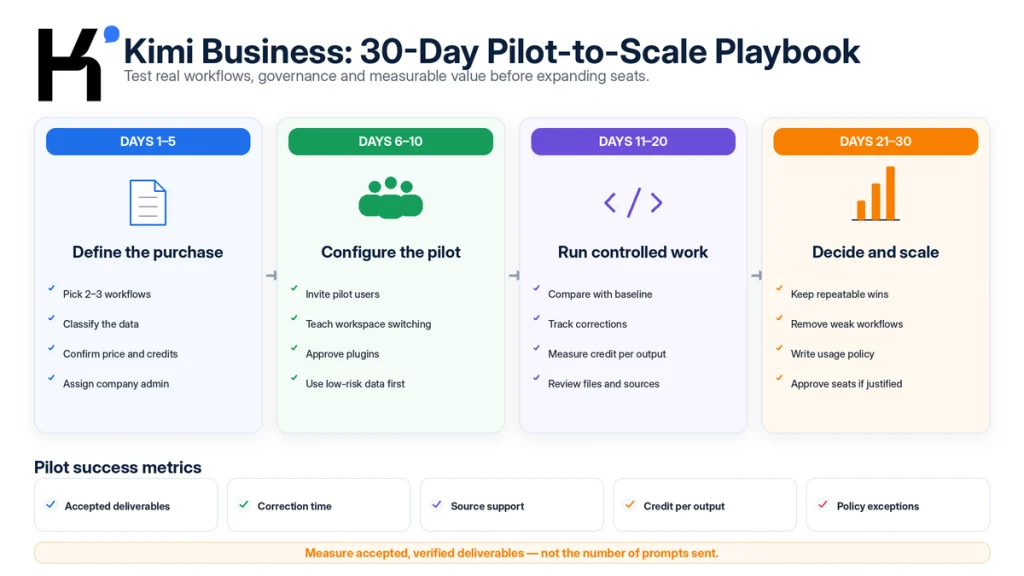
A 30-Day Kimi Business Pilot
A small pilot is safer and more informative than purchasing seats and allowing every employee to experiment independently.
Days 1–5: Define the Purchase
- Select two or three workflows with measurable baselines.
- Classify the data involved in each workflow.
- Define prohibited inputs and actions.
- Request the Business Service Agreement and required security documents.
- Confirm the price, credit allowance, renewal, taxes, and seat rules.
- Assign a company-controlled Administrator account and backup owner.
Days 6–10: Configure the Pilot
- Invite a cross-functional group using short-lived links.
- Teach users to distinguish Personal and Enterprise Workspaces.
- Configure only approved Plugins and browser connections.
- Use public, synthetic, or low-sensitivity data first.
- Test web, desktop, Kimi Work, and Kimi Code separately.
- Create a standard prompt, source, review, and output checklist for each workflow.
Days 11–20: Run Controlled Workflows
- Compare Kimi-assisted work with the existing manual process.
- Track credit consumption by accepted deliverable.
- Record unsupported claims, incorrect calculations, broken files, and source errors.
- Measure correction time—not only generation time.
- Review desktop file changes, browser submissions, code diffs, and Plugin activity.
- Escalate product or billing issues through the Business support channel.
Days 21–30: Decide Whether to Scale
- Identify workflows that created repeatable value.
- Remove workflows with weak evidence, high correction time, or unacceptable data risk.
- Estimate the seats and credits required for the next term.
- Write an internal acceptable-use policy.
- Document offboarding, administrator recovery, Plugin approval, and incident response.
- Approve expansion only when the outcome and governance requirements are both satisfied.
Pilot rule: do not measure success by the number of prompts sent. Measure the number of accepted, verified deliverables produced with less total time, cost, or risk than the previous process.
How to Measure ROI and Adoption
| Metric | How to calculate or review it | Why it matters |
|---|---|---|
| Time to accepted deliverable | From approved input to final human-approved output | Captures generation and correction time together |
| Material correction rate | Percentage of outputs requiring factual, numerical, legal, or structural correction | Separates speed from reliability |
| Source-support failure rate | Percentage of decision-driving claims not supported by the cited source | Critical for research and client-facing work |
| Credit per accepted output | Credits consumed divided by outputs that passed review | More useful than credits per prompt |
| Workflow completion rate | Tasks completed without manual restart or tool failure | Measures operational stability |
| Human review minutes | Time spent checking, fixing, and formatting | Shows whether AI truly reduced workload |
| Active approved users | Users completing at least one governed workflow during the period | Distinguishes adoption from account creation |
| Policy exceptions | Unauthorized data, Plugin, browser, publishing, or file actions | Measures governance cost and risk |
| Support resolution time | Time from business ticket to usable resolution | Tests the practical value of dedicated support |
Compare the pilot against a documented baseline. “The team liked it” is useful feedback, but it is not enough to justify an annual organization-wide purchase.
When Kimi Business Is Not the Right Choice
- The team has fewer than five users: the public minimum may make personal memberships more economical.
- The workforce is mobile-first: the mobile app currently does not support Enterprise Workspace benefits.
- The requirement is only API access: use Kimi Open Platform or an enterprise API agreement.
- The organization needs on-premises inference: Kimi Business is a hosted workspace, not a documented private deployment.
- SSO, SCIM, audit exports, or specific residency are mandatory: do not buy until those controls are confirmed in writing.
- Seats must be reassigned immediately after every departure: removed seats currently enter Pending Release until the next cycle.
- The team cannot perform human review: Kimi output can be inaccurate, incomplete, or unsuitable for a high-impact decision.
- The main need is a shared API key: shared credentials are not a substitute for an API project and server-side key management.
- The organization cannot commit annually: the public Business plan is annual.
Common Kimi Business Problems and Fixes
| Problem | Likely cause | What to do |
|---|---|---|
| Kimi Business is not visible in the mobile app | The mobile app currently supports personal membership only | Use the web or desktop client and switch to the Enterprise Workspace. |
| A member sees personal benefits instead of Business benefits | The Personal Workspace is selected | Open the workspace selector and choose the enterprise organization. |
| An invitation link no longer works | The two-day or seven-day expiry has passed | Generate a new link and verify that an unallocated seat is available. |
| A new employee cannot join | No unallocated seat exists | Add a seat or wait for a Pending Release seat to become available next cycle. |
| A removed seat cannot be reassigned | The seat is in Pending Release status | Plan offboarding around the billing cycle or contact Business support. |
| The only Administrator is leaving | Self-service transfer is not currently supported | Contact support before offboarding and keep the original admin account available until transfer is confirmed. |
| Benefits or credits do not appear after joining | Wrong workspace, account mismatch, or entitlement delay | Confirm the invitation account, switch workspaces, refresh, and send the order and screenshots to support. |
| An Open Platform API key does not work in Kimi Code or Business | The products use separate keys and billing systems | Create the key in the correct product and follow the relevant documentation. |
| A required security control cannot be found | It may be contract-specific, unavailable, or undocumented | Do not infer availability; request written confirmation from Sales. |
| A Plugin is unavailable to the team | Region, workspace, account, plan, or third-party availability differs | Verify the Plugin inside the Enterprise Workspace and review an alternative workflow. |
Frequently Asked Questions
What is Kimi Business?
Kimi Business is Moonshot AI’s annual team workspace plan. It provides managed seats, a separate Enterprise Workspace, advanced Kimi features, Kimi Work, Kimi Code, and a Business-specific statement that enterprise content is not used for model training by default.
How much does Kimi Business cost?
The current public English Help Center lists $600 per seat per year with a five-seat minimum. The published starting annual cost is therefore $3,000 before applicable taxes, extra seats, or negotiated services.
Does Kimi Business have multiple plans?
Kimi currently publishes one standard Business plan rather than multiple Business tiers. Personal memberships have separate Moderato, Allegretto, Allegro, and Vivace tiers, but those are individual plans.
Can a team buy fewer than five seats?
The public self-service minimum is five seats. A smaller team can compare personal memberships or contact Kimi Sales, but a lower Business minimum should not be assumed without a written offer.
Does Kimi Business include Kimi Work?
Yes. The current Business pages include Kimi Work as one of the main ways employees can use Kimi. Desktop users must select the Enterprise Workspace before using the organization’s benefits.
Does Kimi Business include Kimi Code?
Yes. Kimi Code is listed as a Business benefit for terminal and supported IDE workflows. Usage and rate limits can still apply.
Does Kimi Business include API credits?
No public documentation establishes that Business seats include Kimi Open Platform balance. Kimi Business and Kimi API are separate products with different billing, keys, and management systems.
Does Kimi Business use company data for training?
Kimi’s current Business documentation says enterprise content is not used for model training by default. The organization should review the accepted Business Service Agreement and any DPA for the binding scope, exceptions, retention, and remedies.
Is Kimi Business available on mobile?
Not currently. The mobile app supports personal membership only. Enterprise Workspace access is available on the web and desktop client.
Can one person join more than one Kimi Business organization?
Yes. The current FAQ says one user can join up to ten enterprise organizations and occupies a separate seat in each organization.
Can the Kimi Business Administrator role be transferred?
Self-service administrator transfer is not currently available. The organization must contact Kimi support to request the change.
Can a removed seat be assigned immediately to someone else?
Not under the current published seat lifecycle. The removed member loses access immediately, but the seat enters Pending Release and becomes available in the next billing cycle.
Does Kimi Business support SSO or SCIM?
The public English Business pages reviewed for this article do not verify SSO or SCIM. Ask Kimi Sales for written identity and provisioning specifications before treating either capability as included.
Is Kimi Business an on-premises product?
No public documentation describes Kimi Business as an on-premises deployment. Kimi’s API Help Center currently says the API is cloud-only and directs private-deployment enquiries to Sales.
Official Sources and Update Methodology
This article was reviewed on August 24, 2026. Official Kimi pages were used for pricing, minimum seats, workspaces, roles, invitation rules, seat lifecycle, platform support, published benefits, data-training statements, purchase channels, and the separation between Kimi Business and Kimi API.
Public pages were not treated as proof of undocumented enterprise controls. Where SSO, SCIM, audit logs, data residency, retention controls, administrator visibility, certifications, or SLA details were not established in the reviewed documentation, the article directs buyers to obtain written confirmation rather than assuming availability.
- Kimi Business Official Product Page — capabilities, team use cases, workspaces, data statement, support, and product surfaces.
- Kimi Business Help Center Overview — price, minimum seats, features, roles, invitations, seat status, and workspaces.
- How to Purchase Kimi Business — online purchase, minimum seats, and enterprise contract route.
- Kimi Business FAQ — multiple organizations, added seats, administrator transfer, desktop access, contracts, and security documents.
- Kimi Personal Membership Pricing — Moderato, Allegretto, Allegro, and Vivace prices used in the cost illustration.
- Kimi API Overview — pay-as-you-go developer product and its separation from memberships.
- Kimi API Troubleshooting — independent balances, keys, and billing systems, plus the current cloud-only API position.
- Kimi Enterprise API and Sales — contracts, higher quotas, volume discounts, technical support, and custom SLAs for API customers.
- Kimi International Privacy Policy — general personal-information, User Content, retention, transfer, and third-party processing terms.
Prices, entitlements, contracts, and product controls can change after publication. Review the live checkout, accepted order, Business Service Agreement, DPA, security materials, and signed-in Enterprise Workspace before purchasing or processing sensitive company information.
Last verified: August 24, 2026.