
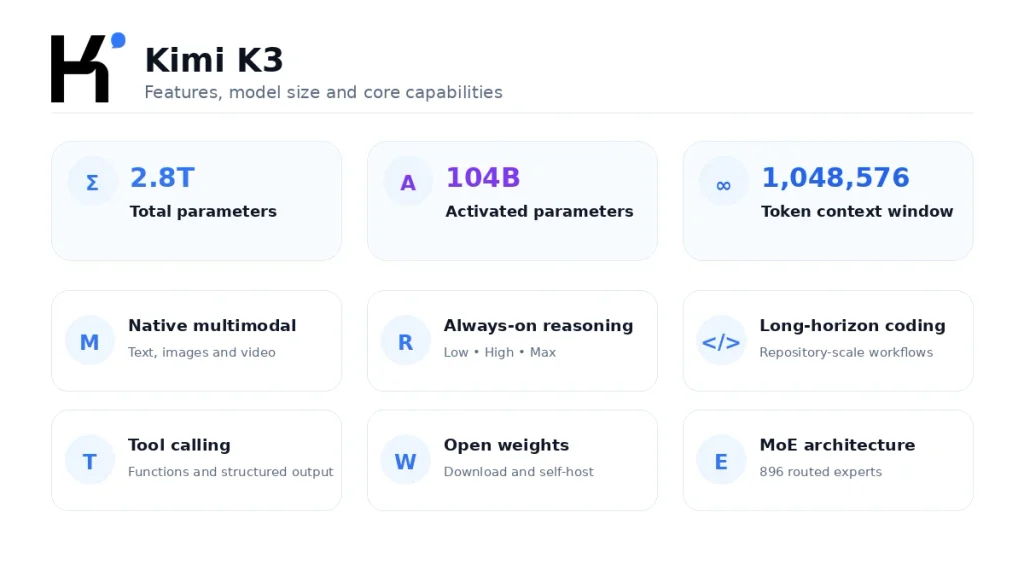
Kimi K3 is Moonshot AI’s flagship open-weight, native multimodal Mixture-of-Experts model. It has 2.8 trillion total parameters, activates 104 billion parameters during inference, and supports a 1,048,576-token context window. The Kimi K3 model is designed for long-horizon coding, agentic knowledge work, deep reasoning, and visual understanding. You can access it through Kimi’s apps, Kimi Work, Kimi Code, the OpenAI-compatible Kimi API using the model ID kimi-k3, or the published model weights. API usage is pay-as-you-go, while access and context limits inside Kimi products depend on the product and membership tier.
Kimi product access, membership entitlements, API prices, rate limits, and supported features can change. This article distinguishes between the official hosted API, Kimi consumer products, Kimi Code, and self-hosted open weights because their limits are not identical.
Quick answer: Kimi K3 is most relevant when a task combines very long context, coding, tools, documents, images, or multi-step agent work. Its 1M-token window is a shared budget for the request and generated response—not 1M input tokens plus another 1M output tokens. Developers can call it through the official API with
model="kimi-k3", while organizations can download the full weights under the custom Kimi K3 License.
Kimi K3 at a Glance
| Developer | Moonshot AI |
|---|---|
| Model type | Native multimodal Mixture-of-Experts model |
| Total parameters | 2.8 trillion |
| Activated parameters | 104 billion |
| Layers | 93, including one dense layer |
| Experts | 896 routed experts; 16 selected per token; 2 shared experts |
| Attention composition | 69 Kimi Delta Attention layers and 24 Gated MLA layers |
| Context window | 1,048,576 tokens |
| Vision encoder | MoonViT-V2, 401M parameters |
| Quantization | MXFP4 weights and MXFP8 activations |
| Hosted API inputs | Text, images, and uploaded video; support can vary in other runtimes |
| Reasoning | Always enabled; low, high, or max |
| Official API model ID | kimi-k3 |
| API compatibility | OpenAI-compatible Chat Completions interface |
| API pricing | $0.30 cached input, $3 uncached input, and $15 output per 1M tokens |
| Weights | Full weights published on Hugging Face |
| License | Custom Kimi K3 License |
What Is Kimi K3?
Kimi K3 is an artificial intelligence model developed by Moonshot AI. It is the model that performs inference: it processes prompts, files, images, video frames, conversation history, and tool results before generating text or tool calls.
The model should not be confused with the products through which it is accessed:
- Kimi: the web and mobile workspace where users chat with Kimi and run agent tasks.
- Kimi Work: a desktop product for documents, research, projects, scheduled tasks, and local workflows.
- Kimi Code: a coding agent for terminals, IDEs, and compatible development tools.
- Kimi API Platform: programmatic access for developers building their own applications.
- Kimi K3 weights: downloadable files for organizations that want to deploy the model on their own infrastructure.
In other words, Kimi K3 is the underlying model, while Kimi Chat, Kimi Work, Kimi Code, and the API are different access routes. Each route can apply its own subscription rules, context limits, tools, interfaces, and rate limits.
Moonshot describes K3 as an open 3T-class model. The exact published parameter count is 2.8 trillion, so “3T-class” refers to its scale category rather than an exact count of three trillion parameters. The model targets long-running coding tasks, research, visual reasoning, and end-to-end knowledge work rather than only short question-and-answer conversations.
How the Kimi K3 Architecture Works
2.8T total parameters vs 104B activated parameters
Kimi K3 is a sparse Mixture-of-Experts, or MoE, model. Its 2.8 trillion figure represents the total capacity distributed across the architecture. The model does not activate all 2.8 trillion parameters for every token.
The official model card lists 104 billion activated parameters. K3 contains 896 routed experts, selects 16 of them for each token, and also includes two shared experts. This routing lets the model maintain a very large total capacity without performing dense computation across every parameter on every step.
Why the distinction matters: “2.8T parameters” describes total model capacity. “104B activated parameters” is more relevant to the amount of model computation involved during a token’s forward pass. Neither figure alone tells you the final latency, memory requirement, serving cost, or answer quality.
The model has 93 layers: one dense layer, 69 layers using Kimi Delta Attention, and 24 using Gated Multi-head Latent Attention. Its vocabulary contains 160,000 tokens.
Kimi Delta Attention, Gated MLA and Attention Residuals
Kimi Delta Attention (KDA) is Moonshot’s hybrid linear-attention mechanism. Its role is especially relevant to long sequences, where conventional attention can become increasingly expensive as the amount of context grows.
Gated MLA refers to Gated Multi-head Latent Attention. Moonshot combines KDA and Gated MLA rather than relying on one attention design across every layer.
Attention Residuals, or AttnRes, are another part of the K3 architecture. At a high level, residual pathways help information move through a deep neural network instead of forcing every layer to rebuild all relevant information from the previous layer’s output.
K3 also uses a Stable LatentMoE framework to scale expert sparsity. Moonshot reports that activating 16 of 896 experts produces an approximate 2.5× improvement in overall scaling efficiency compared with Kimi K2. This is a vendor-reported architectural comparison, not a promise that every K3 request is 2.5 times faster or cheaper.
Vision encoder and native quantization
Kimi K3 uses the MoonViT-V2 vision encoder, which the official model card lists at 401 million parameters. Native visual processing allows the model to combine text with screenshots, charts, scanned documents, interface states, and other images rather than depending entirely on a separate OCR-only stage.
The official hosted API also documents video input through uploaded files. Video support should still be verified for the exact product, provider, or self-hosted runtime you use. For example, Kimi Code’s k3-256k option currently does not support video input, even though the hosted kimi-k3 API documents video support.
K3 applies quantization-aware training using MXFP4 weights and MXFP8 activations. Quantization reduces the numerical precision used to represent parts of the model, which can lower memory and computation requirements. It does not make a 2.8T-parameter model small enough for an ordinary laptop.
Main Kimi K3 Features
1. Long-horizon coding
Kimi K3 is designed to continue working across extended engineering tasks rather than only generating isolated code snippets. Moonshot positions it for navigating large repositories, coordinating terminal tools, editing multiple files, debugging, testing, and completing tasks that combine software engineering with visual feedback.
Potential use cases include:
- Understanding a large codebase before making changes.
- Tracing a bug across several files and dependencies.
- Implementing a feature and running related tests.
- Reviewing architecture and suggesting refactoring steps.
- Working with screenshots during frontend development.
- Analyzing logs, terminal output, and documentation together.
- Maintaining a long coding-agent session without immediately losing earlier context.
A large context window does not guarantee that every repository should be pasted into one prompt. Good coding-agent design still benefits from file selection, search, summaries, tool permissions, tests, checkpoints, and explicit boundaries.
2. Agentic knowledge work
K3 is also built for tasks where the model must collect information, use tools, compare sources, transform data, create deliverables, and continue across multiple steps. Moonshot refers to this category as agentic knowledge work.
Examples include:
- Researching a topic across many documents.
- Extracting evidence and creating a structured report.
- Analyzing spreadsheets and generating charts.
- Creating presentations from research material.
- Building interactive dashboards or websites.
- Combining text, images, code, and tool results in one workflow.
- Maintaining longer project context across several stages.
The word “agentic” should not be interpreted as a guarantee of autonomy or accuracy. The model still needs clear instructions, carefully scoped tools, validation steps, and human review before high-impact actions.
3. Always-on reasoning with adjustable effort
Kimi K3 always has reasoning enabled. The hosted API does not provide a non-thinking mode. Instead, developers control the amount of reasoning through the top-level reasoning_effort parameter:
low: lower reasoning depth, usually more suitable for simpler or latency-sensitive work.high: a middle setting for tasks that require meaningful analysis without always using the maximum budget.max: the deepest available setting and the API default.
Greater reasoning effort can increase latency and generated token usage. It should not be set to max automatically for every classification, extraction, rewriting, or routine coding request.
Changing the reasoning-effort level during an existing session can invalidate prefix-cache hits. For applications that rely on caching, choose the effort level before a conversation begins and avoid changing it unnecessarily.
4. Native image and video understanding
The official Kimi K3 model card describes the model as natively multimodal, while the hosted API documentation provides request formats for images and uploaded video. This enables workflows such as:
- Explaining charts, diagrams, and screenshots.
- Extracting information from scanned documents.
- Reviewing user interfaces and visual errors.
- Connecting visual feedback to frontend or game-development code.
- Summarizing an uploaded video.
- Answering questions across multiple images.
For the official K3 API, the quickstart currently instructs developers to use base64 data or an uploaded ms:// file ID rather than a public image URL. The exact limits on file type, resolution, duration, and size should be checked before production use.
5. Tool calling and dynamic tool loading
Kimi K3 supports function calling through the Chat Completions API. A developer can define tools, allow the model to choose one, prevent tool use, or require a tool call with tool_choice="required".
Tool calling lets the model request actions such as:
- Searching an internal database.
- Running a calculation.
- Retrieving a customer record.
- Calling a weather or inventory service.
- Executing approved code.
- Reading a selected file.
- Updating a task through a controlled application function.
K3 also supports dynamic tool loading. Tool definitions can be inserted into the message history at the point where they become relevant, instead of sending every available tool with every request. This can reduce context usage in applications with large tool catalogs.
6. Structured outputs and Partial Mode
Developers can request a JSON object or constrain the final answer with a strict JSON Schema. This is useful when an application needs predictable fields rather than free-form prose.
K3 also supports Partial Mode, which allows the last assistant message to contain a prefix that the model continues. It can help when an output must begin with a specific phrase, code block, or structural pattern. For strict JSON, Structured Output is generally safer than trying to force JSON with a text prefix.
Kimi K3 Context Window Explained
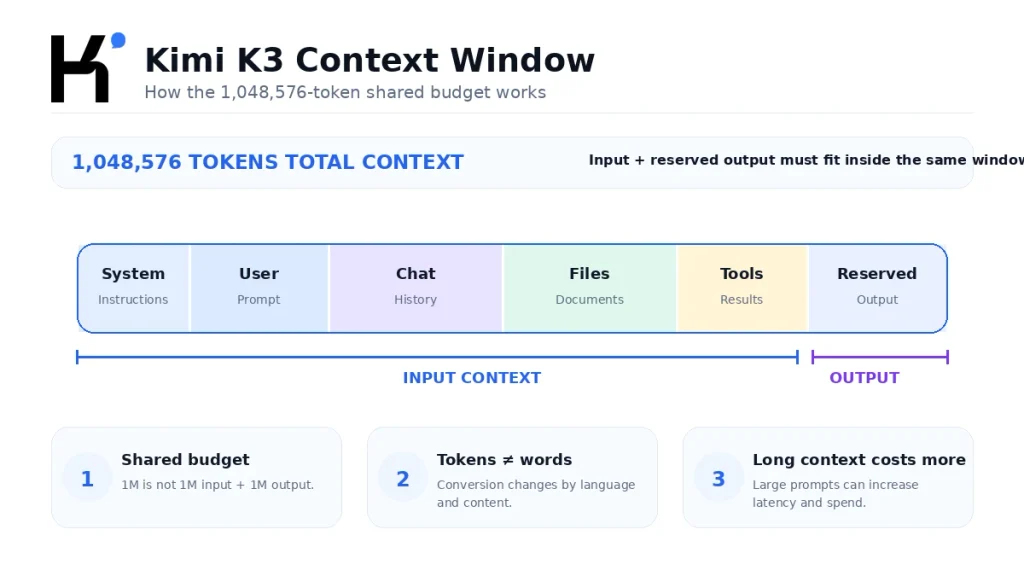
Kimi K3 has a context window of 1,048,576 tokens. This is often shortened to “1M context,” but the exact technical limit is 1,048,576.
A token is not the same as a word. Tokenization varies by language, punctuation, source code, numbers, formatting, and document type. Therefore, claims such as “1M tokens always equals 700,000 words” should be treated only as rough estimates, not guaranteed conversion rules.
What counts toward the 1M-token limit?
The context budget can include:
- System instructions.
- User prompts.
- Previous user and assistant messages.
- Preserved reasoning history in multi-turn K3 sessions.
- Tool definitions.
- Tool calls and tool results.
- Uploaded document text.
- Tokens generated from image or video processing.
- The output capacity reserved through
max_completion_tokens.
The 1M window is not one million input tokens plus another one million output tokens. The input and requested maximum completion must fit within the same model context.
Example: a request containing approximately 900,000 input tokens with
max_completion_tokens=200000asks for a total budget of roughly 1.1 million tokens. That exceeds the 1,048,576-token window and can return aninvalid_request_error. The output cap would need to be reduced, with additional safety margin for token-estimation differences.
How long can Kimi K3’s output be?
For the official Chat Completions API, max_completion_tokens defaults to 131,072 for Kimi K3 and can be configured up to 1,048,576. The maximum value does not mean the model can always return one million tokens after receiving a large prompt. Input plus the requested completion allowance must still fit within the total context window.
Set an explicit and realistic output limit. Leaving the default 131K allowance on a task that needs only a short classification or a few paragraphs can make cost controls less predictable, even if the model normally stops before reaching the maximum.
What is 1M context useful for?
A one-million-token context window can be useful for:
- Large software repositories with multiple related files.
- Long legal, financial, technical, or research document collections.
- Extended agent sessions containing tool results and intermediate work.
- Large support-ticket archives or knowledge bases.
- Comparing information across many reports.
- Maintaining long conversation histories.
- Multimodal projects that combine text, documents, screenshots, and video.
Using the full window is not automatically the best design. Retrieval, file selection, summarization, compaction, and shorter focused contexts can improve speed, reduce cost, and prevent irrelevant material from distracting the model.
Kimi K3 context availability depends on the product
The model architecture supports 1,048,576 tokens, but not every Kimi interface or subscription tier exposes the full window in the same way.
| Access route | Current K3 context information | Important note |
|---|---|---|
| Kimi web and apps | Extra-long chat up to 1M tokens is listed for Allegro and Vivace | General workspace membership entitlements apply |
| Kimi Work | K3 is available in Kimi Work 3.1.0 or later | Workspace features and limits depend on the user’s plan and current product rules |
| Kimi Code | k3 supports up to 1M for eligible higher-tier members; k3-256k is limited to 256K | Current Kimi Code documentation lists K3 for Moderato+, with 1M access for Allegretto+ |
| Official Kimi API | kimi-k3 supports a 1,048,576-token request context | Pay-as-you-go API billing and account rate limits apply |
| Open weights | The model architecture supports 1,048,576 tokens | Actual usable length depends on the inference engine, configuration, hardware, memory, and deployment setup |
The general Kimi workspace and Kimi Code publish different plan thresholds for their respective 1M-context experiences. This is not necessarily a technical contradiction: they are separate products with separate quota and membership rules. Always check the interface and documentation for the access route you intend to use.
How to Access Kimi K3
Use Kimi K3 through the Kimi website or app
The simplest route for a non-developer is the Kimi web or mobile experience. Kimi is available through its official website and supported mobile platforms. Membership determines agent credits, concurrency, feature access, and whether extra-long K3 chat capacity is available.
Users considering a subscription should compare the free and paid plans before upgrading. Extra-long 1M chat is not listed for every paid tier, and paying for a plan does not automatically create general API balance.
Use Kimi K3 in Kimi Work
Moonshot lists K3 access in Kimi Work version 3.1.0 or later. Kimi Work is intended for desktop knowledge workflows involving documents, research, dashboards, projects, widgets, and scheduled tasks.
Use Kimi K3 in Kimi Code
Kimi Code users can select K3 through the /model command or the relevant model selector. Current model IDs include:
k3: the Kimi K3 option with up to 1M context for eligible higher-tier members.k3-256k: the same K3 model constrained to 256K context, intended to reduce quota consumption for ordinary coding work.
Kimi’s documentation says the 1M K3 option consumes roughly twice as much Kimi Code quota as k3-256k. The 256K option is therefore more practical for routine code completion, single-file changes, and smaller feature work that does not need a million-token session.
Use the official Kimi K3 API
Developers can access K3 through Moonshot AI’s API using the model ID kimi-k3. The API provides the greatest control over prompts, messages, output limits, tools, structured output, reasoning effort, caching, and multimodal inputs.
Download and self-host the model weights
Moonshot has published the full Kimi K3 weights on Hugging Face. The official model card provides examples for vLLM, SGLang, and other supported deployment routes. Self-hosting gives an organization more control over infrastructure and data flow, but K3’s scale makes it a data-center deployment rather than a normal local-desktop model.
Kimi K3 API Access
To call the official Kimi K3 API, you need:
- A Kimi API Platform account.
- A successful account top-up; current documentation lists a minimum of $1 to unlock K3 API access.
- A server-side API key.
- Python 3.9 or later for the following example.
- The OpenAI Python SDK.
Install the SDK:
python3 -m pip install --upgrade openaiStore the API key in the MOONSHOT_API_KEY environment variable. Do not hard-code the key in public source code, a browser application, a WordPress page, or client-side JavaScript.
First Kimi K3 API request with Python
import os

from openai import OpenAI

api_key = os.environ.get("MOONSHOT_API_KEY")
if not api_key:
    raise RuntimeError(
        "Set the MOONSHOT_API_KEY environment variable before running this script."
    )

client = OpenAI(
    api_key=api_key,
    base_url="https://api.moonshot.ai/v1",
)

response = client.chat.completions.create(
    model="kimi-k3",
    reasoning_effort="high",
    max_completion_tokens=2048,
    messages=[
        {
            "role": "system",
            "content": "You are a precise technical assistant.",
        },
        {
            "role": "user",
            "content": "Explain context caching in five concise bullet points.",
        },
    ],
)

answer = response.choices[0].message.content or ""
print(answer)
The two Kimi-specific values in a basic OpenAI SDK integration are:
base_url="https://api.moonshot.ai/v1"model="kimi-k3"
The example uses reasoning_effort="high" rather than the default max, and it limits the completion to 2,048 tokens to reduce the risk of unexpectedly large outputs.
Important Kimi K3 API settings
| Field or behavior | Kimi K3 requirement |
|---|---|
model | Use kimi-k3 |
reasoning_effort | low, high, or max; default is max |
| Thinking mode | Always enabled; it cannot be turned off |
max_completion_tokens | Defaults to 131,072 and can be set up to 1,048,576, subject to the total context limit |
temperature | Fixed at 1.0; omit it |
top_p | Fixed at 0.95; omit it |
n | Fixed at 1 |
| Presence and frequency penalties | Fixed at 0; omit them |
| Streaming | Returns separate reasoning_content and final content deltas |
| Structured Output | Supports strict JSON Schema through response_format |
tool_choice | Supports auto, none, and required |
| Context caching | Automatic for eligible repeated prefixes |
Preserve the complete assistant message in multi-turn conversations
Kimi K3 was trained with preserved thinking history. For multi-turn conversations and tool-calling loops, the next request should include the complete assistant message returned by the previous API response.
Do not copy only the visible content field. Preserve fields such as reasoning_content and tool_calls when they are present. Dropping that information can make later responses unstable or inconsistent.
This does not mean an application should display internal reasoning to end users. Parse and show the final content as the user-facing answer, while retaining the complete message internally when it is required for the next model turn.
Streaming responses
When streaming is enabled, K3 can return reasoning and final-answer tokens through separate delta fields. Applications should distinguish between:
reasoning_content: preserved reasoning output used by the model and subsequent conversation state.content: the final answer intended for the user or application.
Both generated reasoning and final-answer tokens can contribute to output usage. Always-on reasoning is one reason cost per completed task can differ from a simple comparison of advertised per-token prices.
Vision and video requests
The official hosted API supports image input through base64 or uploaded file references. It also documents video input through uploaded files. The K3 quickstart currently states that public image URLs are not supported for this route, so developers should not assume that an OpenAI-compatible client’s public-URL format will work unchanged.
Tool calling and official web search
K3 can call developer-defined functions and dynamically loaded tools. The application—not the model—must execute the requested function, validate its arguments, apply authorization rules, return the matching tool result, and continue the conversation.
As of August 21, 2026, Kimi’s K3 documentation says the official web-search functionality is being updated and is not recommended for near-term production workflows. This does not prevent developers from connecting K3 to their own approved search or retrieval tool.
Kimi K3 Context Caching
The official Kimi API applies automatic prefix caching to eligible repeated context. You do not need to create a manual cache object for ordinary K3 requests.
A later request can attempt a prefix-cache hit when the earlier request contains more than 256 prompt tokens. To improve the chance of a hit, keep the large shared prefix unchanged and append new questions after it.
Good caching candidates include:
- A large system prompt reused across a session.
- A code repository or selected file collection.
- A long policy or product manual.
- A stable set of tool definitions.
- A document corpus followed by several questions.
- An extended conversation prefix reused in later turns.
Changes near the beginning of the prompt can reduce cache reuse. Switching reasoning_effort during a session also invalidates prefix-cache hits, so select the reasoning level before starting a cache-sensitive workflow.
Context caching is not identical to retrieval-augmented generation. Caching reduces the cost and latency of repeatedly processing the same prefix. Retrieval chooses a smaller subset of relevant information for each request. Large applications may benefit from using both.
Kimi K3 API Pricing
The official direct API uses flat token pricing across the K3 context window:
| Token type | Price per 1M tokens |
|---|---|
| Input with cache hit | $0.30 |
| Input with cache miss | $3.00 |
| Output | $15.00 |
Example cost without a cache hit
Suppose a request processes 500,000 uncached input tokens and generates 10,000 output tokens:
- Input: 0.5 × $3.00 = $1.50
- Output: 0.01 × $15.00 = $0.15
- Estimated total: $1.65, excluding tax
Example cost with a cache hit
If the same 500,000 input tokens qualify for cached pricing:
- Cached input: 0.5 × $0.30 = $0.15
- Output: 0.01 × $15.00 = $0.15
- Estimated total: $0.30, excluding tax
The example demonstrates why stable-prefix caching matters for long-context applications. It does not guarantee that every repeated request will receive a full cache hit.
Kimi API billing is separate from a normal Kimi membership. Paying for Moderato, Allegretto, Allegro, or Vivace should not be treated as purchasing an equivalent amount of general Open Platform API credit. Use a membership for the Kimi workspace and the API balance for programmatic requests.
Is Kimi K3 Open Source?
Moonshot describes Kimi K3 as an open model and has published the full weights. For precise legal and technical wording, it is safer to describe K3 as an open-weight model released under the custom Kimi K3 License.
The license grants broad rights to use, copy, modify, publish, distribute, sublicense, sell, deploy, fine-tune, and create derivative works, subject to its conditions. It is not the standard MIT, Apache 2.0, or Creative Commons license.
Important conditions include:
- The copyright and permission notice must remain with copies or substantial portions of the software.
- Use must comply with applicable laws and regulations.
- A Model-as-a-Service operator whose aggregate revenue exceeds $20 million during any consecutive 12-month period must enter a separate agreement with Moonshot AI before using the software or derivatives commercially.
- A commercial product or service with more than 100 million monthly active users or more than $20 million in monthly revenue must prominently display “Kimi K3” in its user interface.
- The license contains exceptions for internal use and for use through Moonshot’s official products or certified inference partners.
This is a plain-language summary, not legal advice. Organizations planning commercial deployment should read the complete current license and obtain professional advice where necessary.
Can you run Kimi K3 locally?
Technically, yes: the weights are available, and the official model card provides deployment examples for vLLM and SGLang. In practical terms, “local” does not mean a normal laptop or a single consumer GPU.
Moonshot recommends supernode configurations with 64 or more accelerators for efficient K3 deployment. Actual requirements depend on quantization, context length, concurrency, throughput targets, inference engine, and hardware topology.
A small organization should compare:
- The official hosted API cost.
- A certified or third-party inference provider.
- Hardware purchase or rental.
- Engineering and maintenance work.
- Storage and networking requirements.
- Monitoring, security, and scaling.
- Expected request volume and context length.
Downloading the files is only the first step. Efficiently serving a 2.8T-parameter model is a substantial infrastructure project.
Kimi K3 Benchmarks
Moonshot reports Kimi K3 results across reasoning, coding, agentic, and multimodal evaluations. Selected results from the official model card include:
| Benchmark | Category | Kimi K3 reported score |
|---|---|---|
| GPQA Diamond | Reasoning and knowledge | 93.5 |
| Terminal-Bench 2.1 | Coding and terminal agents | 88.3 |
| BrowseComp | Agentic browsing and research | 91.2 |
| OmniDocBench | Document and visual understanding | 91.1 |
| Video-MME with subtitles | Video understanding | 90.0 |
These numbers require context:
- The K3 results were reported with reasoning effort set to
max. - Different benchmarks use different prompts, tools, agent harnesses, and scoring methods.
- Some comparisons use each model’s own preferred coding or agent framework.
- A higher benchmark score does not guarantee lower latency, lower cost, or better output on your data.
- Vendor-reported results should be supplemented with independent and task-specific tests.
The most useful evaluation is a controlled test that uses your documents, tools, prompts, expected output format, latency requirements, and budget. Record the model version, reasoning effort, context length, tool setup, number of attempts, and scoring method.
Kimi K3 Limitations
Reasoning cannot be disabled
K3 always reasons. The low setting can reduce reasoning effort, but there is no true non-thinking mode. This can be inefficient for simple extraction, classification, rewriting, or routing tasks.
Preserved thinking makes integration stricter
Multi-turn applications must retain the complete assistant message. A framework that strips reasoning_content, changes earlier messages, or switches to K3 halfway through a session can produce unstable behavior.
The 1M window can increase cost and latency
Processing a huge context is not free. Sending irrelevant files or repeatedly missing the prefix cache can increase cost and response time. Full-context prompting should be an intentional design choice, not the default for every request.
Self-hosting requires substantial infrastructure
Open weights provide control, but K3 is still a 2.8T-parameter model. The official recommendation of 64 or more accelerators illustrates the gap between “downloadable” and “easy to run locally.”
Product limits are not uniform
The API model supports a 1M window, but Kimi Chat, Kimi Work, and Kimi Code expose that capability through different memberships, quotas, and model IDs. Verify the exact route rather than assuming one product’s limit applies to all others.
Official web search is currently in transition
Kimi’s API documentation currently says its official web-search functionality is being updated and is not recommended for near-term production use. Developers who need reliable retrieval should consider a controlled external search or RAG pipeline.
The model can be overly proactive
Moonshot’s own technical blog notes that K3 may make unexpected decisions when it encounters ambiguity or minor execution problems because its training emphasizes difficult, long-horizon tasks. Applications should define permissions, boundaries, approval steps, and prohibited actions clearly.
Outputs still require verification
K3 can produce incorrect facts, unsupported citations, faulty code, or unsafe tool arguments. Human review remains necessary for medical, legal, financial, security-sensitive, and other high-impact uses.
Kimi K3 vs Kimi K2.6
K3 does not make K2.6 unnecessary. The two models suit different workloads.
| Area | Kimi K3 | Kimi K2.6 |
|---|---|---|
| Positioning | Flagship model for long-horizon coding, deep reasoning, multimodal and agentic work | General-purpose model for chat, coding, instruction following, and agent tasks |
| Context window | 1,048,576 tokens | 256K tokens |
| Thinking | Always enabled | Can be enabled or disabled |
| Reasoning control | low, high, or max | Uses the K2.x thinking setting instead of reasoning_effort |
| Required tool call | Supports tool_choice="required" | Does not support required |
| Best fit | Very long context and complex multi-step workflows | Shorter, general-purpose tasks where switchable thinking is useful |
Choose K3 when the extra context, stronger agent design, or long-horizon behavior is material to the task. Choose K2.6 when 256K is sufficient and you need the option to turn thinking off for simpler or more latency-sensitive work.
Who Should Use Kimi K3?
Kimi K3 is a strong candidate for:
- Developers working with large repositories and extended coding-agent sessions.
- Researchers processing many long documents.
- Teams building multimodal agents with text, images, video, and tools.
- Applications that need strict JSON Schema outputs.
- Workflows that reuse a large stable prefix and can benefit from caching.
- Organizations that require downloadable weights and controlled infrastructure.
- Users whose existing 256K context is repeatedly insufficient.
A smaller or more general model may be a better choice when:
- The task needs only a short response.
- Latency matters more than deep reasoning.
- The application performs simple classification or extraction.
- The context is far below 256K.
- The workflow cannot preserve K3’s complete assistant messages.
- The infrastructure cannot support self-hosting and the API budget is unsuitable.
The correct model is the one that completes the target task reliably at an acceptable cost and latency—not automatically the newest or largest model.
Frequently Asked Questions
What is Kimi K3?
Kimi K3 is Moonshot AI’s flagship open-weight, native multimodal Mixture-of-Experts model. It is designed for long-horizon coding, agentic knowledge work, reasoning, visual understanding, and tasks requiring up to 1,048,576 tokens of context.
How many parameters does Kimi K3 have?
Kimi K3 has 2.8 trillion total parameters and 104 billion activated parameters. Its MoE architecture contains 896 routed experts, selects 16 per token, and includes two shared experts.
What is the Kimi K3 context window?
The published context length is 1,048,576 tokens. This total must accommodate the request context and the maximum completion requested from the model.
Does Kimi K3 support one million input tokens plus one million output tokens?
No. Input plus max_completion_tokens must fit within the same 1,048,576-token context window. A request that reserves more than the remaining capacity can return an invalid-request error.
What is the Kimi K3 API model ID?
The official API model ID is kimi-k3.
Is the Kimi K3 API OpenAI compatible?
Yes. Moonshot provides an OpenAI-compatible Chat Completions interface. Set the base URL to https://api.moonshot.ai/v1 and select kimi-k3. Some model-specific parameters and constraints still differ from OpenAI models.
Is the Kimi K3 API free?
No. The official API is billed by token usage. Current documentation says K3 API access is unlocked after a successful top-up of at least $1. A Kimi consumer membership and general API balance are separate products.
How much does the Kimi K3 API cost?
The official price is $0.30 per million cached-input tokens, $3 per million uncached-input tokens, and $15 per million output tokens, excluding applicable taxes.
Can Kimi K3 reasoning be turned off?
No. K3 always reasons. Developers can reduce or increase the effort with reasoning_effort="low", "high", or "max". The default is max.
Does Kimi K3 support images and video?
K3 has native visual capabilities, and the official hosted API documents both image and uploaded-video input. Support can differ in third-party providers, self-hosted engines, or product-specific variants such as k3-256k.
Is Kimi K3 open source?
The full weights are publicly available, and Moonshot describes K3 as open. The most precise description is open-weight under the custom Kimi K3 License, which includes commercial conditions and attribution requirements for certain large-scale uses.
Can Kimi K3 run on a personal computer?
Not realistically in its full official form for normal users. Moonshot recommends supernode deployments with 64 or more accelerators for efficient inference. Community quantizations may change hardware requirements, performance, context capacity, and output quality.
Which Kimi plans include 1M context?
For general Kimi extra-long chat, the official membership comparison lists Allegro and Vivace. Kimi Code currently documents 1M access through its k3 option for Allegretto members and above. The official API provides a 1,048,576-token model context through separate pay-as-you-go billing.
What is the difference between k3 and k3-256k in Kimi Code?
Both use the Kimi K3 model, but k3 can provide up to 1M context for eligible users, while k3-256k is capped at 256K. Kimi says the 1M option consumes roughly twice as much Kimi Code quota, making the 256K version more efficient for routine tasks.
Is Kimi K3 always better than Kimi K2.6?
No. K3 is better suited to very long context and complex agentic tasks. K2.6 remains useful for general-purpose work, has a 256K context window, and allows thinking to be disabled when lower latency or simpler behavior is more important.
Official Sources and Update Methodology
This article prioritizes first-party Moonshot AI and Kimi documentation. The main sources reviewed were:
- Official Kimi K3 API Quickstart
- Official Kimi K3 Model Card and Weights
- Kimi K3 Technical Blog
- Kimi K3 Technical Report
- Official Kimi K3 Membership and API Pricing
- Kimi API Model Parameter Reference
- Kimi Chat Completions API Reference
- Kimi K3 Reasoning Effort Documentation
- Kimi Context Caching Documentation
- Kimi Vision and Video Input Documentation
- Kimi Code Model Configuration
- Kimi K3 License
Model specifications, product availability, membership limits, pricing, and API behavior were last checked on August 21, 2026. When official sources conflict with an older third-party launch article, the latest official model card, API reference, pricing page, or product documentation takes priority.
Last verified: August 21, 2026.