
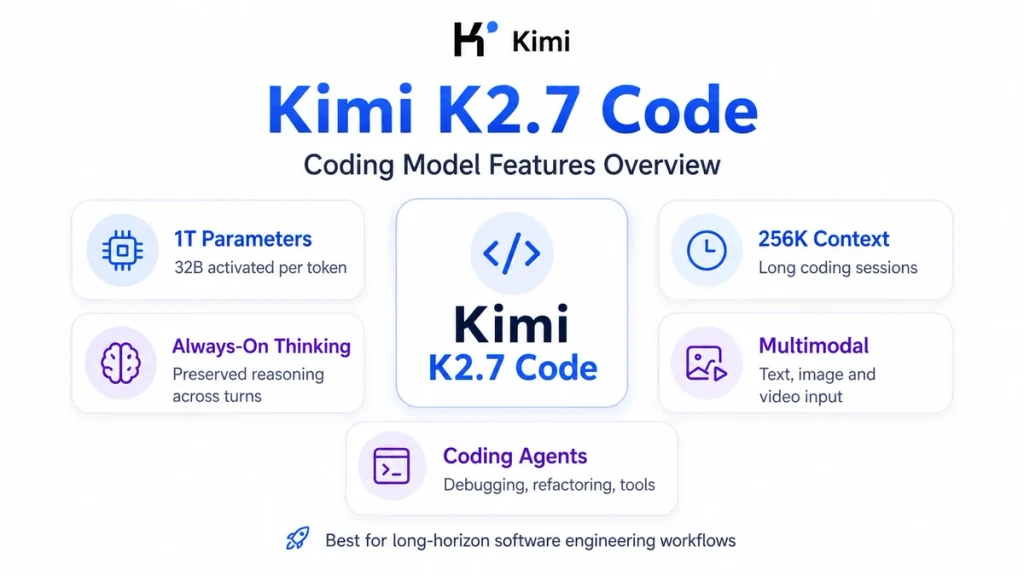
Kimi K2.7 Code is Moonshot AI’s coding-focused, open-weight agentic model. It uses a 1-trillion-parameter Mixture-of-Experts architecture with 32 billion activated parameters and a 262,144-token context window. The model is optimized for long-horizon software engineering, code editing, debugging, tool use, and multi-step programming agents. It always runs with thinking and Preserved Thinking enabled. Developers can use it through Kimi Code, call the official OpenAI-compatible API with model="kimi-k2.7-code", select the faster HighSpeed variant, or download the weights for self-hosting.
Model availability, membership entitlements, API pricing, speed, rate limits, and supported integrations can change. This guide separates Kimi Code membership access from the pay-as-you-go Kimi API because they use different endpoints, model IDs, keys, and billing systems.
Quick verdict: Kimi K2.7 Code is most useful when your workload is primarily software engineering and 256K context is sufficient. It offers lower direct API prices than Kimi K3 and is tuned specifically for coding agents, but it lacks K3’s 1M context window and adjustable reasoning effort. Choose the standard version for cost-sensitive work and HighSpeed when model-output latency matters enough to justify the higher price.
Kimi K2.7 Code at a Glance
| Developer | Moonshot AI |
|---|---|
| Release date | June 12, 2026 |
| Primary purpose | Long-horizon coding and agentic software engineering |
| Architecture | Mixture-of-Experts |
| Total parameters | 1 trillion |
| Activated parameters | 32 billion per token |
| Layers | 61, including one dense layer |
| Experts | 384 routed experts; 8 selected per token; 1 shared expert |
| Attention mechanism | Multi-head Latent Attention |
| Activation function | SwiGLU |
| Vocabulary | 160K |
| Vision encoder | MoonViT, 400M parameters |
| Context window | 262,144 tokens, commonly called 256K |
| Hosted API inputs | Text, images, and video |
| Thinking mode | Always enabled |
| Preserved Thinking | Always enabled |
| Official API model ID | kimi-k2.7-code |
| HighSpeed model ID | kimi-k2.7-code-highspeed |
| Direct API base URL | https://api.moonshot.ai/v1 |
| Open weights | Available on Hugging Face |
| License | Modified MIT License |
What Is Kimi K2.7 Code?
Kimi K2.7 Code is a specialized coding model developed by Moonshot AI and built on the Kimi K2.6 architecture. It is not a completely new parameter-scale generation: it retains the same 1T-total, 32B-activated Mixture-of-Experts structure while receiving additional optimization for coding, instruction following, agentic execution, and reasoning efficiency.
Moonshot released the model on June 12, 2026. The company positions it as a dedicated model for real-world software-engineering workflows such as:
- Understanding an unfamiliar repository.
- Planning and implementing changes across multiple files.
- Debugging code through repeated tool and terminal interactions.
- Refactoring while preserving project-wide behavior.
- Generating and running tests.
- Reviewing screenshots, logs, documentation, and code together.
- Completing long-running programming-agent tasks.
- Calling external tools and processing their results over multiple turns.
Kimi K2.7 Code is also different from Kimi Code. The model provides the intelligence, while Kimi Code is Moonshot’s terminal and IDE coding product. Kimi Code can offer K2.7 Code, K2.7 Code HighSpeed, and Kimi K3 through subscription-based model IDs and quota rules.
K2.7 Code should no longer be described as Moonshot’s overall flagship model. Kimi K3 is the current flagship for frontier coding, long-context reasoning, visual understanding, and knowledge work. K2.7 Code remains a dedicated and lower-priced coding option for workloads that fit within 256K context.
Kimi K2.7 Code Architecture Explained
1T total parameters vs 32B activated parameters
Kimi K2.7 Code is a sparse Mixture-of-Experts model. The 1-trillion figure represents the complete collection of parameters distributed across the model, but it does not activate all one trillion parameters for every token.
The model activates approximately 32 billion parameters per token. It contains 384 routed experts, selects eight experts for each token, and includes one shared expert. The routing system sends different inputs to different subsets of the model.
Why this matters: 1T describes total model capacity, while 32B activated parameters better describes the sparse computation used for an individual token. Neither number alone determines answer quality, latency, memory use, or deployment cost.
The architecture includes 61 layers, one of which is dense. It uses Multi-head Latent Attention, a 7,168-dimensional attention hidden space, 64 attention heads, and SwiGLU activation.
MoonViT visual encoder
K2.7 Code includes MoonViT, a 400-million-parameter vision encoder. This gives the hosted model the ability to combine programming tasks with screenshots, diagrams, interface states, scanned documentation, charts, and video.
Visual input can be particularly useful for:
- Reproducing a user interface from a screenshot.
- Diagnosing frontend rendering problems.
- Reading an error dialog that was not copied as text.
- Connecting a recorded application failure to the relevant code.
- Analyzing architecture diagrams and technical documentation.
- Reviewing charts produced by a data pipeline.
Video understanding is documented for Moonshot’s official hosted API. Support through a third-party provider or self-hosted inference engine can differ and should be verified before designing a production workflow.
Native INT4 quantization
The published model uses native INT4 quantization. Lower-precision weights can reduce memory and inference requirements compared with full-precision deployment, but a one-trillion-parameter model remains a large infrastructure workload. INT4 does not make the full model practical for an ordinary laptop or single consumer GPU.
Main Kimi K2.7 Code Features
Long-horizon software engineering
Short code generation asks a model to write one function or explain one error. Long-horizon coding asks it to preserve an objective through many steps: inspect the repository, form a plan, read related files, make edits, run commands, interpret failures, revise the implementation, and verify the final result.
Kimi K2.7 Code is tuned specifically for this second category. Moonshot reports better instruction compliance and higher end-to-end completion rates than K2.6 on extended software-engineering tasks.
Its practical strengths are most relevant to:
- Repository-scale code analysis.
- Multi-file feature implementation.
- Large refactoring tasks.
- Long terminal-agent sessions.
- Debugging that requires repeated tests and revisions.
- Infrastructure and DevOps workflows.
- Performance and systems-programming tasks.
- Programming agents connected to MCP or custom tools.
A long context window does not remove the need for good agent design. The model still benefits from focused file retrieval, explicit permissions, test commands, checkpoints, compacted history, and clear acceptance criteria.
Improved reasoning-token efficiency
Moonshot reports that K2.7 Code uses approximately 30% fewer thinking tokens on average than K2.6 while improving coding results. The company describes the change as reduced overthinking.
This can matter because reasoning tokens are part of generated output usage. In a long coding-agent loop, planning, retries, tool selection, error interpretation, and verification can generate substantial reasoning content before the final visible response.
The 30% figure is a vendor-reported average, not a guaranteed discount for every request. Actual token consumption depends on the repository, prompt, tools, task difficulty, conversation history, and number of retries.
Always-on Thinking and Preserved Thinking
Kimi K2.7 Code always uses Thinking mode. You cannot turn it off, and the model does not support K3’s reasoning_effort levels.
Its reasoning is returned separately through the reasoning_content field before the final content. Preserved Thinking is also always enabled, which means historical assistant reasoning must remain in the conversation context.
For a multi-turn session, pass the complete assistant message returned by the API back into the next request. Do not copy only the visible final answer. Dropping reasoning_content can cause an error or break the model’s reasoning continuity.
An application does not need to display reasoning content to the end user. It can show only the final answer while retaining the complete message internally for the next model call.
Text, image, and video input
The official Kimi API supports text, image, and video input for K2.7 Code. Moonshot currently documents the following formats:
- Images: PNG, JPEG, WebP, and GIF.
- Videos: MP4, MPEG, MOV, AVI, X-FLV, MPG, WebM, WMV, and 3GPP.
Image and video consumption is calculated dynamically. Higher-resolution images and videos with more or larger keyframes can consume more tokens. Moonshot recommends keeping images at or below 4096×2160 and video at or below 1920×1080, because higher resolutions increase processing time without necessarily improving understanding.
Large media files should be uploaded and referenced by file ID instead of being placed directly in a large base64 request body.
Tool calling and agent loops
K2.7 Code can request developer-defined functions through the Chat Completions API. The model can decide when to call a tool, provide its name and JSON arguments, receive the tool result, and continue reasoning.
Possible tools include:
- Read or search files.
- Write a patch.
- Run a shell command.
- Execute tests.
- Query an issue tracker.
- Retrieve internal documentation.
- Inspect a database schema.
- Analyze part of an uploaded video.
- Call an approved external service.
The application remains responsible for executing tools, validating arguments, enforcing authorization, limiting destructive actions, returning the correct result, and deciding when human approval is required.
JSON Mode, structured data and Partial Mode
The API supports JSON Mode through response_format={"type":"json_object"}. The general Chat Completions interface also supports JSON Schema-based structured output for applications that need predictable fields.
Partial Mode allows the developer to prefill the beginning of the final assistant response and ask the model to continue it. This can be useful for beginning a code block, enforcing a known prefix, or continuing truncated output. JSON Schema is generally safer than relying only on a text prefix when strict machine-readable data is required.
Kimi K2.7 Code’s 256K Context Window Explained
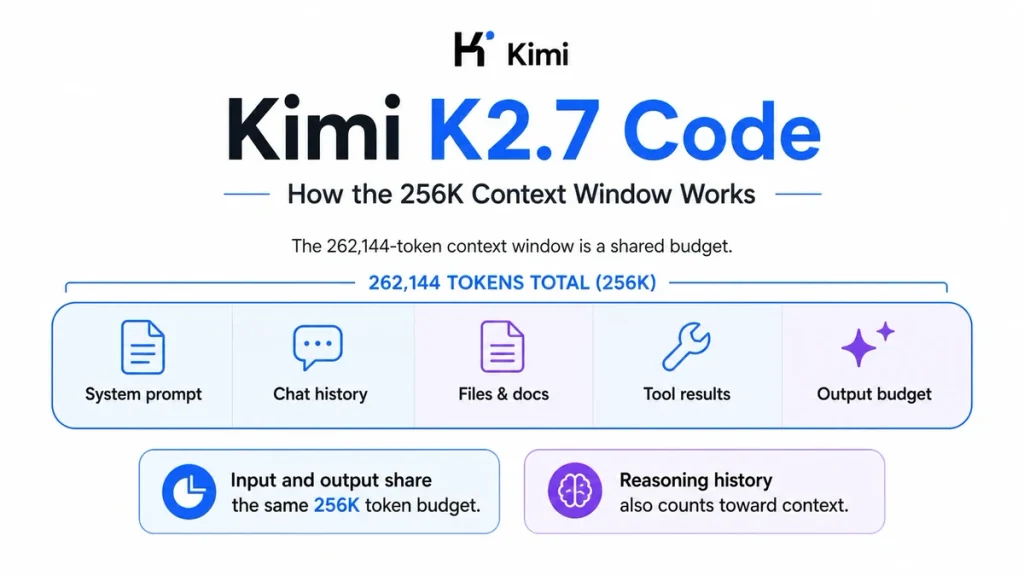
Kimi K2.7 Code supports a context window of 262,144 tokens, commonly written as 256K. A token is not identical to a word: the conversion changes according to language, formatting, source code, whitespace, punctuation, and file type.
The 256K budget can include:
- System instructions.
- User prompts.
- Previous user messages.
- Previous assistant messages.
- Historical
reasoning_content. - Tool definitions.
- Tool calls and tool results.
- Repository files and documentation.
- Tokens produced by image or video processing.
- The output-token allowance requested from the model.
Input and output share the same context window. The model does not provide 262,144 input tokens plus another independent 262,144 output tokens.
Example: if a request already contains about 250,000 prompt and history tokens, asking for a 32,768-token completion would exceed the 262,144-token context budget. The application must shorten the input, compact earlier history, or request a smaller completion.
Default output allowance
Kimi’s K2.7 Code quickstart documents a default max_tokens value of 32,768. New integrations should prefer the current max_completion_tokens field because the general API reference marks max_tokens as deprecated.
The reasoning and final answer share the generated-token allowance. In other words, the sum of reasoning_content and visible content must fit within the requested completion limit.
Do not leave a large default output budget on every request. A code classification, short patch review, or JSON extraction may need only hundreds or a few thousand tokens. Set a realistic limit to control cost and detect unexpectedly long generations.
How to use 256K context efficiently
- Send the files needed for the current task instead of every file in the repository.
- Keep large stable instructions and reference documents at the beginning of the message list.
- Append changing user questions and tool results after the stable prefix.
- Summarize or compact completed stages of a long agent session.
- Remove duplicate logs, generated files, build artifacts, and irrelevant dependencies.
- Use repository search or retrieval before inserting large files.
- Start a new session when switching model IDs because model changes invalidate the earlier context cache.
- Measure prompt, completion, cached, and total token usage from the API response.
How to Access Kimi K2.7 Code
1. Kimi Code subscription
Kimi Code is Moonshot’s coding product for terminals, IDEs, and compatible third-party agents. Its current model IDs include:
kimi-for-coding: the standard Kimi K2.7 Code model, listed for all Kimi Code members.kimi-for-coding-highspeed: the HighSpeed model, currently listed for Allegretto members and above.
In Kimi Code, users can switch models through the official client’s /model command or the relevant model selector. Kimi Code can also be connected to supported tools such as Claude Code, OpenCode, Codex, and Hermes Agent.
Kimi Code access is subscription-based and governed by membership quotas and concurrency. It is not the same as purchasing balance for the general Kimi API.
2. Official pay-as-you-go Kimi API
Developers building applications, internal agents, gateways, or custom tools can use Moonshot’s Open Platform. The direct API uses:
- Base URL:
https://api.moonshot.ai/v1 - Standard model:
kimi-k2.7-code - HighSpeed model:
kimi-k2.7-code-highspeed - Billing: pay as you go by token usage
This route is appropriate when you need to integrate the model into your own product, control prompts and tools, process multimodal inputs, monitor token usage, or manage an organizational API workload.
3. Open weights and self-hosting
Moonshot publishes the full Kimi K2.7 Code weights on Hugging Face. Organizations can deploy them with supported engines such as vLLM, SGLang, and KTransformers, subject to the Modified MIT License and their infrastructure capacity.
4. Third-party platforms
Kimi K2.7 Code can also appear through external model providers and coding platforms. For example, GitHub announced the model for GitHub Copilot in July 2026. Third-party platforms can apply their own price, context, input, rate-limit, data-processing, and availability rules, so their product page should be treated as the source of truth for that route.
Kimi Code Membership vs Kimi API
| Item | Kimi Code Platform | Kimi Open Platform API |
|---|---|---|
| Best for | Terminal and IDE coding agents | Custom applications and production integrations |
| Billing | Monthly or annual membership with quotas | Pay-as-you-go token billing |
| OpenAI-compatible base URL | https://api.kimi.com/coding/v1 | https://api.moonshot.ai/v1 |
| Anthropic-compatible base URL | https://api.kimi.com/coding/ | Use the integration guidance provided for the Open Platform |
| Standard K2.7 model ID | kimi-for-coding | kimi-k2.7-code |
| HighSpeed model ID | kimi-for-coding-highspeed | kimi-k2.7-code-highspeed |
| Limits | Membership and weekly quota rules | Organization-specific rate and balance limits |
| API balance | Not converted into general Open Platform credit | Separate prepaid or pay-as-you-go balance |
Kimi K2.7 Code API Quickstart
For the official direct API, you need:
- An account on the Kimi API Platform.
- A server-side API key.
- Available API balance.
- Python and the OpenAI Python SDK for the example below.
Install or update the SDK:
python3 -m pip install --upgrade "openai>=1.0"Store the key in the MOONSHOT_API_KEY environment variable. Never place a secret API key in public JavaScript, a browser request, a Git repository, or a published WordPress page.
Send a request with Python
import os

from openai import OpenAI

api_key = os.environ.get("MOONSHOT_API_KEY")
if not api_key:
    raise RuntimeError(
        "Set the MOONSHOT_API_KEY environment variable before running this script."
    )

client = OpenAI(
    api_key=api_key,
    base_url="https://api.moonshot.ai/v1",
)

messages = [
    {
        "role": "system",
        "content": (
            "You are a careful software-engineering assistant. "
            "Explain assumptions and do not invent project files."
        ),
    },
    {
        "role": "user",
        "content": (
            "Write a Python function that validates an email-like identifier. "
            "Include type hints, tests, and a short explanation of limitations."
        ),
    },
]

response = client.chat.completions.create(
    model="kimi-k2.7-code",
    messages=messages,
    max_completion_tokens=4096,
)

message = response.choices[0].message
print(message.content or "")
The critical configuration values are:
base_url="https://api.moonshot.ai/v1"model="kimi-k2.7-code"
Do not use https://api.kimi.ai/v1 or the misspelled model ID kimi-k2-7-code. Those values do not match the official direct API documentation.
Preserve the full assistant message in later turns
To continue the conversation, append the complete assistant message returned by the SDK, including its preserved reasoning fields:
# Keep the complete assistant response, including reasoning_content.
messages.append(message.model_dump(exclude_none=True))

messages.append(
    {
        "role": "user",
        "content": (
            "Now modify the implementation so the domain is normalized "
            "to lowercase and add tests for Unicode input."
        ),
    }
)

follow_up = client.chat.completions.create(
    model="kimi-k2.7-code",
    messages=messages,
    max_completion_tokens=4096,
)

print(follow_up.choices[0].message.content or "")
The API is stateless. Moonshot does not automatically remember the earlier turn for the next request. Your application must resend the conversation history, including the full K2.7 Code assistant messages and relevant tool results.
Important API parameter rules
| Parameter or behavior | Kimi K2.7 Code rule |
|---|---|
thinking | Thinking is always enabled. Omit the parameter, or use only the supported enabled configuration with preserved thinking. |
reasoning_effort | Not supported; this field is for Kimi K3. |
temperature | Fixed at 1.0. Do not pass another value. |
top_p | Fixed at 0.95. Do not pass another value. |
n | Fixed at 1. |
| Presence and frequency penalties | Fixed at 0. |
tool_choice | Use auto or none. required is not supported. |
max_completion_tokens | Set an appropriate generated-token budget; input plus the requested completion must fit within 262,144 tokens. |
stream | Supported; reasoning deltas appear before final-answer content. |
response_format | Supports text, JSON Mode, and structured output through the general Chat Completions interface. |
prompt_cache_key | Use a stable session or task ID for coding-agent sessions to improve cache routing; it is required for Kimi Code Plan requests. |
The simplest safe rule is to omit fixed sampling parameters entirely. Supplying values copied from another provider—such as temperature=0—can cause an invalid-request error.
Tool-calling restrictions
When K2.7 Code requests a tool:
- Read the returned
tool_calls. - Validate the requested function name and JSON arguments.
- Check the user’s authorization.
- Execute the approved function in your application.
- Append the complete assistant message to the history.
- Append the tool result with the matching
tool_call_id. - Send the updated history back to the model.
Do not use tool_choice="required" with K2.7 Code. Use auto when the model may choose a tool, or none when tool use must be disabled.
Kimi K2.7 Code Standard vs HighSpeed
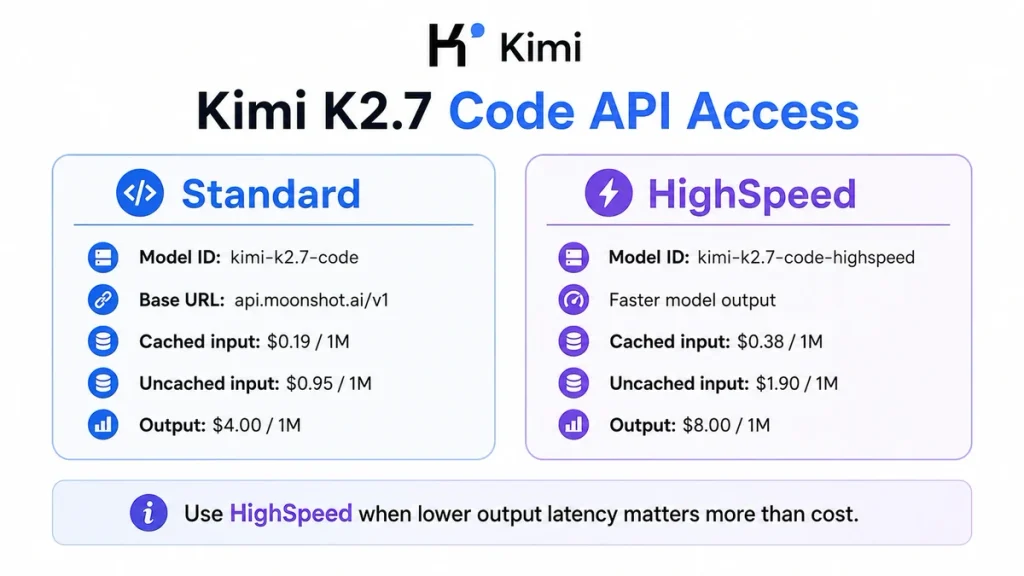
kimi-k2.7-code-highspeed uses the same underlying K2.7 Code model and the same parameter rules. Its primary difference is serving speed.
| Area | Standard | HighSpeed |
|---|---|---|
| Direct API model ID | kimi-k2.7-code | kimi-k2.7-code-highspeed |
| Context window | 262,144 tokens | 262,144 tokens |
| Model quality | Kimi K2.7 Code | Same underlying model |
| Thinking | Always on | Always on |
| Approximate output speed | Regular serving speed | About 180 tokens/s; up to 260 tokens/s in short-context scenarios |
| Cache-hit input price | $0.19 per 1M tokens | $0.38 per 1M tokens |
| Cache-miss input price | $0.95 per 1M tokens | $1.90 per 1M tokens |
| Output price | $4.00 per 1M tokens | $8.00 per 1M tokens |
Moonshot notes that HighSpeed capacity is limited and performance can fluctuate while resources are expanded. Its advantage applies to model generation; slow tools, shell commands, tests, network calls, and other external steps are not accelerated by selecting the faster model.
Inside Kimi Code membership, the HighSpeed model is described as roughly five to six times faster and consumes three times the coding quota. That quota rule is separate from the direct API’s per-token pricing.
Kimi K2.7 Code API Pricing
| Model | Cached input | Uncached input | Output |
|---|---|---|---|
kimi-k2.7-code | $0.19 / 1M tokens | $0.95 / 1M tokens | $4.00 / 1M tokens |
kimi-k2.7-code-highspeed | $0.38 / 1M tokens | $1.90 / 1M tokens | $8.00 / 1M tokens |
Standard API cost example
Assume one coding-agent request processes 100,000 input tokens and generates 20,000 output tokens.
With an uncached input:
- Input: 0.1 × $0.95 = $0.095
- Output: 0.02 × $4.00 = $0.08
- Estimated total: $0.175, excluding tax
With a full cache hit on the input:
- Cached input: 0.1 × $0.19 = $0.019
- Output: 0.02 × $4.00 = $0.08
- Estimated total: $0.099, excluding tax
The example assumes the entire input qualifies for one price category. Real requests can report a mixture of cached and uncached tokens.
How Context Caching Works
Kimi automatically attempts to cache repeated prompt prefixes. Developers do not need to create a cache object, select a manual cache ID, or manage a time-to-live value.
A new request can hit the prefix cache only when the previous request’s prompt contains more than 256 tokens. To increase the chance of reuse:
- Place stable system instructions first.
- Keep the same codebase or documentation prefix unchanged.
- Keep tool definitions stable when possible.
- Append new questions and tool results after the reused prefix.
- Use a consistent
prompt_cache_keyfor one coding session or task. - Avoid changing model IDs during a session.
Good caching scenarios include repeated questions about the same repository, multi-turn code review, an internal documentation assistant, and a long agent session that reuses the same instructions and tool inventory.
Context caching and retrieval are not the same technique. Caching makes repeated prefixes cheaper to process; retrieval selects a smaller relevant subset of a larger codebase. A production coding agent may benefit from using both.
Is Kimi K2.7 Code Open Source?
Moonshot describes Kimi K2.7 Code as open source and publishes the full weights. A precise description is that it is an open-weight model released under a Modified MIT License.
The license permits use, copying, modification, merging, publication, distribution, sublicensing, and sale, provided its notice is retained. Its principal modification states that a commercial product or service using the model or a derivative must prominently display “Kimi K2.7 Code” when that product exceeds either:
- 100 million monthly active users; or
- $20 million in monthly revenue, or the equivalent in another currency.
This is a plain-language summary and not legal advice. Read the current license before commercial deployment.
Can you run Kimi K2.7 Code locally?
The weights can be downloaded and self-hosted, but the full model is not a conventional desktop model. Moonshot currently recommends or documents deployment through:
- vLLM
- SGLang
- KTransformers
The model card requires Transformers version >=4.57.1 and <5.0.0 for its Transformers route. Moonshot’s deployment guide includes single-node examples using eight H200 accelerators with tensor parallelism, illustrating the scale required for a conventional GPU deployment.
The KTransformers examples demonstrate heterogeneous CPU-and-GPU inference, but they still use substantial server hardware, memory, and storage. Downloading the files does not make full-context production inference inexpensive or simple.
Before self-hosting, compare:
- Hosted API spending.
- GPU rental or purchase.
- Model storage and download time.
- KV-cache memory at long context lengths.
- Expected concurrency and throughput.
- Engineering and operations work.
- Monitoring, security, scaling, and updates.
- Whether official hosted video support is required.
Kimi K2.7 Code Benchmarks
Moonshot publishes results comparing K2.7 Code with K2.6 and selected closed models:
| Benchmark | K2.6 | K2.7 Code | Reported improvement |
|---|---|---|---|
| Kimi Code Bench v2 | 50.9 | 62.0 | +21.8% |
| Program Bench | 48.3 | 53.6 | +11.0% |
| MLS Bench Lite | 26.7 | 35.1 | +31.5% |
| Kimi Claw 24/7 Bench | 42.9 | 46.9 | +9.3% |
| MCP Atlas | 69.4 | 76.0 | +9.5% |
| MCP Mark Verified | 72.8 | 81.1 | +11.4% |
These numbers should be interpreted carefully:
- Kimi Code Bench v2 and Kimi Claw 24/7 Bench are Moonshot’s in-house benchmarks.
- K2.7 Code and K2.6 were evaluated through Kimi Code CLI with thinking enabled.
- Other models were evaluated through their respective coding products and high-reasoning settings.
- Different agent harnesses, tool behavior, prompts, and retry strategies affect results.
- A benchmark improvement does not guarantee lower latency or better performance on every repository.
- The reported 30% thinking-token reduction is an average measured by Moonshot.
Evaluate K2.7 Code using your own tasks before routing production traffic to it. A useful test set should include representative repositories, bug fixes, refactors, tool calls, required tests, latency targets, token costs, and a human review rubric.
Kimi K2.7 Code Limitations
Thinking cannot be disabled
Every request uses reasoning. This can improve complex coding work but can be inefficient for simple transformations, short classifications, routing, or mechanical code formatting.
Reasoning effort cannot be adjusted
K2.7 Code does not support reasoning_effort="low", "high", or "max". Those controls belong to Kimi K3.
Sampling controls are fixed
Temperature, top-p, number of outputs, and penalties cannot be freely tuned. Applications migrating from another OpenAI-compatible provider must remove incompatible values.
Preserved Thinking adds integration requirements
Your application must retain complete assistant messages across turns. Frameworks that keep only visible text can break long conversations and tool loops.
Tool choice cannot be forced
K2.7 Code supports auto and none, but not required. Choose K3 or enforce the workflow in application logic when a tool call must occur.
The context window is smaller than K3
Its 256K window is large enough for many repositories, but K3 supports approximately four times as much context. Very large codebases or long sessions may require retrieval, compaction, or migration to K3.
HighSpeed costs more
The direct HighSpeed API doubles the standard token rates. It does not accelerate external tools, tests, network calls, or shell scripts, so the end-to-end benefit depends on how much of the workflow is spent waiting for model output.
Self-hosting is infrastructure-intensive
Open weights provide deployment control, but the model’s one-trillion-parameter scale remains far beyond typical local hardware.
Code still requires review
K2.7 Code can introduce logic errors, security vulnerabilities, dependency mistakes, incomplete migrations, incorrect tool arguments, or tests that do not cover the intended behavior. Use review, sandboxing, automated tests, static analysis, and approval controls for consequential changes.
Kimi K2.7 Code vs K2.6 vs K3
| Area | Kimi K2.7 Code | Kimi K2.6 | Kimi K3 |
|---|---|---|---|
| Positioning | Dedicated coding model | General-purpose K2.x model | Current flagship model |
| Context | 256K | 256K | 1M |
| Thinking | Always on | Can be enabled or disabled | Always on |
| Reasoning control | No adjustable effort | Thinking on or off | Low, high, or max effort |
| Tool choice required | Not supported | Not supported | Supported |
| Best use | Cost-sensitive coding agents and 256K engineering tasks | General chat, vision, agents, and coding with switchable thinking | Largest codebases, frontier coding, deep reasoning, and knowledge work |
Choose K2.7 Code when the task is primarily programming, 256K context is sufficient, and you want lower direct API pricing than K3.
Choose K2.6 when you need a more general-purpose model or want to disable thinking for simple, latency-sensitive work.
Choose K3 when you need 1M context, stronger general frontier capabilities, adjustable reasoning effort, or forced tool selection.
Who Should Use Kimi K2.7 Code?
Kimi K2.7 Code is a strong candidate for:
- Coding agents operating across several files.
- Repository analysis and refactoring.
- Long debugging and testing loops.
- Developers integrating tools through an OpenAI-compatible API.
- Applications that combine screenshots or videos with source code.
- Teams reusing a stable repository prefix and benefiting from caching.
- Organizations that require downloadable model weights.
- Cost-sensitive workloads that do not need K3’s 1M window.
A different model may be better when:
- The task is mostly writing, conversation, or broad knowledge work.
- You need to turn thinking off.
- You need adjustable reasoning effort.
- You need to force a tool call with
tool_choice="required". - Your context regularly exceeds 256K.
- The workload is too simple to justify always-on reasoning.
- Your application cannot preserve complete assistant messages.
Frequently Asked Questions
What is Kimi K2.7 Code?
Kimi K2.7 Code is Moonshot AI’s coding-focused agentic Mixture-of-Experts model. It is optimized for long-horizon software-engineering tasks, tool use, debugging, code editing, and programming agents.
When was Kimi K2.7 Code released?
Moonshot AI released Kimi K2.7 Code on June 12, 2026.
How many parameters does Kimi K2.7 Code have?
It has one trillion total parameters and activates approximately 32 billion parameters per token. Its MoE architecture contains 384 routed experts, selects eight per token, and includes one shared expert.
What is the Kimi K2.7 Code context window?
The model supports 262,144 tokens, commonly called a 256K context window. Prompts, conversation history, reasoning history, tools, files, media tokens, and the requested output share this budget.
What is the correct K2.7 Code API model ID?
The official direct API model ID is kimi-k2.7-code. The HighSpeed ID is kimi-k2.7-code-highspeed.
What is the official Kimi K2.7 API endpoint?
The OpenAI-compatible direct API base URL is https://api.moonshot.ai/v1.
Can Kimi K2.7 Code thinking be turned off?
No. Thinking and Preserved Thinking are always enabled. Passing a disabled-thinking configuration returns an error or, inside some Kimi Code tools, can route the request to K2.6 instead.
Does Kimi K2.7 Code support reasoning_effort?
No. The low, high, and max reasoning_effort settings belong to Kimi K3. K2.7 Code uses fixed always-on thinking.
Does Kimi K2.7 Code support images and video?
Yes. Moonshot’s official hosted API supports text, image, and video input. Availability through a third-party host or self-hosted engine can differ.
How much does the Kimi K2.7 Code API cost?
The standard direct API costs $0.19 per million cached-input tokens, $0.95 per million uncached-input tokens, and $4 per million output tokens, excluding tax. The HighSpeed version costs twice those rates.
What is the difference between Kimi K2.7 Code and HighSpeed?
They use the same underlying model and parameter constraints. HighSpeed provides approximately 180 output tokens per second and can reach 260 tokens per second in short-context scenarios, but its direct API token rates are twice the standard rates.
Does a Kimi Code subscription include general API credit?
No. Kimi Code subscription access and the Kimi Open Platform API have separate keys, model IDs, endpoints, quotas, and billing systems.
Why must reasoning_content be preserved?
K2.7 Code uses Preserved Thinking across turns. The next request must contain the complete earlier assistant message so the model can retain its reasoning and tool-call state. Keeping only the visible answer can cause errors or inconsistent behavior.
Does Kimi K2.7 Code support tool_choice required?
No. Use tool_choice="auto" or "none". Kimi K3 is the current Kimi model that supports "required".
Is Kimi K2.7 Code open source?
The complete weights are published under a Modified MIT License. The license permits broad use and modification but requires prominent attribution for commercial products exceeding specified monthly-user or monthly-revenue thresholds.
Can Kimi K2.7 Code run on a normal PC?
Not realistically in its full official form. Moonshot’s deployment examples use multi-accelerator server configurations. Community quantizations and CPU-GPU hybrid methods can change the requirements, speed, context capacity, and output quality.
Should I use Kimi K2.7 Code or Kimi K3 for coding?
Use K2.7 Code for coding-focused, cost-sensitive workloads that fit within 256K context. Use K3 when you need a 1M context window, adjustable reasoning effort, forced tool selection, or Moonshot’s strongest current general capabilities.
Official Sources and Update Methodology
This article prioritizes first-party Moonshot AI, Kimi, Hugging Face model-repository, and official integration documentation. The main sources reviewed were:
- Kimi K2.7 Code Official Overview
- Official Kimi K2.7 Code API Quickstart
- Official Kimi K2.7 Code Model Card and Weights
- Kimi Model Parameter Reference
- Kimi Thinking Models Documentation
- Official K2.7 Code API Pricing
- Kimi Code Model Configuration
- Kimi Code Platform Overview
- Kimi Context Caching Documentation
- Kimi Vision and Video Input Documentation
- Kimi K2.7 Code Modified MIT License
- Official Deployment Guidance
Model specifications, API behavior, product access, prices, and integration rules were last checked on August 22, 2026. Direct Moonshot pricing should not be replaced with a third-party provider’s price, and Kimi Code subscription endpoints should not be mixed with the general Kimi API endpoint.
Last verified: August 22, 2026.