
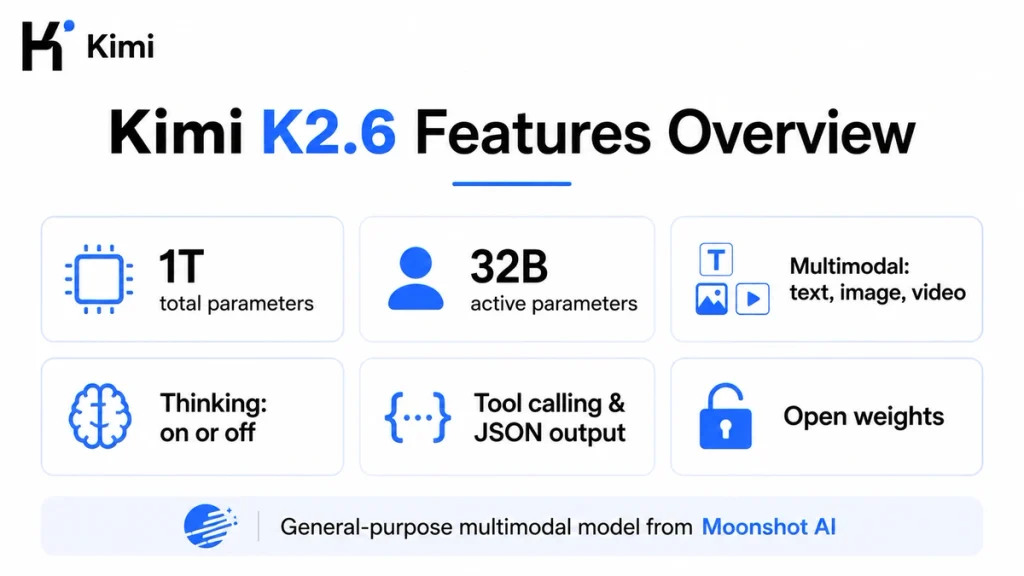
Kimi K2.6 is Moonshot AI’s general-purpose, open-weight multimodal model. It uses a 1-trillion-parameter Mixture-of-Experts architecture while activating about 32 billion parameters for each token. The model supports text, image, and video input, a 262,144-token context window through the official API, tool calling, structured outputs, and both thinking and non-thinking modes. Developers can access the K2.6 API with the model ID kimi-k2.6, while users can access K2.6 through Kimi Chat and selected Kimi products. K2.6 is no longer Kimi’s flagship model, but it remains a practical lower-cost option for general chat, visual understanding, agent tasks, and applications that need switchable reasoning.
Model availability, product context limits, API prices, membership rules, and supported integrations can change. This article distinguishes between the Kimi K2.6 model, the official Kimi API, Kimi Chat, Kimi Work, Kimi Code, and self-hosted open weights because their limits and interfaces are not identical.
Quick verdict: Choose Kimi K2.6 when you need a general-purpose multimodal model, a 256K API context, low direct token prices, and the option to switch thinking off for simpler or latency-sensitive work. Choose Kimi K2.7 Code for coding-focused agents, or Kimi K3 when you need Moonshot AI’s strongest current capabilities, a 1M-token context window, or adjustable reasoning effort.
Kimi K2.6 at a Glance
| Developer | Moonshot AI |
|---|---|
| Release date | April 20, 2026 |
| Current positioning | General-purpose multimodal model with switchable thinking |
| Architecture | Mixture-of-Experts |
| Total parameters | 1 trillion |
| Activated parameters | 32 billion per token |
| Layers | 61, including one dense layer |
| Experts | 384 routed experts; 8 selected per token; 1 shared expert |
| Attention mechanism | Multi-head Latent Attention |
| Activation function | SwiGLU |
| Vocabulary | 160K |
| Vision encoder | MoonViT, 400M parameters |
| Quantization | Native INT4 |
| Official API context | 262,144 tokens, commonly called 256K |
| Kimi Chat context | Approximately 128K tokens per conversation under the current consumer-product documentation |
| Official API inputs | Text, images, and video |
| Thinking behavior | Enabled by default; can be disabled |
| Preserved Thinking | Optional through thinking.keep="all" |
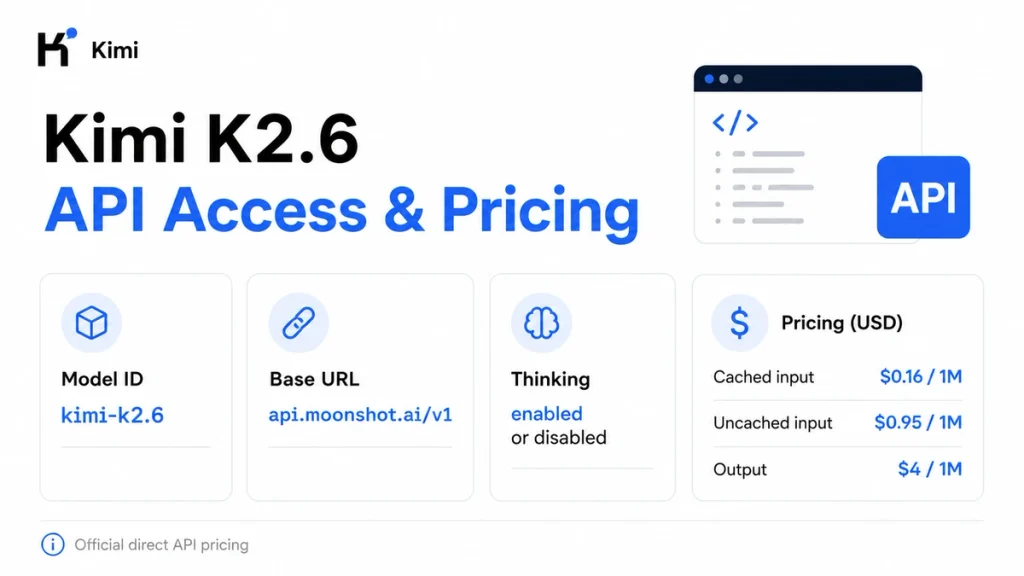
| Official API model ID | kimi-k2.6 |
| Official API base URL | https://api.moonshot.ai/v1 |
| Direct API pricing | $0.16 cached input, $0.95 uncached input, and $4 output per 1M tokens |
| Open weights | Available on Hugging Face |
| License | Modified MIT License |
What Is Kimi K2.6?
Kimi K2.6 is a native multimodal and agentic artificial intelligence model developed by Moonshot AI. The company released and open-sourced it on April 20, 2026 as a successor to Kimi K2.5.
The model is designed to process and generate text, understand images and video, reason through complex tasks, write and review code, call external tools, and support longer agent workflows.
Kimi K2.6 should not be confused with the products through which it can be used:
- Kimi Chat: the web and mobile assistant where K2.6 can be used for general conversation and fast question answering.
- Kimi Work: the desktop workspace for documents, research, local files, projects, scheduled tasks, and agent workflows.
- Kimi Code: Moonshot AI’s terminal and IDE coding product.
- Kimi API: the developer platform for programmatic access to K2.6 and other Kimi models.
- Kimi K2.6 open weights: downloadable model files for organizations that want to operate their own inference infrastructure.
The model provides the intelligence, while each product adds its own system instructions, context management, tools, subscriptions, interfaces, rate limits, and safety policies. A response from Kimi Chat can therefore differ from a response generated by a direct K2.6 API request, even when the user prompt is identical.
Where Kimi K2.6 Fits in the Current Kimi Model Lineup
K2.6 was presented as Moonshot AI’s newest flagship at launch. That description is now historical rather than current.
- Kimi K3 is the current flagship model for frontier coding, deep reasoning, visual understanding, and end-to-end knowledge work.
- Kimi K2.7 Code is the dedicated coding model, with stronger coding instruction compliance and reduced overthinking compared with K2.6.
- Kimi K2.6 remains the general-purpose option with multimodal input, a 256K API context, lower direct prices than K3, and the ability to enable or disable thinking.
This makes K2.6 useful when K3’s 1M context and higher prices are unnecessary, or when K2.7 Code’s always-on coding-focused reasoning is too specialized for the workload.
K2.6 was also available through Kimi Code when it launched. The current Kimi Code model selector now lists Kimi K3 and Kimi K2.7 Code across its named model IDs, rather than exposing K2.6 as a direct selectable model. Developers who specifically need K2.6 should use Kimi Chat, the official Kimi API, a supported provider, or the open weights instead of assuming it remains a named Kimi Code option.
Kimi K2.6 Architecture Explained
1T total parameters vs 32B activated parameters
Kimi K2.6 uses a sparse Mixture-of-Experts, or MoE, architecture. The model contains one trillion parameters in total, but it does not use all one trillion parameters for every token.
Instead, its routing system selects a smaller set of experts according to the current token. The official model card lists approximately 32 billion activated parameters per token.
The distinction matters: one trillion parameters describes the model’s total distributed capacity. Thirty-two billion activated parameters describes the sparse subset involved in processing a token. Neither number alone determines final quality, latency, hardware requirements, or serving cost.
384 experts and 61 layers
The published K2.6 architecture includes:
- 61 layers, including one dense layer.
- 384 routed experts.
- Eight routed experts selected for each token.
- One shared expert.
- 64 attention heads.
- A 160K-token vocabulary.
- A 7,168-dimensional attention hidden space.
- A 2,048-dimensional MoE hidden space for each expert.
The router can direct different token patterns to different experts, allowing the model to distribute specialization across a very large parameter pool without performing dense computation over the complete model for every token.
Multi-head Latent Attention and SwiGLU
K2.6 uses Multi-head Latent Attention, commonly abbreviated as MLA. At a high level, MLA compresses parts of the key-value representation used during attention, helping reduce memory requirements during long-context inference.
The model uses SwiGLU as its activation function. These architectural choices contribute to its ability to process long sequences and serve large agentic workloads, but they do not remove the substantial infrastructure required by a one-trillion-parameter model.
MoonViT vision encoder
Kimi K2.6 includes a 400-million-parameter MoonViT vision encoder. Native visual processing lets the hosted model combine text with screenshots, interface mockups, charts, scanned material, diagrams, and video frames.
Potential uses include:
- Explaining a chart or technical diagram.
- Reading a screenshot of an error.
- Reviewing a web interface or mobile UI.
- Generating frontend code from a visual reference.
- Analyzing a scanned document.
- Connecting video observations with code or tool calls.
Multimodal behavior can vary between Moonshot’s direct API, third-party providers, and self-hosted inference engines. Verify the exact route before promising image or video support in a production application.
Native INT4 quantization
K2.6 uses native INT4 quantization. Lower-precision model weights reduce memory and computation compared with higher-precision deployment, but the complete model remains very large.
Native INT4 should not be interpreted as meaning that the full official model can run efficiently on a normal laptop or one consumer GPU.
Main Kimi K2.6 Features
Thinking and non-thinking modes
K2.6’s most important current differentiator is its switchable thinking behavior.
- Thinking enabled: the model performs and returns reasoning before its final answer. This is better suited to difficult reasoning, coding, planning, and multi-step tool use.
- Thinking disabled: the model produces a more direct answer without the additional reasoning stage. This can reduce latency and token consumption for simpler work.
Thinking is enabled by default through the official API. Developers can disable it for a request with:
extra_body={
    "thinking": {
        "type": "disabled"
    }
}
K2.6 does not support K3’s reasoning_effort values such as low, high, or max. Its control is binary: thinking enabled or disabled.
Long-horizon coding
Moonshot trained and evaluated K2.6 for extended software-engineering tasks that require more than generating one code snippet.
Examples include:
- Exploring a large repository.
- Planning changes across multiple files.
- Running tests and interpreting failures.
- Debugging through repeated tool calls.
- Refactoring while preserving architectural patterns.
- Working across Rust, Go, Python, frontend, DevOps, and performance-optimization tasks.
- Turning visual references into frontend implementations.
Moonshot published long-running case studies involving thousands of tool calls and many hours of execution. These are vendor demonstrations completed with specific agent harnesses, tools, permissions, and evaluation conditions; they are not a promise that one basic API request will autonomously reproduce the same behavior.
Coding-driven design
K2.6 is positioned for workflows that combine visual understanding with frontend and lightweight full-stack development. It can interpret a screenshot or design reference, generate layout and interaction code, and revise the implementation through tool-assisted iteration.
The underlying model does not independently deploy an application, create a database, or operate a browser unless the surrounding product or developer application provides the required tools.
Text, image, and video input
The official hosted K2.6 API supports text, images, and video. Current documentation lists:
- Images: PNG, JPEG, WebP, and GIF.
- Videos: MP4, MPEG, MOV, AVI, X-FLV, MPG, WebM, WMV, and 3GPP.
Moonshot recommends keeping image resolution at or below 4096×2160 and video resolution at or below 1920×1080. Higher resolutions can increase processing time and token usage without necessarily improving model understanding.
Large media files should be uploaded and referenced by file ID rather than inserted into an oversized base64 request body. The K2.6 quickstart currently demonstrates base64 content and uploaded-file references; verify public-URL input support for the exact API or provider route you use.
Tool calling
K2.6 supports function calling through the Chat Completions API. A developer can give the model approved functions such as:
- Searching an internal knowledge base.
- Reading a selected file.
- Running a calculation.
- Checking inventory.
- Executing an approved test command.
- Retrieving a customer record.
- Analyzing a selected video segment.
- Calling a controlled external service.
The application—not the model—must execute the function, validate its arguments, enforce authorization, return the matching tool result, and decide whether human approval is required.
K2.6 supports tool_choice="auto" and tool_choice="none". It does not support tool_choice="required". Use application logic or Kimi K3 when a tool call must be enforced.
Streaming and structured output
The official API supports streaming, JSON Mode, JSON Schema-based structured output through the general Chat Completions interface, and Partial Mode.
- Streaming: returns incremental reasoning and answer deltas.
- JSON Mode: requests a valid JSON object.
- Structured Output: constrains the final response to a defined schema where supported.
- Partial Mode: supplies the beginning of an assistant answer for the model to continue.
Structured output improves format reliability, but the application should still validate required fields, types, ranges, and business rules.
Agent Swarm and orchestration
K2.6’s launch materials described an Agent Swarm system capable of coordinating up to 300 sub-agents across as many as 4,000 workflow steps. This is an orchestration capability built around the model—not a property automatically created by a raw kimi-k2.6 API request.
A direct API integration must still build or connect:
- The orchestrator.
- Sub-agent creation and routing.
- Tool execution.
- Shared and isolated context.
- Retry and failure handling.
- Budget and concurrency controls.
- Result validation and consolidation.
The current consumer Kimi Agent and Agent Swarm products are powered by Kimi K3. Therefore, the 300-agent K2.6 claim should be understood as part of K2.6’s launch-era agent-system research and capability, not as proof that the current Kimi Agent interface still runs on K2.6.
Kimi K2.6 Context Window Explained
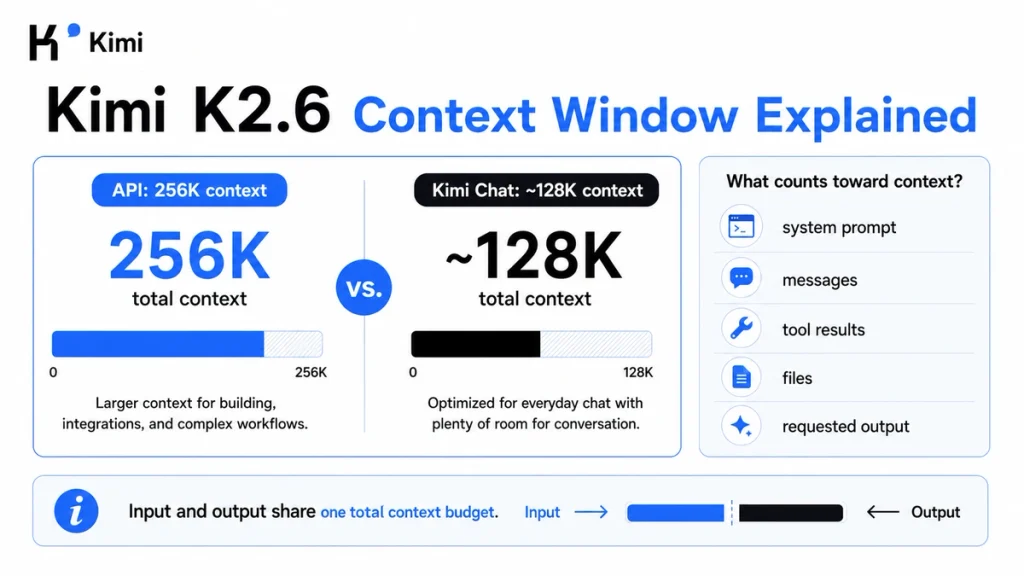
The Kimi K2.6 model and official API support a total context window of 262,144 tokens, commonly shortened to 256K.
A token is not the same as a word. Tokenization changes according to language, source code, punctuation, numbers, whitespace, and document format. Any conversion from tokens to words should be treated as a rough estimate rather than a fixed rule.
256K in the API vs approximately 128K in Kimi Chat
The model’s technical context and the context exposed by a consumer product are not necessarily identical.
| Access route | Current documented K2.6 context | Important note |
|---|---|---|
| Official Kimi API | 262,144 tokens | Your application controls messages, tools, context, and output allowance |
| Kimi Chat | Approximately 128K tokens per conversation | The consumer product applies its own context management and system configuration |
| Kimi Work Agent | Product-managed | Capabilities and credits depend on the current Kimi Work configuration |
| Current Kimi Code | K2.6 is not a directly listed model choice | Current named options use K3 and K2.7 Code |
| Open weights | Architecture supports 262,144 tokens | Practical usable context depends on engine, memory, configuration, quantization, and hardware |
Do not promise that a user can paste the full 256K API capacity into Kimi Chat. The official consumer Help Center currently documents approximately 128K for a K2.6 conversation.
What counts toward the API context?
- System instructions.
- User prompts.
- Previous user and assistant messages.
- Historical reasoning when Preserved Thinking is enabled.
- Tool definitions.
- Tool calls and tool results.
- Uploaded document text.
- Tokens created from image and video input.
- The maximum completion allowance requested from the model.
The 262,144-token limit is a shared budget. It does not mean 262,144 input tokens plus another independent 262,144 output tokens.
Example: a request containing 245,000 prompt and history tokens cannot safely reserve a 32,768-token completion. The combined total would exceed the model context. Shorten the input, compact earlier history, or request a smaller completion.
How long can the API output be?
The K2.6 quickstart documents a default generated-token allowance of 32,768. The current general API documentation recommends using max_completion_tokens rather than the deprecated max_tokens field.
The technical upper bound is the remaining context after the prompt is counted:
maximum possible completion ≤ 262,144 − prompt tokens
The model can stop before reaching the requested maximum. max_completion_tokens is a ceiling, not an instruction to produce an exact number of tokens.
How to use the 256K window efficiently
- Include only documents and repository files needed for the current task.
- Use search or retrieval before inserting a complete corpus.
- Remove duplicate logs, generated files, and build artifacts.
- Keep stable instructions and reference material near the beginning of the prompt.
- Append changing questions after the stable prefix to improve cache reuse.
- Summarize completed stages of long agent sessions.
- Trim verbose tool results after extracting the useful facts.
- Set a realistic completion allowance.
- Measure prompt, cached-input, reasoning, completion, and total tokens.
How to Access Kimi K2.6
Use K2.6 in Kimi Chat
K2.6 is available through the Kimi web and mobile chat experience. Kimi currently states that ordinary K2.6 Chat is free for all users and does not consume membership credits.
This does not mean that every Kimi feature is unlimited. Chat can still have conversation-frequency, product-context, account, and service-capacity restrictions.
Use K2.6 as an Agent in Kimi Work
K2.6 used as an Agent inside Kimi Work can draw from the shared membership credit pool. This differs from ordinary K2.6 Chat, which currently does not consume membership credits.
Use Kimi Work when you need desktop projects, authorized local files, document workflows, scheduled tasks, or other product-level tools rather than a raw model response.
Use K2.6 through the official API
The official API offers the most direct control over K2.6. You can manage the system prompt, conversation history, thinking state, output limit, tools, structured output, media input, streaming, and caching behavior.
Use a third-party API provider
Several external providers serve Kimi K2.6. Their model IDs, token prices, modalities, rate limits, safety rules, context behavior, caching implementation, and data policies can differ from Moonshot’s direct API.
When using a provider, treat that provider’s documentation as the source of truth for its route. Do not copy Moonshot-specific parameters or prices into a third-party integration without verification.
Download and self-host the weights
Moonshot publishes the Kimi K2.6 model weights and code on Hugging Face. Self-hosting provides more control over infrastructure and data flow, but it also transfers responsibility for serving, scaling, security, updates, monitoring, and context management to the operator.
Kimi K2.6 API Quickstart
To call the official K2.6 API, you need:
- A Kimi API Platform account.
- An API key.
- Available API balance.
- A server-side environment for protecting the key.
- The OpenAI Python SDK for the following example.
Install or update the SDK:
python3 -m pip install --upgrade "openai>=1.0"Store the key in the MOONSHOT_API_KEY environment variable. Do not place it in client-side JavaScript, a public Git repository, a WordPress page, or a mobile application bundle.
First Python request with thinking enabled
import os

from openai import OpenAI

api_key = os.environ.get("MOONSHOT_API_KEY")
if not api_key:
    raise RuntimeError(
        "Set the MOONSHOT_API_KEY environment variable before running this script."
    )

client = OpenAI(
    api_key=api_key,
    base_url="https://api.moonshot.ai/v1",
)

response = client.chat.completions.create(
    model="kimi-k2.6",
    messages=[
        {
            "role": "system",
            "content": "You are a precise technical assistant.",
        },
        {
            "role": "user",
            "content": (
                "Review this database migration plan. Identify failure modes, "
                "rollback requirements, and missing validation steps."
            ),
        },
    ],
    max_completion_tokens=4096,
    extra_body={
        "thinking": {
            "type": "enabled"
        }
    },
)

message = response.choices[0].message

if hasattr(message, "reasoning_content"):
    reasoning = getattr(message, "reasoning_content")
    if reasoning:
        print("Reasoning received.")

print(message.content or "")
Thinking is enabled by default, so the extra_body value is optional in this example. It is included to make the chosen behavior explicit.
Send a non-thinking request
response = client.chat.completions.create(
    model="kimi-k2.6",
    messages=[
        {
            "role": "user",
            "content": (
                "Rewrite this sentence in clear business English: "
                "'The implementation was not completed due to insufficient coordination.'"
            ),
        }
    ],
    max_completion_tokens=512,
    extra_body={
        "thinking": {
            "type": "disabled"
        }
    },
)

print(response.choices[0].message.content or "")
Non-thinking mode is useful for routine rewriting, extraction, classification, formatting, short summaries, and other tasks that do not require a long reasoning process.
Important K2.6 API parameter rules
| Parameter or behavior | Kimi K2.6 rule |
|---|---|
model | Use kimi-k2.6 |
thinking.type | enabled by default; can be set to disabled |
thinking.keep | Omitted or null by default; use all to preserve historical reasoning |
reasoning_effort | Not supported; this field belongs to Kimi K3 |
temperature | Fixed at 1.0 in thinking mode and 0.6 in non-thinking mode; omit it |
top_p | Fixed at 0.95; omit it |
n | Fixed at 1 |
| Presence and frequency penalties | Fixed at 0 |
tool_choice | Supports auto or none; required is not supported |
max_completion_tokens | Preferred current field; prompt plus requested completion must fit within 262,144 tokens |
max_tokens | Legacy and deprecated in the general API; use max_completion_tokens |
| Streaming | Supported; reasoning deltas are returned before final content |
| Structured output | Supported through the current Chat Completions response-format options |
The safest rule is to omit fixed sampling parameters. Configuration copied from another OpenAI-compatible provider—such as temperature=0 or temperature=0.7—can fail against Moonshot’s direct K2.6 API.
Preserved Thinking across multiple turns
K2.6 can preserve historical reasoning when thinking.keep is set to all. This is optional and disabled by default.
Use Preserved Thinking when a multi-turn coding, planning, or tool workflow benefits from retaining the model’s earlier reasoning. Avoid it for every ordinary chat because historical reasoning consumes context and is billed as tokens.
messages = [
    {
        "role": "system",
        "content": "You are a careful software architecture assistant.",
    },
    {
        "role": "user",
        "content": "Propose a safe migration from a monolith to three services.",
    },
]

first = client.chat.completions.create(
    model="kimi-k2.6",
    messages=messages,
    max_completion_tokens=4096,
    extra_body={
        "thinking": {
            "type": "enabled",
            "keep": "all"
        }
    },
)

assistant_message = first.choices[0].message

# Preserve the complete message, including reasoning_content when present.
messages.append(assistant_message.model_dump(exclude_none=True))

messages.append(
    {
        "role": "user",
        "content": (
            "Now add a rollback sequence and identify the highest-risk dependency."
        ),
    }
)

second = client.chat.completions.create(
    model="kimi-k2.6",
    messages=messages,
    max_completion_tokens=4096,
    extra_body={
        "thinking": {
            "type": "enabled",
            "keep": "all"
        }
    },
)

print(second.choices[0].message.content or "")
Within one multi-step tool-calling loop, preserve the complete assistant message and ensure each tool call has a matching tool result with the correct tool_call_id.
Using images and video through the API
For small media, use the request format documented by Kimi for base64 content. For large files or media that will be referenced repeatedly, upload the file first and use its returned file reference.
- Resize unnecessarily large images before sending them.
- Avoid sending every frame of a video manually.
- Use the token-estimation API when the media cost is uncertain.
- Do not assume a third-party provider exposes the same video functionality.
- Validate OCR, charts, UI understanding, and video comprehension on your own dataset.
Built-in web search status
Kimi’s current API documentation contains a transition notice around its built-in web-search functionality and does not recommend relying on it for near-term production workflows without rechecking the current documentation.
For a stable production application, you can connect K2.6 to your own approved search or retrieval function through normal tool calling.
Kimi K2.6 Context Caching
The Kimi API automatically attempts to cache repeated initial context. Developers do not need to create a manual cache object, choose a time-to-live value, or pass a cache ID for ordinary prefix caching.
To improve the chance of a cache hit:
- Keep the system prompt stable.
- Keep large reused documents at the beginning of the message list.
- Keep tool definitions in a consistent order.
- Append changing user questions after the stable prefix.
- Avoid editing earlier messages unnecessarily.
- Use consistent conversation and routing behavior.
Good caching scenarios include:
- Asking several questions about the same policy manual.
- Reviewing different modules in the same repository.
- Running a long support session with stable instructions.
- Reusing a large product catalog or schema.
- Evaluating several requests against the same tool definitions.
Context caching is not the same as retrieval. Caching reduces the price of repeatedly processing a stable prefix; retrieval selects the most relevant material before a request. Large applications can use both.
Kimi K2.6 API Pricing
| Token category | Official price per 1M tokens |
|---|---|
| Input with cache hit | $0.16 |
| Input with cache miss | $0.95 |
| Output, including generated reasoning and final content | $4.00 |
Uncached cost example
Suppose a request processes 100,000 uncached input tokens and generates 10,000 output tokens:
- Input: 0.1 × $0.95 = $0.095
- Output: 0.01 × $4.00 = $0.04
- Estimated total: $0.135, excluding tax
Cached cost example
If the same 100,000 input tokens qualify for cached pricing:
- Cached input: 0.1 × $0.16 = $0.016
- Output: 0.01 × $4.00 = $0.04
- Estimated total: $0.056, excluding tax
A request can contain both cached and uncached input tokens. Inspect the API usage fields rather than assuming that an entire repeated request qualifies for the lower rate.
Kimi Membership and API billing are separate
A normal Kimi membership does not create an equivalent amount of general Kimi API balance. Consumer-product credits, Kimi Code quotas, and Kimi Open Platform billing use separate product systems.
K2.6 Chat is currently free and does not consume membership credits, while API calls are billed according to their actual token usage.
Is Kimi K2.6 Open Source?
Moonshot describes Kimi K2.6 as open source and publishes both the model weights and code repository. A precise description is that K2.6 is an open-weight model released under a Modified MIT License.
The license grants broad rights to use, copy, modify, merge, publish, distribute, sublicense, and sell the software, subject to its conditions.
Its main modification states that a commercial product or service using K2.6 or a derivative must prominently display “Kimi K2.6” in its user interface when it has either:
- More than 100 million monthly active users; or
- More than $20 million in monthly revenue, or the equivalent in another currency.
The copyright and permission notice must also remain in copies or substantial portions of the software. This is a plain-language summary, not legal advice. Read the complete current license before commercial deployment.
Can you run Kimi K2.6 locally?
Technically, yes: the full weights are downloadable, and Moonshot documents or recommends vLLM, SGLang, and KTransformers.
Practically, the full model is an infrastructure-scale workload. Moonshot’s deployment guide includes an example serving K2.6 on one H200 node using tensor parallelism across eight accelerators. That example illustrates the model’s scale; it is not a statement that every deployment must use exactly eight H200s.
Current official deployment notes include:
- vLLM 0.19.1 as a manually verified stable production option in the current guide.
- SGLang 0.5.10 or later stable releases, with the current example using
>=0.5.10.post1. - KTransformers with SGLang for heterogeneous CPU-and-GPU inference.
- Tool-call and reasoning parsers configured for the Kimi K2 model family.
Community quantizations can reduce storage or memory requirements, but they can also change speed, output quality, supported context, multimodal behavior, and tool-call reliability.
Before self-hosting, compare:
- Official API spending.
- GPU or server rental.
- Model storage and download requirements.
- KV-cache memory at the desired context length.
- Concurrency and throughput targets.
- Engineering, monitoring, scaling, and security work.
- Updates and inference-engine compatibility.
- Whether official hosted video behavior is required.
Kimi K2.6 Benchmarks
Moonshot publishes benchmark results covering agentic work, coding, reasoning, and vision. Selected results from the official model card include:
| Benchmark | Category | Reported K2.6 score |
|---|---|---|
| HLE-Full with tools | Agentic reasoning | 54.0 |
| BrowseComp | Browsing and research | 83.2 |
| BrowseComp with Agent Swarm | Multi-agent research | 86.3 |
| DeepSearchQA F1 | Deep search | 92.5 |
| Terminal-Bench 2.0 | Terminal agent and coding | 66.7 |
| SWE-Bench Pro | Software engineering | 58.6 |
| SWE-Bench Verified | Software engineering | 80.2 |
| AIME 2026 | Mathematical reasoning | 96.4 |
| GPQA-Diamond | Knowledge and reasoning | 90.5 |
| MMMU-Pro | Multimodal understanding | 79.4 |
| MathVision with Python | Visual mathematical reasoning | 93.2 |
These results require context:
- K2.6 was evaluated with thinking enabled.
- Most tests used a 262,144-token context.
- Tool-augmented tasks used specific search, code-interpreter, and browsing configurations.
- Some competitor results were re-evaluated by Moonshot when no comparable public score was available.
- Coding scores were averaged across multiple runs under the published setup.
- Agent Swarm scores depend on an orchestration system, not only the base model.
- A higher benchmark score does not guarantee lower latency, lower cost, or better results on your data.
Run a controlled evaluation using your own prompts, tools, repositories, documents, formats, latency requirements, and review criteria before routing production traffic.
Kimi K2.6 Limitations
It is no longer Kimi’s flagship model
K3 is the current flagship. Content that calls K2.6 Moonshot AI’s latest or most capable model is outdated.
The Chat context is smaller than the API context
The official API supports 256K, but the current consumer Chat documentation lists approximately 128K for one K2.6 conversation.
Kimi Code no longer lists it as a direct model option
K2.6 was part of Kimi Code’s launch-era availability, but current Kimi Code documentation names K3 and K2.7 Code as its selectable model families.
Reasoning control is binary
You can enable or disable thinking, but K2.6 does not offer K3’s low, high, and max reasoning-effort settings.
Sampling parameters are fixed
The direct API does not allow arbitrary values for temperature, top-p, number of outputs, or penalties. Integrations copied from another provider may require configuration changes.
Required tool choice is unsupported
K2.6 supports automatic or disabled tool use, but not tool_choice="required".
Preserved Thinking increases context and cost
Keeping historical reasoning can improve continuity, but those tokens continue occupying the context window and are billed. It should be enabled intentionally.
Agent Swarm is not a one-request API feature
The 300-sub-agent system requires an orchestration layer and product infrastructure. One direct API call does not automatically launch hundreds of agents.
Self-hosting remains demanding
Open weights improve deployment freedom but do not make the one-trillion-parameter model easy to serve on ordinary hardware.
Outputs still require verification
K2.6 can generate incorrect facts, weak citations, insecure code, faulty tool arguments, or incomplete analysis. Use automated tests, schema validation, sandboxing, access controls, and human review for consequential work.
Kimi K2.6 vs K2.7 Code vs K3
| Area | Kimi K2.6 | Kimi K2.7 Code | Kimi K3 |
|---|---|---|---|
| Current positioning | General-purpose multimodal model | Dedicated coding model | Current flagship model |
| Context window | 256K API context | 256K | 1M |
| Thinking | Enabled or disabled | Always enabled | Always enabled |
| Reasoning control | On or off | No adjustable effort | Low, high, or max |
| Preserved Thinking | Optional | Always on | Always on |
| Tool choice required | Not supported | Not supported | Supported |
| Best fit | General chat, vision, agents, reasoning, and cost-sensitive APIs | Long-horizon coding and programming agents | Largest contexts, frontier coding, reasoning, and knowledge work |
| Cached input price | $0.16 / 1M | $0.19 / 1M | $0.30 / 1M |
| Uncached input price | $0.95 / 1M | $0.95 / 1M | $3.00 / 1M |
| Output price | $4.00 / 1M | $4.00 / 1M | $15.00 / 1M |
Choose K2.6 when you need the most flexible reasoning behavior, general-purpose multimodal input, and lower direct prices.
Choose K2.7 Code when the workload is primarily code generation, code editing, repository work, or a programming agent.
Choose K3 when you need the 1M context window, Moonshot AI’s strongest current model, adjustable reasoning effort, or required tool selection.
Who Should Use Kimi K2.6?
Kimi K2.6 is a strong candidate for:
- General-purpose AI applications that mix chat, reasoning, code, and vision.
- Workloads that need to switch thinking off for simpler requests.
- Long-document or repository tasks that fit inside 256K.
- Tool-using agents that do not need forced tool selection.
- Applications that reuse large prefixes and can benefit from low cached-input pricing.
- Visual analysis involving text, images, or uploaded video.
- Organizations that require downloadable weights.
- Cost-sensitive applications that do not require K3’s 1M context.
A different model may be better when:
- The task is almost entirely software engineering and K2.7 Code’s specialization is more valuable.
- The application needs more than 256K context.
- The model must use a tool on every request.
- You need low, high, and max reasoning-effort controls.
- You want the current Kimi Code model selector rather than a direct API integration.
- Your hardware cannot support self-hosting and the official API is not suitable.
The right model is the one that completes your representative tasks reliably at an acceptable cost, latency, and operational complexity—not automatically the newest or largest model.
Frequently Asked Questions
What is Kimi K2.6?
Kimi K2.6 is Moonshot AI’s general-purpose, open-weight multimodal MoE model. It supports text, image, and video input, long-context reasoning, coding, tool calling, and thinking or non-thinking API requests.
Is Kimi K2.6 still the latest Kimi model?
No. Kimi K3 is the current flagship model, and Kimi K2.7 Code is the newer dedicated coding model. K2.6 remains the general-purpose option with switchable thinking and lower direct API prices.
How many parameters does Kimi K2.6 have?
K2.6 has one trillion total parameters and activates approximately 32 billion parameters per token. It contains 384 routed experts, selects eight per token, and includes one shared expert.
What is the Kimi K2.6 context window?
The model and official API support 262,144 tokens, commonly called 256K. The current consumer Kimi Chat documentation lists approximately 128K tokens for one K2.6 conversation.
Why does Kimi Chat have 128K if the model supports 256K?
Kimi Chat is a managed consumer product with its own system prompt, context management, tools, and policies. The technical model limit and the capacity exposed in a particular product interface can differ.
Does Kimi K2.6 support one 256K input plus another 256K output?
No. Input and requested output share the same 262,144-token context budget. The maximum possible completion is the context limit minus the prompt tokens.
What is the Kimi K2.6 API model ID?
The official direct API model ID is kimi-k2.6.
What is the official K2.6 API base URL?
The OpenAI-compatible base URL is https://api.moonshot.ai/v1.
Is the K2.6 API OpenAI compatible?
Yes. Developers can use the OpenAI SDK by changing the base URL, API key, model ID, and any model-specific parameters. Compatibility does not mean that every OpenAI parameter accepts the same values.
Can Kimi K2.6 thinking be turned off?
Yes. Thinking is enabled by default and can be disabled with thinking.type="disabled".
Does Kimi K2.6 support reasoning_effort?
No. The reasoning_effort parameter belongs to Kimi K3. K2.6 supports thinking on or off rather than low, high, and max effort levels.
What is Preserved Thinking in K2.6?
Preserved Thinking passes previous assistant reasoning_content into later turns. It is disabled by default for K2.6 and can be enabled with thinking.keep="all". Preserved reasoning consumes context and tokens.
Does Kimi K2.6 support images and video?
Yes. The official hosted API supports text, image, and video input. A third-party provider or self-hosted runtime may expose a different set of modalities.
Does Kimi K2.6 support tool calling?
Yes. It supports developer-defined tools with automatic or disabled tool selection. It does not support tool_choice="required".
How much does the Kimi K2.6 API cost?
The official direct rates are $0.16 per million cached-input tokens, $0.95 per million uncached-input tokens, and $4 per million output tokens, excluding tax.
Is Kimi K2.6 free?
K2.6 is currently free in ordinary Kimi Chat and does not consume membership credits. Kimi Work Agent tasks can consume credits, and direct API requests are billed by token usage.
Is Kimi K2.6 available in Kimi Code?
K2.6 was announced as available in Kimi Code at launch. The current Kimi Code model configuration lists K3 and K2.7 Code as its named selectable models, so K2.6 is no longer presented as a direct current model option there.
Does one K2.6 API call launch 300 agents?
No. The 300-sub-agent figure refers to an Agent Swarm orchestration system. A developer must provide or use an orchestration layer that creates agents, assigns tools, controls budgets, manages failures, and consolidates results.
Is Kimi K2.6 open source?
Moonshot publishes the model weights and code under a Modified MIT License. It is accurate to describe K2.6 as an open-weight model with source and deployment resources available.
Can Kimi K2.6 run on a normal computer?
Not realistically in its full official form for most users. Moonshot’s deployment examples use server-grade, multi-accelerator configurations. Community quantizations can change the requirements, speed, context, and quality.
Should I use Kimi K2.6 or Kimi K3?
Use K2.6 for lower-cost general-purpose work, switchable thinking, and tasks that fit inside 256K. Use K3 for 1M context, stronger current capabilities, adjustable reasoning effort, and required tool selection.
Should I use Kimi K2.6 or K2.7 Code?
Use K2.6 for mixed chat, vision, reasoning, and agent workloads or when thinking must be disabled. Use K2.7 Code when software engineering and programming-agent performance are the main priorities.
Official Sources and Update Methodology
This article prioritizes current first-party Kimi, Moonshot AI, Kimi API Platform, and official model-repository documentation. The principal sources reviewed were:
- Official Kimi K2.6 API Quickstart
- Kimi API Platform Model Selection
- Official Kimi Model List
- Official Kimi K2.6 Model Card and Weights
- Kimi K2.6 Technical Launch Blog
- Official Kimi K2.6 Pricing
- Kimi Thinking Models Documentation
- Kimi Model Parameter Reference
- Kimi Context Caching Documentation
- Kimi Vision and Video Input Documentation
- Kimi Tool Calling Documentation
- Kimi Chat Context Documentation
- Kimi Model and Mode Selection
- Kimi Credit and K2.6 Chat Rules
- Current Kimi Code Model Configuration
- Kimi K2.6 Modified MIT License
- Official Kimi K2.6 Deployment Guide
Model specifications, context limits, access routes, parameter behavior, prices, license terms, and deployment guidance were last checked on August 22, 2026. When an older launch article conflicts with the current official Model List, API reference, Help Center, pricing page, or Kimi Code configuration, the current first-party documentation takes priority.
Last verified: August 22, 2026.