
Kimi AI has an official English interface. Open Kimi’s English website, or sign in and go to Settings → General → Language → English. Changing the interface translates menus and controls, but it does not automatically force every answer or web source to be English. For consistent output, begin a new chat and say: “Reply only in English unless I explicitly request another language.” For research, add: “Prioritize English-language primary sources and include links.”
Menu positions, supported languages and app behavior can change. Use Kimi’s current official Help Center and the settings shown in your installed version as the final reference.
English setup has three separate controls:
Interface language controls menus and buttons.
Response language controls what Kimi writes.
Source language controls which materials it searches, reads and cites.
Kimi AI English Setup in 30 Seconds
| What you want | What to do |
|---|---|
| Open the English website | Visit https://www.kimi.com/en |
| Change menus to English | Open Settings → General → Language → English |
| Receive English answers | Say: “Reply only in English.” |
| Use American English | Say: “Use American English spelling, punctuation and terminology.” |
| Use British English | Say: “Use British English spelling and conventions.” |
| Search English sources | Ask Kimi to prioritize English-language primary sources and provide links |
| Translate Chinese material | Ask for an English report while preserving original names, quotations and technical terms |
| Keep the preference | Ask Kimi to remember the language preference, or add it to Project instructions |
Kimi-AI.free is an independent guide and is not the official Kimi service. Use our Official Kimi Links page when opening an account, application or subscription.
The Three Kimi Language Controls
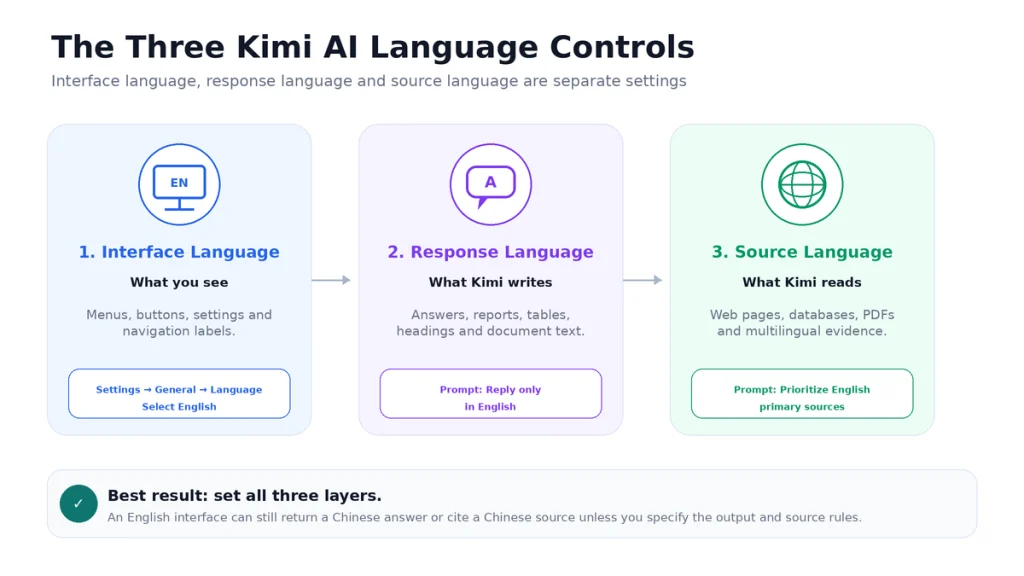
Many language problems happen because users change one layer and expect the other two to follow automatically.
1. Interface language
This controls labels such as Settings, New Chat, Projects, Search, Upload and account menus. It is changed through the product settings.
2. Response language
This controls the text Kimi generates. It is influenced by:
- The language of your latest message.
- The language used earlier in the conversation.
- Your explicit instruction.
- Project or group instructions.
- Relevant saved Memory preferences.
- The language of uploaded material.
3. Source language
This controls the language of web pages, documents and databases Kimi uses for research. Kimi can answer in English while citing a Chinese source, or use English sources and summarize them in another language.
Example: an English interface can still produce a Chinese answer if the conversation and source material are Chinese. An English answer can also rely on non-English evidence when you allow multilingual research.
Open the Official Kimi English Website
The direct English route is:
https://www.kimi.com/enThis is useful when:
- You are not signed in yet.
- The main homepage opens in Chinese.
- A search result sends you to the Chinese route.
- You are using a new browser or private window.
- You want to confirm that English is officially supported rather than relying on browser translation.
Before entering account information, confirm that the domain is kimi.com. Kimi-AI.free does not host an official Kimi login form and cannot access your Kimi account.
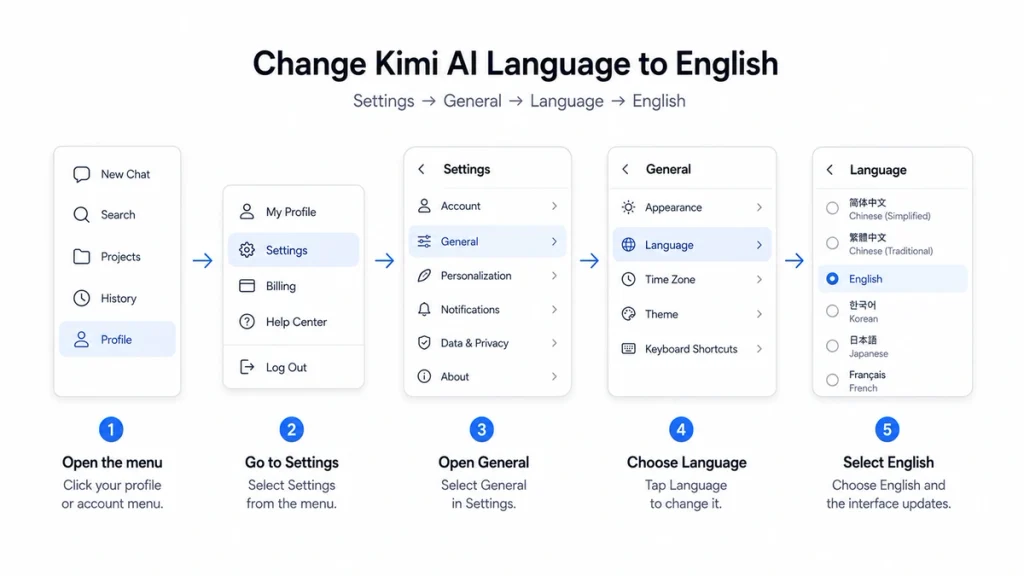
How to Change the Kimi Web Interface to English
- Open the official Kimi website and sign in.
- Open your account or profile menu.
- Select Settings.
- Open General.
- Select Language.
- Choose English.
- Allow the page to refresh if prompted.
- Open a new chat and test one English message.
Menu placement may move as Kimi updates its interface, but the current official path is Settings → General → Language.
Does the English URL remove the need to change Settings?
The /en URL is the quickest way to open an English page. Saving English in Settings is more useful for a signed-in account that you use repeatedly across sessions and devices.
How to Use the Kimi Android App in English
- Install or update Kimi through the official Google Play listing.
- Confirm that the developer is Moonshot AI.
- Open Kimi and sign in to the intended account.
- Open the profile or account menu.
- Go to Settings → General → Language.
- Select English.
- Fully close and reopen the app if some labels do not refresh.
Old discussions about Kimi being available only in Chinese often refer to earlier app versions. Update the official application before using browser translation or installing an unofficial APK.
Do not download a modified APK merely to obtain an English interface. Use the verified links in our Download Kimi AI guide.
How to Use Kimi on iPhone or iPad in English
- Update Kimi through Apple’s official App Store.
- Open the app and sign in.
- Open the account or profile area.
- Select Settings.
- Open General → Language.
- Select English.
- Close and reopen Kimi if the interface does not refresh immediately.
If the option is missing, first confirm that the device is using the latest compatible Kimi version. An old Reddit answer suggesting that the web version is the only English option may describe an older release rather than the current app.
Use Kimi Work and the Desktop Client in English
Kimi’s desktop client includes Chat and Kimi Work modes. The same language principle applies: select English through the available Settings menu, then specify the output language in your task instructions.
For example:
Analyze every PDF in this folder.

Create the final report in English.
Use English section headings and chart labels.
Preserve company names and quoted wording in the original language.
Add an English translation below every non-English quotation.
Do not translate file names or legal entity names.
Changing the desktop interface language does not automatically translate local files, spreadsheet values, code comments or text stored in connected applications. Define the required language inside the task.
What to Do If Kimi Still Appears in Chinese
- Use the English URL. Open
https://www.kimi.com/en. - Check the saved setting. Return to Settings → General → Language.
- Update the app. Older versions may not expose the current language options.
- Restart the product. Fully close and reopen the browser tab or app.
- Start a new chat. An older Chinese conversation can continue influencing response language.
- Sign out and sign in again. This can refresh account-level preferences.
- Clear the local cache. Use this only after saving unsent work and confirming your login method.
- Test another official surface. Compare the web interface with the current mobile or desktop app.
- Contact official support. Report the app version, operating system and screenshot if the language setting will not save.
Browser translation can help you navigate an obsolete or partially translated page, but it should be a fallback. Automatic browser translation can also translate model names, company names, commands, code and technical terms incorrectly.
Make Kimi Reply Only in English
The interface setting and output instruction solve different problems. Use an explicit language instruction at the beginning of the conversation.
Reply only in English unless I explicitly request another language.

If a source is not in English:
- Keep proper names and technical terms in their original form.
- Explain the meaning in English.
- Clearly label any translated quotation.
- Do not silently replace the original source wording.
For shorter answers:
Answer in concise, natural English.
Use short paragraphs and clear headings.
Avoid translating proper nouns unnecessarily.
Why does Kimi switch back to Chinese?
Common causes include:
- The conversation began in Chinese.
- The latest user message is Chinese.
- Most uploaded material is Chinese.
- A saved Project or group instruction requests Chinese output.
- A Memory preference contains an older language choice.
- The prompt asks Kimi to reproduce source wording without specifying the report language.
When the history has become mixed, a new conversation with a clear English instruction is usually more reliable than repeatedly correcting the same thread.
Keep English as a Preference Across Conversations
You can ask Kimi to remember a stable language preference:
Remember that I prefer all normal replies, reports, tables and document headings in English unless I request another language.Review the stored preference through:
Settings → Personalization → Memory Space
A broad global Memory can be inappropriate when you regularly work in several languages. In that case, use Project-specific instructions instead:
Project output language: English.

Source policy:
- English and German sources are allowed.
- Write the final output in English.
- Translate German evidence accurately and label it as translated.
- Preserve official organization and product names.
This keeps one multilingual project from changing every unrelated Kimi conversation.
Choose American or British English
“Write in English” does not define spelling, punctuation, date style or terminology. Specify the variety when consistency matters.
American English prompt
Write in American English.

Use:
- US spelling.
- Month–day–year dates.
- Double quotation marks as the default.
- US business and technical terminology.

Do not mix British spellings into the document.
British English prompt
Write in British English.

Use:
- British spelling and punctuation.
- Day–month–year dates.
- British terminology where it differs.
- The organisation's existing house style.

Flag any source quotation that uses a different variety rather than changing the quotation.
For a client document, provide the client’s Style Guide. “British English” alone does not settle choices such as Oxford commas, title capitalisation, numerals or quotation style.
Search the Web Using English Sources
Kimi Search can work with English prompts and retrieve non-Chinese material. When source language matters, define it explicitly rather than assuming an English interface will filter the web.
Research this question using English-language sources.

Source priority:
1. Official first-party documentation.
2. Government or university sources.
3. Peer-reviewed research.
4. Reputable English-language reporting.

Exclude:
- Machine-translated copies when an original English source exists.
- Unattributed aggregators.
- Sources that do not show a publication date.

Write the answer in English and include a link beside every major claim.
Restrict the country or publication
Use English-language sources published in the United Kingdom.
Prioritize GOV.UK, UK regulators, universities and the official company website.
Do not substitute US rules for UK rules.
State when no current UK source can be found.
Language and jurisdiction are separate. An English-language page can describe US, UK, Indian, Singaporean or international rules. Always state the required country or legal market.
Use Chinese Sources in an English Report
English-only research can exclude important first-party material from a Chinese company, regulator orpublication. A better workflow is often multilingual research with an English deliverable.
Research the topic using both English and original Chinese sources.

Final output:
- Write entirely in English.
- Prefer original Chinese first-party sources over English summaries when available.
- Provide the original Chinese title and an English translation.
- Preserve names, organizations, model IDs and legal entity names.
- Label every translated quotation.
- Link to the original source, not only a translated copy.
- Explain any conflict between the Chinese and English versions.
This is especially useful for company announcements, regulatory filings, product release notes and technical documentation that may appear in Chinese before an English version is published.
Work with English and Multilingual Documents
Kimi can process common documents containing more than one language. Begin by asking it to identify the languages and map the file before summarising it.
Inspect these files before answering.

1. Identify every language used.
2. List which pages or sections use each language.
3. Identify tables, images or scans that may be difficult to extract.
4. Keep quotations in the original language.
5. Write all explanations in English.
6. Add an English translation below each non-English quotation.
7. Cite the file and page for every factual claim.
8. Mark text that could not be read reliably.
Do not assume that a translated summary proves complete file coverage. Verify important names, numbers, formulas, footnotes and quotations in the original document.
Translate a Document into English with Kimi
Kimi Docs can assist with translating and generating editable documents. A good translation request defines what must and must not be translated.
Translate this document into natural English.

Requirements:
- Preserve the heading hierarchy, tables, lists and code blocks.
- Keep company names, product names, model IDs and URLs unchanged.
- Translate job titles only when an established English equivalent exists.
- Preserve all numbers, units and dates.
- Do not simplify legal or technical wording.
- Add [UNCLEAR] where the source text is ambiguous or unreadable.
- Keep the original quotation, followed by the English translation.
- Provide a terminology table for repeated specialist terms.
Translation verification checklist
- Compare names and legal entities with the source.
- Check every number, currency, unit and percentage.
- Verify negative statements and exceptions.
- Check table rows and column labels.
- Review technical terminology for consistency.
- Confirm that quotations were not silently rewritten.
- Ask a qualified human reviewer to examine high-stakes translations.
Create English Documents and Slides
When using Kimi Docs, Sheets or Slides, specify the language of every visible component—not only the body text.
Create the deliverable in English.

Use English for:
- Title and section headings.
- Body text.
- Table headers.
- Chart titles, axes and legends.
- Speaker notes.
- File name.
- Table of contents.
- Captions and footnotes.

Preserve original-language source titles in the references section, followed by an English translation in brackets.
A slide can contain English body text while leaving chart labels, template placeholders orsource images in another language. Inspect the exported file before presenting it.
Use Kimi Code in English
Kimi Code accepts natural-language instructions. Set separate rules for explanations, code identifiers and documentation.
Work in English.

Rules:
- Explain plans, risks and test results in English.
- Write new comments and documentation in English.
- Preserve existing public identifiers and API names.
- Do not translate variable, class, function or package names.
- Keep command output unchanged.
- Quote non-English error messages exactly, then explain them in English.
- Use American English in README and developer documentation.
Do not translate source-code identifiers merely to make the project appear English. Renaming a public symbol can break compatibility.
Use the Kimi API in English
The consumer-interface language setting does not configure an API request. Control API output through the system and user messages sent by your application.
import os

from openai import OpenAI

api_key = os.environ.get("MOONSHOT_API_KEY")
if not api_key:
    raise RuntimeError("Set MOONSHOT_API_KEY before running this script.")

client = OpenAI(
    api_key=api_key,
    base_url="https://api.moonshot.ai/v1",
)

response = client.chat.completions.create(
    model="kimi-k3",
    reasoning_effort="low",
    messages=[
        {
            "role": "system",
            "content": (
                "You are a precise English-language assistant. "
                "Reply in American English unless the user explicitly requests "
                "another language. Preserve proper nouns, model IDs, code, "
                "URLs and quotations in their original form."
            ),
        },
        {
            "role": "user",
            "content": "Explain automatic context caching in plain English.",
        },
    ],
    max_completion_tokens=1200,
)

print(response.choices[0].message.content or "")
The Kimi API is compatible with OpenAI-style SDKs, but each Kimi model has its own parameter rules. Review the current official documentation before copying settings from another provider.
What Changing Kimi to English Does Not Change
- Your account region: changing the menu language should not be treated as changing the region in which the account or service is provided.
- Pricing or currency: plans, taxes and purchase options can still depend on the account and platform.
- Feature availability: an English interface does not unlock a model, subscription or feature.
- Privacy terms: read the policy linked from the exact service you use.
- Source jurisdiction: an English source may describe rules from any country.
- Uploaded content: files remain in their original language unless you request translation.
- Official support access: Kimi-AI.free still cannot access or modify an official Kimi account.
- Answer accuracy: English fluency does not guarantee factual correctness.
Languages Currently Supported by the Kimi Interface
Kimi’s current official Help Center lists support for interface languages including:
- English
- German
- Russian
- French
- Traditional Chinese
- Korean
- Portuguese
- Thai
- Turkish
- Spanish
- Italian
- Indonesian
- Vietnamese
The list can change as Kimi updates its products. Conversation and research language support is broader than a fixed menu list because Kimi can read and combine information from multiple languages.
Ready-to-Copy English Prompts
General English assistant
Reply only in clear English.
Use headings and short paragraphs.
Explain specialist terms the first time they appear.
Keep proper nouns and product names unchanged.
Mark uncertainty instead of guessing.
English research report
Write the final report in English.

Use current English-language primary sources where possible.
You may use original non-English sources when they are more authoritative.
Translate their relevant findings accurately and link to the original source.
Separate verified facts, source interpretation and your own inference.
Plain-English explanation
Explain this in plain English for a reader with no specialist background.

Start with a one-sentence answer.
Then explain:
1. What it is.
2. Why it matters.
3. A concrete example.
4. A common misunderstanding.
5. One limitation.
Bilingual output
Return a bilingual answer.

For each section:
1. Write the English version first.
2. Add the Chinese version below it.
3. Preserve names, numbers and URLs exactly.
4. Use the same heading structure in both languages.
5. Flag any term with no exact equivalent.
English language practice
Act as my English conversation coach.

Use natural English suitable for level [A2 / B1 / B2 / C1].
Ask one question at a time.
After I answer:
- Correct only important errors.
- Explain the correction briefly.
- Give one more natural alternative.
- Continue the conversation.

Do not translate everything unless I ask.
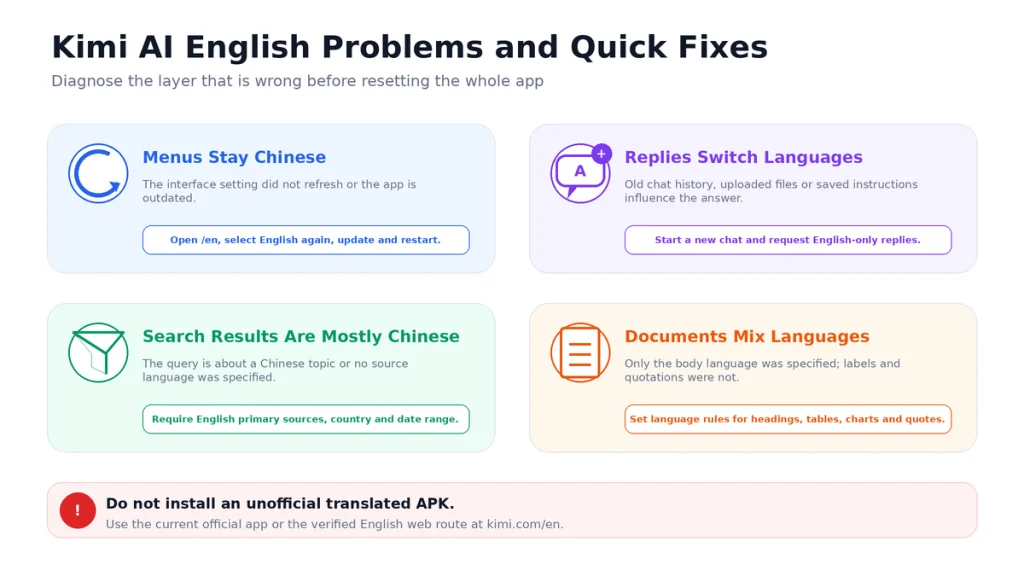
Common Kimi English Problems and Fixes
| Problem | Likely cause | Recommended fix |
|---|---|---|
| Menus remain Chinese | Unsaved setting, old app or cached interface | Use /en, update the app, select English again and restart |
| Answers return to Chinese | Conversation history, source language or saved instruction | Start a new chat and give an explicit English-only instruction |
| Search sources are mostly Chinese | The query concerns a Chinese topic or source language was not restricted | Specify English-language sources, country, date range and preferred domains |
| Kimi translates company names | The translation prompt did not protect proper nouns | Tell it to preserve official names, model IDs and legal entities |
| Document body is English but charts are not | Only prose language was specified | Specify headings, labels, axes, legends, notes and file name |
| The language option is missing | Outdated or unsupported build | Use the latest official app or English web route and contact support if unresolved |
| Kimi Code translates identifiers | The instruction requested full translation | Preserve variables, functions, classes, packages, commands and API names |
| English sounds unnatural | No audience, region or style was specified | Define US or UK English, audience, tone, examples and prohibited phrases |
Frequently Asked Questions
Does Kimi AI have an English version?
Yes. Kimi has an official English interface, and the direct English web route is https://www.kimi.com/en.
How do I change Kimi AI to English?
Open Settings → General → Language and select English. In a browser, you can also open the official /en URL directly.
Can I use the Kimi Android app in English?
Yes. Update the official Android app, then select English through the language settings. Avoid old APKs and unofficial translated versions.
Can I use Kimi on iPhone in English?
Yes. The current Kimi app supports the English interface. Update it through the official App Store and choose English in Settings.
Why does Kimi answer in Chinese when the interface is English?
The interface and answer language are separate. Conversation history, uploaded files, Project instructions or your latest message may cause Chinese output. Start a new chat and explicitly request English-only responses.
Can Kimi understand English prompts?
Yes. Kimi’s current official documentation says K2.6 and K3 support multilingual conversation, retrieval and content creation.
Can Kimi search English websites?
Yes. Kimi Search supports English conversation and can retrieve non-Chinese information. Specify English-language sources, location and preferred source types when those requirements matter.
Can Kimi use Chinese sources and answer in English?
Yes. Ask it to use original Chinese sources, write the final report in English, preserve proper names and label translated quotations.
Can Kimi translate a PDF into English?
Kimi can process and translate supported documents. Check formatting, tables, formulas, names, numbers and specialist terminology in the exported file.
Does Kimi support American and British English?
You can instruct Kimi to follow American or British spelling, punctuation, dates and terminology. Provide a Style Guide when strict consistency is required.
Can Kimi remember my English preference?
You can ask Kimi to remember the preference and review it in Memory Space. For multilingual work, Project-specific language instructions are often safer than one global preference.
Does changing the language change my Kimi plan?
No language setting should be assumed to change your membership, credits, model access or regional purchase options. Check the pricing and account information shown in your signed-in service.
Is Kimi-AI.free the official English Kimi website?
No. Kimi-AI.free is an independent information and tool website. It is not owned, operated or endorsed by Moonshot AI. Use Kimi.com for official accounts and services.
Official Sources and Update Methodology
This guide prioritizes current first-party Kimi and Moonshot AI documentation. The principal sources reviewed were:
- Kimi Language and Capability Support
- Official Kimi English Website
- Kimi Multilingual Search Guide
- Kimi Prompt Basics
- Kimi Memory Space
- Kimi Docs and Sheets Interfaces
- Kimi Document Translation Use Cases
- Kimi Work Overview
- Kimi Code English Documentation
- Kimi API Quickstart
Language settings, supported interfaces and product behavior were last checked on August 23, 2026. When your current Kimi interface differs from this article, follow the live settings and current first-party documentation.
Last verified: August 23, 2026.