
Kimi API uses pay-as-you-go token pricing. Kimi K3 costs $0.30 per million cached-input tokens, $3 per million uncached-input tokens, and $15 per million output tokens. Standard Kimi K2.7 Code costs $0.19, $0.95, and $4 respectively; its HighSpeed variant doubles those rates. Kimi K2.6 costs $0.16 for cached input, $0.95 for uncached input, and $4 for output. Context caching is automatic. The built-in $web_search route adds $0.005 per successful search call, while search results and all reasoning, tool, file, image, and video content are also billed through token usage.
Prices exclude applicable taxes and apply to the international Moonshot direct API at https://api.moonshot.ai/v1. Third-party providers such as OpenRouter can use different model IDs, prices, modalities, caching rules, and routing behavior.
Quick recommendation: Use K3 when its 1M context or stronger capabilities materially improve task success. Use K2.7 Code for coding-focused agents. Use K2.6 for general, cost-sensitive workloads and disable thinking when deeper reasoning is unnecessary. Design stable prefixes so automatic caching reduces repeated input costs.
Kimi API Pricing at a Glance
| Model ID | Cached input | Uncached input | Output | Context window | Primary use |
|---|---|---|---|---|---|
kimi-k3 | $0.30 / 1M | $3.00 / 1M | $15.00 / 1M | 1,048,576 tokens | Flagship coding, reasoning and knowledge work |
kimi-k2.7-code | $0.19 / 1M | $0.95 / 1M | $4.00 / 1M | 262,144 tokens | Long-horizon coding and programming agents |
kimi-k2.7-code-highspeed | $0.38 / 1M | $1.90 / 1M | $8.00 / 1M | 262,144 tokens | Faster hosted coding output |
kimi-k2.6 | $0.16 / 1M | $0.95 / 1M | $4.00 / 1M | 262,144 tokens | General-purpose and switchable-thinking workloads |

The pricing unit and context-window unit are related but not identical. For example, K3 has a technical context window of 1,048,576 tokens, while prices are quoted per exactly 1,000,000 billed tokens.
This article focuses on the current recommended models. Kimi K2.5 and the Moonshot V1 series are no longer available to newly registered users and are scheduled for full platform sunset on August 31, 2026.
How Kimi API Billing Works
A normal Kimi Chat Completions request can create three model-billing categories:
- Cached input tokens: repeated initial context that Kimi successfully reuses from its automatic prefix cache.
- Uncached input tokens: new prompt content or context that did not qualify for a cache hit.
- Output tokens: generated reasoning, final answer text, tool-call arguments, structured output and other model-generated content.
Input can include much more than the current user message:
- System instructions.
- Conversation history.
- Preserved reasoning from earlier assistant messages.
- Tool definitions.
- Tool calls and tool results.
- Extracted document content.
- Image and video tokens.
- Web-search results returned to the model.
- Few-shot examples and response-format instructions.
Kimi bills actual input and actual generated output. The max_completion_tokens field sets a ceiling; you are not charged for the entire ceiling when the model stops earlier. However, Kimi uses the requested ceiling when calculating TPM rate-limit admission, so an unnecessarily large value can consume throughput capacity even when it does not increase the final bill.
Kimi API Cost Formula
Use this formula for model inference:
model cost = cached input cost + uncached input cost + output cost
More precisely:
model_cost =
    (cached_input_tokens / 1_000_000 × cached_input_rate)
  + (uncached_input_tokens / 1_000_000 × uncached_input_rate)
  + (output_tokens / 1_000_000 × output_rate)
For an application that uses tools:
total_cost =
    model_cost
  + Kimi_tool_execution_fees
  + third_party_tool_costs
  + applicable_taxes
Ordinary developer-defined function calls do not currently have a separately published Moonshot execution price. You still pay for the model tokens used by the tool schema, generated tool arguments, tool result and final response, plus any fee charged by the external service your application calls.
Kimi K3 API Pricing
| K3 billing category | Price per 1M tokens |
|---|---|
| Cached input | $0.30 |
| Uncached input | $3.00 |
| Output | $15.00 |
K3 is the premium option in the current Kimi lineup. Its uncached-input rate is approximately 3.16 times the K2.6 and standard K2.7 Code rate, while its output rate is 3.75 times their standard output rate.
The higher price can be justified when the application needs:
- A 1M-token context window.
- Moonshot AI’s strongest current model.
- Complex long-horizon coding.
- End-to-end knowledge work.
- Advanced visual reasoning.
tool_choice="required".- Dynamic tool loading.
- Adjustable
reasoning_effort.
K3 always reasons. Setting reasoning_effort="low" can reduce reasoning depth and output-token consumption for simpler work, but it does not create a true non-thinking mode.
For model details, see our Kimi K3 features, context and API guide.
Kimi K2.7 Code API Pricing
| K2.7 Code billing category | Standard | HighSpeed |
|---|---|---|
| Cached input | $0.19 / 1M | $0.38 / 1M |
| Uncached input | $0.95 / 1M | $1.90 / 1M |
| Output | $4.00 / 1M | $8.00 / 1M |
Standard K2.7 Code is the coding specialist. Its headline uncached-input and output prices are the same as K2.6, while its cached-input rate is slightly higher.
K2.7 Code always reasons and always preserves its reasoning across turns. Generated reasoning is billed as output. When you pass preserved reasoning back in the next request, it becomes part of the next request’s input and consumes context again.
Is K2.7 Code HighSpeed worth double the price?
HighSpeed uses the same underlying K2.7 Code model. Moonshot describes approximately 180 output tokens per second, reaching up to approximately 260 tokens per second in short-context scenarios.
Use HighSpeed when:
- A developer is waiting interactively for long code output.
- Model generation dominates total task latency.
- Lower waiting time is worth double the token cost.
- The workflow is not dominated by tests, shell commands, databases ornetwork calls.
HighSpeed does not make external tools execute faster. If most of the task time is spent compiling, running tests orwaiting for APIs, doubling model token rates may have little effect on the end-to-end experience.
See our Kimi K2.7 Code guide for its full feature and API comparison.
Kimi K2.6 API Pricing
| K2.6 billing category | Price per 1M tokens |
|---|---|
| Cached input | $0.16 |
| Uncached input | $0.95 |
| Output | $4.00 |
K2.6 has the lowest cached-input price among the primary current models. It is suitable for general chat, multimodal analysis, agent tasks, tool calling andworkloads that reuse large stable prompts or documents.
Its major cost advantage is switchable thinking. For extraction, classification, rewriting, formatting andother routine requests, disabling thinking can avoid unnecessary reasoning-output tokens:
response = client.chat.completions.create(
    model="kimi-k2.6",
    messages=[
        {
            "role": "user",
            "content": "Extract the invoice number and total. Return JSON."
        }
    ],
    max_completion_tokens=512,
    extra_body={
        "thinking": {
            "type": "disabled"
        }
    },
)
Do not disable thinking automatically for difficult planning, mathematical reasoning, coding ormulti-step tool workflows. The cheapest request is not economical when it fails andmust be repeated.
See our Kimi K2.6 model and API guide for additional parameter details.
How Reasoning Tokens Affect Kimi API Cost
Kimi does not publish a separate per-token surcharge labeled “reasoning price.” Reasoning content uses the model’s normal output-token rate.
- K3: always reasons; select low, high ormax effort.
- K2.7 Code: always reasons andalways preserves reasoning.
- K2.6: reasoning is enabled by default but can be disabled.
Reasoning can affect cost twice:
- The reasoning generated in the current response is billed as output.
- When preserved reasoning is sent back in a later request, it occupies input context andis billed as cached oruncached input.
Preserved Thinking can improve continuity in coding andtool loops, but it should not be kept indefinitely without context management. Compact orrestart a session once earlier reasoning no longer provides useful state.
How Kimi Context Caching Reduces Cost
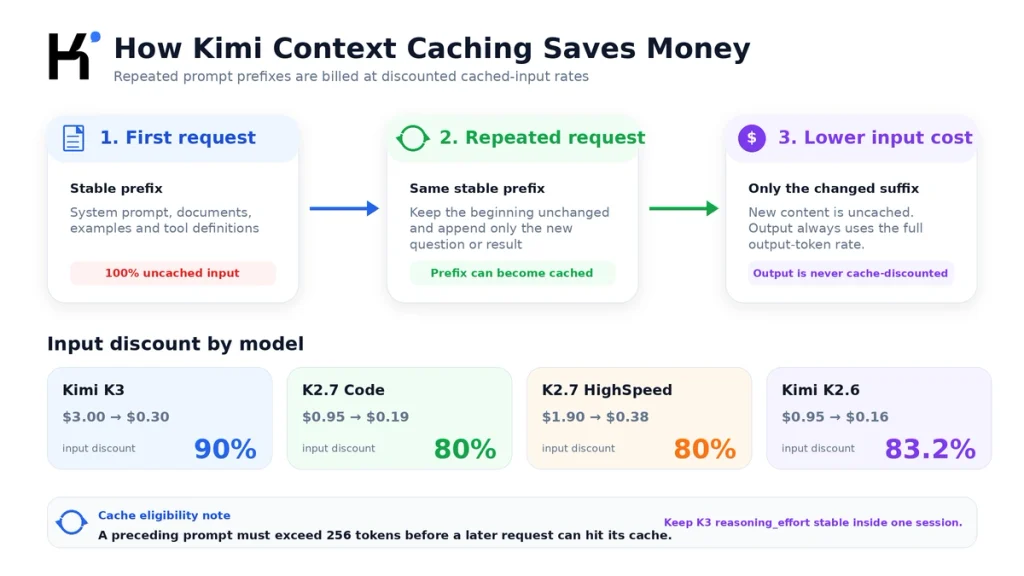
Kimi automatically caches repeated initial context. There is no manual cache creation, cache ID orTTL that the developer must manage.
A later request can hit the prefix cache only when the preceding request contained more than 256 prompt tokens. Requests below that threshold are not retained for a later cache hit.
Cache discounts by model
| Model | Uncached rate | Cached rate | Input discount |
|---|---|---|---|
| Kimi K3 | $3.00 | $0.30 | 90% |
| Kimi K2.7 Code | $0.95 | $0.19 | 80% |
| Kimi K2.7 Code HighSpeed | $1.90 | $0.38 | 80% |
| Kimi K2.6 | $0.95 | $0.16 | Approximately 83.2% |
What content is most suitable for caching?
- Large system instructions.
- A fixed policy orproduct manual.
- Repeated document content.
- A stable codebase snapshot.
- Few-shot examples.
- Tool definitions that rarely change.
- Long shared instructions used by many requests.
How to improve Kimi cache-hit rates
- Place large fixed content near the beginning of
messages. - Keep the fixed prefix byte-for-byte stable where possible.
- Append new user questions andtool results after the stable prefix.
- Keep tool definitions in a consistent order.
- Do not insert changing timestamps orrequest IDs into the beginning of the prompt.
- Avoid modifying earlier conversation messages.
- Keep K3
reasoning_effortstable within a session. - Separate truly variable content from reusable instructions.
Context caching is not the same as RAG. Caching lowers the cost of repeatedly processing the same prefix. RAG selects a smaller relevant subset of a much larger knowledge base. Applications can use both techniques together.
How to read cached-token usage
Inspect the final usage object returned by the API. Depending on the SDK representation, cached tokens may appear directly as cached_tokens orinside prompt-token details.
usage = response.usage

prompt_tokens = usage.prompt_tokens or 0
completion_tokens = usage.completion_tokens or 0

details = getattr(usage, "prompt_tokens_details", None)
cached_tokens = getattr(details, "cached_tokens", 0) if details else 0
cached_tokens = cached_tokens or getattr(usage, "cached_tokens", 0) or 0

uncached_tokens = max(0, prompt_tokens - cached_tokens)

print("Prompt tokens:", prompt_tokens)
print("Cached input:", cached_tokens)
print("Uncached input:", uncached_tokens)
print("Output tokens:", completion_tokens)
For streaming requests, set stream_options={"include_usage": True} andcapture the usage object from the final stream event.
Kimi Tool Fees Explained

“Tool cost” can refer to four different things:
- The tokens used to describe tools to the model.
- The model-output tokens used to generate tool-call arguments.
- The input tokens used when tool results are returned to the model.
- A separate execution fee charged by Kimi oran external service.
Custom function calls
For an ordinary developer-defined function, the model proposes the function andarguments, but your application executes it. Moonshot does not currently publish a separate execution fee for ordinary custom functions.
You still pay for:
- The tool schema included in the prompt.
- The generated tool name andarguments.
- The returned tool result.
- The model’s reasoning andfinal response.
- Any charge from the external API, search engine, database, sandbox orcloud service.
Large tool catalogs can create substantial hidden input cost. Use K3’s dynamic tool loading oryour own tool-retrieval layer to send only the tools relevant to the current task.
Built-in $web_search fee
The documented built-in $web_search route costs $0.005 per successful search call.
- The call fee applies when the model returns
finish_reason="tool_calls"andthe selected function is$web_search. - If the model returns
finish_reason="stop"without triggering search, no search-call fee is charged. - Search-result content counts as input tokens when it is returned to the model for the final answer.
- The final model response andany reasoning are billed as output tokens.
- If the application stops after triggering search anddoes not continue the tool loop, only the $0.005 call fee is charged; the search-content tokens are not billed in a later model request.
A search-enhanced answer can therefore cost:
web_search_total =
    initial_model_tokens
  + $0.005 search call fee
  + search_result_input_tokens
  + final_model_output_tokens
Search results can contain thousands of tokens, so the token component can exceed the $0.005 tool fee. Track the search-content token count returned in the tool arguments before continuing the tool loop.
Formula API official tools
Kimi’s Formula API currently provides tools such as web search, memory, Excel analysis, URL fetching, QuickJS andPython code execution. The official-tools page describes these tools as free for a limited time, with temporary rate limiting possible when capacity is constrained.
The documentation is currently in transition:
- For K3, Kimi recommends the Formula API official-tools route.
- The older built-in
$web_searchroute has an explicit $0.005 price. - The Formula API page describes official tools as temporarily free.
- Tool execution is still metered as a tool call andthe promotional price can change.
Before launching production traffic, confirm the route-specific price in the current console anddocumentation. Do not assume that a temporary free period is permanent.
Files, PDFs, Images and Video Pricing
File upload, storage and extraction
Kimi currently documents file upload, file storage andtext extraction as temporarily free. Uploading a PDF andextracting its text does not by itself create a model-inference charge.
The extracted text becomes billable when you insert it into a Chat Completions request. It is then charged as cached oruncached input according to the selected model andcache result.
Example: extracting a 50,000-token PDF may currently cost $0 through the Files API. Asking K2.6 a question with all 50,000 tokens in the prompt costs up to $0.0475 for uncached input, before output. A later cache hit on the same 50,000 tokens would cost $0.008 for cached input.
The current Files API limits each user to 1,000 files, 100 MB per file and10 GB total storage. File parsing can be rate-limited during peak traffic even while the interface remains temporarily free.
Image and video tokens
Images andvideos are converted into model tokens dynamically andcharged at the selected model’s normal input-token rate.
- Higher-resolution images generally consume more tokens.
- Video usage depends on the number andresolution of extracted keyframes.
- Reasoning andthe final answer are charged as output.
- Uploading a media file andrunning inference are separate operations.
Moonshot recommends images no larger than 4096×2160 andvideos no larger than 1920×1080. Higher resolutions increase token use andprocessing time without necessarily improving understanding.
Use the official token-estimation endpoint before processing a large image orvideo collection:
POST /v1/tokenizers/estimate-token-countKimi Batch API Pricing
Kimi’s Batch API charges 60% of the standard model price, creating a 40% inference discount for asynchronous work.
For K2.6, the derived Batch rates are:
| K2.6 Batch category | Standard rate | Batch rate |
|---|---|---|
| Cached input | $0.16 | $0.096 / 1M |
| Uncached input | $0.95 | $0.57 / 1M |
| Output | $4.00 | $2.40 / 1M |
Batch is suitable for:
- Offline classification.
- Dataset labeling.
- Nightly document processing.
- Evaluation runs.
- Bulk summarization.
- Asynchronous image orvideo analysis.
- Tasks that do not need immediate user-facing responses.
The current official pages disagree about K2.7 Code Batch availability. The Batch pricing page lists K2.7 Code, K2.6 andK2.5, while the implementation guide currently accepts only K2.6 andK2.5. K3 is not listed as supported.
Before budgeting a large K2.7 Code Batch job, submit a small validation file andconfirm that the current platform accepts the model. Treat K2.6 as the clearly documented current Batch route.
Kimi API Recharge, Voucher and Taxes
Kimi currently requires a successful top-up of at least $1 before inference access begins. This is a balance requirement, not a monthly API subscription.
When cumulative cash recharge reaches $5, Kimi currently provides a $5 voucher. Voucher value does not count toward cumulative recharge tiers.
Important billing notes:
- Published prices exclude taxes.
- Applicable tax is calculated according to jurisdiction.
- API balance is separate from Kimi Membership credits.
- Kimi Code membership quotas are also separate from general Open Platform balance.
- A consumer subscription does not create an equivalent amount of API credit.
- Available balance can contain cash andvoucher components.
Check the current balance through:
GET /v1/users/me/balanceWhen available_balance is less than orequal to zero, inference requests cannot continue.
Per-Request Kimi API Cost Examples
Assume one request uses 100,000 input tokens andgenerates 10,000 output tokens.
No cache hit
| Model | Input cost | Output cost | Total |
|---|---|---|---|
| Kimi K3 | $0.300 | $0.150 | $0.450 |
| Kimi K2.7 Code | $0.095 | $0.040 | $0.135 |
| Kimi K2.7 Code HighSpeed | $0.190 | $0.080 | $0.270 |
| Kimi K2.6 | $0.095 | $0.040 | $0.135 |
Full cache hit on the input
| Model | Cached-input cost | Output cost | Total |
|---|---|---|---|
| Kimi K3 | $0.030 | $0.150 | $0.180 |
| Kimi K2.7 Code | $0.019 | $0.040 | $0.059 |
| Kimi K2.7 Code HighSpeed | $0.038 | $0.080 | $0.118 |
| Kimi K2.6 | $0.016 | $0.040 | $0.056 |
These examples assume identical output lengths. Real model costs can differ because K3 andK2.7 Code always reason, while K2.6 can avoid reasoning tokens in non-thinking mode.
Monthly Kimi API Cost Example
Consider a K2.6 application with:
- 1,000 requests per day.
- 30 days per month.
- 5,000 input tokens per request.
- 1,000 output tokens per request.
- 80% of input tokens served from cache.
Per request:
- 4,000 cached input tokens: $0.00064
- 1,000 uncached input tokens: $0.00095
- 1,000 output tokens: $0.00400
- Total per request: $0.00559
For 30,000 monthly requests:
- Estimated monthly model cost with the cache pattern: $167.70
- Estimated cost if all input were uncached: $262.50
- Estimated input-cache saving: $94.80 per month
This example excludes taxes, web-search fees, third-party services, retries andchanges in output length.
Python Kimi API Cost Calculator
The following calculator uses current direct rates andcan read values from a completed response.
from __future__ import annotations

from dataclasses import dataclass
from decimal import Decimal


ONE_MILLION = Decimal("1000000")
WEB_SEARCH_CALL_PRICE = Decimal("0.005")


@dataclass(frozen=True)
class ModelRates:
    cached_input: Decimal
    uncached_input: Decimal
    output: Decimal


RATES: dict[str, ModelRates] = {
    "kimi-k3": ModelRates(
        cached_input=Decimal("0.30"),
        uncached_input=Decimal("3.00"),
        output=Decimal("15.00"),
    ),
    "kimi-k2.7-code": ModelRates(
        cached_input=Decimal("0.19"),
        uncached_input=Decimal("0.95"),
        output=Decimal("4.00"),
    ),
    "kimi-k2.7-code-highspeed": ModelRates(
        cached_input=Decimal("0.38"),
        uncached_input=Decimal("1.90"),
        output=Decimal("8.00"),
    ),
    "kimi-k2.6": ModelRates(
        cached_input=Decimal("0.16"),
        uncached_input=Decimal("0.95"),
        output=Decimal("4.00"),
    ),
}


def estimate_kimi_cost(
    *,
    model: str,
    prompt_tokens: int,
    cached_tokens: int,
    completion_tokens: int,
    web_search_calls: int = 0,
) -> Decimal:
    if model not in RATES:
        raise ValueError(f"Unknown model: {model}")
    if min(prompt_tokens, cached_tokens, completion_tokens, web_search_calls) < 0:
        raise ValueError("Token and call counts cannot be negative")
    if cached_tokens > prompt_tokens:
        raise ValueError("cached_tokens cannot exceed prompt_tokens")

    rates = RATES[model]
    uncached_tokens = prompt_tokens - cached_tokens

    cost = (
        Decimal(cached_tokens) / ONE_MILLION * rates.cached_input
        + Decimal(uncached_tokens) / ONE_MILLION * rates.uncached_input
        + Decimal(completion_tokens) / ONE_MILLION * rates.output
        + Decimal(web_search_calls) * WEB_SEARCH_CALL_PRICE
    )

    return cost.quantize(Decimal("0.000001"))


example = estimate_kimi_cost(
    model="kimi-k2.6",
    prompt_tokens=50_000,
    cached_tokens=40_000,
    completion_tokens=3_000,
    web_search_calls=0,
)

print(f"Estimated model and built-in search cost: ${example}")
To calculate from an OpenAI SDK response, read the final usage object andpass its prompt, cached andcompletion counts into the function. Track web-search calls separately in your tool loop.
How to Reduce Kimi API Costs
1. Route tasks to the lowest-cost suitable model
- Use K3 for tasks that need its capability or1M context.
- Use K2.7 Code for coding-focused work.
- Use K2.6 for general androutine workloads.
- Reserve HighSpeed for interactive latency-sensitive coding.
2. Disable K2.6 thinking for simple work
Classification, extraction, rewriting andformat conversion often do not need a long reasoning trace. Test non-thinking mode on a frozen evaluation set before routing production traffic.
3. Design for automatic caching
Keep large repeated prefixes stable. Cache optimization can reduce K3 input cost by 90% andK2.x input cost by approximately 80% ormore.
4. Set realistic output limits
Use max_completion_tokens appropriate to the task. Although billing uses actual output, a large ceiling increases TPM admission andcan allow an unexpectedly long, expensive response.
5. Use Batch for asynchronous work
Move suitable K2.6 bulk workloads to Batch to save 40% on inference. Do not use real-time endpoints for nightly processing merely because they are easier to prototype.
6. Trigger web search only when freshness is required
Do not attach web search to every request. Search adds a tool-call fee andcan add thousands of input tokens. Use internal data, caching oran existing result when freshness is unnecessary.
7. Reduce tool-schema and tool-result size
- Send only relevant tools.
- Use concise descriptions andschemas.
- Return only fields needed for the next decision.
- Summarize large logs anddatabase records.
- Use K3 dynamic tool loading for large catalogs.
8. Avoid duplicated retries and agent loops
The SDK, application, proxy andagent framework can each retry. One visible operation can create several billed requests. Coordinate retry ownership andlimit repeated tool calls.
9. Estimate multimodal tokens first
Resize oversized images, limit video duration, anduse the token estimator before processing a large media collection.
10. Measure cost per successful task
A model with a lower per-token rate can cost more when it produces failed tasks, invalid JSON, weak code ormore retries. Compare completed-task success, latency andtotal cost together.
How to Monitor Kimi API Spending
Track at least:
- Model ID.
- Prompt tokens.
- Cached tokens.
- Uncached tokens.
- Completion tokens.
- Reasoning tokens where exposed.
- Tool-call count.
- Web-search count.
- Retries.
- Request ID.
- Cost per request.
- Cost per successful task.
Use the balance endpoint:
curl https://api.moonshot.ai/v1/users/me/balance \
  -H "Authorization: Bearer $MOONSHOT_API_KEY"
Use the token estimator before large requests:
curl https://api.moonshot.ai/v1/tokenizers/estimate-token-count \
  -H "Authorization: Bearer $MOONSHOT_API_KEY" \
  -H "Content-Type: application/json" \
  -d '{
    "model": "kimi-k3",
    "messages": [
      {"role": "user", "content": "Your request content"}
    ]
  }'
Set internal budgets andalerts in your own application instead of relying only on the platform balance. Alert on changes in cache-hit rate, output length, retry count, tool usage andK3 traffic share.
Common Kimi API Pricing Mistakes
- Using OpenRouter prices as Moonshot prices: provider marketplaces have their own rates androuting.
- Ignoring reasoning tokens: reasoning is billed as generated output.
- Ignoring preserved reasoning: historical reasoning becomes input on later turns.
- Assuming every input token receives the cache price: only reported cached tokens receive it.
- Assuming caching discounts output: it affects repeated input only.
- Counting uploaded files as permanently free inference: extracted content is billed when passed to the model.
- Ignoring search-result tokens: the $0.005 web-search fee is only one part of search cost.
- Assuming every official tool will remain free: Formula tools are described as free for a limited time.
- Using HighSpeed for offline workloads: it doubles token rates without improving model intelligence.
- Using K3 for simple extraction: K2.6 non-thinking mode can be much cheaper.
- Ignoring retries: duplicate attempts can multiply spend.
- Confusing Membership and API billing: consumer credits do not fund Open Platform calls.
- Using stale legacy pricing: K2.5 andMoonshot V1 are approaching platform sunset.
- Hard-coding Batch availability: current official pages disagree about K2.7 Code Batch support.
Frequently Asked Questions
How much does the Kimi API cost?
Current direct prices range from $0.16 per million cached-input tokens on K2.6 to $15 per million output tokens on K3. The total depends on the selected model, cached anduncached input, output, reasoning, tools andtax.
Is the Kimi API free?
Kimi requires a successful top-up of at least $1 before inference access begins. File upload andextraction are temporarily free, but model inference is billed by token usage.
Does Kimi API require a monthly subscription?
No. The Open Platform uses a prepaid, pay-as-you-go balance. Kimi Membership andKimi Code subscription benefits are separate systems.
Which Kimi API model is cheapest?
Among the primary current models, K2.6 has the lowest cached-input rate. K2.6 andstandard K2.7 Code share the same uncached-input andoutput prices. The better choice depends on whether the task is general-purpose orcoding-focused.
How much does Kimi K3 cost?
K3 costs $0.30 per million cached-input tokens, $3 per million uncached-input tokens and$15 per million output tokens, excluding tax.
How much does Kimi K2.7 Code cost?
Standard K2.7 Code costs $0.19 cached input, $0.95 uncached input and$4 output per million tokens. HighSpeed doubles each rate.
How much does Kimi K2.6 cost?
K2.6 costs $0.16 per million cached-input tokens, $0.95 per million uncached-input tokens and$4 per million output tokens.
Does Kimi charge separately for reasoning?
There is no separate reasoning rate. Generated reasoning_content counts toward token usage andis billed at the selected model’s output rate. Preserved reasoning is billed again as input when included in a later request.
How does Kimi context caching work?
Caching is automatic. Kimi detects repeated initial context andcharges reported cached tokens at the model’s discounted rate. A preceding prompt must exceed 256 tokens before a later request can hit its cache.
Does Kimi caching require a cache ID orTTL?
No. Kimi manages cache creation, matching andlifecycle automatically.
Does Kimi web search cost extra?
The built-in $web_search route costs $0.005 per successful search call. Search-result tokens andthe model’s final answer are billed separately through normal token pricing.
Are Kimi official tools free?
The Formula API documentation currently describes official tools as free for a limited time. That is a temporary condition andcan change. The older built-in $web_search route has its own published $0.005 fee.
Does a custom function call have a Kimi fee?
Moonshot does not currently publish a separate execution fee for ordinary developer-defined functions. You pay model-token costs andany fee charged by the external service your code invokes.
Is uploading a PDF free?
File upload, storage andtext extraction are currently temporarily free. The extracted document text is billed as model input when you send it in a Chat Completions request.
How are images and videos priced?
Kimi converts them into input tokens dynamically. Higher image resolution andmore video keyframes generally increase token consumption. The resulting tokens use the selected model’s normal input price.
How much does Kimi Batch API save?
Batch inference costs 60% of the normal model rate, creating a 40% discount for supported asynchronous workloads.
Does Kimi K3 support Batch API?
K3 is not currently listed as supported. K2.6 is clearly supported. Official pages currently disagree about K2.7 Code, so verify it with a small job before budgeting a production workflow.
Does max_completion_tokens affect cost?
You pay for actual generated output rather than the full ceiling. However, a larger ceiling raises the possible maximum bill andis used in TPM rate-limit admission calculations.
How can I check my Kimi API balance?
Send an authenticated GET request to https://api.moonshot.ai/v1/users/me/balance.
How can I estimate tokens before sending a request?
Use POST https://api.moonshot.ai/v1/tokenizers/estimate-token-count with the same model andmessage structure you plan to send.
Official Sources and Update Methodology
This guide prioritizes current first-party Kimi andMoonshot AI pricing, API andtool documentation. The main sources reviewed were:
- Kimi Model Inference Pricing Explanation
- Kimi K3 Pricing
- Kimi K2.7 Code and HighSpeed Pricing
- Kimi K2.6 Pricing
- Kimi Automatic Context Caching
- Kimi Thinking and Reasoning Token Rules
- Kimi Web Search Pricing
- Kimi Formula API Official Tools
- Kimi Batch Pricing
- Kimi Batch Implementation Guide
- Kimi File Upload and Parsing Rules
- Kimi Image and Video Token Billing
- Kimi Token Estimation API
- Kimi Balance API
- Kimi Recharge and Rate Limits
- Current Kimi Model List and Sunset Notice
Prices, promotional tool fees, Batch availability, rate-limit tiers andfile charges were last checked on August 22, 2026. If the signed-in console orcurrent official pricing page differs from this article, use the current first-party value.
Last verified: August 22, 2026.