
The three Kimi API model families most new applications should evaluate are Kimi K3, Kimi K2.7 Code, and Kimi K2.6. Start with kimi-k3 when you need Moonshot AI’s strongest model, a 1M-token context window, deep reasoning, or advanced agent controls. Choose kimi-k2.7-code for coding-focused agents and repository work that fits inside 256K. Choose kimi-k2.6 for lower-cost general chat, multimodal tasks, tools, and requests where thinking should be disabled. A faster K2.7 serving option is available as kimi-k2.7-code-highspeed.
Model availability, prices, parameter rules, rate limits, Batch support, and access requirements can change. The comparison below uses the international Moonshot direct API at https://api.moonshot.ai/v1, not OpenRouter, SiliconFlow, Fireworks, or another inference provider.
Quick recommendation: Use K3 as the capability default, K2.7 Code as the coding specialist, K2.7 Code HighSpeed when lower output latency justifies double token rates, and K2.6 as the flexible lower-cost model for general or non-thinking workloads.
Kimi API Models at a Glance
| Model ID | Best role | Context | Reasoning behavior | Cached input | Uncached input | Output |
|---|---|---|---|---|---|---|
kimi-k3 | Flagship model for complex coding, knowledge work, vision and deep reasoning | 1,048,576 tokens | Always on; low, high or max | $0.30 / 1M | $3.00 / 1M | $15.00 / 1M |
kimi-k2.7-code | Dedicated coding and programming-agent model | 262,144 tokens | Always on; Preserved Thinking always enabled | $0.19 / 1M | $0.95 / 1M | $4.00 / 1M |
kimi-k2.7-code-highspeed | Same coding model with faster hosted output | 262,144 tokens | Same as standard K2.7 Code | $0.38 / 1M | $1.90 / 1M | $8.00 / 1M |
kimi-k2.6 | General-purpose multimodal and agent model | 262,144 tokens | Thinking enabled by default; can be disabled | $0.16 / 1M | $0.95 / 1M | $4.00 / 1M |

All four IDs use the OpenAI-compatible Chat Completions interface. K2.7 Code HighSpeed is listed separately because it has a different serving speed and price, but it is the same underlying K2.7 Code model with the same context, reasoning behavior, and parameter restrictions.
Which Kimi API Models Are Currently Recommended?
Moonshot’s current API Quickstart recommends three primary model families:
- Kimi K3: the current flagship and recommended starting point when you are not sure which model to test first.
- Kimi K2.7 Code: the dedicated coding model, including a separately priced HighSpeed endpoint.
- Kimi K2.6: the general-purpose model with switchable thinking.
The official Model List still displays K2.5 and Moonshot V1 models, but they are no longer available to newly registered users following the K3 launch and are scheduled for full platform sunset on August 31, 2026. Older K2 preview IDs were discontinued on May 25, 2026.
Do not start a new production integration using:
kimi-latestkimi-k2-0905-previewkimi-k2-0711-previewkimi-k2-turbo-previewkimi-k2-thinkingkimi-k2-thinking-turbo- A K2.5 or Moonshot V1 ID without a documented migration plan
Use a specific active model ID instead of relying on a generic “latest” alias. A specific ID makes behavior, pricing, tests, and migrations easier to track.
The Key Difference Is Workload, Not the Version Number
K3, K2.7 Code and K2.6 are not simply three quality tiers where every newer number replaces every older one.
| Question | Recommended starting model |
|---|---|
| Do you need the strongest current Kimi model? | kimi-k3 |
| Does the request or session need more than 256K context? | kimi-k3 |
| Is the workload mainly software engineering? | kimi-k2.7-code |
| Is interactive coding output speed more important than token price? | kimi-k2.7-code-highspeed |
| Do you need to disable thinking? | kimi-k2.6 |
| Is the task general-purpose and cost-sensitive? | kimi-k2.6 |
| Must the model call at least one tool? | kimi-k3 with tool_choice="required" |
| Do you repeatedly reuse a large cached prefix? | Evaluate K2.6 first because it has the lowest direct cache-hit input rate |
A good architecture can use more than one model. For example, a router might send simple extraction to K2.6, repository changes to K2.7 Code, and unusually large or difficult tasks to K3.
Kimi K3: The Flagship API Model
kimi-k3 is Moonshot AI’s current flagship model. It has 2.8 trillion total parameters, activates approximately 104 billion parameters, and provides a total context window of 1,048,576 tokens.
It is intended for:
- Large codebases and long engineering sessions.
- Deep research and end-to-end knowledge work.
- Complex visual reasoning over images, documents and video.
- Long conversations containing extensive tool history.
- Advanced agents that need forced tool use.
- Applications with large tool catalogs.
- Tasks where 256K context is repeatedly insufficient.
K3 reasoning behavior
K3 always reasons. It does not have a non-thinking mode. Use the top-level reasoning_effort field to choose:
low: simpler or more latency-sensitive tasks.high: a middle setting for meaningful analysis.max: the deepest available setting and the default.
Changing the reasoning-effort level during an existing conversation invalidates prefix-cache hits. Choose the level before starting a cache-sensitive session and avoid switching it unnecessarily.
K3-specific API advantages
tool_choice="required"can force at least one tool call.- Dynamic tool loading can insert tool definitions only when they become relevant.
- The 1M context window can hold substantially more code, documents, history and tool results.
- Strict JSON Schema structured output is documented in the K3 Quickstart.
- Reasoning effort provides more control than the binary K2.6 thinking switch.
The main tradeoffs are price and generated-token usage. K3’s uncached input rate is about 3.16 times K2.6 or K2.7 Code, and its output rate is 3.75 times their standard output rate.
For a deeper model-level explanation, see our Kimi K3 features, context and API guide.
Kimi K2.7 Code: The Dedicated Coding Model
kimi-k2.7-code is the specialist for long-horizon software engineering. It is based on the K2.6 architecture, with one trillion total parameters, approximately 32 billion activated parameters and a 262,144-token context window.
Choose it for:
- Repository analysis.
- Multi-file changes.
- Debugging and repeated test cycles.
- Code editing and refactoring.
- Terminal and IDE agents.
- Programming tools that need stable reasoning across turns.
- Software-engineering tasks that fit within 256K context.
K2.7 Code reasoning behavior
Thinking is always enabled and cannot be turned off. Preserved Thinking is also always enabled, so historical assistant messages must retain their reasoning_content.
Do not send K3’s reasoning_effort field to K2.7 Code. You normally do not need to send the K2.x thinking object either; select the model and preserve the complete assistant responses.
K2.7 Code supports text, images and video through the direct Moonshot API. A third-party provider may expose fewer modalities, so verify the provider-specific route separately.
K2.7 Code Standard vs HighSpeed
kimi-k2.7-code-highspeed is not a different intelligence tier. Moonshot describes it as the same K2.7 Code model with faster output serving.
| Area | Standard | HighSpeed |
|---|---|---|
| Model ID | kimi-k2.7-code | kimi-k2.7-code-highspeed |
| Model behavior | K2.7 Code | Same K2.7 Code behavior |
| Context | 256K | 256K |
| Typical hosted output speed | Standard serving | Approximately 180 tokens/s |
| Short-context peak | Not separately specified | Up to approximately 260 tokens/s |
| Cached input | $0.19 / 1M | $0.38 / 1M |
| Uncached input | $0.95 / 1M | $1.90 / 1M |
| Output | $4.00 / 1M | $8.00 / 1M |
Use HighSpeed when model generation is a meaningful part of the user’s waiting time. It does not accelerate external tests, shell commands, database queries, network calls or other tools.
For the full technical guide, see our Kimi K2.7 Code model and API guide.
Kimi K2.6: The Flexible General-Purpose Model
kimi-k2.6 is Moonshot AI’s general-purpose multimodal model. It shares the one-trillion-total and 32-billion-activated MoE architecture scale of K2.7 Code and provides a 262,144-token API context.
Its main advantage is flexibility. Thinking is enabled by default but can be disabled for simpler requests.
Choose K2.6 for:
- General chat and instruction following.
- Extraction, classification and rewriting.
- Multimodal analysis of text, images and video.
- General tool-using agents.
- Reasoning tasks that fit within 256K.
- Latency-sensitive requests where thinking can be disabled.
- Cache-heavy workloads that benefit from the $0.16 cached-input rate.
- Mixed workloads that are not primarily coding.
K2.6 supports optional Preserved Thinking. Use thinking.keep="all" when a multi-turn reasoning session should retain earlier reasoning state. Avoid enabling it without a clear need because the retained reasoning consumes context and output-billed tokens.
For complete model details, see our Kimi K2.6 features, context and API guide.
Detailed Kimi API Model Comparison
| Capability | Kimi K3 | Kimi K2.7 Code | Kimi K2.6 |
|---|---|---|---|
| Primary role | Flagship capability model | Dedicated coding model | General-purpose model |
| Total parameters | 2.8T | 1T | 1T |
| Activated parameters | 104B | 32B | 32B |
| Total context | 1,048,576 | 262,144 | 262,144 |
| Text input | Yes | Yes | Yes |
| Image input | Yes | Yes | Yes |
| Video input | Yes through the direct API | Yes through the direct API | Yes through the direct API |
| Thinking | Always on | Always on | Enabled by default; can be disabled |
| Reasoning control | low, high, max | Fixed behavior | On or off |
| Preserved Thinking | Always on | Always on | Optional |
tool_choice="required" | Supported | Not supported | Not supported |
| Dynamic tool loading | Supported | Not documented | Not documented |
| Tool calling | Yes | Yes | Yes |
| JSON Mode | Yes | Yes | Yes |
| JSON Schema | Supported by the current Chat Completions interface | Supported by the current Chat Completions interface; validate the target schema | Supported by the current Chat Completions interface; validate the target schema |
| Partial Mode | Yes | Yes | Yes |
| Automatic context caching | Yes | Yes | Yes |
| Can use non-thinking mode | No | No | Yes |
| Batch API | Not listed | Official pages currently conflict; verify before production use | Supported |
The direct API supports the same broad Chat Completions workflow across these models, but “OpenAI compatible” does not mean every model accepts identical parameters.
Reasoning and Thinking Compared
| Model | Correct request behavior | Incorrect behavior |
|---|---|---|
kimi-k3 | Use top-level reasoning_effort if you want to override the default max | Do not send the K2.x thinking object |
kimi-k2.7-code | Omit reasoning_effort and normally omit thinking; preserve complete assistant messages | Do not disable thinking |
kimi-k2.6 | Use thinking.type through extra_body when you want to enable or disable thinking explicitly | Do not use K3’s reasoning_effort |
All three models return reasoning separately through reasoning_content when reasoning is active. The user-facing final answer remains in content.
The safest multi-turn rule is to append the complete assistant message returned by the SDK rather than constructing a new message containing only the visible answer.
Kimi API Context Windows Compared
The context window is shared by the request and requested response. It can include:
- System instructions.
- User prompts.
- Conversation history.
- Preserved reasoning history.
- Tool definitions.
- Tool calls and tool results.
- Document text.
- Tokens created from image and video processing.
- The requested
max_completion_tokens.
K3 does not provide one million input tokens plus another one million output tokens. Input and the requested completion must fit inside the same 1,048,576-token window. K2.7 Code and K2.6 apply the same rule within 262,144 tokens.
K3’s default max_completion_tokens is currently 131,072 and can be configured up to the model’s total context ceiling. That does not mean every K3 request should reserve 131K output tokens. Set a realistic maximum to reduce rate-limit admission and cost risk.
Use Moonshot’s token-estimation endpoint before unusually large requests:
POST /v1/tokenizers/estimate-token-countKimi API Pricing Comparison
Moonshot charges separately for cached input, uncached input and generated output. Reasoning tokens are generated output and are billed at the model’s output rate.
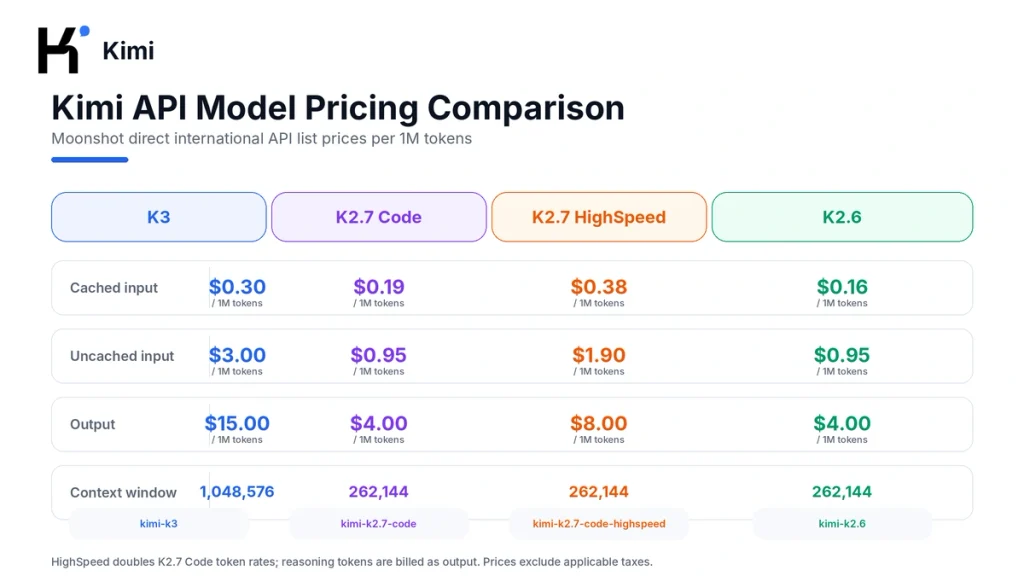
| Model | Cached input | Uncached input | Output | Context |
|---|---|---|---|---|
| Kimi K3 | $0.30 | $3.00 | $15.00 | 1M |
| Kimi K2.7 Code | $0.19 | $0.95 | $4.00 | 256K |
| Kimi K2.7 Code HighSpeed | $0.38 | $1.90 | $8.00 | 256K |
| Kimi K2.6 | $0.16 | $0.95 | $4.00 | 256K |
Cost example: 100K input and 10K output
Assume a request processes 100,000 uncached input tokens and generates 10,000 output tokens:
| Model | Input cost | Output cost | Estimated total |
|---|---|---|---|
| Kimi K3 | $0.300 | $0.150 | $0.450 |
| Kimi K2.7 Code | $0.095 | $0.040 | $0.135 |
| Kimi K2.7 Code HighSpeed | $0.190 | $0.080 | $0.270 |
| Kimi K2.6 | $0.095 | $0.040 | $0.135 |
The same example with a full input cache hit
| Model | Cached input cost | Output cost | Estimated total |
|---|---|---|---|
| Kimi K3 | $0.030 | $0.150 | $0.180 |
| Kimi K2.7 Code | $0.019 | $0.040 | $0.059 |
| Kimi K2.7 Code HighSpeed | $0.038 | $0.080 | $0.118 |
| Kimi K2.6 | $0.016 | $0.040 | $0.056 |
These examples assume the same output length. Real costs can differ because K3 and K2.7 Code always reason, while K2.6 can avoid reasoning output in non-thinking mode.
Which Kimi Model Should You Choose?
| Workload | Recommended starting model | Reason |
|---|---|---|
| Unknown or mixed advanced workload | kimi-k3 | Moonshot’s recommended default and strongest current model |
| Deep research over many documents | kimi-k3 | 1M context and stronger knowledge-work positioning |
| Very large repository or extended agent history | kimi-k3 | Approximately four times K2.x context capacity |
| Standard repository coding | kimi-k2.7-code | Dedicated coding model at lower direct price than K3 |
| Interactive coding where output latency is critical | kimi-k2.7-code-highspeed | Faster hosted generation |
| General chat or multimodal analysis | kimi-k2.6 | General-purpose behavior and lower cost |
| Extraction, classification or short rewriting | kimi-k2.6 with thinking disabled | Avoids unnecessary reasoning tokens |
| Tool workflow that must invoke a function | kimi-k3 | Only K3 supports tool_choice="required" |
| Large stable prefix reused repeatedly | Test K2.6 and K2.7 Code | Lower cached-input rates than K3 |
| Bulk asynchronous work | Start by testing K2.6 | Clearly documented Batch support and lower pricing |
Do not choose based on version numbers alone. Run the same representative workload through at least two candidates and compare end-to-end success, not only one response.
How to List Available Kimi API Models
Use the official Models endpoint instead of hard-coding assumptions about what an account can access:
GET https://api.moonshot.ai/v1/modelsPython example
import os
from typing import Any

import requests

api_key = os.environ.get("MOONSHOT_API_KEY")
if not api_key:
    raise RuntimeError(
        "Set the MOONSHOT_API_KEY environment variable before running this script."
    )

response = requests.get(
    "https://api.moonshot.ai/v1/models",
    headers={"Authorization": f"Bearer {api_key}"},
    timeout=30,
)
response.raise_for_status()

payload: dict[str, Any] = response.json()
model_ids = sorted(
    item["id"]
    for item in payload.get("data", [])
    if isinstance(item, dict) and isinstance(item.get("id"), str)
)

for model_id in model_ids:
    print(model_id)
The returned list shows the models available to the account. It does not replace the parameter, pricing, rate-limit or Batch documentation.
One OpenAI Client, Three Kimi Models
Initialize the OpenAI-compatible client once:
import os

from openai import OpenAI

api_key = os.environ.get("MOONSHOT_API_KEY")
if not api_key:
    raise RuntimeError(
        "Set the MOONSHOT_API_KEY environment variable before running this script."
    )

client = OpenAI(
    api_key=api_key,
    base_url="https://api.moonshot.ai/v1",
)
Do not expose the API key in browser JavaScript, a mobile binary, a public repository, analytics data or a published WordPress page.
Call Kimi K3
response = client.chat.completions.create(
    model="kimi-k3",
    reasoning_effort="high",
    messages=[
        {
            "role": "user",
            "content": (
                "Review this system design and identify reliability, "
                "security and rollback risks."
            ),
        }
    ],
    max_completion_tokens=4096,
)

print(response.choices[0].message.content or "")
Call Kimi K2.7 Code
response = client.chat.completions.create(
    model="kimi-k2.7-code",
    messages=[
        {
            "role": "user",
            "content": (
                "Inspect this repository change plan. Identify missing files, "
                "tests and migration risks."
            ),
        }
    ],
    max_completion_tokens=4096,
)

print(response.choices[0].message.content or "")
Do not pass reasoning_effort or attempt to disable thinking for K2.7 Code.
Call Kimi K2.6 without thinking
response = client.chat.completions.create(
    model="kimi-k2.6",
    messages=[
        {
            "role": "user",
            "content": (
                "Extract the company name, invoice number and total amount "
                "from this text. Return concise JSON."
            ),
        }
    ],
    max_completion_tokens=1024,
    response_format={"type": "json_object"},
    extra_body={
        "thinking": {
            "type": "disabled"
        }
    },
)

print(response.choices[0].message.content or "")
Use thinking-enabled K2.6 when the task requires deeper reasoning. Omit fixed sampling fields such as arbitrary temperature and top_p values.
How to Switch Kimi Models Safely
| Migration | Required changes |
|---|---|
| K2.6 → K3 | Replace the model ID, remove the K2.x thinking object and optionally add top-level reasoning_effort |
| K2.7 Code → K3 | Replace the model ID, add reasoning_effort only when needed and continue preserving complete assistant messages |
| K3 → K2.7 Code | Remove reasoning_effort, remove dynamic tool messages, avoid tool_choice="required" and keep complete assistant messages |
| K3 → K2.6 | Remove reasoning_effort, avoid required tool choice and optionally configure K2.x thinking |
| K2.6 → K2.7 Code | Remove any disabled-thinking configuration; K2.7 thinking and preservation are fixed on |
| K2.7 Code → K2.6 | Choose whether thinking should remain enabled and whether historical reasoning should be preserved |
Start a new conversation when switching model families unless you have tested the exact history format. A conversation created under optional K2.6 thinking may not contain the state expected by K2.7 Code or K3.
Multi-Turn Conversations and Tool Calls
The Chat Completions API is stateless. Your application must resend the conversation history required for the next response.
When reasoning or tools are involved:
- Append the complete assistant message returned by the SDK.
- Do not copy only
content. - Preserve
reasoning_contentwhen present. - Preserve every
tool_call. - Execute each approved function in your application.
- Append one tool result with the matching
tool_call_id. - Send the updated message list back to the same model.
This is especially important for K3 and K2.7 Code because Preserved Thinking is always enabled.
Automatic Context Caching
K3, K2.7 Code and K2.6 support automatic prefix caching. You do not create a manual cache object for ordinary use.
Improve cache reuse by:
- Keeping system instructions stable.
- Keeping large reused documents or repository context near the beginning.
- Keeping tool definitions in a consistent order.
- Appending new questions and results after the stable prefix.
- Avoiding unnecessary edits to earlier messages.
- Keeping K3 reasoning effort stable during one session.
Caching reduces the price of reused input. It does not reduce output pricing, guarantee a hit, or replace retrieval. A production system may use retrieval to select relevant information and caching to avoid repeatedly processing the stable portion.
Batch API Support Requires Verification
Moonshot’s official Batch pricing page currently says Batch supports K2.7 Code, K2.6 and K2.5 at 60% of standard inference pricing. However, the current Batch implementation guide lists only K2.6 and K2.5 as accepted model IDs.
Because these official pages conflict:
- Treat K2.6 as the clearly documented Batch option.
- Verify K2.7 Code in the current console or API before building a production Batch pipeline.
- Do not assume K3 Batch support; K3 is not currently listed.
- Test a small job before uploading a large production JSONL file.
Batch is designed for asynchronous bulk work and is not subject to normal real-time concurrency limits, but tasks must complete within their configured completion window.
Rate Limits Are Shared Across Models
Kimi API rate limits are currently applied at the user level rather than independently per API key, and limits are shared across models.
The platform measures:
- Concurrency
- Requests per minute
- Tokens per minute
- Tokens per day
For admission, the gateway counts prompt tokens plus the requested max_completion_tokens, even when the final response is shorter. A K3 request that reserves an unnecessarily large completion can therefore consume significant rate-limit capacity before that output is generated.
Creating another API key under the same user does not create a separate limit. For detailed troubleshooting, see our Kimi usage and rate-limit guide.
Common Kimi API Model Selection Mistakes
- Using provider-specific IDs: values such as
moonshotai/Kimi-K3belong to another provider, not Moonshot’s direct API. - Comparing provider prices with direct prices: OpenRouter or SiliconFlow rates can differ from Moonshot’s list prices.
- Treating HighSpeed as a better model: it is the same K2.7 Code model with faster serving and double direct rates.
- Sending arbitrary temperature values: the current Kimi families use fixed sampling values and reject unsupported overrides.
- Sending K3 reasoning_effort to K2.x: K2.6 and K2.7 Code do not support it.
- Disabling K2.7 thinking: K2.7 Code always reasons.
- Using tool_choice required on K2.x: only K3 currently supports it.
- Keeping only visible content: this loses preserved reasoning or tool state.
- Assuming the API remembers the conversation: Chat Completions is stateless.
- Assuming 1M context means 1M input plus 1M output: both share one window.
- Choosing K3 for every task: simpler tasks may cost less and respond faster on K2.6.
- Starting on deprecated IDs: use the current Model List before launching an integration.
How to Evaluate the Models on Your Workload
Create a frozen test set before choosing a production default. Include the tasks your application actually performs rather than relying only on vendor benchmarks.
- Select 20–100 representative tasks.
- Define the expected answer or human scoring rubric.
- Use the same relevant source material and tools.
- Set explicit completion limits.
- Record the model ID and reasoning configuration.
- Run more than one attempt when variability matters.
- Measure task success, not only prose quality.
- Record prompt, cached, reasoning and visible-output tokens.
- Measure time to first token and total task duration.
- Include external tool and test execution time.
- Check schema validity, citations, code tests and safety constraints.
- Calculate cost per successful task rather than cost per raw request.
A cheaper request is not cheaper if it fails more often or requires more retries. A more capable model is not automatically better if the workload does not use its extra context or reasoning.
Frequently Asked Questions
What are the main current Kimi API models?
The primary model families recommended for new integrations are Kimi K3, Kimi K2.7 Code and Kimi K2.6. K2.7 Code also has a separately priced HighSpeed serving variant.
What is the best Kimi API model?
Kimi K3 is Moonshot AI’s strongest current model and the official default recommendation when you are unsure. K2.7 Code can be a better fit for focused coding workloads, while K2.6 can be more economical and flexible for general or non-thinking tasks.
What are the official model IDs?
The direct Moonshot IDs are kimi-k3, kimi-k2.7-code, kimi-k2.7-code-highspeed and kimi-k2.6.
What is the Kimi API base URL?
The international OpenAI-compatible base URL is https://api.moonshot.ai/v1.
Is the Kimi API OpenAI compatible?
Yes. It supports OpenAI-compatible request patterns and SDKs. Model-specific reasoning fields, fixed parameters, tool behavior, message history and multimodal formats still require Kimi-specific handling.
Which Kimi model has the largest context window?
Kimi K3 has a 1,048,576-token context window. K2.7 Code and K2.6 each provide 262,144 tokens through the direct API.
Which Kimi model is best for coding?
Start with K2.7 Code for coding-focused agents that fit inside 256K. Use K3 for unusually large repositories, visual coding, advanced tool control or tasks where K3’s broader capability justifies its higher price.
What is Kimi K2.7 Code HighSpeed?
It is the same K2.7 Code model served through a faster endpoint. Moonshot documents approximately 180 output tokens per second and up to 260 in short-context scenarios. Its direct token prices are twice the standard K2.7 Code rates.
Which Kimi model can disable thinking?
Kimi K2.6 can enable or disable thinking. K3 and K2.7 Code always reason.
Does K2.6 support reasoning_effort?
No. K2.6 uses the K2.x thinking object. The top-level reasoning_effort field belongs to K3.
Can K2.7 Code thinking be disabled?
No. Thinking and Preserved Thinking are fixed on for K2.7 Code and its HighSpeed variant.
Which model supports tool_choice required?
Only Kimi K3 currently supports tool_choice="required". K2.7 Code and K2.6 support automatic or disabled tool selection, but not required selection.
Do all Kimi API models support images and video?
K3, K2.7 Code and K2.6 support text, image and video input through Moonshot’s direct API. A third-party provider may offer a different set of modalities.
How much does Kimi K3 cost?
The current direct price is $0.30 per million cached-input tokens, $3 per million uncached-input tokens and $15 per million output tokens, excluding tax.
How much do K2.7 Code and K2.6 cost?
Both standard models cost $0.95 per million uncached-input tokens and $4 per million output tokens. Cached input costs $0.19 for K2.7 Code and $0.16 for K2.6.
Is the Kimi API free?
No. The hosted API uses pay-as-you-go token billing. Moonshot’s current rate-limit page says an account must top up at least $1 to begin using the platform.
Does the Kimi API remember conversations?
No. Chat Completions is stateless. Your application must resend the required history, including complete assistant messages and tool state.
How can I retrieve the available model list?
Send an authenticated GET request to https://api.moonshot.ai/v1/models.
Is Kimi K3 supported by the Batch API?
K3 is not currently listed as a supported Batch model. Official pages currently disagree about K2.7 Code Batch availability, while K2.6 is clearly documented. Verify the current console before building a Batch workflow.
Official Sources and Update Methodology
This comparison prioritizes current first-party Kimi, Moonshot AI, Kimi API Platform and official model-repository documentation. The main sources reviewed were:
- Official Kimi API Quickstart and Model Selection
- Official Kimi API Model List
- Kimi Model Parameter Reference
- Chat Completions API Reference
- Kimi K3 API Quickstart
- Kimi K2.7 Code API Quickstart
- Kimi K2.6 API Quickstart
- Official Kimi K3 Pricing
- Official Kimi K2.7 Code and HighSpeed Pricing
- Official Kimi K2.6 Pricing
- Kimi Recharge and Rate Limits
- List Models API
- Kimi Batch Pricing
- Kimi Batch API Guide
- Official Kimi K3 Model Card
- Official Kimi K2.7 Code Model Card
- Official Kimi K2.6 Model Card
Model IDs, context limits, reasoning behavior, tool constraints, prices and availability were last checked on August 22, 2026. When a third-party provider differs from Moonshot’s direct API, use that provider’s model ID, pricing and feature documentation for the provider-specific route.
Last verified: August 22, 2026.