
Kimi API errors should be diagnosed using the HTTP status, error.type, error.message, endpoint, model ID, and request_id together. Do not retry every failure. Fix unchanged 400, 401, 403, and 404 requests before sending them again. Under 429, retry engine_overloaded_error with bounded backoff, reduce load for rate_limit_reached_error, and check billing for exceeded_current_quota_error. Use streaming for long requests, preserve complete assistant and tool-call messages, and test the direct Moonshot endpoint before blaming an IDE, gateway, or agent framework.
Kimi’s error wording, model access, rate-limit tiers, platform endpoints, and file-processing rules can change. Use the response returned to your account and the current official documentation as the final reference.
Core rule: an HTTP status tells you the broad failure class. The Kimi
error.typeusually determines the actual recovery action. This distinction is especially important for 429, which can mean temporary engine load, an account throughput limit, or insufficient balance.
Security rule: never place a complete API key, Authorization header, private prompt, uploaded document, customer data, session cookie, or tool credential in a public log, screenshot, forum post, GitHub issue, or support ticket.
Kimi API Errors at a Glance
| Status | Common Kimi type | Typical cause | Retry unchanged? |
|---|---|---|---|
| 400 | invalid_request_error | Invalid JSON, missing field, unsupported parameter, context overflow, file problem, or message-layout error | No |
| 400 | content_filter | Input or generated output triggered content-safety review | No |
| 401 | invalid_authentication_error | Malformed, revoked, wrong-product, or wrong-regional-platform API key | No |
| 401 | incorrect_api_key_error | Missing or incorrect API key | No |
| 403 | permission_denied_error | API unavailable to the account, caller lacks permission, or IP is outside the organization allowlist | No |
| 404 | resource_not_found_error | Wrong model ID or no access to the requested model | No |
| 429 | engine_overloaded_error | Temporary server-side capacity pressure | Yes, with bounded backoff |
| 429 | rate_limit_reached_error | Concurrency, RPM, TPM, or TPD limit reached | Only after applying the correct wait or load reduction |
| 429 | exceeded_current_quota_error | Insufficient balance, expired voucher, overdue or disabled account, or token quota | No |
| 499 | client_closed_request | Client, user, SDK, or proxy closed the connection before the response completed | Only after checking duplicate-work risk |
| 500 | server_error or unexpected_output | Internal service or model-output failure | Sometimes, with a strict retry cap |
| 503 | server_unavailable | Temporary maintenance, scaling, or unavailable node | Sometimes |
| 504 | Gateway timeout page | The platform produced no response for 900 seconds | Do not repeat the same long non-streaming request unchanged |
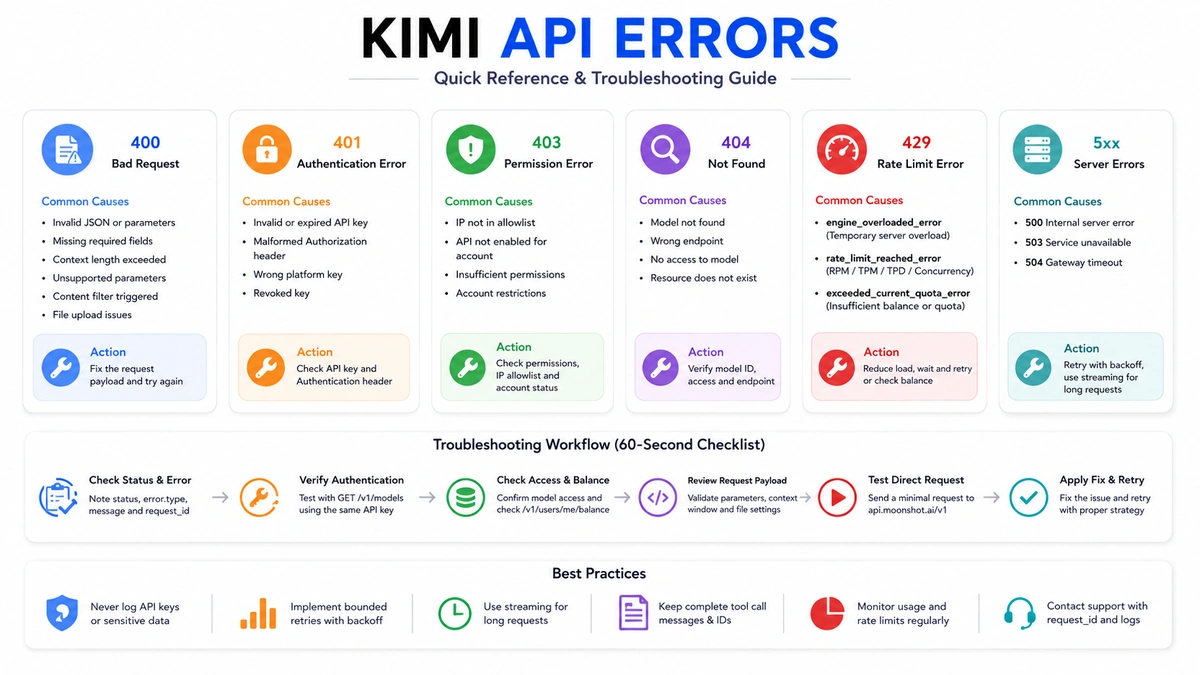
How Kimi API Error Responses Are Structured
A failed Kimi API request normally returns JSON containing an error object:
{
  "error": {
    "type": "rate_limit_reached_error",
    "message": "Organization-level TPM limit reached",
    "code": "optional_code"
  }
}
Capture these signals:
| Signal | What it tells you |
|---|---|
| HTTP status | The broad client, authentication, permission, rate, or server failure class |
error.type | Kimi’s documented cause family and the most useful recovery signal |
error.message | The specific parameter, limit, file, permission, or account detail |
error.code | An additional code where the endpoint supplies one |
request_id | A correlation identifier for logs and official support |
| Response headers | Retry instructions and rate-limit information where supplied |
| Endpoint and model | Whether the request went to the intended platform and model family |
| Timestamp and time zone | Allows correlation with incidents, billing, and server logs |
A 504 can return an HTML gateway page rather than Kimi’s normal JSON object. Your error parser must therefore tolerate a non-JSON body and retain the HTTP status, headers, content type, and a short redacted excerpt.
A 60-Second Kimi API Diagnostic Workflow

- Confirm the product. Open Platform, Kimi Code, and Kimi Membership use separate keys and billing systems.
- Confirm the endpoint. The international direct API base URL is
https://api.moonshot.ai/v1. - Capture the exact response. Record status, type, sanitized message, headers, model, endpoint, and request ID.
- Test authentication. Call
GET /v1/modelsusing the same key. - Check access. Confirm that the requested model appears in the model-list response.
- Check balance. Call
GET /v1/users/me/balance. - Check the payload. Compare it with the model-specific parameter table rather than a generic OpenAI example.
- Check token admission. Estimate input tokens and review
max_completion_tokens. - Test one direct request. Remove the IDE, gateway, relay, or agent framework from the path.
- Choose the recovery action. Correct, wait, throttle, retry, or escalate based on the error type.
A minimal direct test separates Kimi from third-party integration problems:
curl https://api.moonshot.ai/v1/chat/completions \
  -H "Authorization: Bearer $MOONSHOT_API_KEY" \
  -H "Content-Type: application/json" \
  -d '{
    "model": "kimi-k3",
    "reasoning_effort": "low",
    "max_completion_tokens": 128,
    "messages": [
      {"role": "user", "content": "Reply with the word OK."}
    ]
  }'
If this direct request succeeds but Claude Code, OpenCode, Codex, a proxy, or an agent fails, investigate that client’s model alias, protocol conversion, timeout, streaming, automatic retry, and message-transformation logic.
Which Kimi API Errors Should Be Retried?
| Error class | Default decision | Reason |
|---|---|---|
| Malformed 400 | Stop and fix | The same payload will fail again |
| Content-filter 400 | Stop and review | The request or output triggered safety review |
| 401 | Stop and fix | Retries do not repair credentials |
| 403 | Stop and fix | Permission, account, or allowlist configuration must change |
| 404 | Stop and fix | The model, endpoint, resource, or access is wrong |
engine_overloaded_error | Retry with bounds | The condition is temporary server capacity |
rate_limit_reached_error | Wait or throttle | The required delay depends on concurrency, RPM, TPM, or TPD |
exceeded_current_quota_error | Stop and fix billing | Waiting alone does not restore balance |
| 499 | Investigate first | The original server request may have continued after the client disconnected |
| 500 or 503 | Retry with bounds | The service may recover, but endless retries can amplify an incident |
| 504 | Change the request | Enable streaming, reduce work, or split the task rather than waiting another 900 seconds |
Before retrying a tool-enabled request, determine whether an external action may already have happened. A repeated request can otherwise send the same email, modify the same record, create the same ticket, or execute the same command twice.
400 Bad Request: Invalid Request, Parameters, Context, or Files
A 400 means the server received the request but cannot process it in its current form. Do not retry the same body.
Malformed or incomplete request body
- Invalid JSON syntax.
- A missing required field such as
modelormessages. - A field has the wrong type.
- An unsupported endpoint parameter was copied from another provider.
- A tool definition or JSON Schema does not match Kimi’s accepted structure.
- A message role or tool-result layout is invalid.
Log the request shape, not the private content. For example, record field names, message count, tool count, byte size, model ID, and token estimate.
Model-specific parameter errors
| Model | Valid configuration | Common 400 cause |
|---|---|---|
kimi-k3 | Top-level reasoning_effort: low, high, or max | Sending the K2.x thinking object |
kimi-k3 | tool_choice: auto, none, or required | Passing a non-supported custom value |
kimi-k2.7-code | Thinking is always enabled and preserved | Trying to disable thinking or sending reasoning_effort |
kimi-k2.6 | thinking.type can be enabled or disabled | Sending K3’s reasoning_effort |
| K2.6 or K2.7 Code | tool_choice: auto or none | Sending tool_choice="required" |
| K3 or K2.7 Code | temperature fixed at 1.0 | Sending another temperature |
| K2.6 | Temperature fixed at 1.0 in thinking mode and 0.6 in non-thinking mode | Sending an arbitrary temperature copied from another tutorial |
| Current Kimi families | top_p=0.95, n=1, penalties 0 | Overriding a fixed value |
The safest approach is to omit fixed sampling fields entirely. Review the current Kimi Model Parameter Reference whenever you switch model families.
Context-window overflow
Kimi can return invalid_request_error when:
- The input alone exceeds the model context.
- Prompt tokens plus
max_completion_tokensexceed the context. - Preserved reasoning and tool results make the history too large.
- Images or videos add more tokens than expected.
K3 supports a total 1,048,576-token context. K2.7 Code and K2.6 support 262,144 tokens. Input and requested output share the same window.
Use the official token estimator before sending a large request:
curl https://api.moonshot.ai/v1/tokenizers/estimate-token-count \
  -H "Authorization: Bearer $MOONSHOT_API_KEY" \
  -H "Content-Type: application/json" \
  -d '{
    "model": "kimi-k3",
    "messages": [
      {"role": "user", "content": "Your large prompt goes here"}
    ]
  }'
Reduce duplicated history, verbose tool results, irrelevant files, or the requested output ceiling. Do not solve every overflow by switching to K3; retrieval and conversation compaction can be more efficient.
content_filter
A content_filter error means the input or model-generated output triggered Kimi’s content-safety review. The generated answer can trigger the error even when the original prompt appears harmless.
- Confirm that the error came from Kimi rather than a third-party gateway’s separate policy.
- Remove unrelated sensitive content.
- Narrow a legitimate request to the minimum required scope.
- Separate large mixed-content documents into focused sections.
- Do not attempt to bypass or reverse-engineer safety controls.
Kimi does not disclose the exact safety rule that was triggered.
File upload and purpose errors
The current Files API documents these limits:
- Maximum 100 MB per file.
- Maximum 1,000 uploaded files per user.
- Maximum 10 GB total uploaded-file storage.
- A zero-byte file is rejected.
Use the correct purpose:
| Purpose | Use |
|---|---|
file-extract | Extract text from PDF, Word, spreadsheets, text, code, and supported documents |
image | Upload an image for native vision understanding |
video | Upload a video for native multimodal understanding |
batch | Upload a JSONL input file for the Batch API |
Some error-message examples still mention that only file-extract is accepted. Follow the current endpoint documentation for the route you are calling and confirm that an older SDK or wrapper is not rewriting the purpose.
401 Authentication Errors
Kimi documents two common 401 types:
invalid_authentication_errorincorrect_api_key_error
Check in this order:
- Confirm the header is
Authorization: Bearer <key>. - Remove leading or trailing spaces, quotes, and line breaks from the secret.
- Confirm that the environment variable contains the intended key.
- Confirm the key has not been revoked or deleted.
- Confirm it is an Open Platform key, not a Kimi Code or Membership credential.
- Confirm the regional platform matches the endpoint.
- Call
GET /v1/modelswith the same key.
Keys created on platform.kimi.ai are isolated from keys created on other regional Kimi platforms. For the international platform, use:
https://api.moonshot.ai/v1Do not print the complete key while debugging. Log a short fingerprint generated on your server, such as a one-way hash prefix, rather than the secret itself.
403 Permission Errors
A documented permission_denied_error can mean:
- The API or feature is not open to the account.
- The caller is trying to access another user’s information.
- The source IP is outside the organization’s allowlist.
- The organization, project, or member does not have the required permission.
If your organization configured an IP allowlist, an empty list means no source-IP restriction. After addresses are saved, requests from other IPs are denied. Check NAT gateways, serverless egress addresses, CI runners, VPNs, and failover regions rather than only the developer’s local IP.
403 or 429 for insufficient balance?
Kimi’s official pages are not completely uniform here. The canonical error table places exceeded_current_quota_error under 429, while a shorter Help Center FAQ says an insufficient-balance condition can appear as 403.
Build your handler around:
- The returned
error.type. - The message.
- The account’s available balance.
- The model and project being used.
Do not assume that every 403 is a billing problem or that every quota problem is always 429.
404 Resource or Model Not Found
The official error reference maps 404 to resource_not_found_error, usually because the model does not exist or the account cannot access it.
- Check the exact model spelling.
- Call
GET /v1/modelswith the same key. - Check the current Kimi API models guide.
- Confirm the account has completed the required top-up or access step.
- Confirm the endpoint belongs to Moonshot’s API.
- Remove stale model aliases from environment variables and gateway configuration.
model_not_found after using the OpenAI SDK
A frequent cause is forgetting to set Kimi’s base_url. The OpenAI SDK then sends kimi-k3 or another Kimi model name to OpenAI’s servers, which correctly reports that the model does not exist there.
from openai import OpenAI
import os

client = OpenAI(
    api_key=os.environ["MOONSHOT_API_KEY"],
    base_url="https://api.moonshot.ai/v1",
)
429 Kimi API Errors
Do not treat all 429 responses as “wait and retry.” Read error.type first.
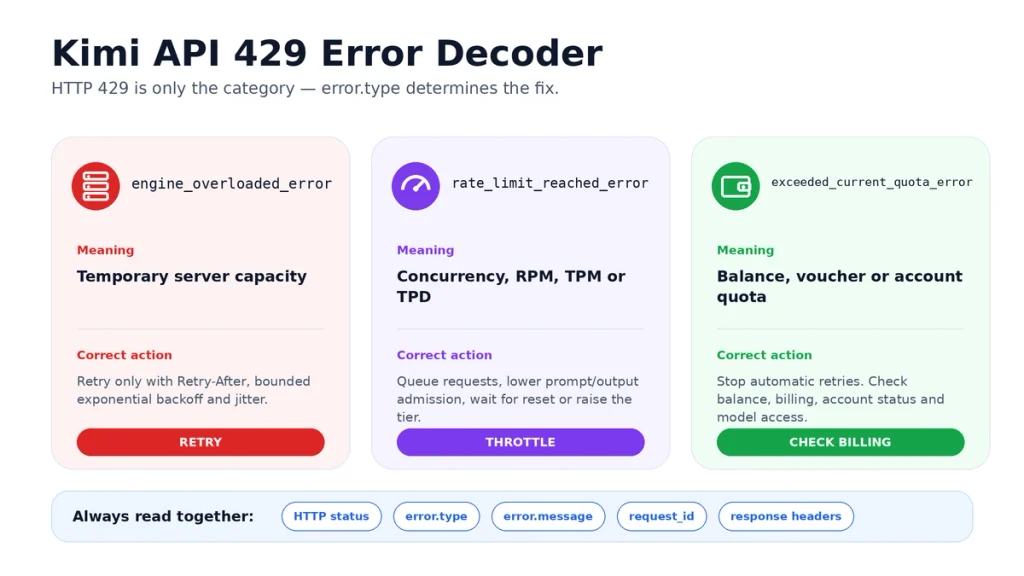
engine_overloaded_error
This is temporary server-side capacity pressure.
- Respect a valid
Retry-Afterheader. - Reduce concurrency.
- Retry with exponential backoff and random jitter.
- Set a maximum attempt count and total deadline.
- Do not top up only to fix this error; upgrading does not create immediate node capacity.
rate_limit_reached_error
This means the account reached at least one throughput control:
| Limit | Meaning | First fix |
|---|---|---|
| Concurrency | Too many requests are being processed simultaneously | Use a queue or semaphore |
| RPM | Too many requests were admitted in one minute | Reduce request frequency and inspect SDK retries |
| TPM | Too many prompt plus reserved-completion tokens were admitted in one minute | Reduce input, output ceiling, or frequency |
| TPD | The daily token allowance was reached | Wait until the next-day reset or obtain a higher tier |
Kimi enforces these limits at the user level, not independently for each key, and currently shares them across models. Creating additional keys does not multiply capacity.
Why a small request can consume substantial TPM
For rate-limit admission, Kimi counts:
Prompt tokens + requested
max_completion_tokens
The gateway uses the requested completion ceiling even when the actual output is shorter. Billing uses actual generated tokens, but TPM admission does not.
Set a realistic completion limit. A classification request that needs 200 tokens should not reserve 131,072 tokens merely because that is a model default.
exceeded_current_quota_error
This normally means:
- Available balance is zero or negative.
- A voucher expired or does not cover the target model.
- The account is overdue or disabled.
- The token quota is insufficient.
Stop automatic retries and check the balance:
curl https://api.moonshot.ai/v1/users/me/balance \
  -H "Authorization: Bearer $MOONSHOT_API_KEY"
When available_balance is less than or equal to zero, inference calls cannot continue.
Why one operation can become three requests
The OpenAI Python SDK automatically retries selected connection errors, 408, 409, 429, and 5xx responses twice by default. One application operation can therefore create three API attempts, all of which count toward RPM.
During debugging, account for the SDK’s retry behavior or temporarily disable it:
client = OpenAI(
    api_key=os.environ["MOONSHOT_API_KEY"],
    base_url="https://api.moonshot.ai/v1",
    max_retries=0,
)
Do not combine SDK retries, framework retries, gateway retries, and your own retry loop without calculating the maximum multiplication.
499 Client Closed Request
A 499 with client_closed_request means the client disconnected before Kimi returned the full response. Possible sources include:
- The user cancelled the request.
- The browser or application closed the connection.
- A reverse proxy timed out.
- A load balancer terminated an idle connection.
- An SSE stream was interrupted.
- The local process crashed or was redeployed.
Check KeepAlive, proxy timeouts, application cancellation, and streaming behavior. Before retrying a tool-enabled operation, determine whether the original request or an external side effect may still have completed.
500, 503 and 504 Server Errors
500: server_error or unexpected_output
Retry after a short delay with a strict cap. If the same request fails repeatedly:
- Retain the
request_id. - Reduce the request to a minimal reproduction.
- Confirm whether the failure follows one model, input type, or tool schema.
- Check the official status page.
- Contact API support with redacted evidence.
503: server_unavailable
This normally represents temporary maintenance, scaling, or unavailable capacity. Respect Retry-After where present, reduce pressure, and use bounded retries.
504: Gateway timeout
Kimi documents a platform timeout of 900 seconds. When the server produces no response within that period, the gateway can return an HTML timeout page.
- Enable
stream=true. - Reduce the requested output.
- Split a long task into stages.
- Reduce oversized tool results.
- Check whether your own proxy has a much shorter timeout.
- Use Partial Mode to continue a long response where appropriate.
A 15-minute or two-hour server allowance does not mean your web server, CDN, serverless platform, browser, or SDK will keep the connection open for that long.
Connection Errors Without a Kimi JSON Response
If you receive a DNS error, TLS failure, connection reset, socket timeout, or empty response, the request may not have produced a Kimi HTTP response at all.
- Confirm DNS resolution for
api.moonshot.ai. - Check outbound HTTPS access on port 443.
- Check VPN, proxy, corporate firewall, and certificate inspection.
- Confirm your application timeout.
- Confirm reverse-proxy and load-balancer timeouts.
- Test a minimal cURL request from the same host.
- Enable streaming for long generations.
- Check whether a middleware layer converted or discarded the original error.
Do not label a proxy-generated 502, 408, or generic “upstream failed” message as a Kimi error until a direct request reproduces it.
Incomplete or Truncated Kimi Output
A short response is not necessarily an API error. Inspect finish_reason:
stop: the model ended normally.length: generation reachedmax_completion_tokens.tool_calls: the model is waiting for the application to execute tools.
If finish_reason="length":
- Increase the completion limit only if context and budget allow.
- Use the token estimator.
- Split the output into sections.
- Use Partial Mode to continue from the previous response.
max_completion_tokens is a ceiling, not a request to generate exactly that many tokens or characters.
Tool Calling Errors and Repeated Tool Loops
When Kimi returns finish_reason="tool_calls", the application must complete the loop correctly:
- Append the complete returned assistant message to
messages. - Preserve
reasoning_contentwhen present. - Preserve every
tool_call. - Validate the function name and JSON arguments.
- Execute the approved function.
- Append a
role="tool"message for every call. - Set the tool message’s
tool_call_idto the exact matching call ID. - Send the full updated history back to the same model.
The model repeats the same tool call
First confirm:
- The assistant message was appended unchanged.
- The tool result is present.
- The
tool_call_idmatches. - Streaming tool-call chunks were assembled correctly.
- The tool result contains new, useful information.
Then implement client-side repeated-call detection. Treat a call as repeated only when the function name and arguments are identical, the calls are consecutive, and the tool result has not produced progress. Stop the loop after a defined maximum instead of paying for unlimited repetitions.
Third-Party IDE, Agent, and Gateway Troubleshooting
Split the request path into layers:
Your application
    ↓
IDE or agent
    ↓
Protocol adapter or gateway
    ↓
Kimi API
    ↓
Model and tools- Run a direct Kimi cURL request with the same Open Platform key and model.
- If it fails, fix Kimi authentication, access, balance, model, or payload first.
- If it succeeds, inspect the third-party tool’s actual endpoint and model alias.
- Check whether it converts OpenAI Chat Completions into Anthropic Messages or another protocol.
- Check whether it removes
reasoning_content. - Check whether it injects unsupported
temperature,thinking, orreasoning_effortfields. - Check timeout and automatic retry settings.
- Upgrade the third-party client and follow Kimi’s integration-specific tutorial.
Model names can differ by integration route. A direct Kimi API request may use kimi-k3, while a compatible Claude Code path can use an integration-specific alias. Do not reuse one route’s model name in another route without checking its official tutorial.
File Extraction and Vision Troubleshooting
Choose between text extraction and native visual understanding:
| Goal | Correct route |
|---|---|
| Extract text from a PDF or document | Upload with purpose="file-extract", retrieve the extracted content, then place that text into messages |
| Understand an image visually | Use a multimodal message or upload with purpose="image" |
| Understand video | Upload with purpose="video" and use a supported multimodal model |
| Submit Batch JSONL | Upload with purpose="batch" |
Text extraction from images relies on OCR. An image with no readable text can produce poor or empty extraction even though a vision model could understand the visual scene.
Do not base64-encode ordinary text merely to transmit it. Kimi warns that encoding text this way can create massive token consumption. Upload supported documents through the Files API or send normal UTF-8 text.
Why You May Be Charged Without Seeing a Result
A missing client result does not prove that the server request failed. The client may stop waiting while Kimi continues processing.
- Check the HTTP status and
request_id. - Check the response
usagefield where available. - Check whether the client retried automatically.
- Check whether an agent created sub-agents or repeated tool calls.
- Check the Open Platform usage and billing dashboard.
- Check client, proxy, and timeout logs.
Kimi states that requests interrupted by a 429 response are not charged. A local timeout, 499, or proxy disconnect is different: the server-side request may still complete and create usage.
Three Useful Diagnostic Endpoints
1. List models
curl https://api.moonshot.ai/v1/models \
  -H "Authorization: Bearer $MOONSHOT_API_KEY"
Use this to verify authentication and confirm that the account can access the requested model.
2. Check balance
curl https://api.moonshot.ai/v1/users/me/balance \
  -H "Authorization: Bearer $MOONSHOT_API_KEY"
Use this for exceeded_current_quota_error, missing voucher, or suspected billing problems.
3. Estimate tokens
curl https://api.moonshot.ai/v1/tokenizers/estimate-token-count \
  -H "Authorization: Bearer $MOONSHOT_API_KEY" \
  -H "Content-Type: application/json" \
  -d '{
    "model": "kimi-k3",
    "messages": [
      {"role": "user", "content": "Estimate this request"}
    ]
  }'
Use this before large contexts and when investigating TPM or context-overflow failures.
A Safe Python Error Classifier and Retry Policy
The following example retries only clear transient conditions. It does not retry authentication, permission, malformed requests, missing models, quota failures, 499, or 504 automatically.
from __future__ import annotations

import random
import time
from dataclasses import dataclass
from typing import Any

import requests


@dataclass(frozen=True)
class KimiError:
    status: int
    error_type: str
    message: str
    request_id: str | None
    retry_after: float | None


def parse_kimi_error(response: requests.Response) -> KimiError:
    error_type = "unknown"
    message = response.text[:500]
    request_id = (
        response.headers.get("x-request-id")
        or response.headers.get("request-id")
    )

    try:
        payload: dict[str, Any] = response.json()
        error = payload.get("error", {})
        if isinstance(error, dict):
            error_type = str(error.get("type") or "unknown")
            message = str(error.get("message") or message)[:500]
    except ValueError:
        # A 504 or intermediary error may return HTML or plain text.
        pass

    retry_after: float | None = None
    raw_retry_after = response.headers.get("Retry-After")
    if raw_retry_after:
        try:
            retry_after = max(0.0, float(raw_retry_after))
        except ValueError:
            retry_after = None

    return KimiError(
        status=response.status_code,
        error_type=error_type,
        message=message,
        request_id=request_id,
        retry_after=retry_after,
    )


def should_retry(error: KimiError) -> bool:
    if error.error_type == "engine_overloaded_error":
        return True

    if error.status in {500, 503}:
        return True

    # A rate-limit error may be concurrency, RPM, TPM or TPD.
    # Inspect the message/reset information instead of blindly retrying.
    return False


def post_with_bounded_retry(
    url: str,
    *,
    headers: dict[str, str],
    json_body: dict[str, Any],
    max_attempts: int = 4,
) -> requests.Response:
    if max_attempts < 1:
        raise ValueError("max_attempts must be at least 1")

    for attempt in range(1, max_attempts + 1):
        response = requests.post(
            url,
            headers=headers,
            json=json_body,
            timeout=(10, 300),
        )

        if response.ok:
            return response

        error = parse_kimi_error(response)

        if not should_retry(error) or attempt == max_attempts:
            raise RuntimeError(
                "Kimi request failed: "
                f"status={error.status}, "
                f"type={error.error_type}, "
                f"request_id={error.request_id}, "
                f"message={error.message}"
            )

        fallback = min(2 ** (attempt - 1), 20)
        delay = error.retry_after if error.retry_after is not None else fallback
        delay += random.uniform(0, min(1.0, delay * 0.2))
        time.sleep(delay)

    raise AssertionError("Unreachable")


api_key = "read-this-from-a-server-side-secret-manager"

response = post_with_bounded_retry(
    "https://api.moonshot.ai/v1/chat/completions",
    headers={
        "Authorization": f"Bearer {api_key}",
        "Content-Type": "application/json",
    },
    json_body={
        "model": "kimi-k3",
        "reasoning_effort": "low",
        "max_completion_tokens": 256,
        "messages": [
            {"role": "user", "content": "Reply with a short health-check message."}
        ],
    },
)

print(response.json())
In production, add an application-level deadline, metrics, circuit breaking, concurrency control, and idempotency protections. Never retry a tool side effect merely because the model request was retried.
Safe Logging for Kimi API Troubleshooting
Store the minimum metadata required to correlate and reproduce a failure:
timestamp_utc=2026-08-22T12:00:00Z
environment=production
endpoint=/v1/chat/completions
model=kimi-k3
http_status=429
error_type=rate_limit_reached_error
request_id=[when returned]
attempt=1
elapsed_ms=842
retry_decision=stop
message_count=8
tool_count=3
estimated_prompt_tokens=12500
max_completion_tokens=4096
client=openai-python
client_version=[version]
proxy=[yes|no]
Do not log:
- The complete API key.
- The Authorization header.
- Private prompts or model outputs by default.
- Uploaded file content.
- Tool credentials.
- Customer identifiers that are not required.
- Session cookies or access tokens.
Moonshot also provides MoonPalace, a cross-platform debugging tool that can capture complete requests, search by request_id or chatcmpl_id, and export structured reports. Use it only in an environment where capturing the complete request is appropriate.
When to Contact Kimi API Support
Contact [email protected] when:
- A repeatable 500 or 503 persists after bounded retries.
- The reset or tier shown in an error conflicts with the dashboard.
- The balance or billing records appear incorrect.
- A model returned by
GET /v1/modelsconsistently produces an unexplained permission failure. - An IP-allowlist configuration behaves differently from the saved organization setting.
- The usage dashboard and retained API response cannot be reconciled.
- An account restriction or suspension needs review.
Include:
- Organization ID and project name.
- Date, time, and time zone.
- Model ID and endpoint.
- HTTP status and
error.type. request_idandchatcmpl_idwhere available.- Client, SDK, IDE, or gateway name and version.
- Redacted logs.
- A minimal reproduction.
- Relevant balance, usage, or billing records.
For help preparing the message, see our guide to contacting Kimi support.
Common Kimi API Troubleshooting Mistakes
- Using HTTP status alone: three different causes share 429.
- Retrying every failure: malformed requests and invalid keys will not repair themselves.
- Forgetting
base_url: the SDK sends the Kimi model name to another provider. - Mixing product keys: Kimi Code, Membership, and Open Platform credentials are separate.
- Mixing regional keys: a key must match the platform and endpoint where it was created.
- Passing arbitrary sampling parameters: current Kimi families use fixed values.
- Using K3 parameters on K2.x:
reasoning_effortis K3-specific. - Disabling K2.7 thinking: K2.7 Code always reasons and preserves reasoning.
- Using required tool choice on K2.x: only K3 currently supports it.
- Reserving excessive output:
max_completion_tokensincreases TPM admission. - Ignoring SDK retries: one visible operation can produce multiple requests.
- Discarding complete assistant messages: reasoning and tool state can be lost.
- Using text extraction for visual understanding: OCR and native vision are different routes.
- Blaming Kimi for a gateway error: reproduce directly before escalating.
- Logging secrets: debugging must not create a credential or privacy incident.
Frequently Asked Questions
What fields should I inspect in a Kimi API error?
Inspect the HTTP status, error.type, error.message, request ID, response headers, endpoint, model ID, timestamp, and sanitized request shape.
What does a Kimi API 400 error mean?
It usually means an invalid request, unsupported parameter, context overflow, file problem, message-layout error, or content-safety rejection. Correct the request before retrying.
Why does my Kimi API key return 401?
The key may be missing, malformed, revoked, created for another Kimi product, or created on a regional platform that does not match the endpoint. Verify the Bearer header and call GET /v1/models.
Why do I receive permission denied?
The API may not be open to the account, the organization role may lack permission, or the source IP may not be in the organization allowlist.
Why does Kimi return model_not_found?
Check the model spelling and access. When using the OpenAI SDK, also confirm base_url="https://api.moonshot.ai/v1"; otherwise the model name may be sent to OpenAI instead of Kimi.
Are all Kimi 429 errors retryable?
No. Retry engine_overloaded_error with bounded backoff. Throttle or wait for rate_limit_reached_error. Stop and fix billing for exceeded_current_quota_error.
Why do I still get 429 after topping up?
Top-up does not fix server overload. You may also be hitting concurrency, RPM, TPM, or TPD. Read error.type and the message before taking action.
Does creating another API key increase my Kimi rate limit?
No. Kimi currently enforces rate limits at the user level and shares them across keys and models.
Why did one request consume several RPM slots?
The OpenAI SDK can automatically retry selected failures twice, producing up to three attempts. Framework, proxy, and application retries can multiply the count further.
Why can max_completion_tokens trigger TPM?
Kimi calculates rate-limit admission using prompt tokens plus the requested completion ceiling, even when the final output is shorter.
What does Kimi API 499 mean?
It means the client or an intermediate proxy closed the connection before the response completed. Check cancellation, KeepAlive, timeout, streaming, and duplicate-work risk before retrying.
How do I fix Kimi API 504?
Use streaming, reduce the output or context, split the task, and inspect client or proxy timeouts. Kimi’s documented 504 occurs after no server response for 900 seconds.
Why is the Kimi output incomplete?
Check finish_reason. A value of length means generation reached max_completion_tokens. Increase it within the remaining context or continue with Partial Mode.
Why does Kimi repeat the same tool call?
Confirm that the complete assistant message, matching tool result, and exact tool_call_id are in the conversation. Then add client-side repeated-call detection and a hard loop limit.
Why does Kimi work with cURL but fail in my IDE?
The issue is probably in the IDE, protocol adapter, model alias, timeout, streaming parser, parameter injection, or automatic retry layer. Use the tool’s logs and its Kimi-specific setup guide.
Why was I charged when the client showed no result?
A local timeout or proxy disconnect may stop displaying the response while the server request still completes. Check the request ID, usage field, SDK retries, agent loops, and billing dashboard.
How do I check my Kimi API balance?
Send an authenticated GET request to https://api.moonshot.ai/v1/users/me/balance.
How do I check whether a Kimi model is available?
Send an authenticated GET request to https://api.moonshot.ai/v1/models using the same key and endpoint as the failing request.
What should I send to Kimi API support?
Send the organization, project, timestamp, model, endpoint, status, error type, request ID, client version, minimal reproduction, and redacted logs. Never send the complete API key.
Official Sources and Update Methodology
This guide prioritizes current first-party Kimi, Moonshot AI, Kimi Open Platform, and official OpenAI SDK documentation. The main sources reviewed were:
- Kimi Common Error Codes
- Kimi API Troubleshooting
- Kimi API Overview
- Kimi Model Parameter Reference
- Recharge and Rate Limits
- Kimi API Main Concepts
- List Models Endpoint
- Check Balance Endpoint
- Estimate Tokens Endpoint
- Files Upload API
- Kimi Tool Use Reference
- Kimi Partial Mode
- MoonPalace Debugging Tool
- Kimi Official Support Contacts
- Official OpenAI Python SDK Retry Documentation
Error types, model constraints, file limits, rate-limit behavior, and troubleshooting recommendations were last checked on August 22, 2026. Where two official pages describe a status differently, this guide recommends using the returned error.type, message, balance, and current endpoint documentation rather than hard-coding one numeric status.
Last verified: August 22, 2026.