
Kimi AI is a credible Claude alternative, but it is not a universal replacement. Kimi is usually the better starting point for web-first multilingual research, dedicated Word and presentation workflows, lower-cost coding models, video input, and open-weight deployment. Claude is usually the better starting point for research that combines the web with connected workplace apps, a more mature coding-agent ecosystem, very large individual file uploads, and interactive Artifacts. For maximum model context, the comparison is now close: Kimi K3 and Claude’s current Fable, Opus, and Sonnet 5 families all support approximately one million tokens at the model or API level.
Models, plan access, prices, file limits, integrations, and usage policies can change. This comparison uses current first-party Kimi and Anthropic documentation and distinguishes between consumer applications, coding products, and API models.
Editorial verdict: choose Kimi for public-web research, multilingual evidence, Office-style production, low-cost coding models, or self-hosting. Choose Claude for connected-company research, a polished coding-agent workflow, very large chat uploads, or interactive applications and Artifacts. Use both when research, implementation, and final document production require different strengths.
Kimi AI vs Claude in 30 Seconds
| Your priority | Better starting point | Why |
|---|---|---|
| Public-web and multilingual research | Kimi | Agentic Search, multilingual retrieval, source labels, and dedicated Deep Research reports |
| Research across Gmail, Google Docs, Slack, or connected systems | Claude | Research can combine web search with connected internal context |
| Exportable long research reports | Kimi | Deep Research provides traceable reports and supports Word or PDF export |
| Mature coding-agent workflow | Claude | Claude Code has broad terminal, IDE, desktop, web, subagent, hook, and MCP support |
| Lower-cost specialized coding model | Kimi | K2.7 Code has substantially lower direct API rates than Claude’s Opus and Sonnet tiers |
| Open weights or private deployment | Kimi | Kimi K3 has officially published downloadable weights |
| Word comments and suggested edits | Kimi | Kimi Docs explicitly supports comments and suggested edits while preserving Word formatting |
| Very large single chat uploads | Claude | Claude currently documents up to 500MB per file in chat |
| More files in one upload workflow | Kimi | Kimi currently documents up to 50 files at a time |
| Interactive apps and visual tools | Claude | Artifacts provide a dedicated environment for shareable interactive content |
| Video input | Kimi | Kimi’s current consumer and API documentation includes video support |
| Maximum model context | Tie | Kimi K3 and Claude’s latest upper-tier models offer approximately 1M tokens |
First, Compare the Right Layers
“Kimi vs Claude” can refer to four different comparisons. Mixing them produces misleading conclusions.
| Layer | Kimi side | Claude side |
|---|---|---|
| Consumer assistant | Kimi web, mobile, desktop, Agent, Docs, Sheets, PPT, and Projects | Claude web, mobile, desktop, Projects, Research, Connectors, file creation, and Artifacts |
| Research product | Kimi Search and Kimi Deep Research | Claude web search and Claude Research |
| Coding agent | Kimi Code | Claude Code |
| Models and API | Kimi K3, K2.7 Code, and K2.6 | Claude Fable 5, Opus 5, Sonnet 5, and Haiku 4.5 |
A user may prefer the Claude Code interface but run a Kimi model through a supported third-party configuration. Another user may prefer Kimi Docs for final production but use Claude Research to search connected internal files. The products are not always mutually exclusive.
Research Desk: Kimi Deep Research vs Claude Research
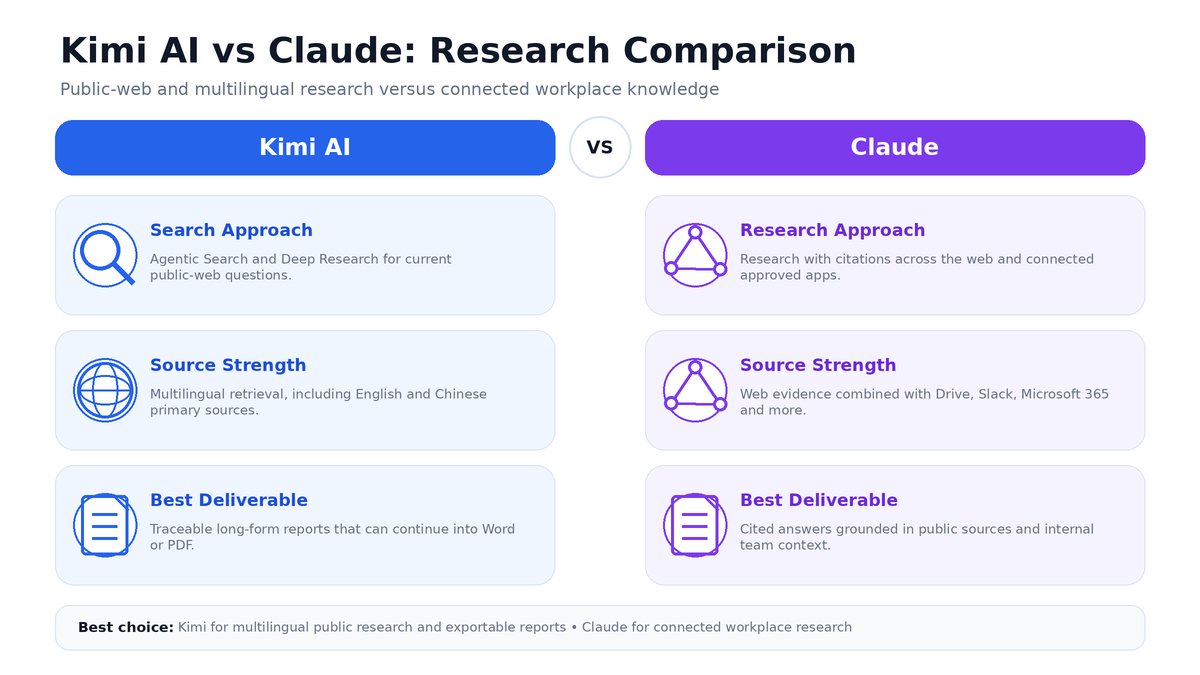
Both platforms now offer agentic research rather than a single web search. The main difference is where the evidence comes from and how the final work product is delivered.
How Kimi approaches research
Kimi provides two research levels:
- Web-Connected Search: suitable for a focused current question, fact check, source lookup, or professional search.
- Deep Research: suitable for a broad investigation requiring clarification, repeated retrieval, evidence selection, analysis, and a long-form report.
Kimi’s current Search documentation emphasizes:
- Real-time information retrieval.
- Clickable source links.
- Authoritative-source labels.
- Retrieval from news, government, financial, and academic sources.
- English, Chinese, and multilingual research.
- Access to vertical databases where available.
Kimi Deep Research runs as a dedicated asynchronous task. It asks clarifying questions, searches repeatedly, evaluates evidence, uses tools, and produces a traceable report. Reports can be downloaded or copied, including Word and PDF export paths under the current documentation.
An important limit is easy to miss: the current Kimi Deep Research product documents a 128K context window, even though the separate Kimi K3 model can support a 1M context through supported routes. Do not assume that every Kimi feature automatically exposes K3’s full model context.
How Claude approaches research
Claude Research is available on paid Pro, Max, Team, and Enterprise plans. It performs multiple searches, follows open questions, and returns citations that users can inspect.
Claude’s strongest research distinction is connected context. Research can combine the public web with information from approved internal sources such as:
- Gmail.
- Google Calendar.
- Google Docs and Drive.
- Slack.
- Microsoft 365.
- GitHub.
- Linear and other connector-supported services.
- Custom MCP connectors.
Claude inherits the user’s permissions from the connected system. This makes it useful for questions such as:
“Research current market changes, then compare them with our internal product roadmap, customer feedback, and meeting notes.”
Kimi can research public information and work with uploaded or local files, but Claude currently documents a broader consumer connector directory for blending web and continuously connected workplace data.
Research comparison table
| Research capability | Kimi | Claude |
|---|---|---|
| Normal web search | Yes, with source links and source labels | Yes, with citations |
| Agentic multi-search research | Kimi Deep Research | Claude Research |
| Research availability | Uses free allowances or membership credits shown in the account | Research requires a paid Claude plan |
| Multilingual web retrieval | Strongly emphasized in Kimi documentation | Supported through multilingual Claude models and web search |
| Connected internal apps | Files, Projects, Kimi Work, plugins, and supported tools | Broad connector system for Google Workspace, Microsoft 365, Slack, and others |
| Dedicated report export | Deep Research reports can be saved as Word or PDF | Research provides cited answers; file creation can turn findings into DOCX, PDF, PPTX, or XLSX |
| Public source verification | Clickable links and highlighted source passages in Deep Research | Easy-to-check citations in Research |
| Research context | Deep Research currently documents 128K | Depends on the Claude model and product configuration |
Research verdict
Choose Kimi for web-first, multilingual, source-heavy research that should become an exportable report. It is especially useful when Chinese and English primary sources must be combined or when the final task continues into Kimi Docs, Sheets, or PPT.
Choose Claude when the answer depends on both the public web and your connected workplace knowledge. Claude is the stronger starting point when relevant evidence lives across email, calendars, shared drives, Slack, project-management tools, and other approved connectors.
Neither platform should be treated as the final authority. Open each important source, locate the supporting passage, and check whether the AI omitted an exception, date, jurisdiction, or contradictory result.
Coding Bench: Kimi Code vs Claude Code
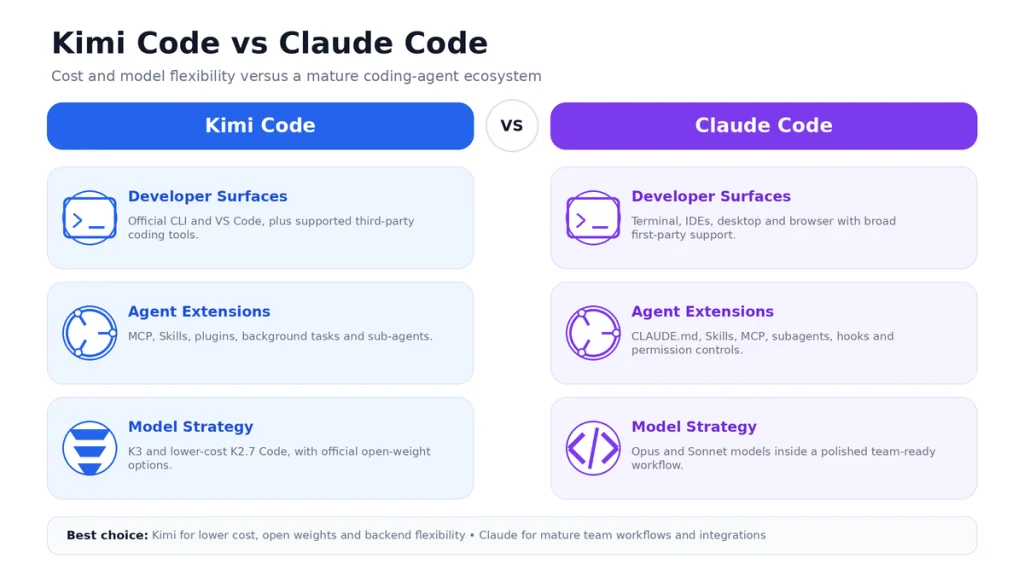
Kimi Code and Claude Code are both repository-aware coding agents. They can inspect files, modify code, run commands, execute tests, and work across several steps. Their differences are clearest in the surrounding tooling and model strategy.
Kimi Code
Kimi Code is available through an official terminal CLI, a VS Code extension, and supported third-party coding tools. It is designed for:
- Repository exploration.
- Multi-file implementation.
- Debugging and test execution.
- Refactoring.
- Shell and terminal operations.
- Goals and longer task completion.
- Background tasks.
- MCP, Skills, plugins, and sub-agents.
Kimi’s current coding model strategy includes K3 for very large and difficult work and K2.7 Code for specialized programming workflows. K2.7 Code also has a HighSpeed serving option.
Kimi’s main strategic advantages are:
- Low-cost K2.7 Code and K2.6 API options.
- Officially published K3 and K2-generation model weights.
- Video input in supported Kimi model routes.
- The ability to use Kimi model benefits in supported third-party coding agents.
- A direct path from coding tasks into the wider Kimi Agent and Work ecosystem.
Claude Code
Claude Code runs in the terminal, IDE extensions, Claude Desktop, the browser, VS Code-compatible editors, and JetBrains products. Its documented extension system includes:
- CLAUDE.md: persistent project instructions.
- Skills: reusable on-demand workflows and knowledge.
- MCP: connections to databases, issue trackers, monitoring, and other tools.
- Subagents: isolated specialist agents.
- Hooks: automatic actions at stages of the coding lifecycle.
- Permissions: controls over which tools can run and which require approval.
This makes Claude Code particularly attractive to teams that need a repeatable engineering environment, policy enforcement, automated checks, and integration with an existing developer-tool stack.
Kimi can be used through Claude Code
The comparison is not always binary. Kimi publishes documentation for using Kimi Code benefits in third-party tools, including Claude Code. In that arrangement:
- The user interface and agent harness may be Claude Code.
- The model service and quota can come from Kimi.
- The model behavior, billing, limits, and data route follow the configured Kimi service.
- Not every native Anthropic feature necessarily works identically with a third-party backend.
This distinction is important when someone says, “I replaced Claude Code with Kimi.” They may have replaced the model backend while continuing to use the Claude Code interface.
Coding comparison table
| Coding area | Kimi Code | Claude Code |
|---|---|---|
| Repository reading and editing | Yes | Yes |
| Run commands and tests | Yes | Yes |
| Terminal | Yes | Yes |
| VS Code | Official extension | Official extension |
| JetBrains | Use depends on supported third-party routes | Officially documented |
| Desktop and browser coding | Available through Kimi products and supported clients | Official Claude Code desktop and web surfaces |
| MCP | Yes | Yes |
| Skills | Yes | Yes |
| Sub-agents | Yes | Yes |
| Hooks and lifecycle automation | Product-specific automation and plugin workflows | Broad first-party hook system |
| Open-weight model option | Yes | No downloadable Claude weights in the current model offering |
| Specialized low-cost coding model | K2.7 Code | Sonnet and Opus models at higher list prices |
| Largest model context | K3: approximately 1M | Fable, Opus, and Sonnet 5: approximately 1M |
Coding verdict
Claude Code is the safer default for a team that values a mature, well-documented coding-agent environment. Its extension model, multi-IDE coverage, hooks, and connected ecosystem reduce the amount of workflow engineering a team must build itself.
Kimi is the stronger value proposition when cost, open weights, or backend flexibility matters. K2.7 Code is attractive for repository work at lower direct token prices, while K3 provides a large open-weight model for organizations able to operate substantial infrastructure.
For a deeper product-only comparison, publish a separate page targeting Kimi Code vs Claude Code rather than expanding this general comparison indefinitely.
Document Studio: PDF, Word, Excel, and PowerPoint
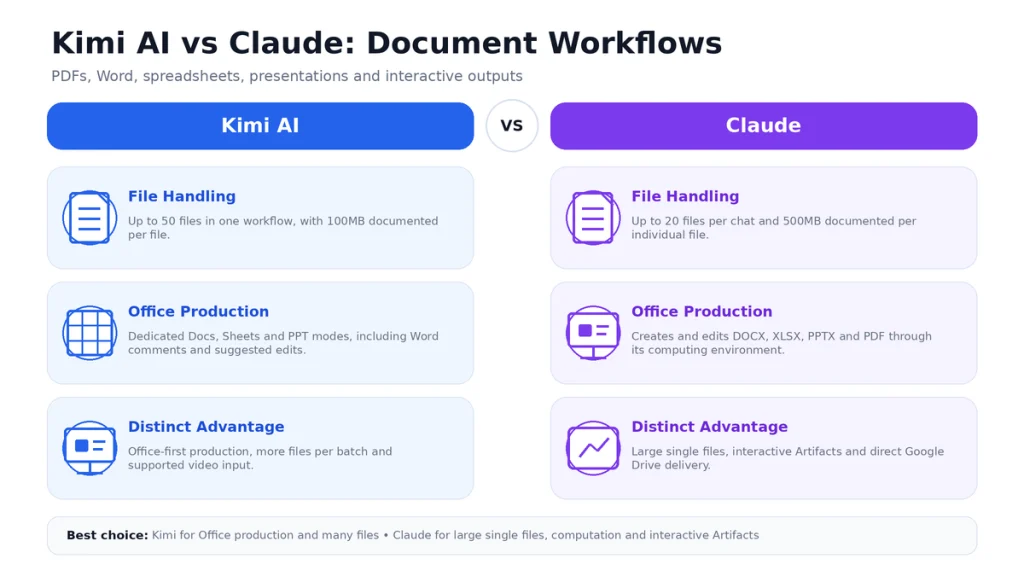
Both platforms have moved beyond summarizing pasted text. Each can now create downloadable Office-style files, but their product emphasis is different.
Kimi’s document workflow
Kimi provides dedicated modes for Docs, Sheets, and PPT. Its current documentation specifically describes:
- Generating long-form Word documents and reports.
- Adding comments and suggested edits to existing Word documents.
- Preserving original Word formatting during review.
- Creating visually designed PDF reports and brochures.
- Analyzing and modeling spreadsheet data.
- Creating editable presentations from a topic, document, spreadsheet, image, or template.
- Comparing document versions and extracting structured details.
Kimi’s consumer interface currently supports common formats including PDF, Word, Excel, PowerPoint, images, TXT, and video, with a documented maximum of 100MB per file and up to 50 files in one upload workflow.
Claude’s document workflow
Claude can directly create and edit:
- Word documents.
- Excel spreadsheets.
- PowerPoint presentations.
- PDF files.
- Python analysis scripts.
- Charts and PNG visualizations.
Created files can be downloaded or saved directly to Google Drive. Claude’s computing environment can perform data analysis, run Python, process multiple files, and build downloadable work products.
Claude also provides Artifacts: a dedicated space for substantial content such as documents, code, diagrams, visualizations, tools, and interactive applications. Artifacts can be modified, shared, and—in supported paid plans—store persistent data.
File upload limits compared
| Limit | Kimi | Claude |
|---|---|---|
| Maximum file size in a normal chat workflow | 100MB per file | 500MB per file |
| Files per chat or upload workflow | Up to 50 files at a time | Up to 20 files per chat |
| Project-file size | Depends on Kimi plan and project storage | 30MB per project file |
| Number of project files | Depends on plan and project limits | Unlimited count, subject to context capacity |
| Maximum PDF pages | No single universal page limit stated in the current general capability page | 1,000 pages |
| Visual PDF analysis | Supports text and multimodal document workflows | Text and visuals for PDFs up to 100 pages; text only from pages 101–1,000 |
| Video input | Supported | Not listed in Claude’s current document-and-image upload formats |
| Created-file size | Feature- and output-dependent | 30MB per created or edited file |
The limits describe what the products accept, not what they will interpret perfectly. A 500MB upload can still exceed the useful context, and 50 uploaded files can still produce missed details, weak retrieval, or conflicting evidence.
Word editing
Kimi has the clearer documented advantage for editorial review inside Word. Its Docs documentation explicitly mentions comments, suggested edits, preserved formatting, heading hierarchy, citations, and list formatting.
Claude can create and edit DOCX files, but its current general file documentation emphasizes direct generation, transformation, analysis, and downloadable output rather than a Track Changes-style editorial workflow.
Spreadsheets and data
Kimi Sheets is designed as a dedicated spreadsheet Agent for natural-language analysis, formulas, financial modeling, summaries, and charts.
Claude uses its computing environment to create XLSX files, write Python analysis, generate charts, process CSV and TSV files, and build machine-learning models. Claude is a strong choice when spreadsheet work is part of a larger code-execution or data-science workflow.
Presentations
Kimi PPT is a dedicated presentation product with scenario modes, template-based generation, automatic layout, visual storytelling, image remixing, and editable decks.
Claude can generate PPTX files and can also use Claude Design or Artifacts for visual and interactive work. Claude is attractive when the presentation is connected to a broader workspace, coding artifact, or data-analysis process.
Document verdict
Choose Kimi for an Office-first workflow: Word review, polished reports, spreadsheet Agents, template-driven decks, video source material, and a larger number of files in one batch.
Choose Claude for very large individual uploads, computational document analysis, Google Drive delivery, and interactive Artifacts.
Current Models and Context Windows
There is no single “Kimi model” or “Claude model.” The correct comparison depends on the tier selected.
| Model | Positioning | Context | Key distinction |
|---|---|---|---|
| Kimi K3 | Kimi flagship for coding, reasoning, and knowledge work | 1,048,576 tokens | Open weights, native vision, configurable reasoning effort |
| Kimi K2.7 Code | Dedicated coding model | 262,144 tokens | Low-cost long-horizon programming model |
| Kimi K2.6 | General-purpose multimodal model | 262,144 tokens | Thinking can be enabled or disabled |
| Claude Fable 5 | Anthropic’s highest-capability widely released model | 1M tokens | Always-on adaptive thinking for long-running agents |
| Claude Opus 5 | Complex agentic coding and enterprise work | 1M tokens | High-capability Claude model at a lower rate than Fable |
| Claude Sonnet 5 | Speed and intelligence balance | 1M tokens | Anthropic’s value-oriented frontier model |
| Claude Haiku 4.5 | Fast and economical tasks | 200K tokens | Lowest-cost current Claude tier |
Context is a tie only at the top tier. Kimi K3 and Claude Fable, Opus, and Sonnet 5 all provide approximately one million tokens. Kimi K2.7 Code and K2.6 use 256K, while Claude Haiku 4.5 uses 200K.
Model context is not the same as product context. A consumer feature such as Kimi Deep Research, a Project knowledge base, an individual plan, or a coding session can apply separate practical limits.
Kimi API vs Claude API Pricing
The following table uses first-party list prices per one million tokens. Kimi input prices shown are for cache misses; both platforms also offer discounted cache reads.
| Model | Standard input | Cache hit | Output |
|---|---|---|---|
| Kimi K3 | $3.00 | $0.30 | $15.00 |
| Kimi K2.7 Code | $0.95 | $0.19 | $4.00 |
| Kimi K2.6 | $0.95 | $0.16 | $4.00 |
| Claude Fable 5 | $10.00 | $1.00 | $50.00 |
| Claude Opus 5 | $5.00 | $0.50 | $25.00 |
| Claude Sonnet 5 | $2.00 | $0.20 | $10.00 |
| Claude Haiku 4.5 | $1.00 | $0.10 | $5.00 |
What the pricing table actually means
- Kimi K3 is cheaper than Claude Opus 5 and Fable 5.
- Claude Sonnet 5 is currently cheaper than Kimi K3 on standard input, cache-hit input, and output list rates.
- Kimi K2.7 Code and K2.6 are substantially cheaper than Claude Sonnet, Opus, and Fable.
- Claude Haiku 4.5 and Kimi K2.x are closer in price, but they are designed for different capability levels.
- Cross-provider token counts differ, so identical text may not produce identical billed-token totals.
- Tool calls, web search, data residency, fast serving, and external services can add separate costs.
Do not select a model using price alone. Measure cost per successful task after retries, tool calls, human corrections, and failed outputs.
Free Access, Plans, and Usage Limits
Kimi
K2.6 at the regular Kimi Chat entry point is currently free and does not consume membership credits. Advanced features—including K3, Deep Research, Docs, PPT, Kimi Work, Kimi Code, and Agent workflows—draw from free allowances or a shared membership credit pool.
Kimi Code also applies a separate five-hour weekly limit in addition to the shared membership system. The exact plan price, currency, benefits, and availability should be checked in the signed-in account because Kimi’s membership system and regional offers can change.
Claude
Claude’s individual plans currently include:
- Free: limited usage.
- Pro: $20 per month or $200 per year.
- Max 5x: $100 per month.
- Max 20x: $200 per month.
Claude Research requires a paid plan. Claude and Claude Code share plan usage limits. Paid users can enable separate usage credits that switch additional work to consumption-based API pricing after included limits are reached.
Plan verdict
Kimi is easier to test for ordinary free chat. Claude provides simpler publicly stated USD individual tiers, while Kimi uses a feature-credit system whose pricing and offers may be account- or region-specific.
Heavy users on either platform must understand two layers: included subscription capacity and optional pay-as-you-go usage after the limit.
Open Weights and Self-Hosting
Kimi has a clear advantage for organizations that require downloadable model weights. Moonshot AI publishes official weights for Kimi K3, K2.7 Code, K2.6, and earlier model families under their applicable licenses.
Claude’s current model offering is accessed through Anthropic’s API, Claude products, and approved cloud platforms rather than downloadable Claude model weights.
Open weights do not make K3 a simple local model. K3 is a 2.8-trillion-parameter mixture-of-experts system and requires substantial storage, accelerators, memory, networking, serving software, and engineering expertise.
| Deployment need | Recommended direction |
|---|---|
| Fast managed deployment with no model infrastructure | Claude API or Kimi API |
| Private deployment with official downloadable weights | Kimi |
| Existing AWS, Google Cloud, or Microsoft ecosystem | Claude has broad first-party cloud-platform availability |
| Low-cost managed coding API | Kimi K2.7 Code |
| Regulated deployment | Evaluate the exact commercial plan, region, retention, and contractual controls—not the brand name alone |
Which Tool Should You Choose?
Choose Kimi if you are a researcher
- Your work is primarily based on the public web.
- You need English and Chinese or other multilingual evidence.
- You want a long report that can move directly into Word, PDF, Sheets, or PPT.
- You regularly analyze video alongside documents.
- You want to test Deep Research through a credit allowance rather than commit immediately to a separate paid research plan.
Choose Claude if you are a researcher
- Your evidence is split across the web and connected internal apps.
- You use Google Workspace, Microsoft 365, Slack, GitHub, or custom connectors.
- You want research to inherit existing access permissions.
- Your organization already manages Claude connectors and enterprise controls.
Choose Kimi if you are a developer
- You want a lower-cost coding model.
- You need open weights or a self-hosting path.
- You work with text, images, and video in one coding or design workflow.
- You want to configure Kimi through a supported third-party coding agent.
- K2.7 Code gives sufficient quality for your repositories.
Choose Claude if you are a developer
- You want a mature coding-agent environment with minimal setup.
- You rely on VS Code, JetBrains, desktop, browser, and terminal access.
- You need hooks, subagents, MCP, Skills, and persistent project instructions.
- Your organization already standardizes on Claude Code and Anthropic’s commercial controls.
Choose Kimi if you work with documents
- You need comments and suggested edits inside Word files.
- You regularly turn documents into professional decks.
- You want dedicated Docs, Sheets, and PPT modes.
- You need to upload more individual files in one workflow.
- Your inputs include video.
Choose Claude if you work with documents
- You need to upload a very large single file.
- You want code execution and Python analysis inside the document workflow.
- You want to save generated files directly to Google Drive.
- You need interactive Artifacts, dashboards, tools, or web applications.
- Your source documents already live inside connected business systems.
Using Kimi and Claude Together
The most efficient workflow may use both platforms rather than forcing one tool to perform every role.
Hybrid research workflow
- Use Kimi Search or Deep Research to collect multilingual public sources.
- Use Claude Research to compare those findings with connected internal documents.
- Create one shared evidence table.
- Open and verify the original sources.
- Use Kimi Docs or Claude file creation to produce the final report.
Hybrid coding workflow
- Use Kimi K2.7 Code for high-volume repository exploration or routine implementation.
- Use Claude Code for a difficult architectural review or established team workflow.
- Run the same tests and static analysis independently.
- Review the final diff without relying on either agent’s self-assessment.
Hybrid document workflow
- Use Claude to process a very large file or perform computational analysis.
- Export the verified findings.
- Use Kimi Docs for comments, document restructuring, or polished Word production.
- Use Kimi PPT or Claude Design according to the required presentation style.
How to Run Your Own Kimi vs Claude Evaluation
Do not choose based only on vendor benchmarks or a single impressive prompt. Build a frozen test set from your actual work.
Research tests
- A current policy question requiring primary sources.
- A multilingual question requiring English and Chinese evidence.
- A question combining public sources and internal files.
- A research report that must include verifiable citations.
Coding tests
- Map an unfamiliar repository without changing it.
- Fix a reproducible bug and add a regression test.
- Implement a multi-file feature with acceptance criteria.
- Review a pull request for correctness and security.
Document tests
- Extract data from a complex PDF.
- Add editorial comments to a Word document.
- Create an Excel model with formulas and charts.
- Turn a verified report into an editable presentation.
Record these metrics
| Metric | What to measure |
|---|---|
| Task success | Whether every acceptance criterion was satisfied |
| Source accuracy | Whether every citation exists and supports the claim |
| Code correctness | Tests, linting, type checking, and human review |
| File usability | Whether the Word, Excel, PPT, or PDF opens and requires minimal repair |
| Human correction | Minutes required to make the result usable |
| Latency | Total time to a verified result, including tools |
| Cost or quota | Tokens, credits, retries, and extra usage |
| Reliability | Whether the workflow succeeds consistently across repeated tasks |
The best tool is the one with the lowest cost per verified successful task—not the one with the most impressive demo, largest model, or cheapest headline token rate.
Final Verdict: Is Kimi a Good Claude Alternative?
Yes, Kimi is a serious Claude alternative for research, coding, and document work. It is particularly compelling for multilingual public-web research, dedicated Office workflows, low-cost coding models, video inputs, and organizations that need open weights.
Claude remains the stronger general recommendation for users who need connected workplace research, a mature coding-agent ecosystem, large individual uploads, and interactive Artifacts. Claude Sonnet 5 also weakens the assumption that Kimi is always cheaper: its current list price is lower than Kimi K3, although Kimi K2.7 Code and K2.6 remain much less expensive.
The most accurate conclusion is not “Kimi wins” or “Claude wins.” It is:
Kimi is the better open, multilingual, Office-oriented, and cost-flexible option. Claude is the better connected, polished, and workflow-mature option.
Test both with your own sources, repositories, and documents before changing a paid workflow or moving confidential data.
Frequently Asked Questions
Is Kimi AI better than Claude?
Neither platform is better for every task. Kimi is usually stronger for multilingual web research, dedicated Office production, low-cost coding models, video input, and open weights. Claude is usually stronger for connected workplace research, mature coding workflows, large individual uploads, and interactive Artifacts.
Is Kimi a good Claude alternative?
Yes. Kimi can replace Claude for many chat, research, coding, PDF, spreadsheet, and presentation tasks. It is not a drop-in replacement for Claude’s Projects, Connectors, Artifacts, Claude Code extensions, or commercial controls.
Which is better for research, Kimi or Claude?
Use Kimi for public-web, multilingual, and exportable Deep Research. Use Claude when research must combine the web with connected internal content such as Google Workspace, Slack, or Microsoft 365.
Which is better for coding?
Claude Code is the stronger turnkey environment for many professional teams. Kimi is attractive when K2.7 Code provides sufficient quality at a lower cost, or when downloadable weights and self-hosting matter.
Can I use Kimi with Claude Code?
Kimi publishes support for using Kimi Code benefits in selected third-party coding agents, including Claude Code. In that configuration, Claude Code can provide the interface while Kimi provides the configured model service and quota.
Which is better for PDF analysis?
Claude accepts larger individual chat files and PDFs up to 1,000 pages, although visual PDF analysis is limited to the first 100 pages. Kimi allows more files in one upload workflow and integrates PDF analysis with Docs, Sheets, PPT, video, and dedicated report production.
Which is better for Word documents?
Kimi has the clearer documented advantage for inserting comments and suggested edits while preserving Word formatting. Claude can create and edit DOCX files and may be preferable when the document is part of a code-execution, connector, or Google Drive workflow.
Can both create PowerPoint and Excel files?
Yes. Kimi provides dedicated PPT and Sheets Agents. Claude can directly create PPTX and XLSX files through its computing and file-creation environment.
Which has the larger context window?
Kimi K3 and Claude Fable 5, Opus 5, and Sonnet 5 all support approximately one million tokens at the model or API level. Kimi K2.7 Code and K2.6 support 256K, while Claude Haiku 4.5 supports 200K.
Which API is cheaper?
Kimi K2.7 Code and K2.6 are cheaper than Claude Sonnet, Opus, and Fable at current list prices. Claude Sonnet 5 is currently cheaper than Kimi K3. Actual costs depend on tokenization, caching, output length, tools, and retry rates.
Which platform has open weights?
Kimi. Moonshot AI publishes official downloadable weights for Kimi K3 and several K2-generation models. Claude’s current models are accessed through Anthropic products, APIs, and approved cloud platforms rather than downloadable Claude weights.
Which is better for students?
Kimi is attractive for multilingual research, many uploaded course files, presentations, and lower-cost access. Claude is attractive for Projects, large individual uploads, clear English explanations, Artifacts, and connected university or workplace services where available.
Which is better for writers?
Kimi is useful for source-heavy research, Word comments, structured documents, and presentations. Claude is useful for connected research, long-context editorial reasoning, Projects, file creation, and interactive content. Writers should test both against their own voice and fact-check every source.
Is Kimi free compared with Claude?
Kimi currently provides free K2.6 Chat without consuming membership credits. Claude also has a limited free plan. Deep research, advanced models, coding, and heavier workflows use paid capacity or credits on both platforms.
Should I cancel Claude and switch to Kimi?
Run a controlled comparison first. Test the exact research, coding, and document tasks you perform, then compare accuracy, human correction, usage limits, cost, and privacy requirements. A hybrid workflow may be more efficient than replacing one platform completely.
Official Sources and Update Methodology
This comparison prioritizes current first-party Moonshot AI, Kimi, Anthropic, Claude, and official model-repository documentation.
Kimi and Moonshot AI sources
- Kimi Capabilities and File Support
- Kimi Agentic Search
- Kimi Deep Research Overview
- Kimi Deep Research Limits and Export
- Kimi Docs and Sheets
- Kimi PPT
- Kimi Code CLI
- Kimi Code Benefits and Limits
- Kimi API Model List
- Kimi K3 Pricing
- Kimi K2.7 Code Pricing
- Kimi K2.6 Pricing
- Official Kimi K3 Model Card and Weights
Claude and Anthropic sources
- Claude Models Overview
- Claude API Pricing
- Claude Research
- Claude Connectors
- Claude File Uploads and Limits
- Claude File Creation and Editing
- Claude Projects
- Claude Artifacts
- Claude Code Overview
- Claude Code Extensions, MCP, Subagents, and Hooks
- Claude Individual Plans
Models, prices, limits, and feature availability were last checked on August 23, 2026. When a signed-in account or current first-party page differs from this article, follow the live official information.
Last verified: August 23, 2026.